AI API Integration Tools: Connect, Build, and Test APIs with AI (2026)

TL;DR
- "AI API integration tools" means two different things: tools that connect your app to existing APIs (integration platforms) and AI tools that help you build APIs (code generators). This guide covers both.
- For connecting APIs without code, Zapier AI and Pipedream are the go-to options. For enterprise integration, MuleSoft and Workato dominate. For generating API code with AI, Claude Code, Cursor, and Copilot are the practical choices.
- AI-assisted API development can cut standard endpoint development time by roughly 40%. The biggest gains come from generating boilerplate routes, data validation, and OpenAPI specs.
- Start with the integration type you need: no-code connectors for quick automation, code generators for custom APIs, or testing tools to validate what you've built.
APIs are the connective tissue of every application. Whether you're pulling data from a third-party service, exposing your own endpoints, or wiring together a stack of SaaS tools, API work is unavoidable, and it's one of the areas where AI tools save the most time.
But "AI API integration tools" actually refers to two different problems. Some people want to connect their app to existing APIs without writing code. Others want AI to help them build custom APIs faster. This guide covers both, because picking the wrong category of tool wastes more time than it saves.
Two Types of AI API Integration Tools
Before diving into specific tools, understand the split:
Integration platforms connect your app to existing APIs. You describe the workflow: "when a new order comes in, send a Slack message and update the spreadsheet", and the platform handles authentication, data mapping, and error handling. No custom code required for standard workflows.
AI code generators help you build custom APIs. You describe the endpoint: "create a REST API for user management with JWT auth", and the AI generates route handlers, validation, database queries, and documentation. You get code you own and deploy yourself.
Most projects need both. The integration platform connects your app to external services. The code generator builds the custom endpoints that make your app unique.
Integration Platforms: Connecting Existing APIs
These tools specialize in wiring applications together. They've added AI features that make the setup faster and the maintenance easier.
Zapier AI
The most widely used integration platform. Connects to over 7,000 apps through pre-built connectors called Zaps. The AI layer lets you describe workflows in natural language: "when someone fills out my Typeform, add them to my Mailchimp list and create a row in Google Sheets", and it builds the automation.
Best for: Non-developers and small teams automating workflows between SaaS tools. Limitation: Gets expensive at high volume. Custom logic beyond simple mapping requires workarounds. Pricing: Free tier (100 tasks/month) / $20/month (Pro)
Pipedream
Developer-friendly integration platform. Lets you write code at any step in the workflow, which makes it far more flexible than pure no-code options. Connect to APIs, drop in JavaScript or Python when you need custom logic, and deploy workflows that run on their infrastructure.
Best for: Developers who need integration automation but want the ability to add custom code. Limitation: Steeper learning curve than Zapier. Requires some coding knowledge. Pricing: Free tier (generous) / $29/month (Advanced)
MuleSoft Anypoint
Enterprise integration platform. Handles API lifecycle management: design, build, manage, secure, and monitor APIs from a central dashboard. The AI layer suggests data mappings and predicts integration patterns based on your existing connections.
Best for: Large organizations with complex integration needs across dozens of internal systems. Limitation: Enterprise pricing and complexity. Overkill for small teams. Pricing: Enterprise (contact sales)
Workato
Enterprise automation platform designed for complex workflows across departments. Handles high data volumes and provides strong security and compliance features. AI assists with recipe building and anomaly detection.
Best for: Mid-to-large businesses needing cross-department automation with governance. Limitation: Expensive. Learning curve for non-technical users. Pricing: Enterprise (contact sales)
Activepieces
Open-source alternative to Zapier. Self-hostable, which matters for teams with data sovereignty requirements. Simpler interface, growing connector library, and AI-assisted workflow building.
Best for: Teams wanting Zapier-like automation without vendor lock-in. Limitation: Smaller connector library than Zapier. Younger ecosystem. Pricing: Free (self-hosted) / Cloud plans from $5/month
SnapLogic
Integration platform that uses machine learning to suggest data mappings, predict integration patterns, and recommend optimizations through its IRIS (Integration Assistant) technology. Handles both application and data integration.
Best for: Data-heavy integration scenarios where AI-assisted mapping saves significant time. Limitation: Enterprise-oriented pricing and setup. Pricing: Enterprise (contact sales)
AI Code Generators for APIs
These tools help you write the actual API code: route handlers, middleware, database queries, validation schemas, and documentation.
Claude Code
Terminal-based agent that understands your full codebase. Describe an API endpoint and it generates the route handler, validation, database queries, error handling, and tests. Because it reads your existing code, it matches your patterns and conventions.
What it generates well: REST and GraphQL endpoints, authentication middleware, database models and migrations, OpenAPI specs, integration tests.
Example prompt: "Add a PATCH /api/users/:id endpoint that validates email format, checks for duplicate emails, updates the user record, and returns the updated user. Follow the patterns in the existing user routes."
Claude Code reads your existing routes, matches the style, and generates consistent code. For complex API work across many files, this is the most capable option. See how it fits into developer workflows with AI.
Cursor
AI-native IDE that handles API code generation through its Composer and agent modes. Describe the endpoint in the chat panel, and Cursor generates code across multiple files: the route handler, the model, the validation schema, and the test file.
What it generates well: Express/Fastify routes, Next.js API routes, database queries, middleware chains.
Best for: Developers who want API generation integrated into their editing workflow rather than running a separate terminal tool.
GitHub Copilot
IDE extension that generates API code inline as you type. Start writing a route handler and Copilot completes it. Add a comment describing the endpoint and it generates the implementation. Works in VS Code, JetBrains, and Visual Studio.
What it generates well: Individual route handlers, data validation, database queries, error responses.
Best for: Developers who want AI assistance while writing API code line by line, rather than generating entire files at once.
App Builders with API Generation
Tools like Bolt.new and Lovable generate full applications including backend APIs. You describe the app, and the API layer is created alongside the frontend. These work well for standard patterns but give you less control over the API architecture.
API Design and Testing Tools
A third category helps with the specification and testing side of API work.
Postman AI (Postbot)
Postman's AI assistant helps generate tests, debug API issues, and create documentation. Describe what you want to test: "verify that unauthorized users get a 401 response", and Postbot generates the test script. Also helps generate OpenAPI specs from existing endpoints.
Best for: Teams already using Postman who want AI-assisted testing and documentation.
Stoplight
API design platform with visual editing and OpenAPI-first workflows. AI assists with spec generation: describe your API in natural language and get a structured OpenAPI spec. Helps teams design APIs before implementing them, which reduces rework.
Best for: API-first development where design and documentation come before code.
Swagger/OpenAPI AI Generators
Several tools now generate OpenAPI specs from natural language descriptions. You describe your API surface: the resources, endpoints, and data models, and get a complete spec that can drive code generation, documentation, and testing.
Best for: Teams wanting machine-readable API documentation that stays in sync with the implementation.
Comparison Table
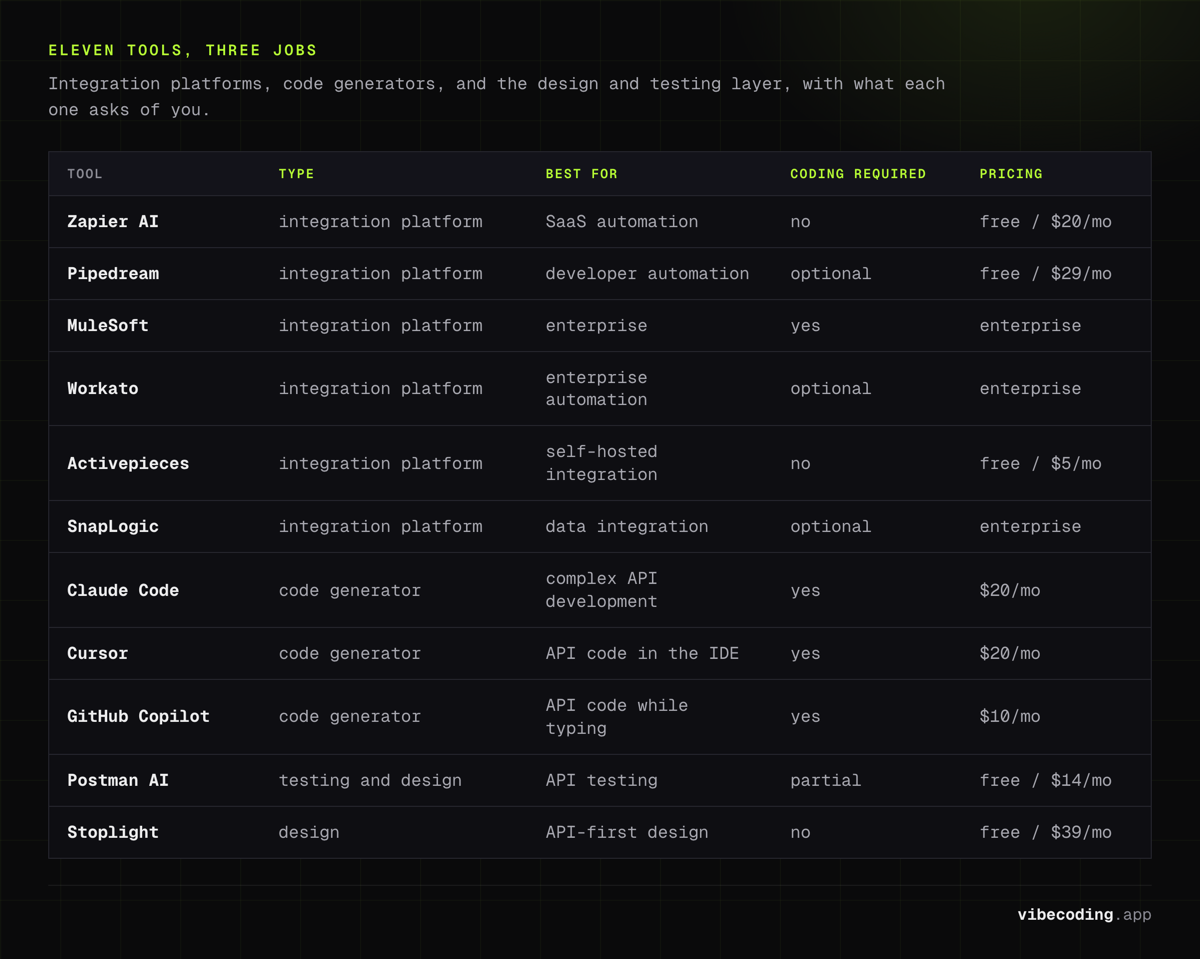
| Tool | Type | AI Features | Best For | Coding Required | Pricing |
|---|---|---|---|---|---|
| Zapier AI | Integration Platform | NL workflow builder | SaaS automation | No | Free / $20/mo |
| Pipedream | Integration Platform | Code + no-code | Developer automation | Optional | Free / $29/mo |
| MuleSoft | Integration Platform | Predictive mapping | Enterprise | Yes | Enterprise |
| Workato | Integration Platform | Recipe AI, anomaly detection | Enterprise automation | Optional | Enterprise |
| Activepieces | Integration Platform | AI workflow builder | Self-hosted integration | No | Free / $5/mo |
| SnapLogic | Integration Platform | ML-powered IRIS | Data integration | Optional | Enterprise |
| Claude Code | Code Generator | Full codebase context | Complex API development | Yes | $20/mo |
| Cursor | Code Generator | Multi-file generation | API code in IDE | Yes | $20/mo |
| GitHub Copilot | Code Generator | Inline completions | API code while typing | Yes | $10/mo |
| Postman AI | Testing/Design | Test generation, docs | API testing | Partial | Free / $14/mo |
| Stoplight | Design | Spec generation | API-first design | No | Free / $39/mo |
How to Choose
By your problem
"I need to connect my app to Stripe, Slack, and a database." Start with an integration platform. Zapier if you want no code, Pipedream if you want code flexibility. These handle auth, rate limiting, and error handling out of the box.
"I need to build a custom REST API for my application." Use an AI code generator. Claude Code for complex multi-file API work, Cursor for API code within your IDE editing flow, Copilot for inline completion while you write endpoints.
"I need to document and test existing APIs." Postman AI for testing, Stoplight for design-first documentation, OpenAPI generators for specs.
"I'm building an MVP and need both frontend and backend." An app builder like Bolt.new or Lovable generates both the frontend and basic API layer. Add a code generator later for custom endpoints.
The practical stack
For most projects, the effective combination is:
- Integration platform (Zapier or Pipedream) for connecting to third-party services
- AI code generator (Claude Code or Cursor) for building custom endpoints
- Postman AI for testing and documentation
This gives you automated external connections, AI-assisted custom development, and validated API behavior. Each tool handles a different phase of the API lifecycle.
What to watch for
Authentication complexity. Integration platforms handle OAuth flows for you. If you're building custom integrations, you're responsible for token management, refresh flows, and secure storage. AI can generate the code, but you need to review it: security in AI-generated code requires attention.
Rate limiting. Both your APIs and the external APIs you connect to have rate limits. Integration platforms handle this automatically. Custom code needs explicit rate limiting, and AI generators don't always include it by default.
Error handling. AI-generated API code tends to handle the happy path well. Edge cases: network timeouts, partial failures, retry logic: often need manual attention. Always test failure scenarios, not just success paths.
Frequently Asked Questions
What are AI API integration tools?
AI API integration tools fall into two categories: integration platforms that use AI to connect your app to existing APIs (like Zapier AI, MuleSoft, and Pipedream), and AI coding tools that help you build custom APIs faster (like Claude Code, Cursor, and GitHub Copilot). Both use AI to reduce the manual work of API development and integration.
What is the best AI tool for building APIs?
For generating API code, Claude Code and Cursor are the most capable: they generate route handlers, validation, database queries, and OpenAPI specs from natural language descriptions. For connecting to existing APIs without code, Zapier AI is most accessible and Pipedream is most flexible for developers.
Can AI generate API endpoints automatically?
Yes. AI coding tools can generate complete API endpoints including route handlers, request validation, error handling, and database queries from natural language descriptions. They work best for standard CRUD endpoints and common patterns. Complex business logic and custom authorization schemes still benefit from human review.
How do I connect my AI-built app to external APIs?
For simple connections, use an integration platform like Zapier or Pipedream: describe the workflow and they handle authentication, rate limiting, and data mapping. For custom integrations, use an AI coding tool to generate the client code. For enterprise integrations, platforms like MuleSoft or Workato provide governance and monitoring. See our deployment guide for more.
Is Zapier AI good for API integration?
Zapier AI is excellent for connecting existing APIs without code. It connects to over 7,000 apps and lets you describe workflows in natural language. It's best for automation workflows like syncing data between services and triggering actions on events. For custom API development or high-volume integrations, developer-focused tools are more appropriate.
Need more on backend development? Check our AI backend generation tools guide, explore AI tools for app development, or browse the complete tools directory.
Related: Firecrawl Review.
Related: APIfy Review.
Related: APIdog MCP Server Review.
Related: Langchain Hub Review.
Related: Langfuse Review.
Related: Openrouter Review.
Related: Lemon AI Review.
Related: Lemon Squeezy Review.
Related: Semantic Kernel Review.

Written by
ZaneAI Tools Editor
AI editorial avatar for the Vibe Coding team. Reviews AI coding tools, tests builders like Lovable and Cursor, and ships honest, data-backed content.