Lovable Review (2026): Pricing, Credits, and Real Limits

TL;DR
An honest look at Lovable in 2026: features, pricing, credits, and real-world limits.
- Build stack: Lovable Cloud backend, Build Mode with AI subagents, and real React code output
- Credit system how credits actually work and when they run out
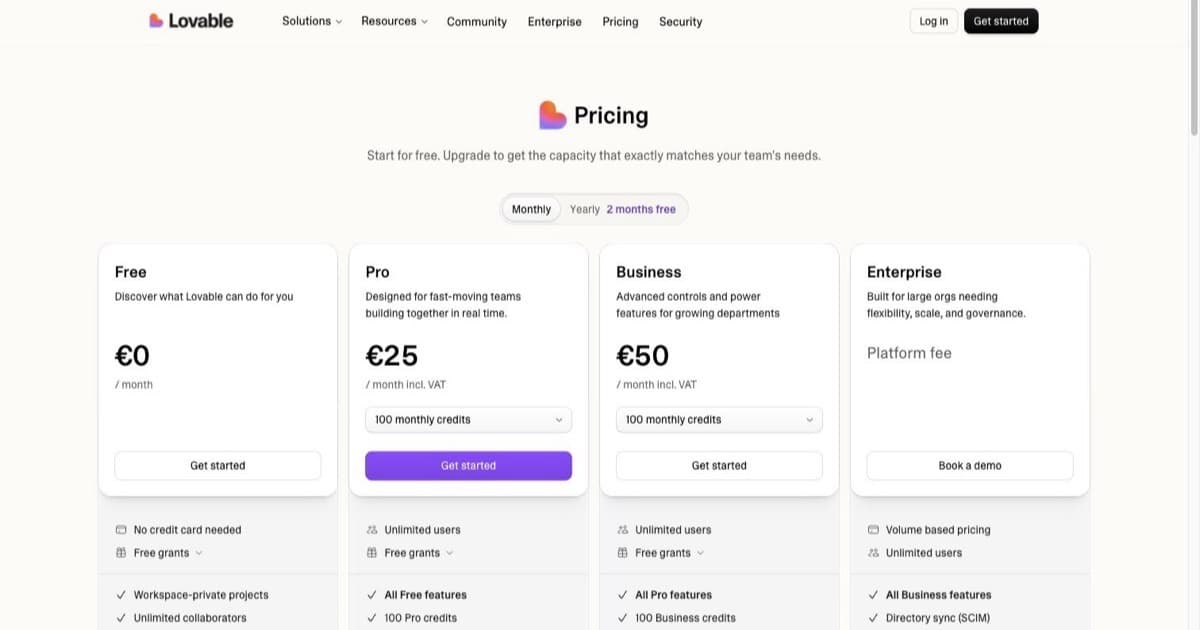
- Pricing Free, Pro ($25/mo), Business ($50/mo), Enterprise
- Data ownership what happens to your code and who controls it
- Best for: Anyone deciding if Lovable is the right prompt-to-app builder for them
This Lovable review covers everything you need to decide if it's the right prompt-to-app builder for you in 2026: how the credit system actually works, what happens to your data, and whether the speed gains justify the trade-offs.
Lovable is a prompt-first platform for building web apps through chat. You describe what you want, it generates real code, and you refine through conversation. It's built for non-developers and developers who want speed for prototypes, internal tools, and MVPs.
Quick verdict: Lovable is one of the fastest ways to go from idea to working web app. Lovable Cloud kills the biggest friction point (configuring an external backend), Build Mode plans and executes multi-step changes on its own, and the newer AI subagents research, review, and synthesise in parallel while it builds. Pricing starts at $25/mo (Pro) and pays for itself if you ship quickly. You will need to watch credit burn during long sessions, and the free tier is tight. Want full control over costs and data? Read the pricing and privacy sections below before you start building.
See also: Lovable tool page for quick specs and the affiliate link.
What is Lovable?
Lovable is a web-based platform that lets you build apps by describing them in natural language. You chat with the tool, it generates code (a real React and Supabase-style stack), and you iterate until you have something you can deploy.
The core workflow:
- Describe your app idea in the prompt box
- Lovable generates UI, backend logic, and data models
- You refine through follow-up prompts ("add a login page", "change the color scheme")
- Deploy to a live URL when ready
Lovable targets indie hackers, founders, small teams, and agencies who need to ship first versions fast. It sits in the "Vibe / No-Code Builders" category alongside Bolt.new, Replit, v0, and Bubble.
What sets it apart from other builders is the credit-based pricing model with monthly and daily allowances. Every prompt, iteration, and generation burns credits: something you'll want to plan around if you're doing long build sessions or complex apps.
Official sources
- lovable.dev (website)
- docs.lovable.dev (docs)
- docs.lovable.dev/changelog (changelog)
Where Lovable Stands in 2026
Lovable has moved from promising newcomer to one of the most-used tools in the category. The company reported passing $500M in annualised revenue in mid-2026 and, per TechCrunch, is in talks to raise funding at a $13.2B valuation. It also lists enterprise customers like Workday, Asana, and Nvidia, and it's a launch partner in Anthropic's Claude Marketplace.
Why does that matter for a review? Traction is a rough proxy for staying power. A tool you build your workflow around should still be here next year, shipping updates and keeping the lights on. On that score, Lovable looks safe. The flip side worth noting: the whole vibe-coding category is young, and security review of AI-generated code is still an active conversation, so treat generated output as a strong first draft, not a finished product.
What Lovable Does Well
If you tried Lovable a while ago and bounced, the current version is worth a fresh look. Here are the pieces that matter most.
Lovable Cloud: Built-in Backend
The biggest friction-remover is Lovable Cloud: a built-in backend that handles authentication, data persistence, and service connections without leaving the platform. Instead of configuring a database externally, managing API keys, and wiring up auth yourself, it's all native.
If you're non-technical, this removes the steepest learning curve. You can add user login, database storage, and third-party connections through prompts instead of config files. If you're a developer, it means fewer context switches and faster iteration.
For a deeper look at how pricing tiers affect backend access, see our Lovable pricing deep look.
Build Mode and AI Subagents
Build Mode (formerly Agent Mode) solves the "one prompt, one edit" limitation. Instead of executing a single change per prompt, it plans and executes multi-step edits on its own, handling dependencies between components. Lovable reports this cuts build errors by up to 90% on complex tasks compared with the old single-step approach.
In May 2026, Lovable added AI subagents on top of this. The main build agent can now spawn specialised workers that run in parallel:
- A Researcher reads your existing codebase to answer the main agent's questions before it patches
- A Reviewer reads a change before it lands
- A Synthesiser pulls together data the build needs
Each subagent shows up in the activity log as its own thread, so you can trace what each one decided. In practice, describe a complex feature ("add a user settings page with profile editing, notification preferences, and account deletion") and Lovable breaks it into steps, checks its own work, and executes.
Chat Mode
Chat Mode lets you talk to Lovable without triggering edits. Ask questions about your codebase, plan architecture decisions, or debug issues, and Lovable responds with analysis instead of touching code. It's handy when you want to understand what your app does, or line up a good prompt, before spending build credits.
Dev Mode and Two-Way GitHub Sync
Dev Mode gives you direct code editing inside the Lovable interface on paid plans, so you can inspect and modify generated code without exporting to an external IDE. Lovable also supports two-way GitHub sync: changes flow between Lovable and your repo, so you can edit locally in VS Code or Claude Code and pull work back in. If you know code but still want Lovable's speed, this is the bridge.
Visual Edits and Draw-to-Build
Visual Edits adds CSS-level editing with multi-element selection. Instead of typing "make the button blue and larger," you select elements and adjust properties visually, which is faster for design work and saves credits on small tweaks. Draw-to-Build goes a step further: sketch a rough layout and Lovable turns it into a working interface, a quick way to get from a napkin idea to a real screen.
Figma Import and AI Connectors
Lovable supports Figma-to-code import, so designers can hand off mockups and Lovable converts them into working components. AI Connectors are pre-built integrations with external AI services (options like Perplexity for search, ElevenLabs for voice, Firecrawl for scraping, and Miro for whiteboards). You add these through prompts, no API key management needed.
Additional Capabilities
- Claude MCP support: connect Lovable to Claude through the Model Context Protocol so you can build, iterate, and manage projects from Claude Code
- Themes System: apply pre-built design themes so you spend less time on visual polish
- Built-in Analytics: track engagement and app performance without adding third-party tools
- Domain Purchasing: buy and connect custom domains right from the dashboard on paid plans
- Vulnerability Scanning: automatic security scans on your generated code
For the complete feature walkthrough, see our build-an-app-with-Lovable tutorial.
Pricing & Credit System Deep Dive
Lovable charges in credits, not flat monthly fees. Every action, prompts, generations, iterations: costs credits. You get a monthly allotment plus daily credits, and you can buy top-ups when you run low.
Pricing Plans
How much does Lovable cost?
Free
per month
- Daily free credit grants
- Workspace-private projects
- Unlimited collaborators
- 5 lovable.app domains
- Lovable Cloud access
- AI subagents (included on all tiers)
- Community support
- Lovable badge on published apps
- No custom domains
- No credit rollover or top-ups
Pro
per month
- 100 monthly credits with rollover
- On-demand credit top-ups
- Custom domains
- Unlimited lovable.app domains
- User roles & permissions
- Remove the Lovable badge
- Email support
Most popular for indie hackers shipping MVPs
Business
per month
- 100 monthly credits
- Everything in Pro
- Team workspace with role-based access
- Internal publish and personal projects
- SSO
- Security center
- Design templates
- Training data opt-out (per docs)
- Priority support
For departments needing SSO and governance
Enterprise
- Volume-based credit pricing
- Dedicated support & onboarding
- SCIM provisioning
- Audit logs
- Publishing and sharing controls
- Support for custom connectors
For a complete pricing breakdown with real project cost examples, see our Lovable pricing deep look.
Plans Overview (2026)
From the official pricing page:
| Tier | Price | Credits | Key Features |
|---|---|---|---|
| Free | $0/mo | 5 build credits/day (up to ~30/mo) + monthly Cloud credits | Public projects, unlimited collaborators |
| Pro | from $25/mo | 100 monthly (scalable) | Private projects, custom domains, code/dev mode, remove badge, credit top-ups |
| Business | from $50/mo | 100+ per seat | SSO, data opt-out, team access controls, centralized billing, priority support |
| Enterprise | Custom | Custom | Dedicated support, onboarding, custom integrations |
Pro and Business credits scale with your needs: the same tiers let you dial up from 100 credits ($25/mo) to as much as 10,000 credits ($2,250/mo) if you're running heavy workloads.
How Credits Work
Credits burn when you:
- Submit a prompt that generates code
- Iterate on existing code through chat
- Regenerate UI or backend components
- Deploy or preview changes
A simple styling change costs roughly 0.5 credits, while a complex feature (adding auth, creating new pages) runs about 1.2 credits. A basic MVP typically requires 150 to 300 credits from start to deploy.
Monthly credits roll over for one billing cycle: use them or lose them after that. Daily credits don't roll over; they reset each day. Paid plans can buy top-up credits when you run out mid-cycle.
Lovable also offers a student discount on paid plans for anyone with a valid student email. Check their pricing page for eligibility.
Long build sessions without monitoring credit usage can hit your cap mid-project. The free plan's daily credits are enough to evaluate Lovable, but serious use requires a paid tier.
Disclosure: Links to Lovable use our referral link. We may earn a commission at no extra cost to you. This does not affect our review.
Cost Comparison
| Tool | Free Tier | Starting Paid | Credit Model |
|---|---|---|---|
| Lovable | Yes (daily build credits) | $25/mo | Monthly + daily credits, top-ups available |
| Bolt.new | Yes | $25/mo | Pricing page |
| Replit | Yes | ~$25/mo (Core plan) | Monthly credits included |
| v0 | Yes | ~$20/mo | Business tier available |
| Cursor | Yes | ~$20/mo | Pro plan |
| Claude Code | Via API | Usage-based | API pricing |
Credits give you flexibility (pay for what you use), but they add friction. You have to track usage, upgrade when you hit caps, and plan around daily limits. Flat-rate tools like Bubble don't have this problem.
See also: Lovable vs Bolt.new comparison for direct pricing and feature comparison.
Building Your First App with Lovable
You can go from zero to a working prototype in minutes.
Step 1: Sign Up Free
Head to lovable.dev and create a free account. No credit card needed. You'll get daily build credits to test the platform.
Step 2: Describe Your App
In the prompt box, describe what you want to build. Be specific about features and layout. A good first prompt:
"Build a task manager with user authentication, a dashboard showing tasks sorted by priority (high, medium, low), due dates, and email notifications when a task is overdue."
Lovable will generate a full working prototype: UI, routing, data models, and backend logic: from this single prompt.
Step 3: Review and Refine
Your first generation won't be perfect. Use follow-up prompts to iterate:
"Make the sidebar collapsible and add a dark mode toggle in the top navigation bar."
"Change the task cards to show a color-coded priority badge and add a drag-and-drop interface for reordering."
Each refinement burns credits, so batch related changes into single prompts when possible.
Step 4: Connect Your Backend
You have two options:
- Lovable Cloud (recommended): Built-in backend with auth, data persistence, and service connections. No external setup required.
- External database: Connect your own instance if you need more control or already have an existing database.
For most projects, Lovable Cloud is the faster path. Just prompt: "Connect this app to Lovable Cloud with user authentication and persistent data storage."
Step 5: Deploy to a Live URL
When your app is ready, click Deploy. Lovable gives you a live URL on a subdomain (free plan) or lets you connect a custom domain (paid plans). Your app is live and shareable immediately.
For a complete walkthrough with screenshots, see our Lovable tutorial guide.
Key Features
1. Prompt-to-App Workflow
Lovable's strength is the chat interface. You describe features in plain English, and it generates working code. The workflow feels smooth for:
- Landing pages
- Internal dashboards
- Simple CRUD apps
- Prototypes and MVPs
It handles UI layout, routing, state management, and backend logic without you writing a line of code.
2. Real Code Generation
Unlike pure no-code platforms that lock you into a proprietary system, Lovable generates real React code. You can export it, sync it two ways with GitHub, hand it to a developer, or keep building in your own IDE.
This matters when you outgrow the platform or need custom features later.
3. Figma Import
Lovable supports Figma-to-code import. Designers hand off mockups, and Lovable converts them into working components. You can work in familiar design tools, then bring everything into Lovable when you're ready to build.
4. Documentation and Quick Start
Lovable's official docs are clear and well-structured. They cover:
- Getting started guides
- Plans and credits explained
- Integrations (check docs for full list)
- Privacy and security policies
The docs include a Quick Start path that gets you building in minutes: better than competitors who bury their docs or write vague tutorials.
5. Changelog and Product Updates
Lovable publishes a public changelog with regular updates. Recent additions include the AI subagents, Build Mode improvements, and new integrations.
If platform stability matters to you, this transparency is a good sign. You can see what's shipping and plan around new features.
6. Training Data Controls and Opt-Out
If you're building anything real, pay attention here.
Lovable's data opt-out documentation explains:
- Customer data may be used for model training by default
- Opt-out mechanisms differ by plan (Free/Pro versus Business/Enterprise)
- Lovable states it will not use raw/identifiable PII for training and does not sell PII
How to opt out:
- Free and Pro plans: Contact support to request opt-out
- Business and Enterprise plans: Use workspace settings to toggle opt-out
If you're building anything proprietary or handling sensitive data, configure this before you start. Don't assume "enterprise-grade privacy" without checking your plan tier.
7. Trust Center and Security Positioning
Lovable maintains a Trust Center for security and compliance info. Before you claim SOC2 or ISO certifications in your own docs, verify them there first.
Additional legal/policy pages:
Need enterprise governance (SSO, audit logs, dedicated support)? SSO and data opt-out ship on the Business plan; contact Lovable's enterprise team to confirm the rest.
Which AI Models Power Lovable?
This trips a lot of people up, so it's worth being precise. There are two different model layers:
- The build agent (the AI that writes and edits your app) runs on Anthropic's Claude models. Lovable's co-founder has publicly credited Claude for reliable, consistent code generation.
- In-app AI features (the AI you add to the apps you build) run on Google Gemini and OpenAI GPT models through Lovable's AI gateway. That means you can ship AI features in your own product without managing provider keys or billing separately.
The practical takeaway: you get Claude-grade code generation for the build itself, plus a managed multi-model layer for anything AI-powered you want inside your finished app.
Credit-Saving Tips
Credit burn is the #1 complaint from Lovable users. Look, experienced builders do a few things differently to stretch their credits further.
Draft prompts externally first. Write and refine your prompts in ChatGPT, Claude, or a text editor before pasting them into Lovable. A well-crafted prompt gets better results on the first try, which avoids expensive re-generations. This alone can save 30 to 40% of your credits.
Use Chat Mode to plan before you build. Chat Mode answers questions and inspects your project without spending build credits. Line up the approach there, then switch to Build Mode once you know what you want.
Debug in VS Code via GitHub sync. Sync your project to GitHub, work locally in VS Code or Claude Code, and fix bugs in code directly instead of burning credits on "fix the error on the dashboard page" prompts. This saves a large share of credits on debugging alone.
Batch multiple changes into single prompts. Instead of sending five separate prompts for five changes, combine them: "Make the sidebar collapsible, add a dark mode toggle, change the header color to blue, add a footer with social links, and make the layout responsive." One prompt, one credit charge.
Use Lovable Cloud instead of an external backend. Configuring external services generates more back-and-forth prompts (and more credit burn). Lovable Cloud handles auth, data, and connections natively with fewer prompts.
Build from templates and themes when available. Starting from a Lovable theme or design template means less generation work and fewer credits spent on basic layout and styling.
Lovable vs Competitors
Lovable vs Bolt.new
Bolt.new (bolt.new) is the closest direct competitor. Both target the same person: you want to ship a working prototype fast.
When to choose Lovable:
- You want Lovable Cloud's built-in backend (Bolt requires external backend setup)
- You need collaboration for your team
- You prefer Build Mode with subagents for complex multi-step builds
- You value clear documentation and changelog transparency
When to choose Bolt.new:
- You prefer metered tokens to credits at the same $25/mo Pro price
- You prefer pricing without daily credit caps
- You're comfortable with StackBlitz's environment (Bolt uses WebContainers)
Pricing comparison: Both have free tiers, and both Pro tiers are $25/mo. Check current Bolt.new pricing for details.
See also: Bolt.new vs Lovable comparison page for feature-by-feature breakdown.
Lovable vs Replit
Replit (replit.com) is a browser-based IDE with AI features, not a pure no-code builder. If you write code (even with AI help), Replit fits. If you want zero-code workflows, Lovable fits better.
When to choose Lovable:
- You don't want to touch code or terminal commands
- You want a chat-first build experience
- You're building web apps and want a built-in backend
When to choose Replit:
- You're a developer who wants AI-assisted coding, not full automation
- You need terminal access and package management
- You're building beyond web apps (CLI tools, bots, scripts)
Pricing comparison: Replit's Core plan includes monthly credits similar to Lovable. Both charge around $25/mo for starting paid tiers.
See also: Replit vs Lovable comparison and our Lovable vs Replit deep look.
Lovable vs v0 (Vercel)
v0 (v0.app) focuses on UI generation and component creation. It's built for developers speeding up frontend work, not for non-technical builders shipping full apps.
When to choose Lovable:
- You want full-stack app generation (UI + backend + data)
- You're a non-developer shipping MVPs
- You need deployment included
When to choose v0:
- You're a developer building UI components for existing apps
- You want to integrate generated UI into your own codebase
- You're already in the Vercel ecosystem
Pricing comparison: v0 starts around $20/mo. Business tier includes training opt-out defaults (v0 pricing page).
Lovable vs Cursor
Cursor (cursor.com) is an AI-powered code editor built on VS Code. It's for developers who want IDE-level control with AI assistance, not for no-code builders.
When to choose Lovable:
- You're a non-developer or want zero-code app building
- You want built-in deployment and hosting
- You prefer a chat-first workflow over an IDE
- You need a visual builder with no local setup
When to choose Cursor:
- You're a developer who wants AI assistance inside a full IDE
- You need fine-grained control over every line of code
- You're working on existing codebases, not greenfield apps
- You want to use your own tech stack and deployment pipeline
Pricing comparison: Cursor Pro starts at ~$20/mo. Unlike Lovable, Cursor doesn't include hosting or deployment: you manage infrastructure yourself.
See also: Lovable vs Cursor vs Claude Code comparison for a detailed breakdown of all three approaches.
Lovable vs Claude Code
Claude Code is Anthropic's terminal-based AI coding agent. If you're comfortable in the terminal and want AI that handles complex, multi-file production codebases, it's the deepest option available. Worth noting: Lovable's own build agent runs on Claude, so both draw on the same underlying model strength, just wrapped very differently.
When to choose Lovable:
- You want a visual, browser-based builder with no terminal required
- You're a non-developer building MVPs and prototypes
- You want built-in hosting, deployment, and backend services
- You prefer a guided, chat-based workflow
When to choose Claude Code:
- You're a developer building complex production applications
- You need to work across entire codebases with full context
- You want direct terminal access and complete control over your stack
- You're comfortable with API-based pricing and managing your own infrastructure
Pricing comparison: Claude Code uses Anthropic's API pricing (usage-based, no monthly subscription). For heavy use, costs can exceed Lovable's tiers, but you get unlimited flexibility. For light use, it can be cheaper than Lovable's paid plans.
See also: Lovable vs Cursor vs Claude Code comparison for when to pick each tool.
Comparison Table
| Feature | Lovable | Bolt.new | Replit | v0 | Cursor | Claude Code |
|---|---|---|---|---|---|---|
| Pricing | Free + $25/mo | Free + $25/mo | Free + ~$25/mo | Free + ~$20/mo | Free + ~$20/mo | Usage-based API |
| Primary Use | No-code web apps | Prompt-to-app | Browser IDE | UI generation | AI-powered IDE | Terminal AI agent |
| Best For | MVPs, prototypes | Fast builds | Developers | Frontend work | IDE developers | Production codebases |
| Backend | Lovable Cloud | External setup | Built-in | None | Your own | Your own |
| Collaboration | Unlimited collaborators | Limited | Multiplayer | None | Git-based | Git-based |
| Key Strength | Cloud backend + Build Mode subagents | StackBlitz environment | Full IDE features | Vercel integration | IDE control + AI | Deep codebase understanding |
| Key Weakness | Credit burn management | No built-in backend | Not zero-code | UI-only scope | Not for non-devs | Terminal-only, no visual builder |
For a full comparison of all alternatives, see our Lovable alternatives roundup. If you also need workflow automation behind your app, read Lovable vs Emergent vs n8n on pairing builders with backend automation.
Data Privacy & Security
Training Policy
From the official training opt-out docs:
- Lovable may use customer data for model training unless you opt out
- Opt-out mechanisms differ by plan tier:
- Free/Pro: Contact support
- Business/Enterprise: Workspace setting toggle
- Lovable states it does not use raw/identifiable PII for training
- Lovable does not sell PII
If you're building anything proprietary, configure opt-out before you start. Don't assume default privacy.
Privacy, Terms, and DPA
Lovable publishes:
- Privacy Policy: Governs personal data handling
- Terms of Service: Platform use rules
- Data Processing Agreement: For data protection contexts
For specific retention policies or GDPR compliance details, read the Privacy Policy and cite exact sections.
Enterprise Security
Lovable maintains a Trust Center for security and compliance claims. Before you promise SOC2, ISO, SSO, or audit logs in your own docs, verify from official sources.
For enterprise governance questions, contact Lovable's enterprise team through their enterprise landing page.
Real-World Use Cases
1. MVPs and Prototypes
Lovable shines at fast iteration for proof-of-concept work. Validating a product idea and need a working demo in hours, not weeks? This is where Lovable fits.
Example: Build a waitlist landing page with email capture and admin dashboard in one session.
2. Internal Tools for Small Teams
Need a simple CRUD app for internal use (task tracker, content manager, data entry form)? Lovable ships faster than hiring a developer or wrestling with traditional no-code tools.
Example: Team dashboard that pulls data from Google Sheets and displays stats with filters.
3. Agency First Versions
Agencies shipping client projects can use Lovable for v1, then hand off code to developers for custom features. The credit system works if you bill clients for build time.
Example: Client wants a booking app MVP. Build core flow in Lovable, sync code to GitHub, customize edge cases in-house.
4. Landing Sites and Simple Web Apps
If your app is mostly static pages with light interactivity, Lovable handles it cleanly. Deploy to a live URL and iterate based on user feedback.
Example: Portfolio site with blog, contact form, and image gallery.
Community Buzz & Social Proof
Lovable has an active community on X (Twitter). Here are real posts from builders showing actual results:
-
@PrajwalTomar_: "Built entire UI of SaaS in 45 minutes" using Lovable, demonstrating the platform's speed for production-grade interfaces (source)
-
@PrajwalTomar_: Shares a complete workflow system for "shipping 45+ MVPs" with Lovable, including prompt engineering strategies and project organization tips (source)
-
@rmtwiits: "First web3 portfolio on lovable and it's fire", shows Lovable working beyond typical SaaS use cases into web3 and portfolio sites (source)
-
@PrajwalTomar_: Demonstrates a "landing page in under 15 minutes" workflow with specific prompt templates and iteration strategies (source)
-
@izu_anyiam: Highlights the "Figma and Lovable" era for building apps, showing the design-to-code pipeline that Lovable's Figma import enables (source)
The community's especially active around Lovable's speed for MVPs and the Figma-to-code workflow.
Pros & Cons
Pros
- Fast iteration: Prompt-to-app workflow delivers working prototypes in hours
- Lovable Cloud eliminates backend setup: Built-in auth, data persistence, and service connections, no external configuration required
- Team collaboration: Unlimited collaborators on paid plans with role-based access
- Build Mode with subagents: Multi-step autonomous edits, plus parallel Researcher, Reviewer, and Synthesiser workers, mean fewer broken builds (Lovable cites up to 90% fewer build errors on complex tasks)
- Claude-powered build agent: Code generation runs on Anthropic's Claude models
- Figma import and Draw-to-Build: Design-to-code pipelines bridge the gap between designers and builders
- Two-way GitHub sync: Move between Lovable and your own IDE without losing work
- Clear documentation: Official docs cover setup, pricing, privacy, and features without vagueness
- Training opt-out available: Explicit controls for data usage (must configure by plan tier)
- Free plan exists: Start testing without payment
- Real React output: Export and continue building in your own environment
- Active development and strong traction: Public changelog, $500M ARR, and enterprise customers signal staying power
Cons
- Credit burn is still the #1 complaint: You must monitor usage and upgrade or buy top-ups. Long debugging sessions can drain credits fast
- Free tier is limited: Daily build credits are enough to evaluate the platform, but not to build something substantial
- No native mobile output: Lovable generates web apps only, no React Native, Flutter, or native iOS/Android export
- Complex apps need oversight: Apps with many interconnected components can hit generation-quality limits where you'll want to review the code yourself
- Training opt-out not default: You must configure this intentionally based on your plan
- Enterprise features need verification: Confirm SOC2, SSO, or audit logs via the Trust Center for your plan
- Cost unpredictability: Credit systems make it harder to budget compared to flat-rate tools
FAQs
1. What is Lovable?
Lovable is a platform to build and iterate web apps and websites through natural language prompts. You describe what you want, and it generates working code (a real React and Supabase-style stack you can export).
2. What can Lovable do in 2026?
Lovable pairs Lovable Cloud (a built-in backend) with Build Mode, an autonomous agent that plans and executes multi-step changes. In May 2026 it added AI subagents (a Researcher, a Reviewer, and a Synthesiser) that run in parallel during a build. It also supports Draw-to-Build, Figma import, Visual Edits, two-way GitHub sync, custom domains on paid plans, and real React code output.
3. What is Lovable Cloud?
Lovable Cloud is the built-in backend service. It handles authentication, data persistence, and service connections natively within the platform, so backend setup happens through prompts instead of manual configuration.
4. Does Lovable support team collaboration?
Yes. Lovable supports collaboration on shared projects with role-based access (builder, reviewer, admin roles). Paid plans include unlimited collaborators, which makes it workable for agency teams and small companies.
5. What AI models does Lovable use?
Lovable's build agent runs on Anthropic's Claude models. The in-app AI features you add to your own apps run on Google Gemini and OpenAI GPT models through Lovable's AI gateway, so you get a managed model layer without wiring up provider keys yourself.
6. Does Lovable have a free plan?
Yes. The pricing page lists a Free plan with 5 daily build credits (up to about 30 a month) plus a monthly grant of Cloud credits, public projects, and unlimited collaborators. For every other way to save, including the student discount and the LinkedIn Premium perk, see our guide to Lovable promo codes and free credits.
7. How does Lovable pricing work?
It uses plans with monthly credits and daily credits, plus optional top-ups. Every prompt, generation, and iteration burns credits. A styling change costs ~0.5 credits; a complex feature costs ~1.2 credits. Paid plans start at $25/mo (Pro) and $50/mo (Business). Check the pricing page for current tier details.
8. How many credits does a typical project use?
A basic MVP typically requires 150 to 300 credits from initial prompt to deployment. Simple landing pages may take 50 to 80 credits. Complex apps with auth, dashboards, and multiple pages can exceed 500 credits.
9. Is there a student discount?
Yes. Lovable offers a discount on paid plans for students with a valid student email. Check their pricing page for eligibility and verification details.
10. Where are Lovable's docs?
Official documentation: docs.lovable.dev
11. Does Lovable use customer data for model training?
The official docs explain when customer data may be used and how opt-out works by plan tier (Free/Pro versus Business/Enterprise).
12. How do I opt out of training data usage?
- Free and Pro plans: Contact support to request opt-out
- Business and Enterprise plans: Use the workspace setting to toggle opt-out
Read the data opt-out documentation for full details.
13. Where is Lovable's privacy policy?
14. Where is Lovable's trust/security information?
15. What are common alternatives to Lovable?
- Bolt.new, Closest competitor for prompt-to-app builds ($25/mo)
- Replit, Browser IDE with AI features (more control, less no-code)
- v0, UI generation focused (not full-stack)
- Cursor: AI-powered IDE for developers
- Claude Code, Terminal AI agent for production codebases
- Bubble, Established no-code platform (no AI-first workflow)
See: Lovable alternatives page and our 2026 alternatives roundup.
16. Is "vibe coding" a real term?
Yes. It appears in mainstream coverage and educational explainers from major platforms. Google Cloud defines it as building software by describing the desired "vibe" and functionality rather than writing syntax.
Our Take & Recommendations
Lovable delivers on its core promise: fast app scaffolding through natural language prompts, now with a built-in backend, autonomous Build Mode, and parallel subagents that check their own work. The docs are clear, the credit system is transparent, and training opt-out controls are actually documented (unlike competitors who hide this).
Choose Lovable if:
- You're shipping MVPs or prototypes in days, not weeks
- You want a built-in backend (Lovable Cloud) without external configuration
- You need team collaboration on a single project
- You value clear documentation and policy transparency
- You want a free tier to test workflow fit
- You're comfortable managing credit usage and costs
Skip Lovable if:
- You need flat-rate pricing without usage caps
- You want full IDE control (pick Cursor or Claude Code)
- You only need UI generation, not full-stack (pick v0)
- You're building complex backend systems (pick traditional tools or Claude Code)
- You need native mobile app output
Final Verdict
Lovable is the strongest it has ever been. Lovable Cloud removes the biggest barrier for non-technical builders, Build Mode with subagents makes complex apps more reliable, and unlimited collaborators make it work for teams. The credit system still adds friction, but the speed gains justify it for early-stage work. Configure your privacy settings before you build, and use the credit-saving tips above to stretch your budget.
Start building free at lovable.dev, no credit card needed. Or check the Lovable tool page for quick specs and pricing.
Disclosure: The link above is a referral link. We may earn a commission at no extra cost to you. This does not affect our editorial opinion.
Related content:

Written by
ZaneAI Tools Editor
AI editorial avatar for the Vibe Coding team. Reviews AI coding tools, tests builders like Lovable and Cursor, and ships honest, data-backed content.