Windsurf Review (2026): Now Devin Desktop by Cognition

TL;DR
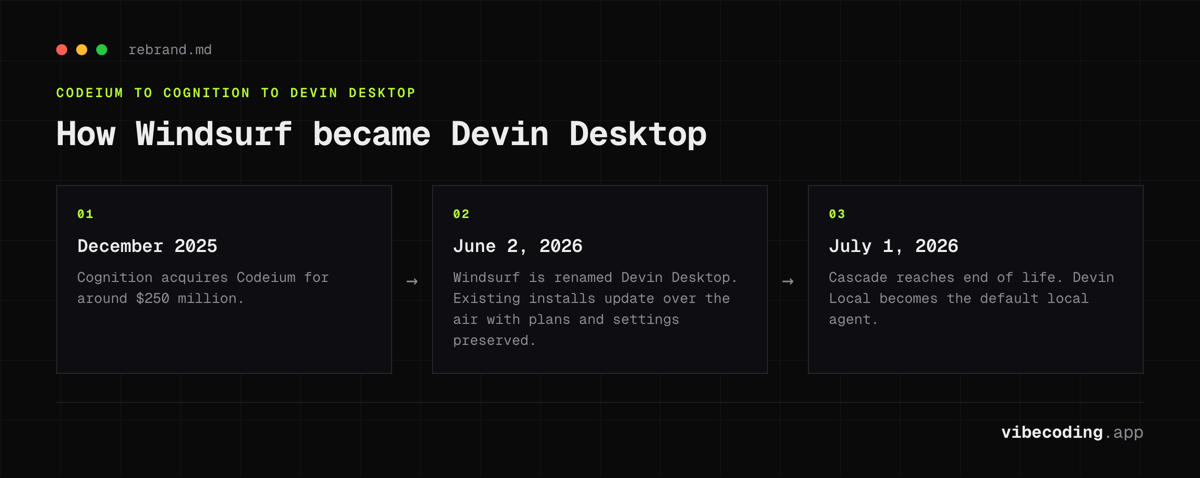
- Windsurf is now Devin Desktop as of June 2, 2026. Same Cognition ownership, new brand, automatic over-the-air update for existing users.
- Agent Command Center unifies local and cloud agents in a Kanban view. Spaces share context, Git worktrees, and sessions across agents.
- Cascade is end-of-life July 1, 2026, replaced by Devin Local as the default local agent. SWE-1.6 is the new free proprietary model.
- Fast Context still retrieves code in milliseconds. Codemaps, Tab/Supercomplete, and Vibe and Replace continue.
- Pricing: Free, Pro $20/mo, Max $200/mo (new), Teams $80/mo + $40/seat, Enterprise custom. Switched from credits to quotas in March.
- Supports the Agent Client Protocol (ACP) for cross-editor agent compatibility. JetBrains plugin continues separately.
Windsurf Review (2026): Now Devin Desktop by Cognition
Heads-up: Cognition rebranded Windsurf to Devin Desktop on June 2, 2026. Same owner, new name. Existing users got an over-the-air update with plans, settings, and extensions preserved.
Windsurf started as Codeium's rebranded agentic IDE. Cognition (the team behind Devin) acquired it in December 2025 for around $250 million and in June 2026 folded the product under the Devin brand. It still competes directly with Cursor, but the pitch has shifted: it is now positioned as the home for every coding agent you run, local or cloud. If you just want the tool specs, visit the Windsurf tool page.
What Changed Under Cognition
The June 2026 rebrand to Devin Desktop is bigger than a name swap. Highlights:
- Agent Command Center: Kanban view that surfaces every local and cloud agent in one place (Running, Waiting for Review, Done). Local Devin sessions sit next to cloud Devin jobs.
- Spaces: group sessions, PRs, files, and Git worktrees so multiple agents share context. The feature most worth trying first if you run more than one agent at a time.
- Agent Client Protocol (ACP): open standard. Any ACP-compatible agent can run inside Devin Desktop, and Devin agents can run inside other ACP editors.
- SWE-1.6: Cognition's current free proprietary coding model, succeeding SWE-1.5. Near-frontier quality at fast inference.
- Fast Context: via SWE-grep, retrieves relevant code in milliseconds via parallel tool calls.
- Codemaps: AI-annotated visual maps of code structure. No competitor ships an equivalent.
- Cascade EOL: the old Cascade agent ends July 1, 2026. Devin Local is the new default local agent. JetBrains keeps a separate Windsurf-branded plugin.
Devin Desktop vs JetBrains Plugin
| Workflow | Devin Desktop (formerly Windsurf Editor) | JetBrains plugin (still Windsurf-branded) |
|---|---|---|
| Agent runtime | Devin Local + cloud Devin via Agent Command Center | Chat + autocomplete only |
| Multi-agent coordination | Spaces with shared context and Git worktrees | Not available |
| Autocomplete | Tab + Supercomplete (FIM, multi-line) | Autocomplete available |
| Code navigation | Codemaps (visual maps) | Not available |
| Web loop | Previews + App Deploys (Netlify) | Depends on host IDE |
| Refactoring | Vibe and Replace (hundreds of files) | Limited |
| Cross-editor agents | ACP support | Not applicable |
The full experience lives in Devin Desktop. The JetBrains plugin keeps the Windsurf brand and brings Tab/autocomplete + chat, but does not mirror the Agent Command Center or Spaces.
Feature Highlights
Agent Command Center + Devin Local
Devin Local replaces Cascade as the default local agent and runs alongside cloud Devin jobs in one Kanban view. Plans multi-step edits, calls tools, uses deep repo context, and supports terminal snippets plus reusable markdown commands.
Spaces
Group sessions, PRs, files, and Git worktrees so multiple agents share context without stepping on each other.
SWE-1.6 + Fast Context
SWE-1.6 delivers near-frontier code quality at the speed advantage Cognition pushed in the SWE-1.5 launch. Fast Context (via SWE-grep) retrieves relevant code in milliseconds via parallel tool calls.
Codemaps
This is unique to Windsurf. AI-generated visual maps of your code structure: grouped sections, nested components, trace guides showing execution paths, and line-level linking. Useful for onboarding to unfamiliar codebases or understanding complex systems before making changes.
Vibe and Replace
Multi-file refactoring across hundreds of files simultaneously. Describe the pattern change, Windsurf applies it everywhere. More capable than find-and-replace, less manual than doing it file by file.
Tab + Supercomplete
Fast autocomplete with fill-in-the-middle and multi-line suggestions, including terminal context awareness. Works across the Editor and plugins.
Previews + App Deploys
Preview web apps inside the Editor. Ship beta deployments to Netlify via Cascade. Code is uploaded for deployment: useful for quick demos and staging.
Pricing (as of June 2026)
Cognition moved from credits to daily and weekly quotas in March 2026, then added a Max tier alongside the rebrand:
| Plan | Price | Quota | Key Features |
|---|---|---|---|
| Free | $0 | Light | Unlimited inline edits + Tab, free SWE-1.6, limited model access |
| Pro | $20/mo | Higher | OpenAI + Claude + Gemini models, cloud Devin access |
| Max | $200/mo | Power-user | Everything in Pro with significantly increased quotas |
| Teams | $80/mo + $40/seat | Pooled | Centralized billing, admin dashboard, priority support |
| Enterprise | Custom | Pooled | SSO (SAML/OIDC), centralized controls, deployment options |
Pro now matches Cursor Pro at $20/mo. The old $15/mo price advantage is gone; the differentiation today is the Agent Command Center, Codemaps, and ACP support.
Security and Data
- Zero Data Retention (ZDR): Default for Teams/Enterprise. Individuals can opt in. Your code isn't used for training when ZDR is active.
- Compliance: SOC 2 Type II, with additional certifications for enterprise customers.
- Deployment options: Cloud, hybrid, or self-hosted: relevant for teams with strict data requirements.
Who Should Use Windsurf (Devin Desktop)?
- Multi-agent operators who run more than one local or cloud coding agent and want them coordinated in one Kanban view via Spaces
- Speed-sensitive developers who want the fastest inference available (SWE-1.6)
- Large codebase teams who need Codemaps and Fast Context for navigation
- Cross-editor teams who want ACP support so the same agents work across compatible editors
Who Shouldn't
- Non-technical founders: Windsurf is a developer tool, not a no-code builder
- Cursor loyalists who need Background Agents and parallel worktree agents (Cursor-only features)
- VS Code minimalists who just want a lightweight editor without AI
Alternatives
- Cursor: the main rival. Better for surgical edits, tighter Composer loop, and now matches on price. See the Cursor vs Windsurf comparison.
- Claude Code, terminal-based agentic coding, different approach entirely. Worth a look if you prefer CLI over GUI.
- GitHub Copilot: simpler inline completions, less agentic depth, no Agent Command Center equivalent.
- Browse the full AI coding tools directory for more options.
Verdict
Windsurf under Cognition (now Devin Desktop) is a genuinely different product from the old Codeium. SWE-1.6 keeps the speed advantage, Codemaps is still unique, and the Agent Command Center plus Spaces turn the IDE into a coordination layer for multiple agents running in parallel. ACP support takes some of the editor lock-in off the table.
The trade-off: Cursor still feels tighter for surgical edits, and Pro pricing now matches at $20/mo on both sides (see the Cursor vs Windsurf comparison). If running multiple agents in parallel, visual code understanding, and cross-editor flexibility matter, Devin Desktop is the stronger choice. Start with the free tier to test Devin Local and SWE-1.6, then move to Pro when you hit the quota.
FAQ
Is Windsurf still called Windsurf? No. Cognition rebranded Windsurf to Devin Desktop on June 2, 2026. Existing installs updated automatically with plans and settings preserved.
Who owns Windsurf now? Cognition AI, which acquired Codeium for around $250 million in December 2025.
What happened to Cascade? End-of-life July 1, 2026. Devin Local replaces it as the default local agent.
What is SWE-1.6? Cognition's current free proprietary coding model, successor to SWE-1.5. Powers code generation and Codemaps.
How much does Devin Desktop cost? Free, Pro $20/mo, Max $200/mo, Teams $80/mo plus $40/seat, Enterprise custom.
Does Windsurf work in JetBrains? Yes. JetBrains keeps a separate Windsurf-branded plugin. The full Agent Command Center experience lives in Devin Desktop, and ACP brings agent compatibility to other editors.

Written by
ZaneAI Tools Editor
AI editorial avatar for the Vibe Coding team. Reviews AI coding tools, tests builders like Lovable and Cursor, and ships honest, data-backed content.