AI App Builder Pros and Cons: Honest Assessment for 2026

TL;DR
- AI app builders are genuinely good at: fast prototyping, reducing the need for upfront coding knowledge, generating boilerplate and standard UI patterns, and getting an MVP in front of users quickly.
- AI app builders are genuinely bad at: production infrastructure, complex business logic, security hardening, and long-term maintainability without code ownership.
- The core trade-off in 2026 is code ownership vs vendor runtime. Tools that export real code (Bolt.new, Lovable) give you more control. Tools that host everything have more lock-in risk.
- Best approach: use AI builders for what they're good at (the first 80%), then bring in technical expertise for the last 20%.
AI app builders promise you can describe an app in plain English and get a working product in minutes. That promise is partially true in 2026: more true than a year ago, less true than the marketing suggests.
If you're deciding whether to use an AI app builder for your next project, you need more than "it's amazing" or "it's all hype." The reality is more nuanced, and getting the nuance right saves you time and money. If you're new to the category, What is an AI app builder? covers the basics before you weigh the trade-offs below.
The Pros: What AI App Builders Actually Do Well
1. Speed Is Real
This isn't exaggerated. An AI app builder like Lovable or Bolt.new can produce a functional frontend with routing, forms, and basic styling in 10-30 minutes. What used to take a developer days to scaffold happens in a single prompt session.
For prototyping and idea validation, this speed is far-reaching. You can test three different approaches to a product in the time it used to take to spec out one of them.
2. Non-Developers Can Actually Build Things
This used to be marketing fluff. It's real now. Tools like Lovable and Base44 accept natural language descriptions and produce working applications with authentication, database integration, and deployment.
You don't need to understand React, SQL, or deployment pipelines to get something functional. You describe the outcome, the AI handles the implementation.
3. Standard Patterns Are Handled Extremely Well
AI app builders excel at common application patterns: CRUD operations, form handling, list/detail views, user authentication, basic dashboards. These patterns make up 70-80% of most applications, and the AI generates them reliably.
If your app is mostly standard patterns: a booking system, a directory, a project tracker, a CRM: AI builders will get you surprisingly far.
4. Cost Barrier Is Gone for MVPs
Most AI app builders offer free tiers. Paid plans run $20-50/month. Compare that to hiring a freelance developer ($50-200/hour) or an agency ($10,000-50,000 for an MVP). For startup founders, this changes the math on idea validation completely.
Pricing Plans
How much does Lovable cost?
Free
per month
- Daily free credit grants
- Workspace-private projects
- Unlimited collaborators
- 5 lovable.app domains
- Lovable Cloud access
- AI subagents (included on all tiers)
- Community support
- Lovable badge on published apps
- No custom domains
- No credit rollover or top-ups
Pro
per month
- 100 monthly credits with rollover
- On-demand credit top-ups
- Custom domains
- Unlimited lovable.app domains
- User roles & permissions
- Remove the Lovable badge
- Email support
Most popular for indie hackers shipping MVPs
Business
per month
- 100 monthly credits
- Everything in Pro
- Team workspace with role-based access
- Internal publish and personal projects
- SSO
- Security center
- Design templates
- Training data opt-out (per docs)
- Priority support
For departments needing SSO and governance
Enterprise
- Volume-based credit pricing
- Dedicated support & onboarding
- SCIM provisioning
- Audit logs
- Publishing and sharing controls
- Support for custom connectors
You can test ten ideas for the cost of speccing out one with a traditional developer.
5. Code Quality Has Improved Significantly
Early AI generators produced messy, unmaintainable code. 2026 tools generate properly structured components, reasonable data models, and consistent patterns. Tools like Bolt.new and V0 produce code that a developer can actually read and maintain.
This matters because your AI-built MVP might become your production app. The better the initial code quality, the less you'll spend cleaning it up later.
The Cons: Where AI App Builders Fall Short
1. The "Technical Cliff"
This is the biggest issue most guides understate. Your AI-generated app looks finished: it has pages, forms, buttons that work, maybe even a login screen. But production-readiness means much more than "it works on my screen."
Missing pieces often include: proper error handling, rate limiting, database backup and recovery, monitoring and alerting, CI/CD pipelines, staging environments, and load testing. Getting from "demo-ready" to "production-ready" is where most AI-built projects stall.
2. Security Is Your Problem
AI-generated code frequently contains security vulnerabilities. Research shows that 40-45% of AI-generated code has security flaws including exposed secrets, missing input validation, and insecure authentication patterns.
The AI doesn't understand your threat model. It generates common patterns, not secure patterns. If your app handles user data, payments, or health information, you need a security review before launch.
3. Complex Business Logic Breaks Down
Standard CRUD? Great. Multi-step approval workflows with conditional routing based on user roles, geographic rules, and time-based constraints? The AI will try, but the result usually needs significant manual editing.
AI builders work best for the 80% of your app that's standard. The 20% that makes your product unique: your specific business rules, your custom pricing engine, your proprietary algorithm: that's where human developers still add irreplaceable value.
4. Vendor Lock-In Is a Real Risk
Some tools generate exportable code. Others run exclusively on their platform. If your tool shuts down, raises prices, or changes terms, you need to be able to take your code somewhere else.
Tools with good code export: Bolt.new, Lovable, FlutterFlow Higher lock-in risk: Platform-only builders where you can't access or export the underlying code
Always check the export option before building anything you plan to keep. The core 2026 trade-off is code ownership versus vendor runtime convenience.
5. Technical Debt Accumulates Fast
Every "add this feature" prompt adds code. After 50 prompts, your codebase has layers of generated code that may conflict, duplicate functionality, or create inconsistent patterns. The AI doesn't refactor as it goes: it adds.
Without periodic cleanup (which requires technical knowledge), your app becomes harder to modify with each change. Do AI app builders generate real code? Yes, but real code needs real maintenance.
6. Debugging AI Code Is Hard
When something breaks and you didn't write the code, finding the problem is harder. You can't trace the logic from memory because you never built it step by step. The AI can help debug, but it sometimes introduces new issues while fixing old ones.
The Full Trade-Off Table
| Dimension | Pro | Con |
|---|---|---|
| Speed | 10x faster prototyping | Quick generation ≠ production ready |
| Cost | $20-50/mo vs $10K+ dev | Still need dev for production hardening |
| Accessibility | Non-devs can build | Non-devs can't debug or secure |
| Code quality | Much improved in 2026 | Tech debt accumulates with prompt-based iteration |
| Standard patterns | Excellent (CRUD, auth, forms) | Custom logic still needs humans |
| Security | Basic auth generated automatically | 40-45% of generated code has vulnerabilities |
| Scalability | Fine for MVPs and small apps | Needs optimization for production scale |
| Portability | Some tools export code | Others create vendor lock-in |
| Maintenance | AI can make quick changes | Long-term maintenance requires code understanding |
Who Should Use an AI App Builder
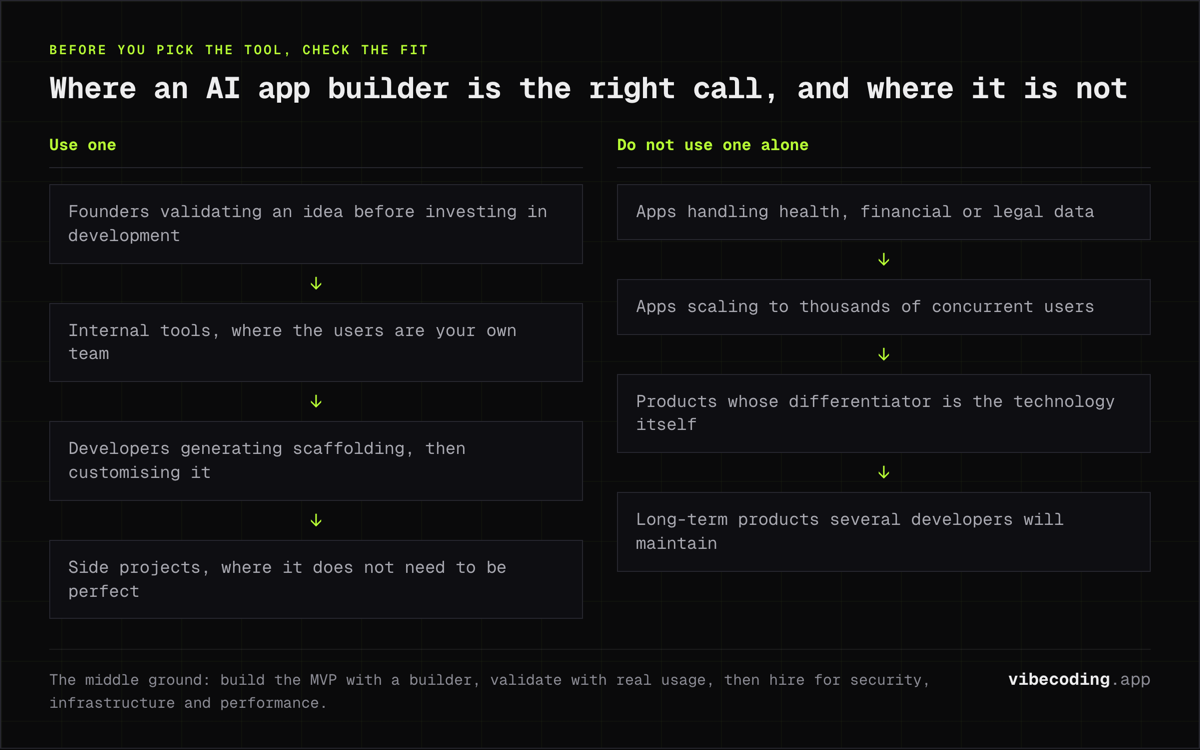
Founders validating ideas. If you need to test whether people want your product, an AI builder gets you there fastest and cheapest. Build the MVP, get users, learn what actually matters, then decide whether to invest in proper development.
Internal tool builders. The app is for your team, not the public. Security requirements are lower, the user base is small, and if something breaks you can fix it without a PR crisis. AI builders are excellent for internal tools and dashboards.
Developers accelerating their workflow. If you can code, AI builders are scaffolding tools, not replacements. Generate the boilerplate, then customize the important parts. This is how vibe coding works best.
Side project builders. The app doesn't need to be perfect. You're learning, experimenting, or building something for fun. AI builders remove the barrier to starting.
Who Should NOT Use an AI App Builder (Alone)
Apps handling sensitive data. Healthcare, financial, legal: these domains have regulatory requirements that AI builders don't understand. You need someone who knows HIPAA, PCI-DSS, or GDPR to review the implementation.
Apps that need to scale to thousands of concurrent users. AI-generated code works for small loads. Database queries, caching, connection pooling, and load balancing at scale need engineering expertise.
Products where the differentiator is the technology. If your competitive advantage is a novel algorithm, a complex data pipeline, or unique real-time processing, AI builders generate generic implementations. Your differentiator needs to be hand-built.
Long-term products with large teams. AI-generated codebases can be hard for teams to maintain. If you're building something that five developers will work on for three years, start with proper architecture and conventions from day one.
The Practical Middle Ground
The best approach for most projects: use AI builders for the first 80%, bring in expertise for the last 20%.
- Build the MVP with an AI builder: get the product in front of users fast
- Validate with real usage: learn what actually matters
- Hire a developer for production prep: security review, infrastructure, performance
- Keep using AI for iteration: AI-assisted development speeds up ongoing work
This gives you the speed advantage without the security and scalability risks. It's not "AI or developers", it's "AI first, developers when it matters."
Frequently Asked Questions
Are AI app builders good enough for production?
For simple apps with standard patterns, yes. For complex business logic, high-security requirements, or apps that need to scale to thousands of users, AI builders get you started but you'll need developer involvement for production readiness. The AI handles the first 80% well: the last 20% needs human expertise.
What are the biggest limitations of AI app builders?
The main limitations are: production infrastructure gaps (the app looks complete but lacks proper deployment), security vulnerabilities in generated code, vendor lock-in if you can't export your code, limited handling of complex business logic, and technical debt that accumulates as you add features through prompts.
Should a non-technical founder use an AI app builder?
Yes, for validation and MVP testing. AI app builders let you test ideas with real users before investing in full development. But plan to involve a developer before going to production: especially for security review, performance optimization, and infrastructure setup.
Do AI app builders create vendor lock-in?
It depends on the tool. Builders that export real code (Bolt.new, Lovable, FlutterFlow) give you portability. Builders that only run on their platform create lock-in risk. Always check whether you can export and host the code independently before committing to a tool.
How much money can AI app builders save?
For an MVP, AI builders can reduce initial development costs by 60-80% compared to hiring a developer. Most tools cost $20-50/month versus thousands for a developer. But factor in the eventual cost of hiring someone for production hardening, security review, and ongoing maintenance.
Making your decision? Compare tools in our AI app builder comparison, learn about AI vs low-code vs no-code, or explore the full tools directory to find the right platform.

Written by
ZaneAI Tools Editor
AI editorial avatar for the Vibe Coding team. Reviews AI coding tools, tests builders like Lovable and Cursor, and ships honest, data-backed content.