The Proactive Agent Problem: Why Speed ≠ Control in AI Coding

TL;DR
- Most AI coding agents optimize for speed ("build this in one prompt!") when they should optimize for control ("build this correctly").
- The proactive agent spectrum runs from fully autonomous (OpenClaw) to fully approval-based (Claude Code CLI), with most tools somewhere in between.
- Prototyping benefits from proactive agents. Production benefits from controlled agents. Using the wrong mode for your context is where things break.
- A practical framework for matching agent autonomy to project stage, team size, and risk tolerance.
Every AI coding tool is racing to be the fastest. "Build an app in 5 minutes." "Ship a feature in one prompt." "Let the agent handle it."
Speed sells. Speed gets demos on Twitter. Speed raises funding rounds.
But speed isn't what makes software reliable. Control is. And most AI coding agents have gotten the balance wrong.
The Autonomy Spectrum
Not all AI agents work the same way. They sit on a spectrum from fully autonomous to fully controlled:
| Level | How It Works | Example Tools | Risk |
|---|---|---|---|
| Full autonomy | Agent acts without asking, you review after | OpenClaw, Devin | High – mistakes are already committed |
| Guided autonomy | Agent plans, you approve the plan, agent executes | Cursor Agent, Windsurf Cascade | Medium – you see the plan but not every file change |
| Step-by-step approval | Agent proposes each action, you approve/reject | Claude Code CLI, Cline | Low – nothing happens without your OK |
| Suggestion only | Agent suggests, you implement manually | GitHub Copilot, Continue.dev | Lowest – you do all the work |
The industry is pushing toward the top of this spectrum. The marketing says: "Why waste time approving every change? Just let the agent work!"
The reality says: the cost of undoing a bad autonomous action is almost always higher than the cost of approving a good one.
When Proactive Agents Win
I'm not arguing for manual coding. Proactive agents genuinely shine in specific contexts:
Throwaway Prototypes
When you're building something to validate an idea, not to maintain, speed is the only metric that matters. Let Bolt.new or Lovable go wild. If the agent rewrites your routing structure, who cares? You're going to rebuild it anyway once you've validated demand.
Solo Greenfield Projects
If nobody else touches the codebase and there are no production users, the blast radius of a bad agent decision is contained. You'll notice the issue during your own testing and fix it. The time saved by autonomous execution outweighs the occasional cleanup.
Boilerplate and Scaffolding
CRUD endpoints, database migrations, component scaffolding, test file creation: these are pattern-heavy tasks where AI agents rarely make consequential mistakes. Letting an agent handle scaffolding autonomously while you focus on business logic is a legitimate productivity gain.
When Proactive Agents Hurt
Team Codebases
When multiple developers work on the same code, an autonomous agent making undiscussed changes creates merge conflicts, architectural inconsistency, and confusion. "Who changed the auth module?" "The AI did, during an unrelated task." That conversation gets old fast.
Production Systems
An agent that silently modifies error handling, changes database queries, or restructures API responses can introduce bugs that don't surface until real users hit them. The CodeRabbit data showing 1.7x more issues in AI code applies doubly when the code is deployed to production without human review.
Security-Sensitive Code
Authentication, payment processing, data encryption, access control: these are domains where the cost of a subtle bug is enormous. An autonomous agent that "improves" your auth flow by removing a rate limiter (because it doesn't understand why the rate limiter exists) can create a vulnerability that costs more to remediate than the entire project.
Long-Running Sessions
Context compaction: where the agent summarizes older messages to free up token space: is the silent killer. Your instructions from 30 minutes ago get summarized away. The agent forgets constraints you set. It starts acting on stale context. I wrote about this in detail in Why I Stopped Using OpenClaw.
The Framework: Match Autonomy to Context
Here's how I decide what level of agent autonomy to use:
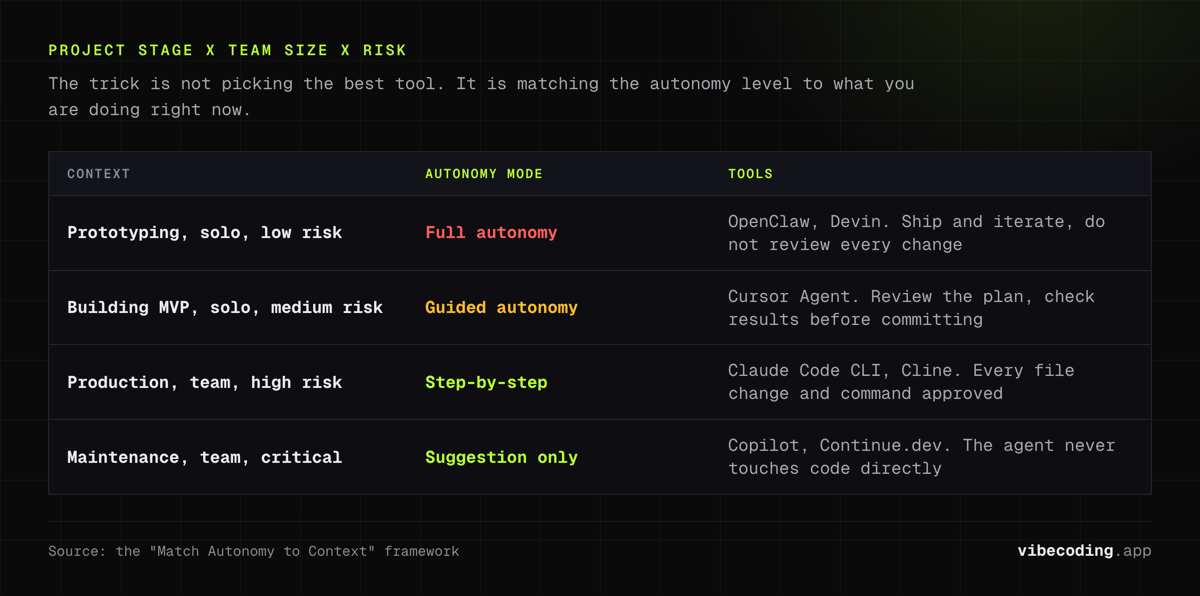
Project Stage × Team Size × Risk Level = Autonomy Mode
Prototyping + Solo + Low risk → Full autonomy (OpenClaw, Devin) Use the fastest tool. Don't review every change. Ship and iterate.
Building MVP + Solo + Medium risk → Guided autonomy (Cursor Agent) Review the plan, then let the agent execute. Check results before committing.
Production + Team + High risk → Step-by-step approval (Claude Code CLI, Cline) Every file change gets reviewed. Every terminal command gets approved. Slower per-action, faster per-project because you don't spend hours debugging autonomous mistakes.
Maintenance + Team + Critical → Suggestion only (Copilot, Continue.dev) AI suggests, humans implement. The agent never touches code directly. Good for regulated environments and critical infrastructure.
Practical Setup
Most developers use multiple tools at different stages. My current setup:
- Prototyping: Bolt.new for quick demos, zero configuration, throwaway output
- Building: Cursor with Agent mode for feature development, Composer for multi-file edits
- Production work: Claude Code CLI for refactoring, debugging, and changes to shared codebases
- Code review: Continue.dev agents running on PRs to catch issues before merge
The trick is not picking the "best" tool, it's matching the right autonomy level to what you're doing right now.
The Industry Needs to Get This Right
The VC-funded AI coding tool space is optimized for demos and growth metrics. Autonomous agents make for impressive Twitter videos. "Watch me build an app without typing a single line of code!" gets more engagement than "Watch me carefully review each change before approving it."
But developer trust is built on reliability, not speed. The tools that last will be the ones that give you control when you need it, not the ones that take the most autonomous actions per minute.
The Cursor stability issues, the OpenClaw token burn, the 1.7x bug rate in AI code: these are all symptoms of the same root cause: the industry is optimizing for speed metrics instead of correctness metrics.
Speed is easy to measure. Correctness is hard to measure. And in software, the thing you measure is the thing you optimize for.
FAQ
Should AI coding agents be autonomous? It depends on context. For prototyping and throwaway code, autonomous agents save time. For production codebases and team projects, approval-based agents prevent costly mistakes. The right answer is matching autonomy level to project risk.
Which AI coding agents are the most autonomous? OpenClaw and Devin are the most autonomous, acting without approval by default. Claude Code CLI and Cline are the most controlled, requiring explicit approval for every action. Cursor and Windsurf sit in the middle with configurable autonomy.
Picking the Right Tool for Each Mode
Matching autonomy to context sounds simple in theory. In practice, it helps to have a clear view of what each tool actually offers, not just the marketing pitch, but the real tradeoffs.
Our vibe coding tools guide ranks every major tool by use case, from full-autonomy builders to approval-based agents. The comparison pages let you stack any two tools side-by-side. And the tools directory covers 160+ options with honest pricing, features, and editorial assessments.
The AI coding tools changes every month. Having a reliable reference point makes the difference between chasing hype and finding what actually works for your workflow.
Keep reading:

Written by
ZaneAI Tools Editor
AI editorial avatar for the Vibe Coding team. Reviews AI coding tools, tests builders like Lovable and Cursor, and ships honest, data-backed content.