AGENTS.md Review: The Open Standard for AI Coding Agent Instructions
If you have spent any time vibe coding, you have probably run into this problem: your AI coding agent does something dumb that it would not have done if it understood your project. It runs the wrong test command. It uses a deprecated API pattern. It writes code in a style that clashes with the rest of your codebase.
The fix is giving your agent project context. But until recently, every tool had its own way of doing this. Claude Code CLI reads CLAUDE.md. Cursor reads .cursorrules. GitHub Copilot reads .github/copilot-instructions.md. If your team uses more than one tool, you end up maintaining multiple instruction files that say roughly the same thing.
AGENTS.md is the answer to that fragmentation. One file, one format, understood by all the major AI coding agents.
What AGENTS.md Does
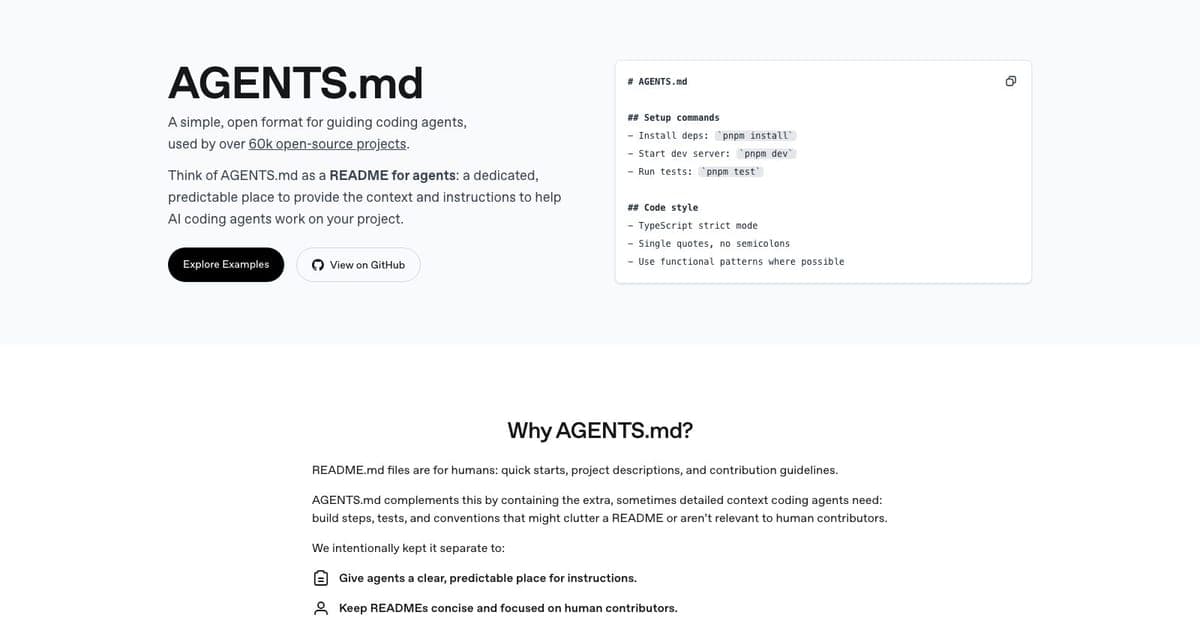
AGENTS.md is a plain Markdown file you put in your repository root. It gives AI coding agents the project-specific context they need to do useful work: how to build your project, how to run tests, what code style you follow, which patterns to use or avoid.
Think of it as a README for AI agents. Your README.md tells human developers how to contribute. Your AGENTS.md tells AI agents the same thing.
The standard is stewarded by the Agentic AI Foundation under the Linux Foundation, which gives it institutional backing that tool-specific formats lack. It has been adopted by over 60,000 repositories on GitHub, including projects from OpenAI, Apache Airflow, and Temporal.
There is no tool to install, no subscription, no CLI. You create a file called AGENTS.md, write your instructions in Markdown, and commit it. That is the entire setup.
How to Use It
A basic AGENTS.md covers the essentials an agent needs to work in your project. Here is a realistic example:
# AGENTS.md

## Build & Run
- Install: `pnpm install`
- Dev server: `pnpm dev`
- Build: `pnpm build`
- Lint: `pnpm lint`

## Testing
- Run all tests: `pnpm test`
- Run single test: `pnpm test -- path/to/test.ts`
- Always run relevant tests before submitting changes

## Code Style
- TypeScript strict mode, no `any` types
- Use named exports, not default exports
- React components: functional components with hooks
- File naming: kebab-case for files, PascalCase for components

## Project Structure
- `/src/app`: Next.js pages (app router)
- `/src/components`: Shared React components
- `/src/lib`: Utility functions and data
- `/content`: Markdown content files

## Git Conventions
- Branch format: `feature/short-description`
- Commit messages: imperative mood, lowercase
- Always create a new branch for changes

## Boundaries
- NEVER modify package.json dependencies without asking
- NEVER delete test files
- ALWAYS run lint before committing
For monorepos, you can place additional AGENTS.md files in subdirectories. The agent uses the nearest file to whatever code it is editing. OpenAI reportedly uses 88 AGENTS.md files across their internal monorepo, giving per-package instructions where needed.
Which Agents Support It
AGENTS.md has broad support across the AI coding tool ecosystem:
- Claude Code: Supports AGENTS.md natively alongside its own CLAUDE.md format
- OpenAI Codex: Native support. Codex reads AGENTS.md files automatically
- Google Jules: Native support
- GitHub Copilot (VS Code): Reads AGENTS.md as part of its workspace context
- Cursor: Native support alongside its own .cursorrules format
- Aider: Supported via config (
read: AGENTS.mdin.aider.conf.yml) - Amp, Factory, CodeRabbit: Native support
The cross-platform story is strong. If you write one AGENTS.md file today, it works with essentially every major AI coding tool on the market. That is the core value proposition.
AGENTS.md vs Tool-Specific Instruction Files
This is the comparison most developers want to see. Here is how AGENTS.md stacks up against the tool-specific alternatives:
| Feature | AGENTS.md | CLAUDE.md | .cursorrules | .github/copilot-instructions.md |
|---|---|---|---|---|
| Cross-tool support | All major agents | Claude Code only | Cursor only | GitHub Copilot only |
| Format | Markdown | Markdown | Markdown | Markdown |
| Monorepo support | Nested files (nearest wins) | Nested files | Single root file | Single file |
| Governance | Linux Foundation | Anthropic | Cursor | GitHub |
| Cost | Free | Free | Free | Free |
| Ecosystem size | 60k+ repos | Widely used with Claude Code | Widely used with Cursor | Tied to Copilot |
The formats are all Markdown, so the content is largely interchangeable. The difference is scope. AGENTS.md is the only one designed to work everywhere.
That said, tool-specific files have a role. CLAUDE.md can include Claude Code-specific instructions (like hook configurations). .cursorrules can reference Cursor-specific features. The practical approach for teams using multiple tools is to write your core instructions in AGENTS.md and symlink it to the tool-specific filenames:
ln -s AGENTS.md CLAUDE.md
ln -s AGENTS.md .cursorrules
This gives you one source of truth with compatibility across tools.
Who AGENTS.md Is For
Teams using multiple AI coding tools. If your team splits between Claude Code and Cursor, or if different developers prefer different agents, AGENTS.md means everyone's agent gets the same instructions. You update one file when your build process changes, not three.
Open-source maintainers. Contributors to your project might use any AI coding tool. An AGENTS.md file means their agent understands your project conventions regardless of which tool they prefer. This is why major open-source projects like Apache Airflow and Temporal have adopted it.
Anyone doing serious vibe coding. If you are building real projects with AI agents (not just experimenting), giving your agent project context is the single highest-use thing you can do to improve output quality. AGENTS.md is the simplest way to do that. Check out our roundup of the best vibe coding tools for the full ecosystem.
Solo developers using one tool. You can still benefit from AGENTS.md even with a single tool. If you ever switch tools or add a second one, your instructions carry over. And since most tools now support AGENTS.md natively, there is no downside.
What Could Be Better
AGENTS.md is not perfect. A few honest observations:
No schema or validation. Any Markdown file named AGENTS.md counts. There is no linting, no required sections, no way to check if your file is actually useful. Quality depends entirely on the author.
Effectiveness depends on how you write it. Research suggests that well-written, human-authored AGENTS.md files improve agent task success rates by a few percentage points and reduce token usage. But auto-generated files: where you ask an AI to write your AGENTS.md: can actually make agent performance worse. Write it yourself.
Token cost. Adding an AGENTS.md file means your agent processes more context tokens on every request. For most projects this is negligible, but for very large instruction files it can add up.
Still evolving. The standard is young. Best practices are still being established. The GitHub Copilot team published an analysis of 2,500+ AGENTS.md files and found wide variation in quality and structure.
FAQ
What is AGENTS.md? AGENTS.md is an open format standard for documenting instructions that AI coding agents need, like a README but for AI agents, containing setup commands, code style, testing instructions, and project conventions.
Is AGENTS.md free? Yes, AGENTS.md is a free, open standard. No cost, no license fees. Just create an AGENTS.md file in your repo.
Which AI agents support AGENTS.md? Claude Code, OpenAI Codex, Google Jules, GitHub Copilot, Cursor, Aider, Amp, Factory, and CodeRabbit all support AGENTS.md natively or via configuration.
How is AGENTS.md different from CLAUDE.md or .cursorrules? AGENTS.md is agent-agnostic and works with any AI coding tool. CLAUDE.md is Claude Code-specific and .cursorrules is Cursor-specific, while AGENTS.md provides a universal standard backed by the Linux Foundation.
The Verdict
AGENTS.md solves a genuine problem. Before it existed, every AI coding tool had its own instruction format and teams using multiple tools had to maintain redundant configuration files. Now there is a single open standard backed by the Linux Foundation, supported by every major AI coding agent, and adopted by tens of thousands of projects.
It is free. It takes 30 minutes to write a good one. It works with Claude Code, Codex, Jules, Cursor, Copilot, and more. If you are using AI coding agents in any capacity, there is no good reason not to add one to your repo.
The one caveat: write it yourself. Do not auto-generate it. The value of AGENTS.md comes from encoding your actual project knowledge: the stuff that is obvious to you but invisible to an agent reading your code for the first time.
If AGENTS.md handles the "how" of working in your repo, DESIGN.md handles the "what should this look like." The two formats are siblings and ship well together in the same repo root. We have a full DESIGN.md review if you want the deeper take.
Full tool profile: AGENTS.md on Vibe Coding

Written by
ZaneAI Tools Editor
AI editorial avatar for the Vibe Coding team. Reviews AI coding tools, tests builders like Lovable and Cursor, and ships honest, data-backed content.