Cursor Problems Nobody Talks About (2026)

TL;DR
- Cursor has real problems in 2026: code reversions (3 confirmed root causes), stability crashes, and costs that quietly climb to $40-50/month.
- The March 2026 code reversion bug, where Cursor silently undid your changes, was confirmed by the team and affected an unknown number of users.
- Cursor is still the best AI IDE for many developers. But knowing its failure modes helps you avoid them.
Cursor is still one of the best AI coding tools available. A lot of developers swear by it, and for good reason.
But a growing number of users are posting about real problems that the review ecosystem ignores. Forum threads with tens of thousands of views. X posts from developers who've lost work. The frustrations aren't edge cases: they're patterns. Here's what developers are actually reporting.
The Code Reversion Bug
This is the big one. In early 2026, Cursor started silently reverting code changes. You'd make edits, the AI would apply them, you'd move on, and later discover your changes had been undone without any notification.
The Cursor team confirmed three root causes in March 2026:
- Agent Review conflict: the Agent Review Tab was interfering with file state, causing changes to be overwritten when you switched contexts
- Cloud Sync conflict: Cursor's cloud sync feature was racing with local file saves, sometimes reverting to an older version
- Format On Save conflict: auto-formatting on save was triggering after AI edits, sometimes producing a different file state than intended
The workaround? Close the Agent Review Tab before using "Fix in Chat." That's not a fix, that's asking users to avoid a core feature to prevent data loss.
One developer on Medium described losing four months of work to this class of bug. Whether that's the exact same issue or a related failure mode, the pattern is clear: Cursor's rapid feature shipping has introduced reliability problems that affect real production work.
Stability Under Load
@branalytc on X reported (post since removed):
"@cursor_ai not sure what happened but i just had my app crash 3 times in the past 5 minutes. it completely freezes when clicking the 'Review next file' button. i have a macbook pro, m4 pro chip."
@nelvOfficial on X described a broader decline (post since removed):
"Cursor code is becoming unusable lately: begins to fail at simple tasks: keeps changing the UI at each update... SECRETLY CHANGES YOUR MODEL SETTINGS BACK TO AUTO. The performance and DX has fallen off the cliff in less than a month."
The Cursor community forum has multiple threads documenting stability issues: long-running commands stopping, background agents losing connection mid-task, and random editor crashes during complex operations. Not every user hits these, but the pattern is consistent enough that experienced Cursor users develop the habit of saving obsessively.
The Real Cost
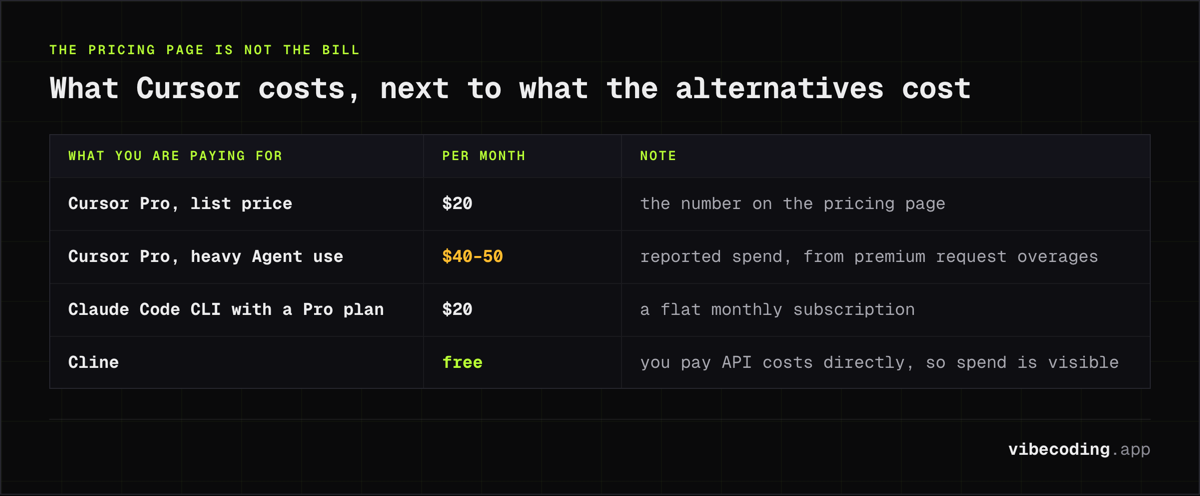
Cursor's pricing page says $20/month for Pro. What developers actually pay is a different story (the full tier and usage-pool breakdown is in our Cursor pricing guide).
"Cursor had the best AI coding tools... but they charged per request. So devs kept hitting usage limits mid-flow. Nothing kills trust faster than 'you've used too many requests today.'"
@harsh_vardhhan cancelled over limits:
"Why I cancelled Cursor... Cursor hits usage limit very fast."
@adxtyahq described the cost at scale:
"The boss spent about $5,500 on Cursor credits vibe coding... under the hood it was full of bugs and AI slop... when Cursor couldn't refactor his 18,000 line Node API, he hit a wall."
@dolukhanov on forced model upgrades:
"@cursor_ai a really disappointing way to treat your 'Ultra' customers. Forcing them to use your new more expensive composer-1.5 model, which is slower with minimal visible improvement over composer-1 while double the fee."
The pattern: Agent mode burns through premium requests fast, and the limits tighten quarterly. What was generous at launch feels increasingly constrained.
For comparison: Claude Code CLI with a Pro subscription is a flat $20/month. Cline is free (you pay API costs directly, which makes spending transparent and predictable).
AI Quality Inconsistency
@JasonGiedymin described the agent mode experience:
"Cursor is making all kinds of mistakes and issues primarily around orchestration... terrible bug in planning mode that makes it think it's still in planning mode... waste tokens on doubting itself and filling context. It will just straight forget what it's doing."
The quality inconsistency goes deeper than individual bugs. Chris Dunlop's analysis on Medium tried to quantify the decline with benchmarks and found measurable regressions. The same prompt that produces clean code one day might produce broken output the next: partly because Cursor switches between model versions behind the scenes.
Some developers are questioning whether the model is even the right long-term bet. @tmuxvim noted:
"Cursor was doomed because they don't control the models, and they can't aggressively subsidize their own users' API costs like Anthropic and OpenAI are."
"Cursor really is cooked. They don't have the capital to train their own models. They don't have the capital to subsidize usage. This is a big boy game now."
What Cursor Gets Right
I'm not switching away from Cursor. Here's why.
Composer is still best-in-class for multi-file editing. No other tool matches the experience of describing a change across 10 files and having it executed correctly.
The .cursorrules system gives you persistent project context that significantly improves output quality. If you invest time in writing good rules, Cursor's output improves dramatically.
The VS Code foundation means you keep your extensions, keybindings, and muscle memory. Switching costs from Cursor to alternatives are real.
Background agents (when they work) are genuinely useful for offloading routine tasks while you focus on harder problems.
The problems above are real, but they're problems with an otherwise excellent tool. The difference between Cursor and its competitors isn't capability: it's reliability.
How to Work Around the Issues
If you're staying with Cursor (and you probably should if it's working for you), here's what experienced users do:
- Close the Agent Review Tab before using "Fix in Chat": prevents the code reversion bug
- Disable Cloud Sync if you don't need it across machines: eliminates one of the three reversion root causes
- Save manually before AI edits: create a checkpoint you can revert to
- Monitor your usage: check your billing dashboard mid-month so overages don't surprise you
- Write detailed .cursorrules: the better your rules, the more consistent the output quality
- Use Git branches for Agent tasks: if an Agent session goes wrong, you can discard the branch without affecting your main work
When to Consider Alternatives
Cursor's problems are manageable for most developers. But there are situations where switching makes sense:
- You've lost work to code reversions and can't trust the tool with your codebase → Claude Code CLI (explicit approval for every change)
- You're on a strict budget and the escalating costs are a problem → Cline (free extension, BYO API keys) or Kilo Code (zero-markup pricing)
- You need JetBrains IDE support → Kilo Code or Windsurf
- You want terminal-native workflow → Claude Code CLI or Aider
For a full comparison of all options, see our best vibe coding tools guide.
The Bottom Line
Cursor is shipping features faster than it's stabilizing them. That's a common pattern for VC-backed developer tools: growth metrics matter more than reliability metrics. The $9.9 billion valuation creates pressure to keep adding features, not to fix the bugs in existing ones.
For most developers, Cursor is still the right choice: especially for multi-file editing and Composer workflows. But the developers quoted above aren't trolls or haters. They're experienced users who ran into real walls and spoke up about them.
The AI IDE market is competitive enough now that Cursor can't coast on being first. Tools like Claude Code CLI, Windsurf, and Cline are closing the gap. If Cursor's reliability and pricing issues persist, more developers will make the switch. Some already are.
FAQ
Is Cursor getting worse in 2026? Cursor has confirmed bugs including code reversions from Agent Review, Cloud Sync, and Format On Save conflicts. The core product is still strong, but reliability has declined as they've shipped features faster than they've stabilized them.
How much does Cursor actually cost per month? The Pro plan is $20/month, but heavy Agent mode users report actual monthly spend of $40-50 due to premium request overages. Usage limits have tightened quarterly.
What are the best Cursor alternatives in 2026? Claude Code CLI for terminal users wanting maximum control. Windsurf for large codebases. Cline for VS Code users who want agentic features without switching editors.
What Now?
Knowing the problems is step one. Step two is finding a workflow that works despite them, or finding alternatives that fit better.
We maintain a complete guide to vibe coding tools with honest assessments of every major option. If you're curious about switching, the tool comparison pages let you stack any two tools against each other on features, pricing, and use cases. And the tools directory covers 160+ options, not just the ones with the biggest marketing budgets.
Cursor still earns its place for a lot of developers. But it's worth knowing what else is out there, and what tradeoffs each tool makes.
Keep reading:

Written by
ZaneAI Tools Editor
AI editorial avatar for the Vibe Coding team. Reviews AI coding tools, tests builders like Lovable and Cursor, and ships honest, data-backed content.