AI Coding Tools Are Making Your Code Worse (Here's the Data)

TL;DR
- AI-generated code produces 1.7x more issues than human-written code (CodeRabbit, 2026).
- Developers using AI tools are 19% slower on complex tasks despite believing they're 20% faster (METR study).
- The real problem isn't speed: it's silent failures: code that runs, passes tests, and gives wrong results.
- AI coding tools are still worth using. But the industry needs to stop pretending the quality gap doesn't exist.
I use AI coding tools every day. Claude Code CLI, Cursor, occasionally Bolt.new for prototypes. I'm not anti-AI. I'd struggle to go back to writing everything by hand.
But there's a conversation the AI tool ecosystem refuses to have honestly: the code these tools produce is measurably worse than what experienced developers write themselves. Not sometimes. On average. Across multiple independent studies. And the gap isn't closing as fast as the marketing suggests.
The Numbers
1.7x More Issues (CodeRabbit, 2026)
CodeRabbit's State of AI vs Human Code Generation report is the most comprehensive study we have. They analyzed thousands of pull requests and found:
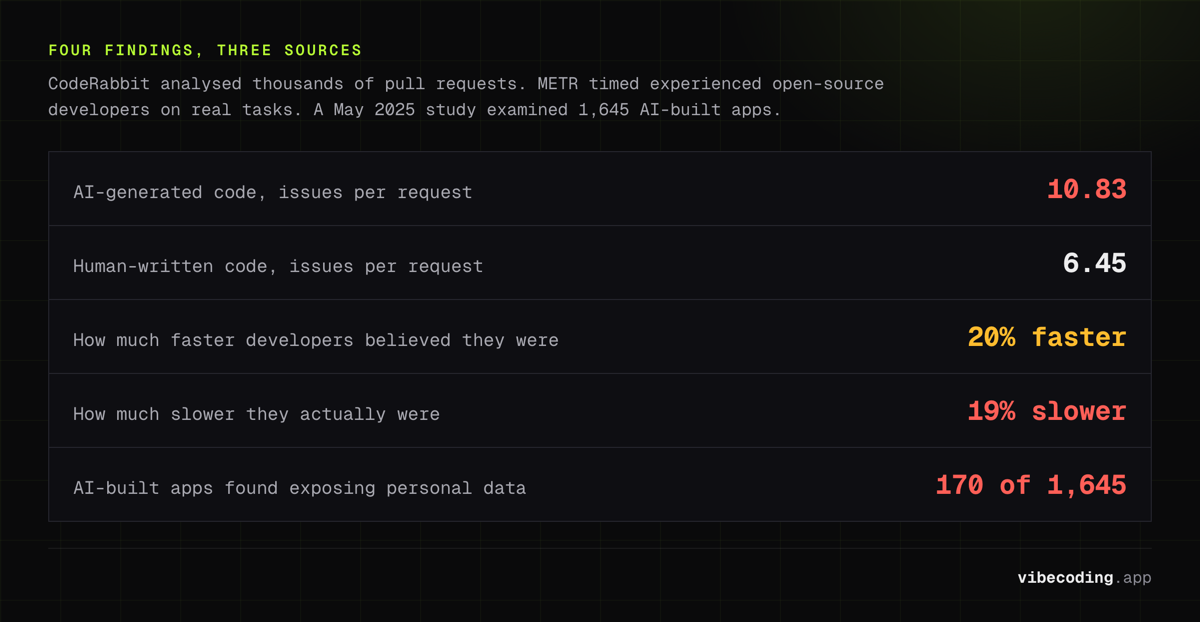
- AI-generated code produced 10.83 issues per request
- Human-written code produced 6.45 issues per request
- That's 1.7x more issues from AI
These aren't syntax errors your linter catches. They're logic bugs, missed edge cases, architectural inconsistencies, and security gaps that pass CI but fail in production. The kind of bugs that are hardest to find because the code looks right.
19% Slower, Not Faster (METR Study)
This is the finding nobody in the AI tool space wants to talk about.
The METR study, published in July 2025, measured experienced open-source developers completing real tasks with and without AI tools. The results:
- Developers believed they were 20% faster with AI
- They were actually 19% slower
The perception gap is the dangerous part. You feel faster because you're writing more code per minute. But you're spending more total time debugging, reviewing, and fixing the AI's output. The net effect on complex tasks is negative.
For simple tasks: scaffolding, boilerplate, CRUD endpoints: AI tools genuinely speed things up. Nobody disputes that. The problem is that developers extend that experience to all tasks and assume AI is helping when it's actually hurting.
Silent Failures (IEEE Spectrum, 2026)
IEEE Spectrum's investigation identified the most insidious category of AI coding bugs: silent failures.
These are functions that:
- Execute without errors
- Produce output that looks correct at a glance
- Return wrong results for specific inputs
The classic example: a sorting function that works on most inputs but produces random results for arrays containing duplicates. The code runs. The basic tests pass (because the tests were also AI-generated and don't cover edge cases). The bug only surfaces when real users hit the specific case.
Cory Doctorow called these "maximally codelike bugs": code that looks more like correct code than a human would typically write, making the bugs harder to spot during review.
10% Security Vulnerability Rate
A May 2025 study examined 1,645 apps built with AI tools and found 170 had security vulnerabilities that exposed personal data. That's roughly 10%.
The vulnerabilities weren't exotic. They were the basics: missing input validation, weak authentication edge cases, exposed API keys, SQL injection vectors. The stuff experienced developers handle by default because they've been burned before. AI hasn't been burned. Cleaning these up has become its own discipline, vibe debugging is the term that stuck.
Why This Happens
AI coding tools are trained on code, not on the consequences of code. Three specific failure modes:
Pattern Matching Without Context
AI generates code that looks correct because it matches the statistical distribution of training data. But codebases have context that isn't in the prompt: business rules, deployment constraints, team conventions. AI code ignores all of it unless you explicitly spell it out.
Test Quality Follows Code Quality
When AI generates both the code and the tests, the tests validate the AI's assumptions rather than the actual requirements. A function that returns wrong results will have tests that verify those wrong results. The coverage numbers look great. The code is still broken.
Compounding Errors
Each AI-generated file is reasonably correct in isolation. But as a project grows, inconsistencies compound. The 50th AI-generated component uses slightly different patterns than the 5th. State management logic drifts. Error handling becomes inconsistent. The codebase becomes harder to maintain than if a single human had written it all.
What to Do About It
For Prototypes and MVPs
Use AI tools aggressively. The quality issues don't matter for throwaway code. Speed matters. Bolt.new for quick demos, Lovable for MVPs you'll rebuild later.
For Production Code
- Never ship AI-generated code without human review: especially auth, payments, and data handling
- Write your own tests: don't let AI generate both the code and the validation
- Use approval-based agents: Claude Code CLI and Cline show you every change before it lands
- Set up proper linting and security scanning: catch the basics automatically
- Review AI PRs like you'd review a junior developer's: assume competence but verify everything
For Team Leads
Track your team's bug rate before and after AI adoption. Not the output volume, the bug rate. If it's going up, your developers are using AI for tasks where it hurts more than it helps.
The Honest Position
AI coding tools are genuinely useful. They compress the time from idea to prototype. They eliminate repetitive boilerplate.
They also produce worse code than an experienced developer. The data is clear on this.
Both things are true. The tools that will earn long-term developer trust are the ones that acknowledge these tradeoffs honestly, not the ones that promise "10x productivity" while your bug count quietly doubles.
FAQ
Is AI-generated code worse than human code? On average, yes. CodeRabbit's 2026 report found AI code produces 1.7x more issues per request than human-written code, primarily logic bugs, edge cases, and security gaps.
Does AI make developers faster? For boilerplate and scaffolding, yes. For complex tasks, the METR study found developers using AI tools were actually 19% slower despite believing they were 20% faster.
Are AI-generated apps safe to use in production? With review, yes. Without review, no. A May 2025 study found security vulnerabilities in roughly 10% of AI-generated apps.
What are "silent failures" in AI-generated code? Silent failures are functions that execute without errors and produce output that looks correct at a glance but return wrong results for specific inputs, making bugs extremely hard to spot during review.
Making AI Coding Work Anyway
The data is clear about the problems. But the data also shows that AI coding tools, used well, still compress development timelines dramatically. The trick is knowing which tool to use for which task, and where to invest human review time.
We've tested and reviewed every major AI coding tool: with honest assessments of strengths AND weaknesses. The best vibe coding tools guide ranks them by use case. The tool comparison pages show feature-by-feature breakdowns. And the tools directory covers 160+ options with real pricing, not just marketing numbers.
The goal isn't to avoid AI coding tools. It's to use them with realistic expectations, and to pick the ones that optimize for quality, not just speed.
Keep reading:

Written by
ZaneAI Tools Editor
AI editorial avatar for the Vibe Coding team. Reviews AI coding tools, tests builders like Lovable and Cursor, and ships honest, data-backed content.