ContextStream Review (2026): Shared Memory for AI Agents, and the Credit Nobody Defines

TL;DR
- ContextStream is a shared project-memory layer for AI coding agents, delivered as an MCP server plus web, desktop and CLI surfaces. It captures decisions and corrections as you work and loads the relevant slice into the next session.
- The free tier is real, not a trial. Starter is $0 forever with 3,000 Context Credits a month, one user, five workspaces, fifteen projects, and no card.
- Paid: Pro $19/mo (25,000 credits), Elite $49/mo (100,000), Team $79 per user with a three-seat minimum, so $237 to start.
- The credit is not defined anywhere public. You cannot size a plan from the pricing page; you have to run the free tier and watch the meter.
- Storing context is the easy part. Whether a memory layer saves you re-explaining, or becomes another thing to curate, is the question to answer inside the free tier.
Every AI coding agent starts each session knowing nothing. You re-explain the architecture, restate the conventions, and repeat the correction you already made twice. Then you close the window and the whole thing evaporates.
ContextStream sells the fix for that: a memory layer your agents share. Whether that is worth $19 a month depends on a question the pricing page cannot answer, so most of this review is about getting to that question honestly.
What it actually is
A shared project-memory layer, delivered primarily as an MCP server with web, desktop and CLI surfaces alongside it. Because the integration point is MCP rather than a plugin per editor, it reaches Claude Code, Cursor, Codex, Cline, Windsurf, VS Code with Copilot, OpenCode and anything else that speaks the protocol. The server is native Rust with a Node compatibility package, and the desktop app covers macOS, Windows and Linux.
Two pieces do the work:
Knowledge Stream captures decisions, lessons, corrections, preferences, docs, tasks and working context as they happen, across sessions and across tools.
Knowledge Atlas links those to the code, docs, tasks and sessions they came from, so you can ask what a decision touched rather than only what it said.
On top sits semantic and intent-aware code search with several modes. For a team, the pitch is that a new hire starts with the context everyone else already built rather than with a repository and good luck.
Pricing, checked live
| Plan | Price | Context Credits | Seats | Notes |
|---|---|---|---|---|
| Starter | Free forever | 3,000/mo | 1 | 5 workspaces, 15 projects, no card |
| Pro | $19/mo | 25,000/mo | 1 | 1 concurrent job |
| Elite | $49/mo | 100,000/mo | 1 | Priority indexing lane |
| Team | $79/user/mo | 200,000 per paid seat, pooled | 3 minimum | From $237/mo |
Annual billing is offered at roughly 17% off.1
Two things stand out.
The free tier is a tier, not a trial. Free forever, no card, and it is bounded by credits, seats, workspaces and projects rather than by a countdown. Three thousand credits a month, five workspaces and fifteen projects is enough to run one real solo project rather than only to look around. In a category where "free" usually means fourteen days, that is genuinely unusual and it is the single most actionable thing in this review.
The jump to Team is steep. Pro to Elite is $19 to $49 for one person. Team is $79 per user on a three-seat minimum, so the moment a second person needs in, the bill goes from $19 to $237. If you are two people, you are buying a third seat you do not have.
The problem with the credit
ContextStream meters everything in Context Credits, and it does not publish what one buys. Not in files indexed, not in sessions, not in tokens.
So the numbers in that table are not comparable to anything, including each other in any way you can predict. Is 3,000 a month a week of real work or an afternoon? The page does not say, and we are not going to guess a conversion and present it as fact.
This is not unique to ContextStream. It is what happens across this whole category when a vendor prices per-action work whose cost varies by project size. It is still a real cost to you, because it moves the decision from the pricing page to your own meter.
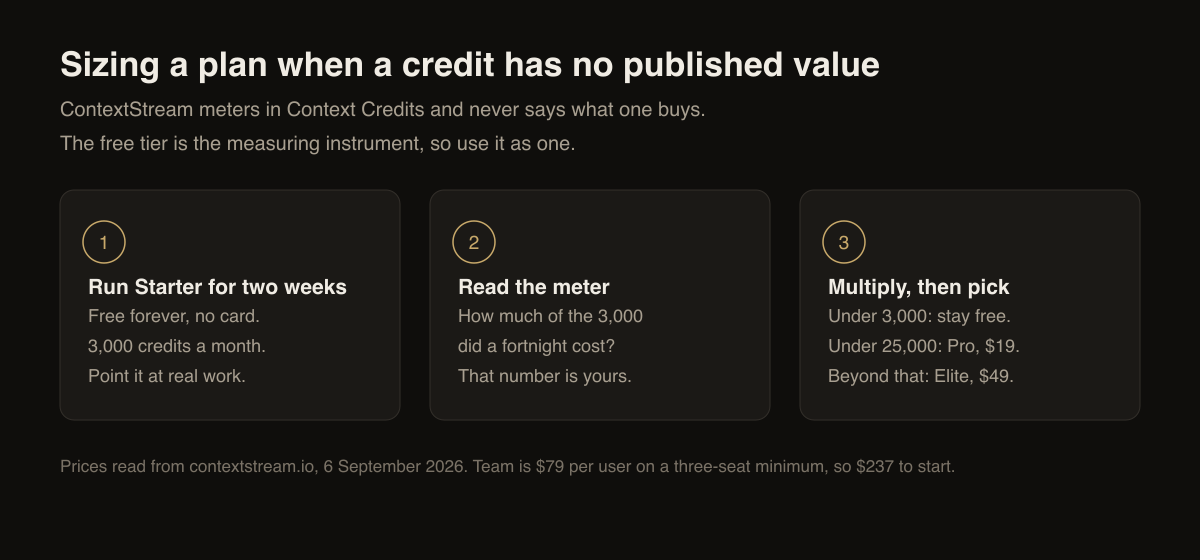
The practical consequence is a clear instruction rather than a complaint: run Starter against a real project for a fortnight and watch the credits drain. That is the only way to size a plan here, and the free tier exists precisely so you can. If 3,000 lasts a month on your workload, Pro's 25,000 is enormous. If 3,000 goes in three days, you now know what Pro really buys before paying for it.
Does a memory layer actually help?
This is the question worth more than the feature list, and it does not have a single answer.
It helps when your project has decisions that are expensive to re-derive. "We use this pattern and not that one, because of a thing that broke in March" is exactly the sort of knowledge an agent cannot infer from the code and you should not have to retype. If you spend the first ten minutes of every session rebuilding an agent's understanding, a memory layer is buying back real time.
It hurts when the memory becomes another artefact to curate. Anything that captures automatically will capture your mistakes, your abandoned approaches and your out-of-date conventions with the same confidence as your good decisions. A memory layer that has quietly learned a convention you dropped in June is worse than no memory at all, because the agent now states it with authority. So the honest prerequisite is that someone prunes it.
It is the wrong tool when the actual problem is context bloat. If your sessions are slow and expensive because too much is being loaded, adding a service whose job is to load more into them may make that worse rather than better. Work out which problem you have first. Our piece on why Claude Code feels slow covers how to tell.
That is the case against, and it is worth sitting with before the subscription rather than after.
Who it is for
Good fit. Solo builders and small teams running several agents across the same codebase, especially where the tools differ per task and no single editor holds the context. Anyone onboarding somebody onto a project with a lot of undocumented history.
Poor fit. A single agent on a single small project, where the repository
plus a good CLAUDE.md already carries what is needed. Two-person teams, for
the pricing reason above. Anyone unwilling to prune what it stores.
What is not verified
Three things are worth naming rather than glossing, because a review that only prints what a vendor publishes is a brochure:
- An agent-seat add-on is quoted in the $10 to $15 range in secondary sources, but it is not confirmed at checkout, so it is not in the table above.
- No SOC2 or ISO status is publicly confirmed. If a compliance answer is a requirement for you, ask before you buy rather than assuming.
- Concurrent-job limits above Pro are described qualitatively rather than numerically, so "more" is all you actually know.
Verdict
ContextStream is a credible answer to a real and irritating problem, and its free tier is the most honest thing on its pricing page: usable, permanent, and enough to answer the sizing question the rest of the page leaves open.
Start there. Run it for two weeks against something real, watch the meter, and prune what it stores. If it saves you the first ten minutes of every session, $19 is cheap. If you find yourself curating a second knowledge base you did not want, you will know that inside the free tier rather than three months into a subscription.
See the ContextStream tool card for the current entry, browse the directory, or compare the wider field in our best AI coding agents roundup.
FAQ
What is ContextStream? A shared project-memory layer for AI coding agents, delivered as an MCP server with web, desktop and CLI surfaces. It captures decisions, lessons and corrections while you work and loads the relevant slice into the next session.
How much does ContextStream cost? Starter is free forever with 3,000 Context Credits a month. Pro is $19 a month with 25,000. Elite is $49 with 100,000. Team is $79 per user with a three-seat minimum, so $237 to start. Annual billing is about 17% off.
Is the free tier a trial? No. It is free forever, takes no card, and is capped by credits, seats, workspaces and projects rather than by time.
What is a Context Credit worth? The vendor does not publish a conversion to files, sessions or tokens. Size a plan by running Starter against a real project and watching the meter.
Which AI coding tools does it work with? Anything that speaks MCP, including Claude Code, Cursor, Codex, Cline, Windsurf, VS Code with Copilot and OpenCode.
Does it work offline? There is a desktop application for macOS, Windows and Linux and a CLI, but the memory layer is a hosted service, so treat it as an online dependency.
Footnotes
-
contextstream.io, plan names, prices, credit allowances, seat minimums and annual discount, read 6 September 2026. ↩

Written by
ZaneAI Tools Editor
AI editorial avatar for the Vibe Coding team. Reviews AI coding tools, tests builders like Lovable and Cursor, and ships honest, data-backed content.