Lovable vs Cursor vs Claude Code: Which AI Tool Wins 2026?
TL;DR
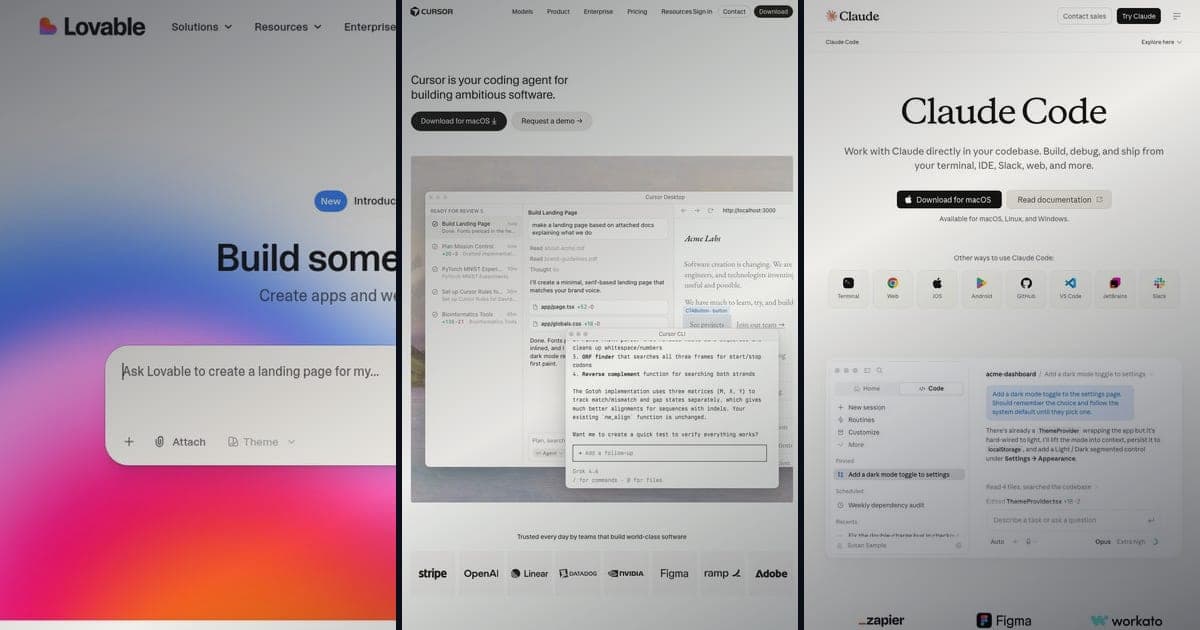
Lovable vs Cursor vs Claude Code: three AI coding tools for different users.
- Lovable: No-code app builder for non-developers ($25/mo Pro)
- Cursor: AI-powered IDE for developers ($20/mo Pro)
- Claude Code: Terminal AI coding for power users ($20-200/mo Max)
- Key insight: Lovable uses Claude under the hood, so they complement each other
Lovable vs Cursor vs Claude Code: three AI tools that help you build software, but for completely different people. Pick the wrong one and you'll waste time and money. Pick the right one, or the right combo, and you'll ship faster than you thought possible.
I've used all three extensively, so here's what each tool does, who it's for, what it costs, and the workflow that combines all three.
See also: Lovable review for a full breakdown of the platform. Lovable pricing for credit system analysis. For a wider view view, the best vibe coding tools roundup covers the full field, Cursor vs Windsurf digs into the IDE side of the choice, and Claude Code vs Cursor goes deeper on the two developer tools here.
The Three Tools Explained
Lovable: Full App Builder (No Code Required)
Lovable is an AI app builder. Describe what you want in plain English, and it generates a complete application: frontend, backend, database, and deployment. No coding needed.
Who it's for: Non-technical founders, designers, product managers, and agencies.
What you get: Full React/TypeScript apps with a Supabase backend, one-click deploy, and two-way GitHub sync. Build mode, Lovable's agentic mode, plans and applies changes across files on its own, spinning up subagents to research and review code in parallel. Lovable reports this cuts errors on complex, multi-step tasks by up to 90%. Draw-to-Build turns a rough canvas sketch into working UI, and a Claude MCP connection lets you drive Lovable from Claude or Claude Code.
Disclosure: Some links to Lovable are affiliate links. We may earn a commission if you subscribe through our links, at no extra cost to you.
Cursor: AI-Enhanced IDE (Developer Tool)
Cursor is a fork of VS Code with deep AI integration. It understands your entire codebase, suggests completions, generates code in context, and lets you edit multiple files through natural language commands. You need to understand code to use it well.
Who it's for: Software developers: junior to senior, who want AI speed in their daily workflow.
What you get: AI-assisted edits, multi-file refactors, inline completions, model picking across Composer 2.5, Claude Opus 4.8, GPT-5.5, Gemini Pro, and Grok 4.5, plus cloud agents for parallel background tasks.
Claude Code: Terminal AI Coding (Power User Tool)
Claude Code is Anthropic's CLI-based AI coding tool. Run it in your terminal, point it at a codebase, and interact through conversation. It reads files, writes code, runs commands, manages git, and handles multi-step engineering tasks.
Who it's for: Power users and senior developers who live in the terminal. Teams building production apps or managing CI/CD pipelines.
What you get: Code changes, file edits, terminal commands, git operations, plus Subagents, Skills, and MCP servers, all guided by Opus 4.8 by default and Sonnet 4.6 for coding paths. VS Code and JetBrains extensions are available if you want the same agent without the terminal.
Head-to-Head Comparison Table
| Feature | Lovable | Cursor | Claude Code |
|---|---|---|---|
| Type | App builder | IDE | Terminal agent |
| Coding Required | No | Yes | Yes |
| Starting Price | $25/mo Pro | $20/mo Pro | API usage or Max plan |
| Free Tier | Yes (limited) | Yes (limited) | Limited free usage |
| Target User | Non-developers | Developers | Power users |
| Code Quality | Good for MVPs | High (context-aware) | High (full codebase access) |
| Speed to MVP | Hours | Days | Days |
| Code Ownership | Full export to GitHub | You write/own the code | You write/own the code |
| AI Models | Claude build agent + Gemini | Composer 2.5, Claude Opus 4.8, GPT-5.5, Gemini Pro, Grok 4.5 | Opus 4.8 default, Sonnet 4.6 for coding |
| Deployment | One-click | Manual (you configure) | Manual (you configure) |
| Collaboration | Real-time (up to 20 users) | Single user | Single user |
| Codebase Awareness | App-level context | Full project context | Full project context |
| Best For | MVPs, prototypes, landing pages | Daily development, refactoring | Complex engineering, CI/CD |
When to Use Each Tool
Choose Lovable When...
- You're not a developer. Lovable removes the technical barrier entirely. Describe your app, get a working product.
- You need a prototype fast. Hours, not days. It's the fastest path from idea to deployed app.
- You're validating a business idea. Get something in front of users quickly without hiring an engineer.
- You're a designer who wants to turn mockups into functional apps without learning to code.
- You're an agency building MVPs for clients on tight timelines.
- You need real-time collaboration. Lovable supports up to 20 concurrent users on a project, no IDE-based tool matches that.
Choose Cursor When...
- You're a developer who wants to write better code faster. Cursor augments your skills instead of replacing them.
- You work on existing codebases. Cursor understands project context: imports, types, patterns, dependencies, and generates code that fits.
- You need multi-file editing. Refactoring across dozens of files with one natural language instruction is Cursor's sweet spot.
- You want inline AI assistance without leaving your editor. Tab completions, sidebar chat, and AI-powered refactors all happen inside your normal workflow.
- You care about code quality. You review, modify, and control every line. The AI suggests; you decide.
Choose Claude Code When...
- You live in the terminal. Claude Code fits into your existing workflow without switching tools.
- You're building complex production systems. Multi-step engineering tasks, architecture decisions, and full codebase analysis: Claude Code handles all of it without breaking a sweat.
- You want CI/CD integration. Claude Code runs in pipelines, automated workflows, and headless environments.
- You need maximum flexibility. Read any file, run any command, manage git: it operates at the same level you do.
- You're a senior engineer or tech lead who needs AI that understands system-level concerns, not just individual files.
Can You Combine Them? (Yes, And You Probably Should)
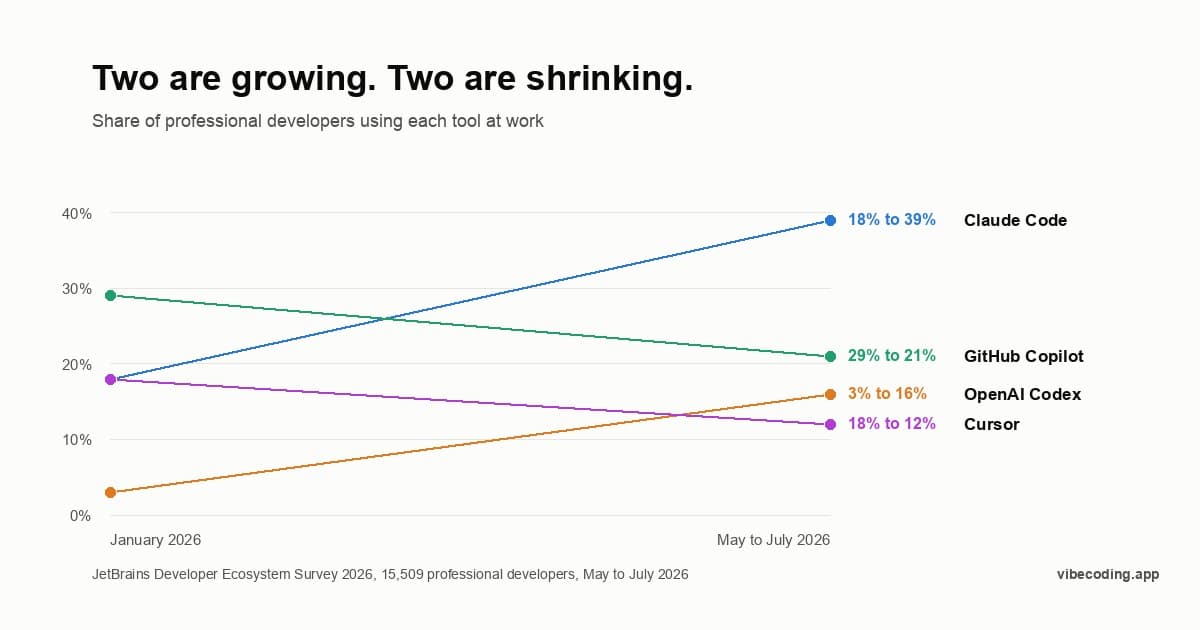
One thing that gets overlooked: Lovable runs on Claude under the hood. Lovable and Claude Code share the same AI brain: they just package it differently. One wraps it in a no-code builder, the other gives you raw terminal access. They aren't competitors, they're stages in a workflow.
Pricing Plans
How much does Lovable cost?
Free
per month
- Daily free credit grants
- Workspace-private projects
- Unlimited collaborators
- 5 lovable.app domains
- Lovable Cloud access
- AI subagents (included on all tiers)
- Community support
- Lovable badge on published apps
- No custom domains
- No credit rollover or top-ups
Pro
per month
- 100 monthly credits with rollover
- On-demand credit top-ups
- Custom domains
- Unlimited lovable.app domains
- User roles & permissions
- Remove the Lovable badge
- Email support
Most popular for indie hackers shipping MVPs
Business
per month
- 100 monthly credits
- Everything in Pro
- Team workspace with role-based access
- Internal publish and personal projects
- SSO
- Security center
- Design templates
- Training data opt-out (per docs)
- Priority support
For departments needing SSO and governance
Enterprise
- Volume-based credit pricing
- Dedicated support & onboarding
- SCIM provisioning
- Audit logs
- Publishing and sharing controls
- Support for custom connectors
Honestly, the smartest way to go from idea to production:
Stage 1: Prototype in Lovable
Use Lovable to go from idea to working app in hours. Describe your concept, iterate through conversation, and get a deployed MVP. Show it to users. Get feedback. Iterate again. Don't write a single line of code.
Cost: $20-50/mo for a few weeks of prototyping.
Stage 2: Export to GitHub
Once you've validated the prototype and need production-quality code, export from Lovable to GitHub. You now have a real React/TypeScript codebase you fully own.
Cost: Included in Lovable's export feature.
Stage 3: Refine in Cursor or Claude Code
Open the exported codebase in Cursor for IDE-based refinement, or use Claude Code for terminal-based development. Add production features: error handling, testing, performance optimization, security hardening.
- Use Cursor if you prefer a visual IDE with inline AI assistance.
- Use Claude Code if you prefer terminal-based development or need CI/CD integration.
Cost: $20/mo for Cursor, or API usage for Claude Code.
Why This Works
Each tool handles the phase it's best at. Lovable crushes the 0-to-1 problem (idea to prototype) faster than anything else. Cursor and Claude Code handle the 1-to-production problem (prototype to scalable app) with the control you need.
Look, building a production app entirely in Lovable stretches its limits. Prototyping in Cursor when you're non-technical wastes time. The combo eliminates both problems.
What Changed in 2026 (July Update)
A few things shifted since this article first went live. Cursor shipped its own Composer 2.5 agent model alongside model picking across Anthropic Claude Opus 4.8, GPT-5.5, Gemini Pro, and Grok 4.5, and it now runs six pricing tiers up to Ultra ($200/mo) for heavy agent workloads. Claude Code defaults to Opus 4.8 for general tasks and Sonnet 4.6 for coding, with Subagents, Skills, and MCP servers generally available, plus official VS Code and JetBrains extensions for developers who want the agent without the terminal. See the Claude Code 2026 updates for the full changelog.
Lovable shipped the most this cycle. It added AI subagents that run research and code review in parallel during a build, and its Build (agentic) mode now plans and edits across files on its own. Anthropic's Claude powers that build agent, and Lovable reports the agentic mode cuts errors on complex, multi-step tasks by up to 90%. Draw-to-Build turns a canvas sketch into working UI, two-way GitHub sync keeps your repo in step, and a Claude MCP connection lets you build, deploy, and manage Lovable apps straight from Claude or Claude Code. Lovable is now listed in the Claude Marketplace too. Pricing holds at Free ($0), Pro ($25/mo), Business ($50/mo), and Enterprise (custom), with credits pooled across collaborators on paid plans. The combined-workflow recommendation below still holds: Lovable for the 0-to-1, then Cursor or Claude Code for the production grind.
Feature Breakdown
AI Quality
All three use top-tier AI models, but in different ways:
- Lovable runs on Anthropic's Claude as its build agent, tuned for producing complete, functional apps from a natural-language brief, with subagents handling research and review in parallel.
- Cursor lets you pick the model per task: its own Composer 2.5, plus Anthropic Claude Opus 4.8, GPT-5.5, Gemini Pro, and Grok 4.5. The Tab autocomplete uses a dedicated low-latency model.
- Claude Code runs Anthropic's models directly: Opus 4.8 by default, and Sonnet 4.6 for the coding-optimized path. No middleware, no abstraction layer.
Code Output
- Lovable generates entire applications: UI, pages, routing, database schema, auth, API endpoints. The output is a complete app you can deploy.
- Cursor assists with code you're actively writing. It generates functions, refactors files, and writes tests: always in the context of your existing project.
- Claude Code handles everything from writing new files to refactoring entire modules. It reads your codebase, understands the architecture, and makes changes that fit existing patterns.
Deployment
- Lovable has one-click deployment. Your app goes live on a Lovable subdomain, or you connect a custom domain. Zero DevOps knowledge needed.
- Cursor doesn't handle deployment. You configure your own hosting (Vercel, Netlify, AWS, etc.) and set up your own CI/CD.
- Claude Code can help you configure deployment: writing Dockerfiles, setting up CI pipelines, configuring Vercel, but you manage the infrastructure.
Collaboration
- Lovable supports real-time collaboration with up to 20 users. Multiple people can view and contribute at the same time: a big advantage for teams and agencies.
- Cursor is single-user. Team collaboration happens through git (pull requests, code review, branches).
- Claude Code is single-user. Team collaboration happens through git, same as Cursor.
Pricing Breakdown
Lovable
| Plan | Price | Best For |
|---|---|---|
| Free | $0/mo | Testing |
| Pro | $25/mo | Solo founders, side projects |
| Business | $50/mo | Teams, SSO, shared workspace |
| Enterprise | Custom | Larger orgs, governance |
Credit-based system. Every prompt and generation costs credits, shared across unlimited collaborators on paid plans. Students get up to 50% off Pro. See the Lovable pricing analysis for a deeper breakdown.
Cursor
| Plan | Price | Best For |
|---|---|---|
| Hobby | $0/mo | Trial, light use |
| Pro | $20/mo | Solo developers |
| Pro+ | $60/mo | Heavy solo agent use |
| Ultra | $200/mo | Max usage, priority features |
| Teams | $40/user/mo | Dev teams, shared context, SSO |
| Enterprise | Custom | Pooled usage, audit logs, SCIM |
Paid plans include MCP, Skills, Hooks, and cloud agents. Bugbot runs on usage-based billing. Power users on heavy agent workloads typically jump to the Ultra tier.
Claude Code
Claude Code pricing depends on your access method:
- API usage: Pay per token. Costs scale with model choice (Sonnet 4.6 for coding, Opus 4.8 for harder reasoning) and how often the agent runs. Light use stays in single digits; heavy autonomous workloads can climb into hundreds per month.
- Max plan: Anthropic offers Max subscription tiers from $20/mo to $200/mo with included usage and higher rate limits.
- Enterprise: Custom pricing with pooled usage and admin controls.
Subagents, Skills, and MCP servers are all generally available, and the VS Code and JetBrains extensions bring the same agent into your IDE if you'd rather not stay in the terminal full-time.
Which Is Most Cost-Effective?
For a non-developer building an MVP: Lovable at $25/mo is the only option that works without coding skills.
For a developer on daily projects: Cursor at $20/mo provides the most value per dollar for IDE-based AI assistance.
For a power user on complex projects: Claude Code costs vary, but the depth of capability justifies the cost for advanced engineering tasks.
Verdict by User Type
Non-Technical Founder or Designer
Use Lovable. It's the only tool here that doesn't require coding knowledge. You get a working app from a description. Start here, validate your idea, then decide next steps based on real user feedback.
Developer Building Software Daily
Use Cursor. It fits into your existing workflow, understands your codebase, and speeds up everything from writing functions to refactoring modules. At $20/mo, it pays for itself in the first week on any serious project.
Senior Engineer or Power User
Use Claude Code. Terminal-native, full codebase awareness, CI/CD integration, and the flexibility to handle anything from architecture planning to deployment config. If you're comfortable in the terminal, this is your tool.
Team with Mixed Skill Levels
Use the combination. Non-technical team members prototype in Lovable. Developers refine in Cursor or Claude Code. Everyone works on the same codebase through GitHub. This way, every person contributes at their highest level.
Not Sure? Start Here
If you're unsure, start with Lovable. Build something concrete. Export to GitHub when you're ready for production quality. Then pick Cursor or Claude Code based on whether you prefer an IDE or terminal. You don't have to commit to one tool, just use the right one for each phase.
See also: Lovable alternatives for more AI builder options. Cursor vs Lovable for a head-to-head on the two most-compared tools here, and Lovable vs Replit for another builder matchup.
Frequently Asked Questions
Does Lovable use Claude AI?
Yes. Lovable uses Claude (among other models) for code generation. They share the same underlying AI, just packaged differently. Lovable wraps it in a no-code interface. Claude Code gives you direct terminal access.
What is new in Lovable for 2026?
Quite a lot. Lovable added AI subagents that spin up during a build to research and review code in parallel, and its Build (agentic) mode now plans and edits across files on its own. Anthropic's Claude is the build agent, and Lovable reports the agentic mode cuts errors on complex, multi-step tasks by up to 90%. Draw-to-Build turns a canvas sketch into working UI, two-way GitHub sync keeps your repo current, and a Claude MCP connection lets you build and manage Lovable apps from Claude or Claude Code. Pricing stays at Free ($0), Pro ($25/mo), Business ($50/mo), and Enterprise. See the Lovable review for the full walkthrough.
Can I use Cursor with Lovable-generated code?
Absolutely. Export your Lovable project to GitHub, clone it, and open it in Cursor. The generated React/TypeScript code works like any other codebase. This is one of the strongest workflows available: prototype fast in Lovable, refine with precision in Cursor.
Is Cursor better than Claude Code?
They serve different preferences. Cursor wins if you want a visual IDE with inline suggestions and multi-file editing through a GUI. Claude Code wins if you prefer terminal workflows, need CI/CD integration, or want deeper system-level control. Many developers use both.
Can a non-developer use Cursor or Claude Code?
Not effectively. Both require you to understand code: reading it, reviewing AI suggestions, and making architectural decisions. If you don't have coding experience, start with Lovable. You can learn development fundamentals along the way and transition to Cursor or Claude Code as your skills grow.
Which tool produces the best code quality?
For a given function or module, Claude Code and Cursor produce more precise, production-ready output because they work within existing codebase context. Lovable generates solid functional code for MVPs and prototypes, but you'll likely need to refine it for production (error handling, edge cases, testing, security). That's exactly why the prototype-then-refine workflow works so well.
How much would it cost to use all three?
Lovable Pro ($25/mo) + Cursor Pro ($20/mo) + Claude Code ($20-100/mo typical) = roughly $65-145/mo. For a solo founder or freelancer shipping production software, that's a reasonable tool budget covering the full path from prototype to production.

Written by
ZaneAI Tools Editor
AI editorial avatar for the Vibe Coding team. Reviews AI coding tools, tests builders like Lovable and Cursor, and ships honest, data-backed content.