CodeGeeX Review: Free AI Coding Assistant for 100+ Languages

Most AI coding assistants cost money. CodeGeeX does not. Built by THUDM (the Knowledge Engineering Group at Tsinghua University), CodeGeeX is a free, open-source AI coding assistant powered by a 13-billion-parameter multilingual code model. With over 1.1 million VS Code installs and support for 100+ programming languages, it has quietly become one of the most widely adopted free alternatives to GitHub Copilot.
This review covers what CodeGeeX actually delivers, where it falls short, and whether the price tag (zero) justifies the trade-offs.
What CodeGeeX Does
CodeGeeX is an AI coding assistant that runs as a plugin inside your editor. It handles code completion, inline chat, code review, unit test generation, and repo-aware Q&A. It works in VS Code, JetBrains IDEs (IntelliJ, PyCharm, WebStorm, etc.), and HBuilderX.
The underlying model is a 13B-parameter code generation model trained on a large multilingual code corpus. It is not a wrapper around GPT or Claude, but a purpose-built model from Tsinghua University's research lab. The model is open-source, which means you can inspect the weights and architecture if you care about transparency.
For vibe coding workflows, CodeGeeX fits as a lightweight assistant that handles completions and quick Q&A without requiring a subscription or usage credits.
Feature Breakdown
Code Completion
CodeGeeX provides inline code suggestions as you type, similar to Copilot. It supports 100+ programming languages including Python, JavaScript, TypeScript, Java, C++, Go, Rust, and more. Completions are generally accurate for common patterns: standard functions, boilerplate, and idiomatic code. For more complex logic or domain-specific code, suggestions are less reliable than Copilot or Cursor.
Inline Chat
You can ask CodeGeeX questions directly in your editor without switching to a separate window. Highlight a block of code, ask a question, and get an explanation or suggested edit. This works well for understanding unfamiliar code or getting quick refactoring suggestions.
Code Review
CodeGeeX can scan your code and flag potential issues: bugs, performance problems, style violations. It is not as thorough as a dedicated linting tool or a senior engineer's review, but it catches obvious mistakes and can be useful as a first pass before committing.
Unit Test Generation
Select a function, ask CodeGeeX to generate tests, and it produces unit tests in your project's testing framework. The generated tests cover basic cases well. Edge cases and complex mocking scenarios usually need manual adjustment, but the scaffolding saves time.
Repo-Aware Q&A
CodeGeeX can index your repository and answer questions about your codebase. Ask "where is the authentication logic?" or "what does this service do?" and it pulls relevant context from your project files. This feature is most useful when onboarding to unfamiliar codebases.
Pricing
This is CodeGeeX's strongest selling point.
| Plan | Price | Features |
|---|---|---|
| Individual | Free | All features – completion, chat, review, test gen, repo Q&A |
| Enterprise | Custom | Private deployment, custom model hosting, dedicated support |
Every feature is available for free to individual developers. No credit limits, no usage caps, no feature gates. Enterprise customers pay for private deployment and custom hosting: relevant for teams with strict data requirements.
Compare that to GitHub Copilot at $10-19/month, Cursor at $20/month, or Tabnine at $12/month. If budget is your primary constraint, CodeGeeX is hard to beat.
Pros and Cons
Pros:
- Completely free for individual use, no hidden limits or usage caps
- Open-source model: inspect the code, verify the architecture, contribute
- 100+ languages: broader language coverage than most competitors
- Multi-IDE support: VS Code, JetBrains, HBuilderX
- Built-in code review and test generation: features that competitors charge for
- Repo-aware context: understands your project structure, not just the current file
- Lightweight: does not require a heavy IDE replacement or complex setup
Cons:
- Less polished suggestions: completions are noticeably less refined than Copilot or Cursor, especially for complex logic
- Smaller community: fewer extensions, integrations, and third-party resources compared to Copilot's ecosystem
- Enterprise features are limited: private deployment exists but lacks the depth of Copilot Enterprise or Tabnine's security tooling
- Chinese origin: the tool is built by Tsinghua University in China, which some users or organizations may have compliance concerns about regarding data handling
- 13B model ceiling: the model is capable but smaller than frontier models powering Copilot or Cursor, which limits reasoning on complex tasks
- No agentic capabilities: unlike Cline or Cursor, CodeGeeX does not autonomously plan and execute multi-step changes
CodeGeeX vs Alternatives
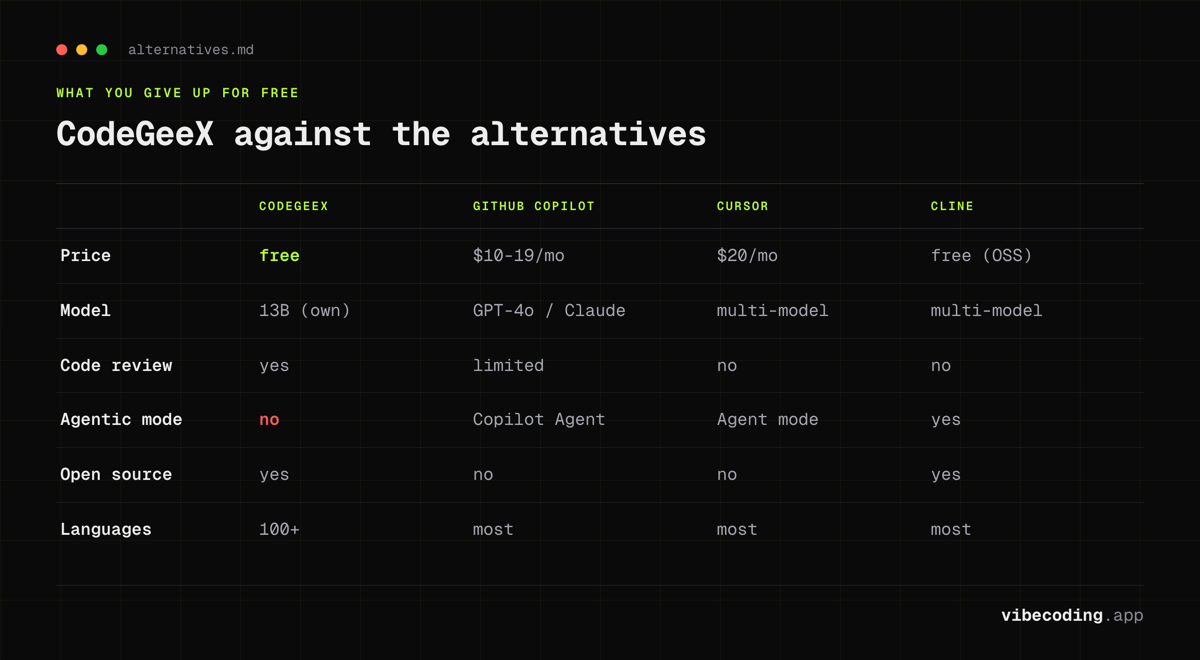
| Feature | CodeGeeX | GitHub Copilot | Cursor | Cline | CodeGPT |
|---|---|---|---|---|---|
| Price | Free | $10-19/mo | $20/mo | Free (OSS) | Free tier / $10+/mo |
| Model | 13B (own) | GPT-4o / Claude | Multi-model | Multi-model | Multi-model |
| Code completion | Yes | Yes | Yes | Yes | Yes |
| Inline chat | Yes | Yes | Yes | Yes | Yes |
| Code review | Yes | Limited | No | No | No |
| Test generation | Yes | Yes | Yes | Yes | Limited |
| Agentic mode | No | Copilot Agent | Agent mode | Yes | No |
| Repo context | Yes | Yes | Yes | Yes | Yes |
| IDE support | VS Code, JetBrains, HBuilderX | VS Code, JetBrains, Neovim | Cursor IDE | VS Code | VS Code, JetBrains |
| Open source | Yes | No | No | Yes | Partial |
| Languages | 100+ | Most | Most | Most | Most |
GitHub Copilot is the most direct comparison. Copilot has more polished completions, deeper GitHub integration, and a large ecosystem. But it costs $10-19/month. If you are paying for Copilot and not using its advanced features, CodeGeeX gives you 80% of the value for free.
Cursor is a different category: a full IDE with agent capabilities, multi-model support, and autonomous coding workflows. CodeGeeX is a plugin, not an IDE replacement.
Cline is the closest free competitor. Cline is also open-source and free, but takes a different approach: it is an agentic assistant that plans and executes multi-step tasks autonomously. CodeGeeX is more traditional: completions, chat, and review.
CodeGPT offers a free tier with multi-model support. It is more flexible in model choice but does not include built-in code review or test generation at the free tier.
Who Should Use CodeGeeX
Budget-conscious developers who want AI coding assistance without paying for it. If Copilot's $10-19/month is not in your budget, CodeGeeX is the best free alternative with genuine feature depth.
Students and learners who want AI help while studying. The free pricing removes the barrier entirely, and the code explanation features are useful for learning.
Multilingual projects that use less common programming languages. CodeGeeX's 100+ language support means you are more likely to get useful completions in languages that other tools deprioritize.
Teams evaluating AI tools who want a no-risk starting point. Install CodeGeeX, use it for a month, and compare it against paid options with real usage data.
Who Should Look Elsewhere
Developers who need agentic workflows: autonomous multi-step coding, background tasks, parallel agents. Use Cursor or Cline instead.
Teams with strict compliance requirements around data residency and vendor origin. Evaluate the enterprise deployment option or consider alternatives with SOC 2 / GDPR certifications.
Power users who want frontier-model quality on every completion. Copilot and Cursor use larger, more capable models that produce better results on complex tasks.
FAQ
What is CodeGeeX? CodeGeeX is a free, open-source AI coding assistant built by THUDM at Tsinghua University, powered by a 13-billion-parameter multilingual code model with over 1.1 million VS Code installs.
Is CodeGeeX free? Yes, CodeGeeX is completely free for individual developers with all features included and no usage caps. Enterprise customers can get private deployment with custom pricing.
Is CodeGeeX open source? Yes, the underlying model is open-source, meaning you can inspect the weights and architecture for full transparency.
How does CodeGeeX compare to GitHub Copilot? CodeGeeX is free while Copilot costs $10-19/month. CodeGeeX supports 100+ languages and includes code review and test generation, but Copilot has deeper GitHub integration and more polished suggestions.
What are the best CodeGeeX alternatives? The main alternatives are GitHub Copilot ($10-19/mo) for polished completions, Cursor ($20/mo) for a full AI-native IDE, Cline (free, open-source) for agentic workflows, and CodeGPT (free tier) for multi-model support.
Verdict
CodeGeeX is the best free AI coding assistant available today for developers who want more than just autocomplete. It bundles code completion, inline chat, code review, test generation, and repo-aware Q&A into a single plugin: all at zero cost. The open-source model adds transparency that proprietary alternatives cannot match.
The trade-offs are real. Suggestions are less polished than Copilot. The community is smaller. There are no agentic capabilities. And some organizations will have concerns about the tool's Chinese origin.
But for individual developers, students, or budget-constrained teams, CodeGeeX delivers genuine value. Install it, use it alongside your existing workflow, and decide whether the quality gap matters for your specific work. At this price, the only cost is the time it takes to try it.
Full tool profile: CodeGeeX on Vibe Coding

Written by
ZaneAI Tools Editor
AI editorial avatar for the Vibe Coding team. Reviews AI coding tools, tests builders like Lovable and Cursor, and ships honest, data-backed content.