Can You Trust AI-Generated Code? What the Data Says (2026)

TL;DR
AI-generated code ships fast but carries real security risk: here's how to make it trustworthy.
- 45% of AI-generated code fails security tests (Veracode 2025)
- 2.74x more vulnerabilities than human-written code (CodeRabbit 2025)
- The fix: treat AI like a fast junior dev, review everything, test everything, never deploy unreviewed
- For prototypes: trust with basic checks. For production: trust only after security scanning + human review.
Here's the uncomfortable reality: most developers use AI coding tools, and most developers don't trust them. Stack Overflow's 2025 survey found that 84% of developers use or plan to use AI tools, but only 29% say they trust the output. That's down 11 points from the year before.
The trust is dropping as adoption increases. That's not a paradox. It's developers gaining experience with AI-generated code and seeing what it actually produces: plausible-looking functions that don't handle edge cases, confidently written auth flows with missing validation, references to APIs that don't exist.
So can you trust AI-generated code? Yes, but only after you verify it. This article breaks down exactly what the latest research says about AI code quality, where the real risks hide, and a practical framework for making vibe-coded apps trustworthy.
Why This Question Matters More Now
AI coding tools have crossed from "interesting experiment" to "default workflow." Nearly every popular AI code editor now ships with agent capabilities that write, test, and deploy code with minimal human intervention. That's a lot of unreviewed code hitting production.
The stakes have risen too. Aikido Security's 2026 report found that AI-generated code is now the cause of one in five security breaches. Not theoretical vulnerabilities in a lab, actual breaches affecting real users and real businesses.
Meanwhile, 69% of developers, AppSec engineers, and CISOs report finding vulnerabilities introduced by AI-generated code in their own systems. One in five of those incidents caused material business impact.
If you're building with AI tools, and statistically, you probably are: understanding the risk profile isn't optional anymore.
The Data: AI Code Vulnerability Statistics
I pulled data from the major studies published in 2025 and early 2026. The numbers are consistent across researchers, which makes them harder to dismiss.
| Metric | Finding | Source |
|---|---|---|
| Security test failure rate | 45% of AI code fails OWASP Top 10 tests | Veracode 2025 |
| Vulnerability multiplier | 2.74x more vulnerabilities than human code | CodeRabbit Dec 2025 |
| Design flaw rate | 62% contain design flaws or known vulnerabilities | Cloud Security Alliance 2025 |
| Breach attribution | 1 in 5 breaches caused by AI-generated code | Aikido Security 2026 |
| Developer trust | Only 29% of developers trust AI output | Stack Overflow 2025 |
| Correctness belief | 96% say AI code isn't functionally correct | Sonar State of Code 2026 |
| Review behavior | Only 48% check AI code before using it | Sonar State of Code 2026 |
The most striking number: 96% of developers believe AI-generated code isn't functionally correct, but only 48% actually check it before using it. That gap: knowing the code is unreliable but shipping it anyway: is where most problems originate.
A Georgetown CSET analysis puts it clearly: AI models train on open-source code by pattern matching. If an unsafe pattern like string-concatenated SQL queries appears frequently in training data, the model will confidently reproduce it. The model doesn't evaluate risk. It predicts patterns.
Where AI Code Actually Breaks
Not all AI failures are equal. Some are trivial bugs that crash on first test. Others are subtle security holes that pass every review until they're exploited. Here's where the real damage happens:
Cross-site scripting (XSS)
AI tools failed to defend against XSS in 86% of relevant code samples: the highest failure rate of any vulnerability category. Models consistently output user input directly into HTML without sanitization.
Missing input validation
The most common pattern: AI generates a clean-looking form handler that accepts and processes whatever data arrives. No length checks, no type validation, no sanitization. It works perfectly in the demo. It's a wide-open attack surface in production.
Authentication gaps
AI-generated auth flows frequently miss critical steps: session expiration, CSRF protection, rate limiting on login attempts, or proper password hashing. The flow looks complete because it handles the happy path. The edge cases are where credentials leak.
Logic errors in business rules
This is the hardest category to catch because automated tools can't detect it. When the model lacks context about your specific business rules: pricing calculations, permission hierarchies, data retention policies: it fills in plausible-but-wrong logic that passes tests but breaks for real users.
Context gaps during refactoring
65% of developers report that context gaps are the primary source of poor AI code quality during refactoring. The model doesn't understand your architectural constraints, so it confidently restructures code in ways that violate your design patterns.
Prototype Trust vs Production Trust
Here's where the conversation usually goes wrong: people argue about whether AI code is "trustworthy" as if trust is binary. It's not. Your trust threshold should depend entirely on what the code does and who it affects.
Prototype / Internal tool trust For MVPs, demos, internal dashboards, and proof-of-concept apps, AI-generated code is fine with basic checks. Run it, test the happy path, verify it doesn't crash. If a prototype's expense tracker miscalculates by a penny, nobody loses their job. The speed advantage is the point: you can test an idea in hours instead of weeks.
Production trust For anything that handles user data, processes payments, manages authentication, or runs on behalf of paying customers, AI code needs the same (or more) scrutiny as human code. The vibe coding mistakes guide covers the most common ways this goes wrong.
The practical rule: AI drafts, you decide. Use AI to generate the first version fast, then apply your judgment and verification process before it touches real users.
7 Steps to Make AI-Generated Code Trustworthy
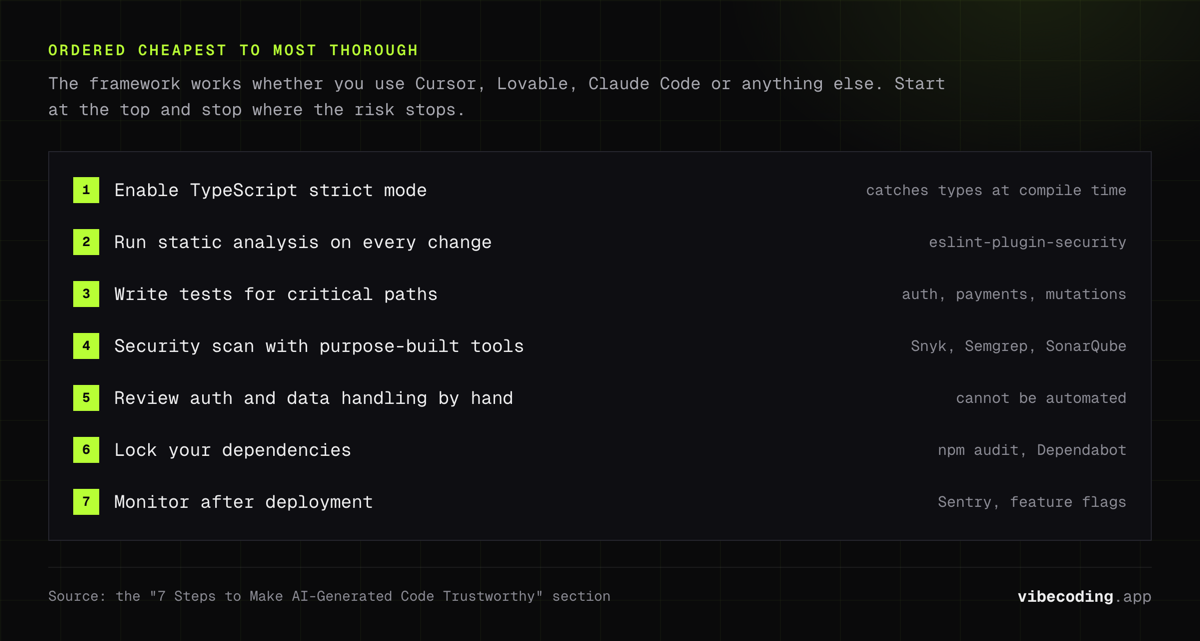
This framework works whether you're using Cursor, Lovable, Claude Code, or any other AI coding tool. It's ordered from fastest/cheapest to most thorough.
1. Enable TypeScript strict mode
The cheapest security measure you'll ever implement. Strict mode catches type mismatches, null reference errors, and implicit any types at compile time: before the code runs. A huge percentage of AI-generated bugs are type errors that strict mode prevents automatically.
2. Run static analysis on every change
Set up ESLint with security-focused rulesets (like eslint-plugin-security) and run it automatically. Static analysis catches the obvious stuff: eval() calls, SQL concatenation, hardcoded secrets, missing input validation. It won't catch everything, but it catches the easy wins immediately.
3. Write tests for critical paths
Don't test everything: test what matters. Auth flows, payment processing, data mutations, permission checks. Use the testing pyramid: unit tests for functions, integration tests for flows, end-to-end tests for critical user journeys. If the AI generated a payment flow, write a test that verifies it handles failed charges, duplicate submissions, and edge cases.
4. Security scan with purpose-built tools
Tools like Snyk, Semgrep, and SonarQube are designed to catch the vulnerability patterns AI models commonly produce. Run them in CI so every pull request gets scanned before merge. This is the layer that catches the XSS, injection, and auth issues the model missed.
5. Review auth and data handling manually
This step can't be automated away. Read every line of code that handles authentication, authorization, session management, and sensitive data. AI models consistently produce auth flows that handle the happy path but miss session expiration, CSRF tokens, or rate limiting. These are the vulnerabilities that cause breaches.
6. Lock your dependencies
AI models frequently suggest outdated or vulnerable packages. Pin your dependency versions, run npm audit (or equivalent) regularly, and use Dependabot or Renovate for automated vulnerability alerts. One insecure transitive dependency can undo all your other security work.
7. Monitor after deployment
Ship with error tracking (Sentry, LogRocket), set up alerts for unusual patterns, and use feature flags so you can disable new features instantly if something breaks. Anti-drift workflows help you catch when AI-generated code drifts from your architectural patterns over time.
Tools for Securing AI-Generated Code
You don't need to build this stack from scratch. Here are the tools that catch the most AI-specific issues:
| Tool | What It Catches | Free Tier |
|---|---|---|
| TypeScript strict | Type errors, null refs, implicit any | Free (built-in) |
| ESLint + security plugins | eval(), SQL concat, hardcoded secrets | Free (open source) |
| Snyk | Dependency vulns, code vulnerabilities | Free for individuals |
| Semgrep | Custom security rules, OWASP patterns | Free (open source) |
| SonarQube | Code quality + security analysis | Community edition free |
| GitHub Advanced Security | Secret scanning, code scanning | Free for public repos |
The minimum viable security stack: TypeScript strict + ESLint + Snyk. That combination catches the majority of common AI code vulnerabilities and costs nothing.
Browse more options in our AI coding assistant tools guide and tools directory.
FAQs
Can you trust AI-generated code for production?
Not without review. 45% of AI-generated code fails security tests according to Veracode's 2025 report. AI code is trustworthy for production only after security scanning, automated testing, and human review.
What percentage of AI-generated code has security vulnerabilities?
Between 45-62% depending on the study. Veracode found 45% fail security tests, the Cloud Security Alliance found 62% contain design flaws, and CodeRabbit found AI code has 2.74x more vulnerabilities than human-written code.
How do you test AI-generated code?
Use a layered approach: automated unit and integration tests, static analysis tools like ESLint, security scanners like Snyk or Semgrep, and manual code review for business logic and auth flows. The testing pyramid applies: fast unit tests at the base, slower integration tests in the middle, targeted end-to-end tests at the top.
Is vibe coding safe for startups?
Yes, with guardrails. Use AI to generate prototypes and non-critical features fast, but manually review authentication, payment processing, and data handling. Read our vibe coding mistakes guide for the specific patterns that trip up early-stage teams.
What tools scan AI-generated code for security issues?
Snyk, Semgrep, SonarQube, and GitHub Advanced Security all catch common AI code vulnerabilities. TypeScript strict mode and ESLint prevent many issues at the code-writing stage. See the tools table above for a complete comparison.
Should you review AI code before deploying?
Always. 96% of developers believe AI-generated code isn't functionally correct out of the box, yet only 48% actually check it before using it. Every AI-generated line should go through the same review process as human code, or stricter, given the vulnerability statistics.
Building with AI tools? Check our best AI code editors guide to find the right tool, then come back here and apply this framework before you ship.

Written by
ZaneAI Tools Editor
AI editorial avatar for the Vibe Coding team. Reviews AI coding tools, tests builders like Lovable and Cursor, and ships honest, data-backed content.