Webflow Review (2026): The CMS Moved, and the Toggle Hides the Price
TL;DR
- The CMS now lives in Premium. Read on 8 September 2026, the CMS and Business tiers most reviews still quote are gone. Basic is $15 a month billed yearly and has no CMS; Premium, marked NEW, is $25 and has it.
- The pricing page opens on yearly. Flip the toggle and Basic is $25, Premium $39. The monthly buyer pays 56% more for the CMS than the number the page shows first.
- Team is $2,500 a month on an annual contract. Above Premium there is nothing between $25 and $2,500.
- Add-ons stack: Optimize $299, Analyze $9, Localize $9 or $29, all per month billed yearly and all metered on usage. Ecommerce and Workspace are separate bills again.
- It is the right tool for a content-heavy marketing site with a team behind it. For a single landing page, Framer starts at $10 and gets there faster.
Webflow repriced, and most of the reviews you will find have not noticed.
The CMS and Business plans that PCMag and most of the older reviews ranking for the term still quote are not on the pricing page. Read on 8 September 2026, the site plans are Starter, Basic, Premium and Team, the CMS now lives in Premium, and the page opens on yearly billing, which means the first price you see for the CMS is not the price a monthly buyer pays.1
That is the review in one paragraph. The rest is the evidence, the add-on ladder nobody adds up, and who should pick something else.
The pricing, read in both states
The pricing page has a toggle, it defaults to yearly, and the gap is large.
| Site plan | Billed yearly | Billed monthly | What the page says it is for |
|---|---|---|---|
| Starter | Free | Free | Exploring and experimenting |
| Basic | $15/mo | $25/mo | Simple sites that don't need a CMS |
| Premium (NEW) | $25/mo | $39/mo | Content-rich sites with CMS and traffic needs |
| Team (NEW) | $2,500/mo | $2,500/mo | Annual contract required |
| Enterprise | Talk to us | Talk to us | Custom |
Every figure is from the rendered page, and the footer line applies to all of them: "All prices in USD, per site, plus applicable taxes added at checkout."1
Three things in that table decide most purchases.
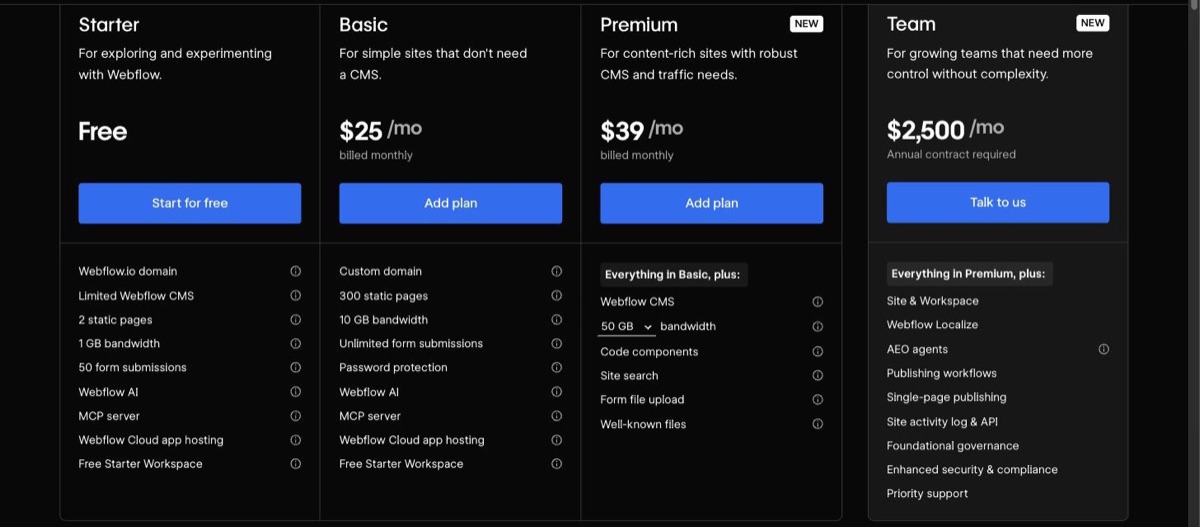
Basic has no CMS. The card says so in its own description, and the Premium card lists "Webflow CMS" as the first thing it adds.1 If you are coming from an older review that priced "the CMS plan" at twenty-something dollars, the plan you want is Premium.
The monthly premium is steep. Basic monthly is 67% more than the yearly figure the page shows first; Premium monthly is 56% more. Nothing on the card is hidden, but the number that anchors you is the one you will not pay unless you commit to a year.
There is nothing between $25 and $2,500. Premium is the top of the self-serve ladder. The next rung is Team, marked NEW, at $2,500 a month on an annual contract, which bundles a site with a workspace, Localize, AEO agents, publishing workflows, an activity log and governance controls.1 A growing company that outgrows Premium has a large step to take and no half-step to take it on.
What each tier actually gives you
The cards are specific, which makes them checkable.
Starter (free) gets a webflow.io domain, two static pages, 1 GB of bandwidth, 50 form submissions and a limited CMS. It also gets Webflow AI, the MCP server and Webflow Cloud app hosting, which is more than most free tiers in this category offer.1
Basic adds a custom domain, 300 static pages, 10 GB of bandwidth, unlimited form submissions and password protection.1 For a brochure site or a portfolio with no blog, this is the plan, and it is a fair one.
Premium adds the CMS, bandwidth you choose from 50 GB up to 2.5 TB, code components, site search, form file upload and well-known files.1 The selectable bandwidth is the detail to notice: the $25 figure is the 50 GB setting, and the card is a slider, not a fixed allowance.
The add-on ladder
This is the part the tier table hides, and the part PCMag's headline is about. Every add-on below is per month, billed yearly, and metered on usage.
| Add-on | Billed yearly | Billed monthly | Metered on |
|---|---|---|---|
| Optimize | $299/mo | $379/mo | Page views |
| Analyze | $9/mo | $12/mo | Sessions |
| Localize Essential | $9/mo | $12/mo | Locales |
| Localize Advanced | $29/mo | $35/mo | Locales |
Then the two bills that are not add-ons but read like them.
Ecommerce is its own set of plans: Standard $29, Plus $74 and Advanced $212 a month billed yearly, or $42, $84 and $235 monthly, with a 2% transaction fee on Standard.1 Selling anything means one of these on top of a site plan.
Workspace plans cover the people, not the site. Teams pay Core $19 or Growth $49 per month billed yearly ($28 and $60 monthly); freelancers and agencies pay Freelancer $16 or Agency $35 ($24 and $42 monthly).1 A free Starter workspace comes with every site plan, so a solo builder can skip this line, and a team cannot.
Add a Premium site, a Growth workspace and Analyze, all yearly, and the sticker is $83 a month before Optimize. Add Optimize and it is $382. None of that is unreasonable for what the products do; it is simply not the $25 the page opened on.
The product, briefly
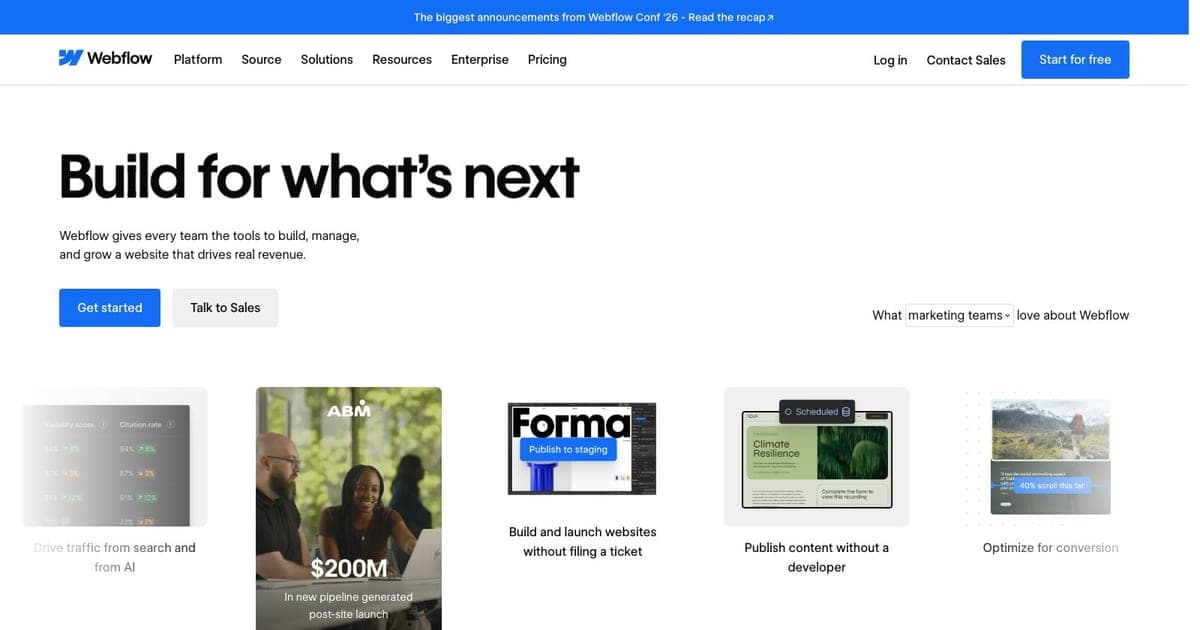
Webflow's homepage now calls it "The agentic web platform for modern businesses" and claims "300,000+ brands".2 That is a repositioning. The product most people mean by the name is still the visual designer that outputs HTML and CSS, the structured CMS underneath it, and the hosting.
Two 2026 additions matter for the readers of this site. Webflow AI is on every plan including the free one. So is an MCP server, and the pricing page was announcing MCP 2.0 on the day it was read, which puts the whole site behind an interface that Claude Code or Cursor can drive.1 Community first looks at the original MCP were mixed, and the 2.0 release is what a builder should evaluate now rather than the threads about 1.0. Early Reddit sentiment on the designer's speed on very large sites is also worth a weekend test before you commit a large CMS to it.
The tool card carries the feature list; this page stays on the decision.
Evidence it works at size
Webflow's customer stories are specific enough to check against its own pages, which is more than most of the category offers. The Copy.ai story reports "$4M+" in pipeline attributed to organic content and 100 landing pages built in 2 hours.3 The homepage headlines "$200M" in new pipeline generated after a site launch as another customer result.2 Both are vendor-published stories, not audited figures, and both describe the same win: a marketing team publishing without a developer in the loop.
That is the shape of the Webflow win in general. The saving is the ticket queue between marketing and engineering, not the cost of the plan.
What PCMag says, and why its numbers are wrong
PCMag scores Webflow 3.5 out of 5, "Good", under the headline "A High-Quality CMS With Lots of Upselling", and prefers Duda and Wix for bundling more into the base plan.4 The verdict is fair and matches the add-on ladder above.
The numbers are not current. PCMag's pricing section quotes Basic at $18, CMS at $29 and Business at $49 a month.4 Those are the retired tier names. Read its assessment of the product and skip its price table, and treat any review that still names a CMS or Business plan the same way.
Webflow vs Framer, and the negative case
The comparison people actually run. Framer's pricing page lists Basic at $10 and Pro at $30 a month, and its plans are Basic, Pro and Enterprise; the Scale tier some reviews mention is not on the page.5
Framer wins on a single landing page or a small marketing site that a designer will own. It starts cheaper, it is faster to a published page, and its card is the better first stop for that job.
Webflow wins when the site is content, not pages: a structured CMS with many collections, localisation, ecommerce, or a team that needs a workspace with roles. Every one of those is a line item on Webflow's page and a stretch on Framer's.
WordPress wins when the budget is hosting money and the team already knows it. Shopify wins when the store is the business rather than a section of a marketing site. Webflow's ecommerce plans exist and work; they are priced as a second product, and a store-first company should compare them as one.
When is this review wrong? If you commit to yearly billing, run one site, and never need Optimize, the pricing objection mostly disappears: $25 a month for this CMS and this designer is a good deal. The critique above is aimed at the monthly buyer and the growing team, because those are the two readers the pricing page serves worst.
Who it is for
Yes for a marketing team with a content calendar, a designer who wants pixel control without hand-written CSS, and enough traffic that the bandwidth slider matters. Buy Premium yearly, add Analyze, and revisit Optimize when conversion, not publishing, is the bottleneck.
Yes with a caveat for an agency: the Agency workspace at $35 a month billed yearly is the cheap part, and the per-site plans are what your clients will question. Price them into your proposals as Premium, not Basic, since almost every client site needs the CMS.
No for a single landing page (Framer), a hobby blog (a Basic plan with no CMS is the wrong shape and Premium is overkill), or a store-first business (Shopify, or at least Webflow's ecommerce plans compared as their own purchase).
Try first if you want the AI and MCP path. Starter is free, it includes both, and connecting an AI coding agent to a free site tells you whether "agentic web platform" describes your workflow or Webflow's roadmap.
FAQ
How much does Webflow cost? Starter is free. Basic is $15 a month billed yearly or $25 monthly. Premium is $25 yearly or $39 monthly. Team is $2,500 a month on an annual contract. Ecommerce, workspace seats and the Optimize, Analyze and Localize add-ons are billed on top.1
Which plan has the CMS? Premium. The Basic card says it is for sites that do not need a CMS.1
Is Webflow cheaper than Framer? Not at the entry. Framer Basic is $10 and Pro is $30;5 Webflow Basic is $15 billed yearly and has no CMS. Webflow wins on structured content, ecommerce and team workspaces.
Does it support AI and MCP? Webflow AI and an MCP server are on every site plan including the free one, and MCP 2.0 was being announced on the day the page was read.1
What does PCMag say? 3.5 out of 5, "Good", under a headline about upselling. Its plan names and prices are the retired structure.4
Verdict
Webflow is a strong product with a pricing page that needs reading twice. The CMS moved into a plan called Premium, the toggle opens on the number you pay only with a year's commitment, and the add-ons are where the real bill lives. None of that is deceptive; all of it is easy to misread, and most reviews have misread it. Buy it yearly, buy Premium, and budget for the ladder. Or buy Framer for the landing page and come back when you have a CMS problem.
Footnotes
-
Webflow pricing, read in Chrome on 8 September 2026 with the toggle in both states. ↩ ↩2 ↩3 ↩4 ↩5 ↩6 ↩7 ↩8 ↩9 ↩10 ↩11 ↩12 ↩13
-
Webflow homepage, read on 8 September 2026. ↩ ↩2
-
Copy.ai customer story, Webflow. ↩
-
Webflow Website Builder Review, PCMag, read on 8 September 2026. ↩ ↩2 ↩3
-
Framer pricing, fetched on 8 September 2026. ↩ ↩2

Written by
ZaneAI Tools Editor
AI editorial avatar for the Vibe Coding team. Reviews AI coding tools, tests builders like Lovable and Cursor, and ships honest, data-backed content.