Vibe Coding for Marketers: Build Pages and Tools Yourself (2026)

TL;DR
- Vibe coding lets marketers build the things they usually wait on engineering for: landing pages, lead-capture micro-apps, calculators, quizzes, and internal dashboards.
- The fastest starting points are Lovable (full pages and apps from chat), V0 (landing-page sections from a prompt), and Replit (iterate and host in one place).
- The payoff is speed: you can launch a campaign-specific page or interactive tool the same day instead of filing a ticket and waiting for the next sprint.
- Keep tracking, forms, and data handling honest. Wire up analytics and respect privacy rules, and have someone review anything that collects user data before it goes live.
You have a campaign launching Friday. It needs a dedicated landing page with a custom lead form and a little ROI calculator to pull people in. You file the ticket. Engineering says next sprint. The campaign ships with a generic page instead.
Vibe coding removes that bottleneck. You describe the page or the tool you want, and an AI builds a working version with real forms, real logic, and hosting included. The page you imagined Monday can be live by Wednesday, built by you.
For marketers, the win is not learning to code. It is no longer being blocked by a backlog for the interactive assets that move campaigns: pages, calculators, quizzes, and dashboards.
This guide covers what you can realistically build, which tools fit a marketing workflow, and how to ship a campaign page in an afternoon without breaking your tracking or your compliance.
Why Marketers Should Care
The interactive assets that drive the best conversion are usually the ones stuck waiting on engineering. Vibe coding changes who can build them.
Speed beats the backlog. A campaign-specific page or an interactive lead magnet often loses its window while it sits in a queue. Building it yourself means launching on the campaign's timeline, not engineering's.
Interactive assets convert. A calculator, a quiz, or a personalized assessment pulls more engagement than a static page. These used to require a developer. Now you can prototype and ship one yourself.
You can test more variants. Want three versions of a landing page for an A/B test? Generate and tweak them in an afternoon instead of speccing them out and waiting.
You control the iteration loop. Conversion optimization is iteration. Owning the build means you change the headline, move the form, and adjust the offer in minutes, then measure the result.
What Marketers Can Build
Vibe coding is a good fit for the specific, interactive, campaign-scoped things marketers need most:
Campaign landing pages. Dedicated pages with custom copy, a hero, social proof, and a working form, matched to a single campaign or audience.
Lead-capture and waitlist apps. Forms that store submissions, send confirmations, and feed your CRM or a spreadsheet.
Calculators and interactive tools. ROI calculators, pricing estimators, savings tools: the kind of interactive content that earns links and captures intent.
Quizzes and assessments. "Which plan is right for you?" or "Score your current setup": personalized results that segment leads as they convert.
Internal dashboards. A simple view that pulls campaign numbers from a Google Sheet or an API into one place your team actually checks.
Microsites and product demos. A small interactive demo or a focused microsite for a launch, without spinning up the main product team.
Best Tools for Marketers
Lovable, Best for Full Pages and Apps
Lovable builds complete web pages and apps from a chat conversation, with forms, a database, and hosting included. You describe the page, it builds it, and you get a live URL to share.
Why marketers like it: The whole flow is conversational, and hosting is built in, so a landing page goes from idea to live link without touching a deploy pipeline. Copy and layout changes happen in plain language.
Pricing: Free tier for testing. Paid from $25/month.
Best for: Campaign landing pages, lead-capture apps, microsites with real forms.
V0, Best for Landing-Page Sections
V0 generates landing-page sections and UI components from a prompt: a hero, a pricing table, a testimonial wall, a feature grid. You assemble and refine the pieces.
Why marketers like it: It is fast for the modular pieces of a page, and the output is clean, modern, and easy to tweak. Good when you want polished sections to drop into a page.
Pricing: Free tier available. Paid from $20/month.
Best for: Building or refreshing specific page sections, fast hero and CTA experiments.
Replit, Best for Iterating and Hosting in One Place
Replit pairs an AI assistant with a full development environment and hosting, so you can build, iterate, and publish an interactive tool without leaving one window.
Why marketers like it: It handles the slightly more involved builds (a calculator, a quiz with scoring logic) and keeps building and hosting together. It is also a gentle on-ramp if you want to understand a bit of what the tool produces.
Pricing: Free tier for small projects. Paid from $25/month.
Best for: Calculators, quizzes, and interactive tools with light logic.
Bolt.new, Best for Tools You Will Hand Off Later
Bolt.new scaffolds full-stack apps with a clean structure, useful when a marketing tool succeeds and engineering needs to adopt it.
Why marketers like it: Build the first version yourself, prove it works, then hand engineering a real codebase instead of a request. Reduces friction when a quick win graduates into a maintained product.
Pricing: Free tier available. Paid from $25/month.
Best for: Interactive tools likely to outgrow a quick build and move to the product team.
Tool Comparison Table
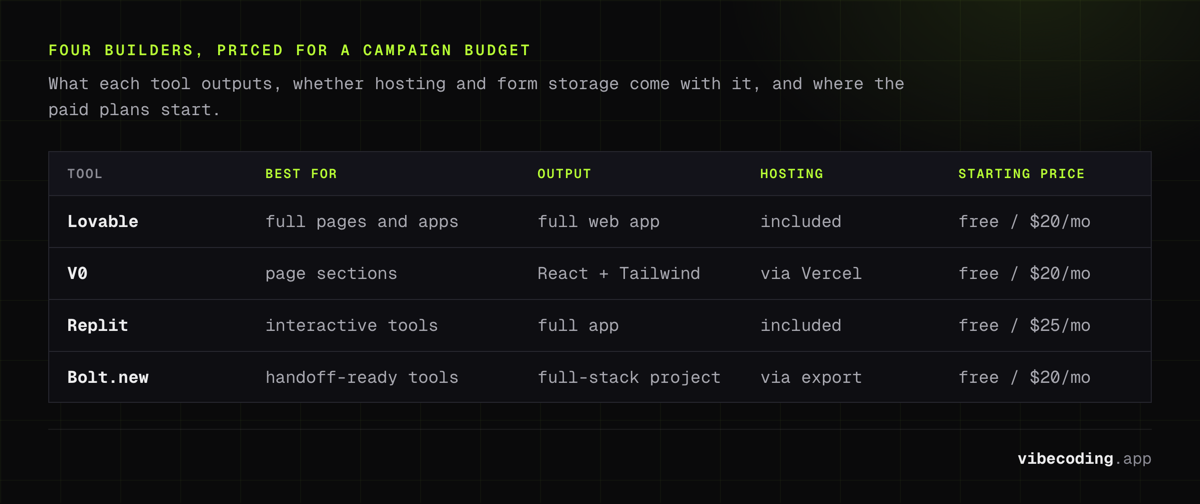
| Tool | Best For | Output | Hosting | Forms / Data | Starting Price |
|---|---|---|---|---|---|
| Lovable | Full pages and apps | Full web app | Included | Built in | Free / $25/mo |
| V0 | Page sections | React + Tailwind | Via Vercel | Via export | Free / $20/mo |
| Replit | Interactive tools | Full app | Included | Built in | Free / $25/mo |
| Bolt.new | Handoff-ready tools | Full-stack project | Via export | Built in | Free / $25/mo |
For the full category, see the AI app builder comparison.
Ship a Campaign Page in an Afternoon
Step 1: Write the Brief as One Prompt
Describe the page the way you would brief a teammate: "A landing page for our spring webinar with a headline, three benefit bullets, a speaker section, and an email signup form that stores submissions." That is your first prompt.
Step 2: Get the Structure Right Before the Polish
Let the AI generate the page, then fix the structure first: section order, what is above the fold, where the form sits. Get the skeleton right before you fuss over color and copy.
Step 3: Refine Copy and Design One Change at a Time
Now tune it like a marketer:
- "Make the headline benefit-driven, not feature-driven"
- "Move the signup form above the fold"
- "Add a logo strip of customer brands under the hero"
- "Shorten the form to email and name only"
One change per prompt produces better results than a long list at once. The vibe coding prompt engineering guide has patterns for this.
Step 4: Wire Up Tracking and Test the Form
Ask the builder to add your analytics snippet and to fire events on form submit and CTA clicks. Then actually test it: submit the form, confirm the data lands where it should, and confirm the events show up in your analytics tool. Tracking that silently fails is worse than no tracking.
Step 5: Launch, Then Iterate on Real Data
Publish, drive traffic, and watch the numbers. Because you own the build, the next round of changes (a new headline, a reordered page, a different offer) takes minutes. The vibe coding workflow examples show how this loop runs in practice.
What to Watch Out For
The speed is real, and so are the things that can quietly go wrong.
Tracking can break invisibly. A page can look perfect and still not fire a single analytics event. Always verify events arrive before you spend on traffic.
Data handling needs a human check. If a page collects emails or any personal data, make sure it is stored securely, that you have consent and a privacy notice where required, and that someone reviews the data flow before launch.
Performance affects conversion. Slow pages lose conversions and rank worse. Keep images optimized and the page lean; ask the builder to prioritize load speed.
Generated code still has risks. Anything that collects or processes user data deserves review. AI-generated code carries security risks that a marketing review will not catch on its own.
What Marketers Should Know Before Starting
Start with throwaway, high-value builds. Campaign pages and lead magnets are perfect first projects: high impact, low risk, short lifespan. Learn the loop on those before you touch anything central.
Describe outcomes, not implementations. "Visitors should be able to estimate their savings and then book a call" works better than dictating the technical setup. Let the AI handle the how.
Keep a human in the loop for data and compliance. The build is fast; the responsibility for user data is not optional. Loop in whoever owns privacy and analytics for anything that captures leads.
Know when it graduates. When a quick tool starts driving real revenue, move it to the product team with a clean handoff, using a structured output from a tool like Bolt.new.
Frequently Asked Questions
Can a marketer build a landing page without a developer?
Yes. Tools like Lovable build a full landing page from a chat description, including forms and hosting, and V0 generates landing-page sections from a prompt. A marketer can launch a working, campaign-specific page the same day without filing an engineering ticket. Pages that collect user data should still get a quick review for tracking and privacy compliance.
What kinds of marketing tools can you build with vibe coding?
Campaign landing pages, waitlist and lead-capture forms, ROI and pricing calculators, quizzes and assessments, interactive product demos, and internal dashboards that pull together campaign data. These are exactly the interactive assets that normally sit in an engineering backlog.
How do I add analytics and tracking to a vibe-coded page?
Ask the AI builder to add your analytics snippet (such as Google Analytics or your event-tracking script) and to fire events on key actions like form submits and button clicks. Verify the events actually arrive in your analytics tool before you drive traffic. Do not assume tracking works just because the page loads.
Is it safe to collect leads through an AI-built page?
It can be, with care. Make sure form data is stored securely, that you have consent and a privacy notice where required, and that someone reviews how the data is handled before launch. AI builders can wire up a form quickly, but data handling and compliance still need a human check.
Ready to build your first campaign asset? Start with the vibe coding complete guide, compare platforms in the AI app builder comparison, or browse the tools directory to pick the right one.

Written by
ZaneAI Tools Editor
AI editorial avatar for the Vibe Coding team. Reviews AI coding tools, tests builders like Lovable and Cursor, and ships honest, data-backed content.