Vibe Coding by Voice: How to Build Hands-Free in 2026

TL;DR
Vibe coding by voice means you describe the feature out loud and AI writes the code. The stack is two layers: a dictation tool plus an AI editor.
- Dictation: Wispr Flow or SuperWhisper (the one Karpathy used) turns speech into clean text system-wide.
- Editor: Cursor or Claude Code turns that text into working code.
- Why: speaking is faster than typing for describing intent, and it's far easier on your wrists.
- Full hands-free: add Talon Voice + Cursorless for keyboard-free navigation and editing.
Vibe coding by voice means you describe the software you want out loud, and an AI editor writes the code, so you build without touching the keyboard. You talk into a dictation tool, it drops clean text into your AI editor's chat, the AI generates the code, and you refine it by speaking again. It's the same loop as regular vibe coding, with your voice as the input instead of typing.
If that sounds niche, the person who coined vibe coding was doing it by voice from day one.
What vibe coding by voice actually is
When Andrej Karpathy described vibe coding in February 2025, the setup he described wasn't just "let AI write the code." He was talking to his editor with voice dictation, barely touching the keyboard, accepting changes and pasting errors back by speaking. Voice was part of the original idea, not a bolt-on.
So vibe coding by voice is the natural form of it: you stay at the intent level ("build a settings page with a dark-mode toggle and save the preference") and let two pieces of software handle the rest, one to turn your speech into text, one to turn that text into code. You're directing, out loud, like you'd brief a junior dev sitting next to you.
It fits a few people especially well: indie hackers who want to move fast, anyone dealing with RSI or wrist strain, and developers who simply think better out loud than in their fingers.
Why voice plus AI beats typing for this
Two facts stack up. First, speaking is just faster for getting words out: most people talk at around 150 words a minute and type somewhere between 40 and 80. Second, and this is the part that makes it work now, you're not dictating syntax. You're not saying "open paren, const, space" like the old speech-to-code days. You describe what you want in normal English and the AI writes the brackets, the imports, the boilerplate.
That second point is why this failed for years and works today. Dictating code character by character was miserable. Dictating intent to an AI that fills in the code is a completely different experience. The voice tool only has to capture plain language, which it's very good at, and the AI does the precise part.
The wrist thing is real too. If you've ever had your hands ache after a long session, moving 80% of your input to speech is a genuine relief, and it's why a lot of developers with RSI lean on this setup to keep working.
The tools: a two-layer stack
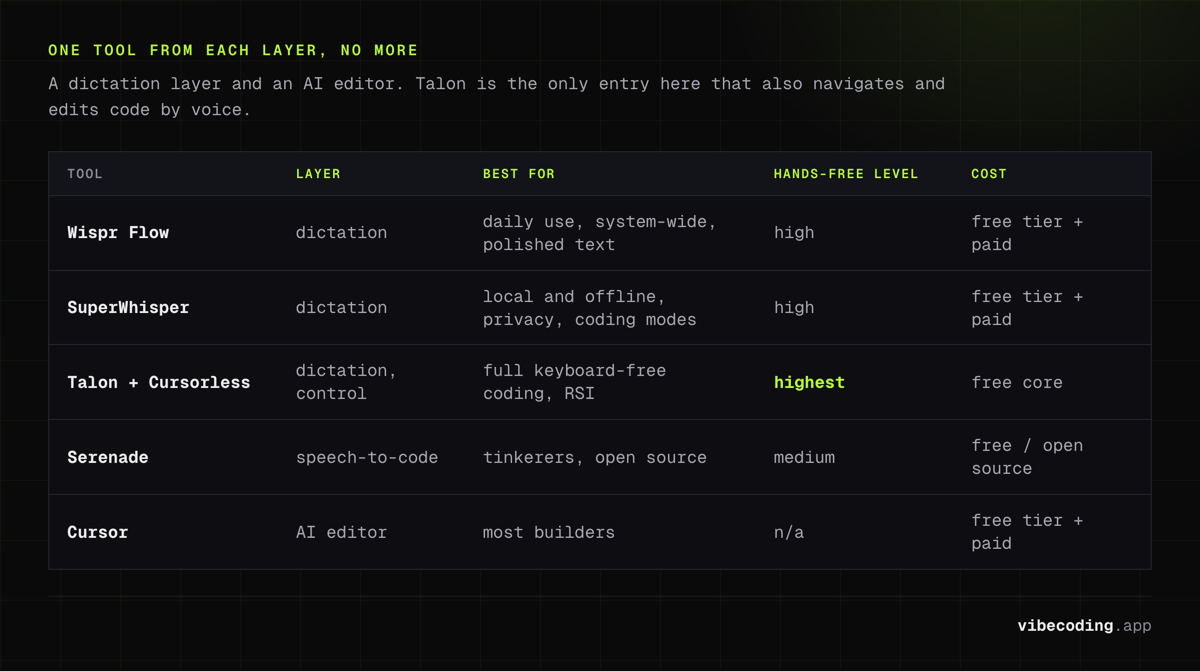
You need one tool from each layer. Don't overthink it.
Layer 1, dictation (the mouth):
Ready to try Wispr Flow?
AI dictation app that turns speech into polished text in any text field, with auto-edits and voice commands.
- Wispr Flow is the easiest starting point. It's system-wide, so it works in your editor, your browser, anywhere, and it cleans up your speech as you go (removes the "ums," fixes the grammar) so what lands is tidy text, not a raw transcript. Hold a hotkey, talk, release.
- SuperWhisper is the other strong pick and the one Karpathy used. It can run Whisper models locally and offline, with modes tuned for coding. Good if you care about privacy or working without a connection.
- Talon Voice plus Cursorless is the power-user tier: full keyboard-free control, including navigating and editing code by voice, not just prompting. It has a real learning curve, but it's what people building completely hands-free reach for.
- Serenade is an open-source option focused on speech-to-code if you want to tinker.
Layer 2, the AI editor (the brain):
- Cursor is the common default. You dictate into its chat or composer and it makes the changes across your files.
- Claude Code works well if you live in the terminal and like longer agentic sessions.
| Tool | Layer | Best for | Hands-free level | Cost |
|---|---|---|---|---|
| Wispr Flow | Dictation | Daily use, system-wide, polished text | High | Free tier + paid |
| SuperWhisper | Dictation | Local/offline, privacy, coding modes | High | Free tier + paid |
| Talon + Cursorless | Dictation/control | Full keyboard-free coding, RSI | Highest | Free core |
| Serenade | Speech-to-code | Tinkerers, open source | Medium | Free / open source |
| Cursor | AI editor | Most builders | n/a | Free tier + paid |
For most people, Wispr Flow plus Cursor is the fastest path to a working voice setup. Add Talon later if you want to go fully keyboard-free.
Setting it up, step by step
- Install your AI editor. Get Cursor running on a small project first so you know what "normal" feels like.
- Install your dictation tool. Set Wispr Flow (or SuperWhisper) and pick a push-to-talk hotkey you can hold comfortably, something like a function key.
- Add a custom vocabulary. This is the step people skip and then complain about accuracy. Feed it your project's function names, the libraries you use, and any jargon. Five minutes here saves you constant corrections.
- Test the loop on something tiny. Open the editor's chat, hold your hotkey, and say: "Add a button that toggles dark mode and remembers the choice." Watch it land as clean text, then generate.
- (Optional) Layer on Talon once the basics feel natural and you want to navigate and edit by voice too.
How the workflow actually feels
Once it clicks, the rhythm is conversational. You hold the key and say the feature, full sentences, like you mean it: "Build a pricing section with three tiers, highlight the middle one, and pull the prices from a config file." The AI generates. You look at it, hold the key again: "Make the middle card bigger and add a yearly toggle that drops each price by twenty percent."
When something breaks, you don't read the stack trace out loud. You point the AI at it: "The save button isn't persisting, figure out why and fix it." Errors get spoken at, not debugged by hand. That's the same move as text-based vibe coding, just faster to say than to type.
The trick that separates good results from frustrating ones is speaking in full thoughts. Short, clipped fragments confuse both the dictation tool and the AI. Talk like you're explaining it to a person.
Who's actually coding by voice
Three groups keep showing up. The first is developers with RSI or wrist injuries, for whom this isn't a productivity hack but the difference between coding and not coding. Shifting input to speech is one of the most effective ways to keep building when typing hurts, and it's the reason the Talon community exists in the first place.
The second is indie hackers and solo founders who want to move at the speed of thought. Describing a whole feature in one spoken breath, then refining it conversationally, is genuinely faster than typing the same instructions, especially for the rough first pass of an MVP.
The third is people who just think better out loud. Verbalizing what you want often forces clearer architecture than typing does, because you have to actually say the thing instead of half-forming it in code. A surprising number of developers report that talking through a feature surfaces the edge cases before they write a line.
You don't need to commit fully. Plenty of people dictate the prompts and big descriptions by voice, then drop back to the keyboard for fiddly edits. Mixing the two is the realistic default.
The honest caveats
This isn't magic, and a few things will trip you up if no one warns you:
- Your microphone matters more than you think. A decent headset mic is the single biggest accuracy upgrade. Laptop mics in a noisy room produce garbage transcripts.
- Precise edits still want the keyboard. Describing a feature by voice is great. Renaming one variable in the middle of a line is faster with your hands. Use both.
- Review still applies. Voice makes you iterate faster, which means you can generate bad code faster too. Read what ships, especially anything touching auth, payments, or data. AI output can carry security gaps no matter how you input the prompt.
- Local vs cloud. If privacy matters, SuperWhisper's offline mode keeps your dictation on-device, but the AI editor turning words into code usually still needs a connection.
For the broader picture of which AI tools fit which job, see the best vibe coding tools.
FAQ
Is vibe coding by voice faster than typing? For describing what you want, yes, since speaking runs ~150 wpm vs 40 to 80 typing and the AI writes the syntax. For precise symbol edits, the keyboard still wins.
What tools do I need to start? A dictation tool (Wispr Flow or SuperWhisper) plus an AI editor (Cursor or Claude Code).
Can I code completely hands-free? Yes, with Talon Voice + Cursorless on top of your AI editor for full navigation and editing by voice.
Is it good for RSI? It's one of the better options, since it moves most input off the keyboard. Many developers with RSI rely on a voice-plus-AI setup.
Does it work offline? Dictation can (SuperWhisper runs local Whisper models); the AI editor generally still needs a connection.
Want to try the easiest setup? Start with Wispr Flow for dictation and Cursor as your editor, then browse the best vibe coding tools to round out your stack.

Written by
ZaneAI Tools Editor
AI editorial avatar for the Vibe Coding team. Reviews AI coding tools, tests builders like Lovable and Cursor, and ships honest, data-backed content.