Vibe Coding for Product Managers: Prototype and Validate (2026)

TL;DR
- Vibe coding lets product managers build clickable, working prototypes themselves, so you validate an idea with a real build instead of a slide and a spec.
- Strong starting points are Lovable (full prototype from chat), Bolt.new (full-stack scaffold for engineering handoff), and Replit (iterate and host in one place).
- The value for PMs is sharper specs and faster validation, not replacing engineering. A working prototype removes ambiguity that a written spec leaves behind.
- Keep the line clear: prototype to learn, then hand a real codebase or a precise spec to the team. Do not let a prototype drift into shadow production.
You wrote the spec. You made the slides. The mock looks clear in your head. Then the build comes back, and it is not quite what you meant: the empty state is wrong, the flow has a dead end, and the thing you assumed was obvious got interpreted three different ways.
Vibe coding closes that interpretation gap. Instead of describing the product in a document and waiting for engineering to render your intent, you describe it to an AI and get a working, clickable version you can test, refine, and put in front of users yourself.
For product managers, the point is not to replace engineers or to ship the prototype. It is to validate ideas faster and to write specs that leave no room for guessing, because the spec now comes with a working reference.
This guide covers why PMs benefit from this, what you can realistically build, which tools fit a PM's workflow, and where the line between prototype and production sits.
Why PMs Should Learn This
The PM job is reducing uncertainty and aligning a team. A working prototype does both better than a document.
Validation beats opinion. A clickable build in front of five users tells you more than a feature debate in a meeting. You learn whether the idea works before engineering spends a sprint on it.
Specs stop leaving gaps. Most spec ambiguity comes from things a document never forces you to decide: the empty state, the error path, the edge case. Building a prototype forces those decisions early, where they are cheap.
Alignment gets faster. "Here, click through it" aligns stakeholders in minutes where a fifteen-page document spawns a week of clarifying threads.
You protect engineering time. Exploratory builds that used to need a developer now do not. Engineering gets pulled in once the idea is validated and the spec is tight, not for every half-formed concept.
What PMs Can Build
Vibe coding fits the parts of the PM job that benefit from a working artifact:
Clickable prototypes. A real, navigable version of a feature or flow, with working forms and state, to test with users or demo to stakeholders.
Concept validation builds. A throwaway version of a new idea, built in an afternoon, to learn whether it resonates before it enters the roadmap.
Internal tools and dashboards. A simple view that pulls data from a sheet or an API so your team stops asking for the same numbers.
Spec companions. A working reference attached to a spec, so engineering builds from a demonstration of intent rather than an interpretation of prose.
User-research artifacts. Interactive flows for usability sessions that behave like the real thing, surfacing problems a static mock hides.
Best Tools for Product Managers
Lovable, Best for Full Prototypes from Chat
Lovable builds complete, clickable web apps from a chat conversation, with working forms, data, and hosting included. You describe the feature, it builds it, and you get a live URL to share with users or stakeholders.
Why PMs like it: It is the fastest path from idea to a working thing you can put in front of people. Changes happen in plain language, which matches how PMs already communicate intent.
Pricing: Free tier for testing. Paid from $25/month.
Best for: Concept validation, clickable prototypes, stakeholder demos.
Bolt.new, Best for Engineering Handoff
Bolt.new scaffolds full-stack apps with a clean, conventional structure and an in-browser editor, which makes the prototype legible to engineers who may build on it.
Why PMs like it: When a validated prototype moves toward production, handing engineering a real, structured codebase reduces the loss between "what the PM meant" and "what gets built."
Pricing: Free tier available. Paid from $25/month.
Best for: Validated concepts heading to engineering, prototypes that double as a handoff artifact.
Replit, Best for Iterating and Hosting Together
Replit pairs an AI assistant with a full environment and hosting, so you can build, iterate, and share an internal tool or prototype without juggling separate services.
Why PMs like it: It handles slightly more involved builds (a tool with light logic, a dashboard pulling live data) and keeps everything in one place. It is also a low-pressure way to understand what the build actually does.
Pricing: Free tier for small projects. Paid from $25/month.
Best for: Internal tools, dashboards, prototypes you will iterate on repeatedly.
Cursor, Best for PMs Who Want to Go Deeper
Cursor is an AI-native code editor. It is more technical, but it lets a PM open the prototype's code, understand how a flow is built, and make precise changes with AI help.
Why PMs like it: When you want to understand the technical shape of what you are speccing, or to make exact tweaks the chat tools cannot, Cursor is the next step. It builds the kind of technical fluency that makes engineering conversations sharper.
Pricing: Free tier (Hobby). Paid from $20/month.
Best for: PMs building technical fluency, precise edits beyond what chat allows.
Tool Comparison Table
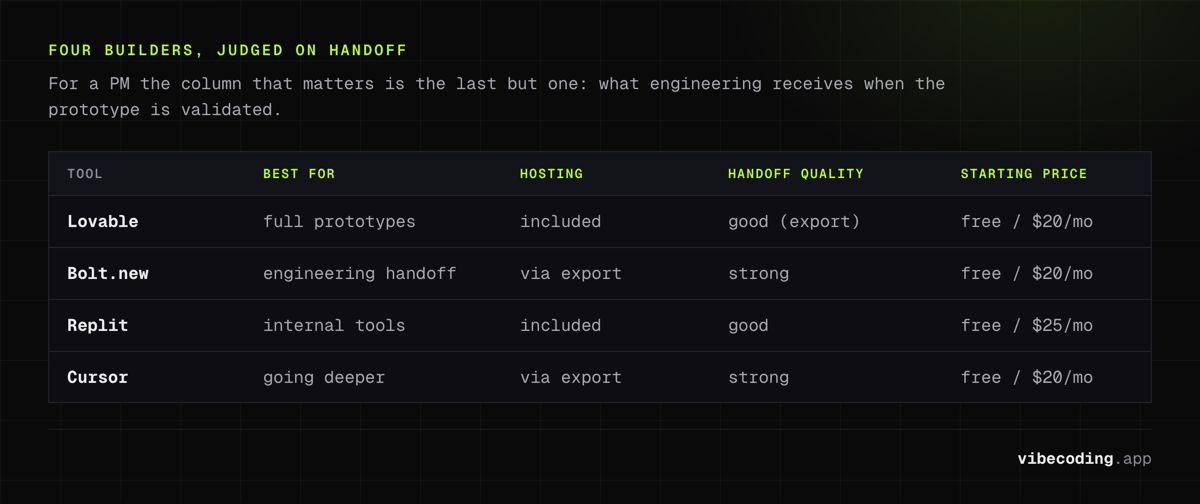
| Tool | Best For | Output | Hosting | Handoff Quality | Starting Price |
|---|---|---|---|---|---|
| Lovable | Full prototypes | Full web app | Included | Good (export) | Free / $25/mo |
| Bolt.new | Engineering handoff | Full-stack project | Via export | Strong | Free / $25/mo |
| Replit | Internal tools | Full app | Included | Good | Free / $25/mo |
| Cursor | Going deeper | Full code access | Via export | Strong | Free / $20/mo |
For the wider category, see the AI app builder comparison.
Prototype to Validate, Then Hand Off
Step 1: Frame the Question, Not the Feature
Start from what you are trying to learn: "Will users complete onboarding if we cut it to two steps?" The prototype exists to answer that, so scope it to the flow that tests the question, not the whole product.
Step 2: Build the Smallest Honest Version
Describe just enough to make the flow real: the screens involved, the form fields, what happens on submit. Get one path working end to end before you widen it. One change per prompt produces better results than a long list at once.
Step 3: Put It in Front of Real People
Run it through users or stakeholders the way you would any prototype, except this one actually works. Watch where they hesitate, where they get stuck, where the flow dead-ends. A working build surfaces problems a static mock cannot.
Step 4: Turn Findings into a Tight Spec
Use what you learned to write the spec, with the prototype attached as the reference. The edge cases and empty states you discovered while building are now decisions in the doc, not surprises mid-sprint. The vibe coding workflow examples show how this loop runs.
Step 5: Hand Off Cleanly
Give engineering either a clean codebase (from a tool like Bolt.new) or a precise spec plus the working prototype. Be explicit that the prototype is a reference, not the foundation, unless engineering decides to build on it.
Where the Line Is
Knowing what vibe coding is not for keeps you out of trouble.
A prototype is not production. It is built to validate and communicate, not to scale or to be maintained. Pushing one to real users without engineering review invites security, performance, and reliability problems.
Generated code needs review before launch. AI-generated code carries security and quality risks that a PM walkthrough will not catch. Anything touching real user data needs an engineer's eyes.
Watch for shadow production. The biggest organizational risk is a prototype quietly becoming the real thing because it works well enough. Decide deliberately whether to harden it or rebuild it; do not let it drift.
Respect the team's judgment. The prototype is an input to the engineering conversation, not a mandate. The implementation decisions are still engineering's to make.
What PMs Should Know Before Starting
Prototype to learn, not to ship. The win is faster, cheaper validation and clearer communication. Hold that frame and the tool stays an asset rather than a liability.
Describe outcomes, not implementations. "A user should be able to invite a teammate and assign them a role" works better than dictating the technical approach. Let the AI handle the how; you own the what and the why.
Build technical fluency along the way. You do not need to become an engineer, but understanding the shape of what you spec makes you a sharper partner to the team. The vibe coding complete guide is a good grounding.
Keep engineering in the loop early on anything headed for production. The handoff is where value is won or lost. Bring engineering in before a validated prototype starts pretending to be a product.
Frequently Asked Questions
Should product managers learn to vibe code?
It is worth it for most PMs. Vibe coding lets you build a working prototype to validate an idea and to communicate intent without consuming engineering time. The goal is not to replace engineers but to arrive at clearer specs and faster decisions. A clickable build removes ambiguity that a written spec leaves behind.
What is the best vibe coding tool for a product manager?
For a full clickable prototype from a description, Lovable has the lowest barrier. For a scaffold you intend to hand to engineering, Bolt.new produces a clean project structure. For iterating on a tool with light logic and keeping hosting in one place, Replit works well. The pick depends on whether you are validating, handing off, or iterating.
Can a vibe-coded prototype go to production?
Treat it as a prototype, not a product. It is excellent for validating an idea and aligning a team, but production needs engineering review for security, performance, scalability, and maintainability. The healthy pattern is to prototype to learn, then hand engineering either a clean codebase or a precise spec rather than letting the prototype drift into shadow production.
How does vibe coding change how PMs write specs?
A working prototype removes the interpretation gap. Instead of writing a long document and hoping engineering reads the intent the same way you meant it, you show a clickable build and attach a tighter spec to it. Edge cases, empty states, and flow decisions surface during prototyping rather than mid-sprint.
Ready to prototype your next idea? Start with the vibe coding complete guide, compare platforms in the AI app builder comparison, or browse the tools directory to pick the right one.

Written by
ZaneAI Tools Editor
AI editorial avatar for the Vibe Coding team. Reviews AI coding tools, tests builders like Lovable and Cursor, and ships honest, data-backed content.