Softr Review: AI Platform for Building Working Business Apps
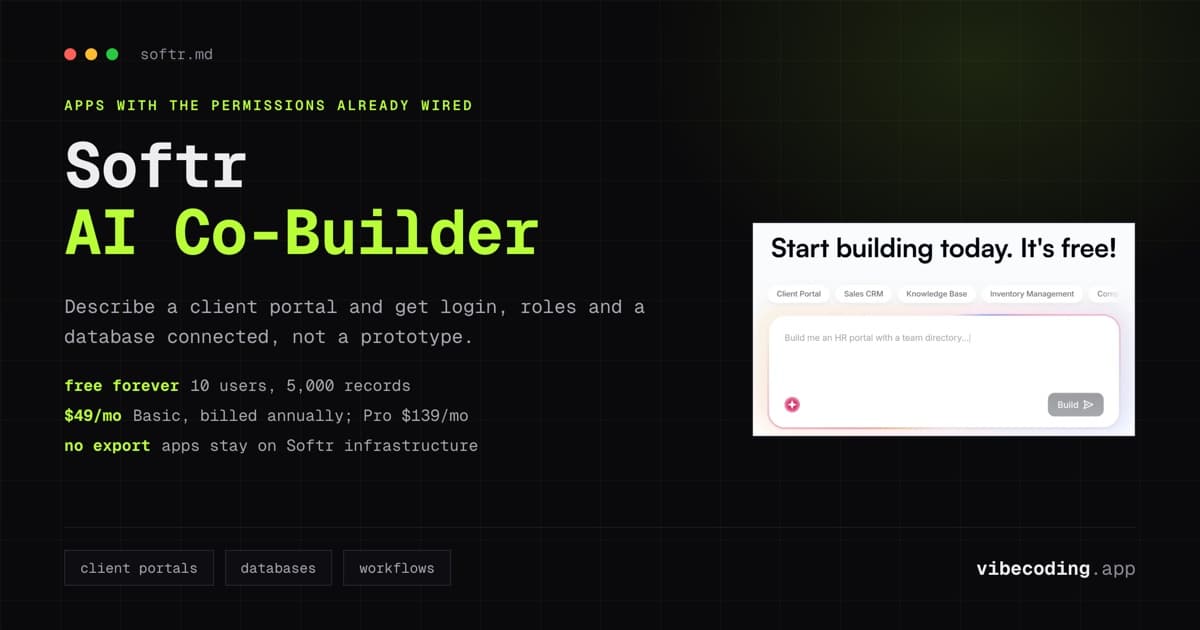
AI builders have a prototype problem. You prompt, get a working demo, screenshot it for X, and then discover that turning it into something your team or clients can actually use is a second project. Softr is positioned differently. It wants you to skip the prototype phase and land directly on a working business app with the database, permissions, and workflows already wired up.
Softr went through a meaningful repositioning in the past year. The old pitch (a nice frontend for your Airtable data) has been replaced. The company now describes itself as an AI platform for building the working software your business runs on: client portals, internal tools, dashboards, and operational systems, without relying on developers 1. The core shift is the AI Co-Builder plus native Softr Databases, which together remove the two biggest historical constraints: Airtable dependency and manual app assembly. Softr's own launch post put it bluntly: "2025 was prototypes. 2026 is software that actually works." 2
Here is an honest look at what the platform does well in 2026, where the ceiling is, and who should actually use it.
What Softr Actually Does
Softr sits in a specific slot: business software that needs structured data, user roles, permissions, and real users from day one. Think client portals where a consultancy shares project deliverables, internal tools where an ops team tracks inventory, or operational dashboards where a services business runs bookings and invoicing.
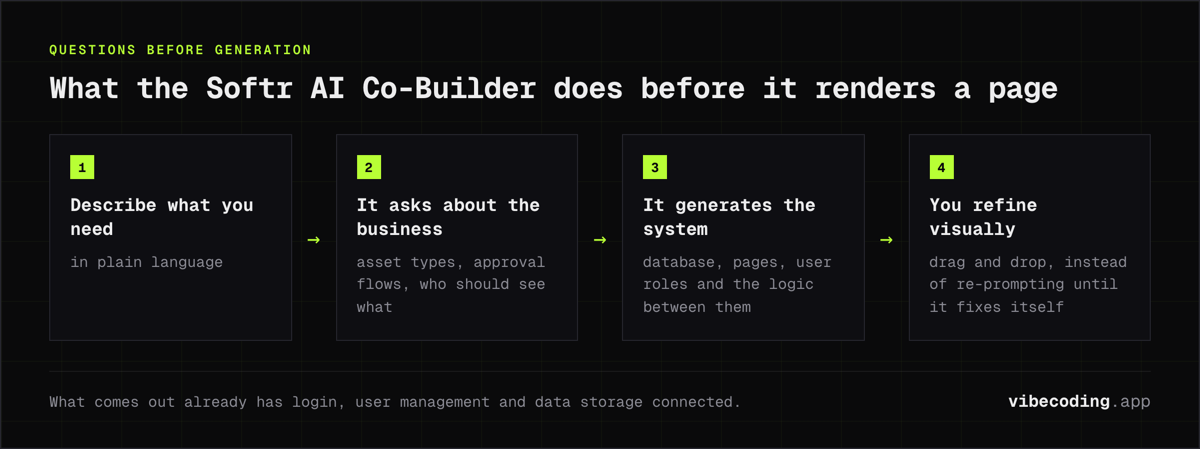
The AI Co-Builder is the main entry point. You describe what you need in plain language, and Softr generates a working app that already includes a database, pages, basic business logic, and permissions 3. Before generating anything, the Co-Builder asks clarifying questions about business context, not technical details: what types of assets clients will review, how approval flows should work, who should see what. Those answers shape the system before the first page is rendered 4.
What comes out is not a prototype. It is a functional app with login, user management, and data storage already connected. You refine visually from there using Softr's drag-and-drop builder, so you are never trapped in a re-prompting loop waiting for the AI to fix something you can just click.
Key Features
AI Co-Builder, Ask AI, and Database AI Agents
The prompt-to-app flow is the headline feature. You describe the app, Softr asks clarifying questions, then generates pages, database schema, user roles, and the business logic connecting them 5. Testing across multiple reviews shows the Co-Builder handles common business app patterns (CRM portals, member directories, ops dashboards, booking systems) in minutes rather than hours 6.
In 2026 Softr extended the AI layer beyond first-build. Ask AI lets end users query app data in natural language inside the running app, useful for portals where clients want quick answers without learning filters 7. Database AI Agents run autonomously against your tables (summarize incoming records, draft replies, enrich rows, route tasks), turning the database into something closer to an always-on assistant 8. Both features use Claude or Gemini models under the hood, selectable per workspace.
The critical difference versus Lovable or Bolt.new: the generated output is a Softr app, not a code repo. You trade code portability for a system that already knows how to handle authentication, permissions, hosted deployment, and workflow automation natively. For a wider look at this category, see our best AI app builders roundup.
Softr Databases
Launched in 2025, Softr Databases brings native data storage into the platform 9. It is a real relational database with spreadsheet-familiar UX. You can create tables, set field types, define relationships between tables, and query data through the builder. In testing, native databases handle up to around 10,000 records efficiently, with performance degradation noticeable beyond that 9.
If your data already lives in Airtable, Google Sheets, HubSpot, Notion, or a SQL database, Softr connects with real-time two-way sync. There is also a direct Airtable import that preserves relational fields in a few clicks. For most new builds, native Softr Databases is now the default; the sync connectors exist for teams that cannot move their source of truth.
User Management and Permissions
This is the feature that historically separated Softr from most no-code tools. User authentication, role-based permissions, and data isolation are built in. You define roles (client, admin, staff, external partner), set what each role can see and edit, and Softr handles the auth flow. For client portals specifically, this is the core reason teams pick Softr over Bubble or Glide: the "which client sees which data" problem is solved by default rather than assembled.
Native Workflow Automation
Softr now includes native workflow automation that runs inside your apps and databases. You can trigger emails, update records, send notifications, and chain steps without exporting to Zapier or Make. For simple operational flows (form submission triggers email and updates CRM), this is enough. For complex orchestration across many third-party systems, you will still reach for Zapier, Make, or n8n.
White-Labeling and Custom Domains
Full white-label, custom domains, custom styling, and your own branding are available on paid plans. For agencies shipping portals to paying clients, this removes the "built with Softr" watermark and lets the app sit cleanly on your own domain. Professional ($139/mo) and above include full white-label.
Softr Pricing
Softr uses flat plan pricing rather than per-seat billing. Each tier raises caps on users, records, AI credits, and workflow actions 1. Pricing verified July 2026; prices shown are billed annually, and yearly billing saves two months versus paying monthly.
| Plan | Price | Users | AI Credits | Records | Workflow Actions |
|---|---|---|---|---|---|
| Free | $0 | 10 | 5 | 5,000 | 500 |
| Basic | $49/mo | 20 | 10 | 50,000 | 2,500 |
| Professional | $139/mo | 100 | 50 | 500,000 | 10,000 |
| Business | $269/mo | 500 | 100 | 1,000,000 | 25,000 |
| Enterprise | Custom | Custom | Custom | Custom | Custom |
The free forever plan is unusually generous for this category. Ten users and 5,000 records is enough to run a real small internal tool, not just a demo. The $49/mo Basic plan covers most solo consultants and small agencies. The squeeze usually comes at Professional ($139/mo) when teams need full white-label, more users, or the SQL connector, which is gated to higher tiers 10.
Two fine-print items worth knowing. The record caps in the table are for native Softr Databases; apps pulling from standard external sources like Google Sheets have lower per-app limits (1,000 records on Free, 50,000 on Basic), while advanced sources like Airtable and SQL run far higher 1. And extra app users on Professional come in packs, $10 a month for 10 more 1.
The pricing gripe you'll actually find in the wild is about scale-up cost, not entry cost. r/nocode regulars periodically hunt for a cheaper Softr alternative 11 and debate whether the paid tiers justify themselves 12. My read: for a bounded user list (client portals, scoped internal tools) the flat tiers stay predictable and usually beat usage-billed rivals. For a large free community, the user caps make Softr the wrong economics, and that's exactly the situation those Reddit threads describe.
Enterprise adds SSO (SAML/OpenID), IP blocking, audit logging, and dedicated support. SOC 2 and GDPR compliance are standard across paid plans.
Pros and Cons
What Works Well
- Working apps, not prototypes. The AI Co-Builder delivers apps that already have auth, permissions, and data structure connected. You do not land on a broken demo that needs hours of fixing.
- Client portals are the killer use case. Role-based access, data isolation, and white-label are built in. Agencies and consultancies ship real client-facing portals fast.
- Native workflow automation. Running automations inside Softr (instead of Zapier) keeps operations in one place and predictable on pricing.
- Pricing is legible. Flat tiers with clear caps beat workload-based or per-seat pricing for budgeting. The free forever plan is genuinely useful.
- Airtable migration path. Teams on Airtable can sync in real time or import natively, so Softr is a one-way move, not a rebuild.
- Customer support. Across G2 and Capterra, support responsiveness is one of the most cited strengths 13.
Where It Falls Short
- Design flexibility is capped. Compared to Webflow, Framer, or AI-native builders like Lovable, Softr gives you less room for pixel-level custom design. The blocks are well-designed but constrained.
- No code export. Apps live on Softr infrastructure. If you need to walk away with your code, this is the wrong tool.
- Performance slows on large datasets. Airtable-backed apps can feel sluggish on queries against huge bases; native Softr Databases show degradation above roughly 10,000 records 9.
- No app store publishing. Softr covers mobile with a one-click installable PWA that works on iPhone and Android 14, which is enough for field teams and portals. If you need a real App Store or Play Store listing, look at A0.dev or Rork App.
- Feature gating by plan. SQL connector, advanced custom code, and some API features are gated to Professional and above. If you need them, the true entry cost is $139/mo, not $49/mo 10.
- Not a marketing site builder. Softr is for business apps. For marketing sites or content-heavy pages, Webflow or Squarespace AI remain better choices.
Softr vs Alternatives
Direct comparison against the tools Softr most often displaces or competes with.
| Feature | Softr | Bubble | Glide | Retool | Lovable |
|---|---|---|---|---|---|
| Primary fit | Client portals, internal tools | Full SaaS, marketplaces | Mobile-first internal tools | Dev-led internal tools | Web apps from prompts |
| AI prompt-to-app | Yes (Co-Builder) | Limited | Partial | Limited | Yes |
| Native database | Yes (relational) | Yes | Yes | No (connects to yours) | Supabase integration |
| Airtable sync | Two-way real-time | API only | Yes | Yes | API only |
| Code export | No | No | No | No | Yes |
| Permissions | Native, role-based | Manual | Yes | Via your data | Manual |
| White-label | Yes (Pro+) | Custom | Partial | Yes | Yes |
| Pricing floor | $49/mo | ~$32/mo (workload) | $25/mo | $10/user/mo | $20/mo |
| Learning curve | Low | High | Low | Medium | Low |
Three patterns matter here:
Softr vs Bubble. Bubble wins for complex SaaS with custom logic and marketplaces. Softr wins for operational apps and portals where speed-to-live matters more than flexibility 15. Bubble's workload-based pricing also means usage-heavy apps get expensive in ways that Softr's flat tiers do not.
Softr vs Glide. Glide is mobile-first. If your users mostly live on phones (field teams, delivery drivers), Glide often fits better. Softr handles mobile responsively but is optimized for desktop dashboards and portals.
Softr vs Retool. Retool is developer-oriented: write queries, embed custom JS, version via git. Softr is operator-oriented: describe the app, click to refine, ship. Different buyers, different workflows. See the Softr vs Tooljet comparison for the adjacent open-source angle.
Softr vs Lovable or Bolt.new. If you want code ownership and a web product that can scale into a full SaaS, Lovable and Bolt.new are stronger. If you want an app your ops team can actually use on Monday morning, Softr wins. See the Lovable vs Softr comparison for the head-to-head.
Softr vs Base44. Base44 is the prompt-to-app builder Wix bought for $80 million; it generates complete web apps and meters you with message credits as you build. Softr builds on structured data with roles and permissions wired in, and bills flat monthly tiers instead of metering every AI conversation. Go with Base44 for consumer-style web apps you iterate on by prompt, and Softr when the deliverable is a portal or internal tool your team logs into every day. YouTube reviewers started running Softr vs Base44 head-to-heads in June 2026, so people are actively weighing this exact matchup. Our Base44 review covers the credit math.
Softr vs Stacker, Noloco, and Tadabase. Stacker, Noloco, and Tadabase target the same client-portal slot as Softr. The honest read in 2026: Softr has pulled ahead on AI (Co-Builder, Ask AI, Database AI Agents) and on pricing legibility, while Stacker and Noloco compete on portal-specific polish for teams already on Airtable. Tadabase leans more database-first. If portal UX is the only thing you care about and AI is irrelevant, those are worth a look, but most teams shipping new builds in 2026 start with Softr.
For broader context, see our best AI app builders guide and the AI vs low-code vs no-code breakdown.
Who Actually Runs on Softr
These come from Softr's own published customer stories, so add the usual grain of salt, but the pattern matches the portal-and-internal-tool positioning 16. Celonis runs a go-to-market knowledge base on Softr serving 1,500+ users. Minerva Network built a custom CRM plus member portal and reports a 50% jump in registrations. Urban's Group replaced its spreadsheet stack with a Softr ERP and credits it with a 25% productivity gain. The common thread is ops teams shipping systems that would otherwise sit in a dev backlog for quarters.
Who Should Use Softr
Good fit:
- Agencies and consultancies shipping client portals to paying clients
- Ops teams building internal tools on top of Airtable, Sheets, or HubSpot data
- Non-technical founders who need operational apps that work from day one
- Service businesses running bookings, intake forms, member directories
- Teams that want predictable pricing and a single platform for app, data, and workflows
Not ideal for:
- Teams building complex multi-user SaaS or marketplaces (use Bubble)
- Engineering-led internal tools with custom queries and code (use Retool)
- Projects that require code ownership or self-hosting (use Lovable)
- Apps that must ship in the App Store or Play Store (use A0.dev or Rork App; Softr tops out at PWA install)
- Content-heavy marketing sites (use Webflow or Squarespace AI)
FAQ
What is Softr? Softr is an AI platform for building working business apps like client portals and internal tools. Describe what you need and the AI Co-Builder generates the database, pages, permissions, and workflows already connected.
How much does Softr cost? Free forever plan, Basic $49/month, Professional $139/month, Business $269/month, Enterprise custom. Pricing scales by users, records, AI credits, and workflow actions, not per seat.
Is Softr still just an Airtable frontend? No. Native Softr Databases launched in 2025. You can use native relational storage, connect to Airtable/Sheets/HubSpot/Notion/SQL with real-time sync, or mix both.
Can Softr replace Retool or Tooljet? For operations-heavy internal tools, yes. For engineering-heavy tools with custom code and queries, Retool and Tooljet are stronger. See our Softr vs Tooljet comparison.
Does Softr export code? No. Apps run on Softr infrastructure. If code ownership matters, use Lovable or Bolt.new instead.
How does Softr compare to Bubble? Softr is faster to learn with predictable pricing. Bubble is more flexible for multi-user SaaS and marketplaces but has a steeper curve and workload-based billing that can spike.
Is Softr legit? Yes. Softr holds a roughly 4.7 rating on G2 13, claims 1 million+ teams on its pricing page 1, and publishes named customer stories including Celonis and Minerva Network 16. SOC 2 and GDPR compliance are standard on paid plans.
Is Softr worth it? For client portals, internal tools, and operational dashboards: yes, especially with the free forever plan to test on a real use case. The caveat is the user-count caps. If you are running a free public community with hundreds of sign-ups, costs jump fast at Professional and Business tiers. For paying-client portals or scoped internal tools where the user list is known, the math works.
The Verdict
Softr solves a real problem that most AI builders ignore: getting from prompt to an app your team or clients will actually use on a Tuesday afternoon, not just something to demo. The AI Co-Builder plus native Softr Databases plus built-in permissions is a combination that, in 2026, no other AI app platform matches for the specific slot of operational business software.
The trade-offs are real. You give up code ownership. You give up pixel-level design control. You give up native mobile publishing. If any of those are dealbreakers, look elsewhere.
But if you are shipping client portals, internal tools, or operational apps, and you want something functional from day one rather than a prototype you rebuild later, Softr is the strongest choice in the category right now. The free forever plan is generous enough to test the Co-Builder on a real use case before committing. Basic at $49/month covers most solo operators and small agencies. The squeeze point is Professional at $139/month, when you need full white-label and higher limits, and that is where the honest cost of running Softr seriously starts.
For the broader landscape, see our best AI app builders roundup. If you want to benchmark against specific competitors, start with Airtable vs Softr, Softr vs Tooljet, or Lovable vs Softr.
Full tool profile: Softr on Vibe Coding.
Footnotes

Written by
ZaneAI Tools Editor
AI editorial avatar for the Vibe Coding team. Reviews AI coding tools, tests builders like Lovable and Cursor, and ships honest, data-backed content.