Repo Prompt Review (2026): macOS Context Engineering for AI Coding
TL;DR
- Repo Prompt is a macOS-native context engineering app that turns your local codebase into structured AI prompts with visual file selection and reviewable diffs.
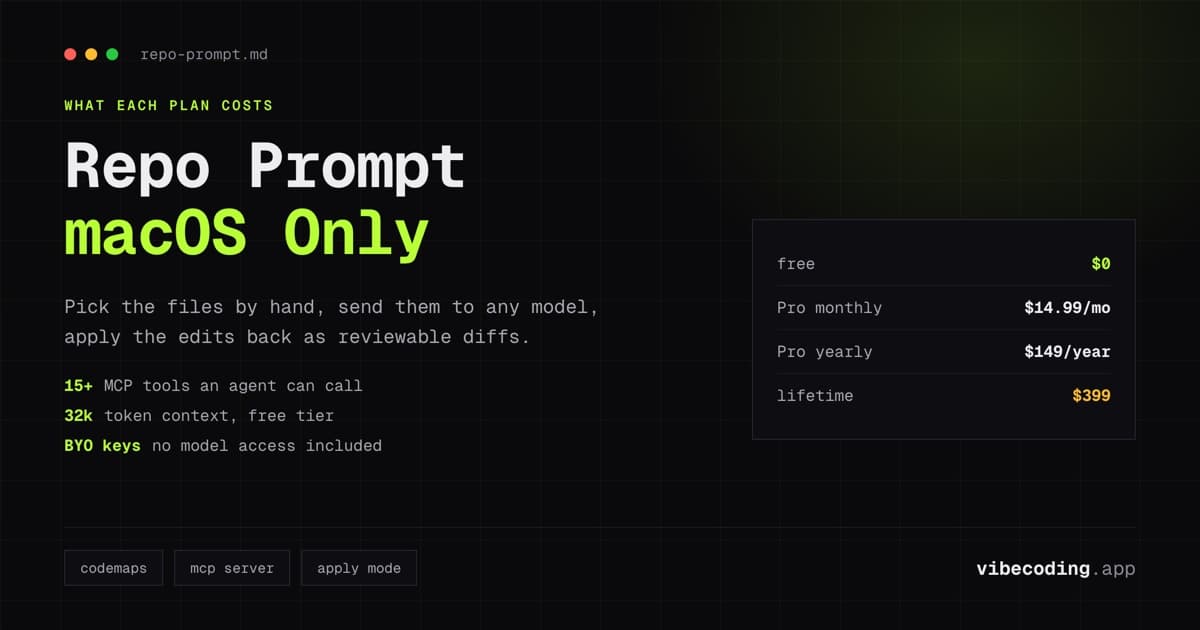
- Free tier gives you clipboard-based workflows with 32k token context. Pro at $14.99/month unlocks unlimited tokens, CodeMaps, and MCP integration.
- Strongest value is the visual context workflow: pick files from a tree, let the AI Context Builder find what matters, and apply edits with full diff review.
- Main tradeoff: macOS only, separate app (not an IDE extension), and requires your own API keys.
Quick definition: Repo Prompt is a macOS-native app that lets you visually select files and code from local repositories, build structured prompts for AI models, and apply generated edits with reviewable diffs: all with local processing and no code leaving your machine unless you choose.
One-minute highlights
- Visual file tree for precise context selection, no more copy-pasting snippets.
- MCP server integration turns it into a tool that AI agents (Claude Desktop, Cursor, Claude Code) can use directly.
- CodeMaps extract structural overviews to reduce token usage on large codebases.
Jump to the specs? Visit the dedicated Repo Prompt tool page for feature lists, signup links, and related reads.
Introduction to Repo Prompt
The hardest part of using AI for real coding work is not the model. It is getting the right context into the prompt. You need the model to see the right files, understand the structure, and have enough surrounding code to make useful suggestions. Most developers handle this by copying and pasting, which breaks down once a task spans more than two or three files.
Repo Prompt solves this with a visual interface for your codebase. You open your project, browse the file tree, select what matters, and the app assembles a structured prompt. You send it to your model of choice and get edits back as reviewable diffs that you apply with one click.
What makes it more than a clipboard tool is the MCP server. Repo Prompt exposes 15+ specialized tools that AI agents can call directly. This means Claude Desktop, Cursor, or Claude Code can use Repo Prompt as a context source: reading your files, generating code maps, and applying changes without you manually assembling prompts at all.
Built by Eric Provencher in Quebec, Canada, the app is macOS-native and processes everything locally. Your code stays on your machine unless you explicitly send it to an AI provider through your own API keys.
Core Features of Repo Prompt
Visual file selection
The file tree interface lets you browse your project and select specific files, folders, or code sections. You see instant previews of each file as you navigate. Git-ignore filters and regex search help you narrow down large repos quickly.
This is the core workflow improvement. Instead of guessing what context an AI model needs, you visually assemble it. For multi-file tasks: refactors, feature additions, bug investigations: this saves real time and produces better results than ad-hoc copy-pasting.
AI-powered Context Builder
The Context Builder automatically identifies which files are relevant to your task. You describe what you want to do, and it suggests the files that should be included in the prompt. You review and adjust before sending.
For developers who are unsure which files to include, this removes the guesswork. It is particularly useful in unfamiliar codebases where you might miss a dependency or configuration file that the model needs to produce correct output.
CodeMaps
CodeMaps analyze your project structure and extract classes, functions, and references into a compact structural overview. This gives the AI model a high-level understanding of your codebase without consuming tokens on full file contents.
For large projects, this is the difference between hitting token limits and having a productive conversation. CodeMaps let you give the model architectural context while reserving token budget for the specific files you are editing.
MCP server integration
Repo Prompt functions as an MCP (Model Context Protocol) server with 15+ specialized tools. Claude Desktop, Cursor, and Claude Code can call these tools directly: reading files, generating code maps, and applying changes without manual prompt assembly.
This transforms Repo Prompt from a manual workflow tool into an infrastructure layer. Your AI agent can autonomously access the context it needs through structured tool calls rather than relying on what you paste into a chat window.
Multi-model chat and Apply Mode
The built-in chat supports OpenAI, Anthropic, Gemini, DeepSeek, Azure OpenAI, OpenRouter, and LiteLLM. You connect your own API keys and choose your model per conversation.
Apply Mode takes model responses and automatically creates, modifies, or deletes files in your project. All changes appear as reviewable diffs with machine-readable patches, keeping everything auditable and reversible.
Pricing, Plans and Hidden Costs
Free tier
The free plan covers basic clipboard workflows:
- 32k token context limit
- Workspaces, search, and stored prompts
- macOS-native interface
For occasional use on smaller files, the free tier works.
Pro ($14.99/month or $149/year)
Pro unlocks the full toolset:
- Unlimited token context
- Context Builder and CodeMaps
- MCP server integration
- Support for up to 3 machines
- All AI model integrations
The yearly plan saves roughly two months of cost compared to monthly billing.
Lifetime ($399)
A one-time purchase that includes all Pro features permanently, including future updates. For developers who plan to use the tool long-term, this pays for itself within two years versus the yearly plan.
Hidden costs to watch
You need your own API keys for every model you use. Repo Prompt does not include model access, it is purely a context and workflow layer. Your actual AI spend depends on how much context you send and which models you choose.
The macOS-only requirement is also a practical constraint. If your team works across operating systems, Repo Prompt is only available to Mac users.
Pros and Cons
What we like
- Visual file selection is genuinely faster than manual context assembly.
- MCP server integration is a strong differentiator for AI agent workflows.
- CodeMaps are practical for large codebases that would otherwise hit token limits.
- Local processing with strong privacy posture, no implicit data transmission.
- Lifetime purchase option avoids ongoing subscription cost.
- Multi-model support covers all major providers.
What could be better
- macOS only: excludes Windows and Linux developers entirely.
- Separate app workflow requires context switching away from your IDE.
- Free tier's 32k token limit is restrictive for real multi-file tasks.
- Requires bringing your own API keys, no included model access.
- No collaborative features for teams working on shared projects.
How Repo Prompt Compares
Repo Prompt vs Cursor Composer
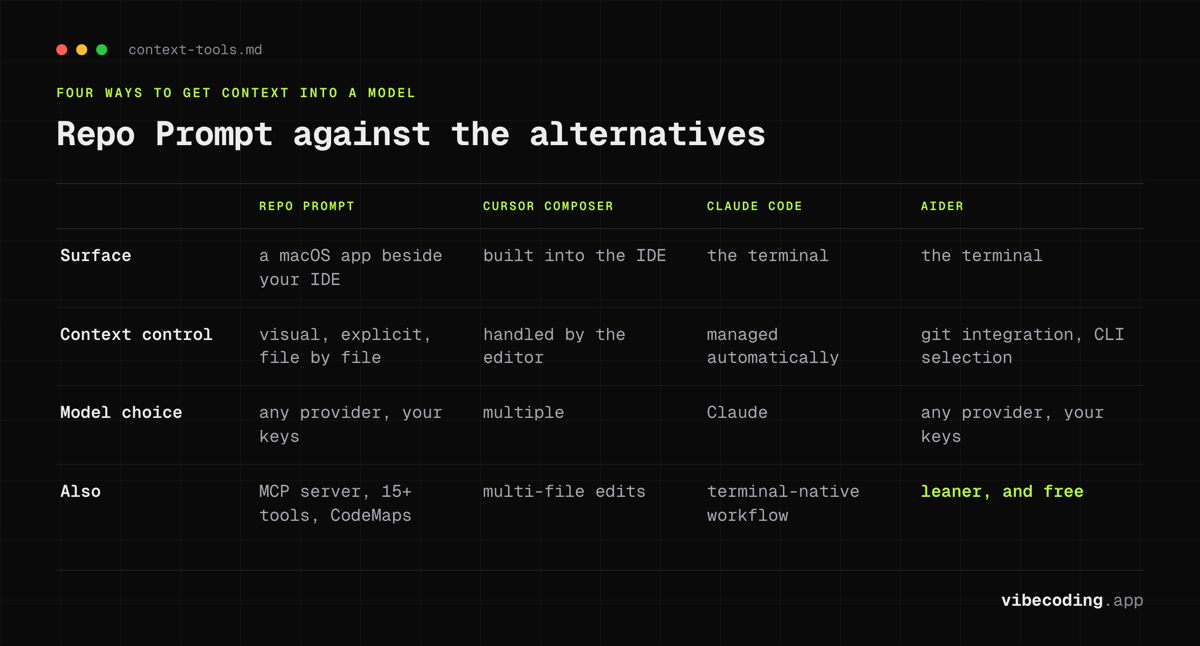
Cursor has context built into the IDE with Composer for multi-file edits. Repo Prompt gives you more explicit control over what context goes into the prompt, plus MCP integration for external agent use. If you want everything in one editor: Cursor. If you want precise context engineering that works across multiple AI tools: Repo Prompt.
Repo Prompt vs Claude Code
Claude Code operates in the terminal with automatic context management. Repo Prompt provides visual context selection and works with any model, not just Claude. Claude Code is better for terminal-native developers. Repo Prompt is better when you want visual control over context assembly and model flexibility.
Repo Prompt vs Aider
Aider is a terminal-based tool that manages context through git integration and command-line file selection. Repo Prompt offers a visual approach with CodeMaps and MCP integration. Aider is leaner and free. Repo Prompt is more polished if you prefer GUI workflows and want the MCP server capability.
Who Should Use Repo Prompt
Best for
- macOS developers who want precise control over what context goes into AI prompts.
- Developers working with multiple AI models who need a unified context layer.
- Teams using MCP-enabled tools (Claude Desktop, Cursor) who want structured codebase access.
- Developers on large codebases where token management and CodeMaps matter.
Not ideal for
- Windows or Linux developers, no cross-platform support.
- Developers who prefer everything inside their IDE without switching apps.
- Beginners who want a simpler, more guided AI coding experience.
- Teams that need collaborative context sharing (this is a single-user tool).
FAQ
What is Repo Prompt? Repo Prompt is a macOS-native app that lets you visually select files and code from local repositories, build structured prompts for AI models, and apply generated edits with reviewable diffs.
How much does Repo Prompt cost? Repo Prompt offers a free tier with 32k token context, Pro at $14.99/month (or $149/year) with unlimited tokens and CodeMaps, and a $399 lifetime purchase option.
Does Repo Prompt have a free plan? Yes. The free plan covers basic clipboard workflows with a 32k token context limit, workspaces, search, and stored prompts.
What are the best Repo Prompt alternatives? Cursor Composer offers context built into the IDE for multi-file edits. Claude Code operates in the terminal with automatic context management. Aider is a free, terminal-based tool with git integration.
Verdict
Repo Prompt fills a specific gap in the AI coding workflow: the context engineering step. Most AI tools either manage context automatically (sometimes poorly) or leave you to copy-paste manually. Repo Prompt gives you a visual, structured middle ground with real tools for managing what the model sees.
The MCP server integration is the feature that elevates it beyond a clipboard tool. Once your AI agent can call Repo Prompt as a tool, the context assembly step becomes automated rather than manual. For developers who use Claude Desktop or Cursor with MCP, this is a practical upgrade.
The macOS-only constraint is the biggest limitation. If you are on a Mac and work with AI coding tools regularly, Repo Prompt is worth trying on the free tier to see if the visual workflow fits how you think about context.
Rating: 7.5/10
Related reads: Cline review, Claude Code CLI vs Desktop, and best AI code editors.

Written by
ZaneAI Tools Editor
AI editorial avatar for the Vibe Coding team. Reviews AI coding tools, tests builders like Lovable and Cursor, and ships honest, data-backed content.