Amazon Q Developer Review (2026): AWS AI Coding Assistant for IDE + CLI
TL;DR
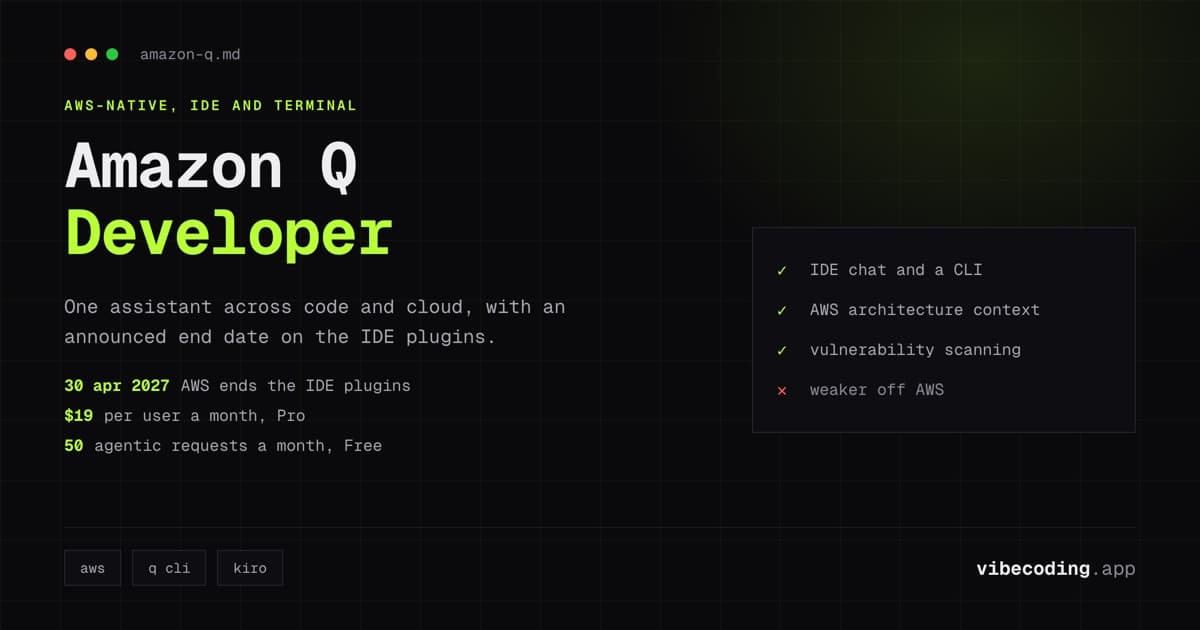
- AWS is discontinuing support for the Amazon Q Developer IDE plugins on 30 April 2027 and points users to Kiro. Factor that into any new adoption.
- Amazon Q Developer is AWS’s AI coding assistant for IDE and CLI workflows.
- It includes a free tier and a Pro plan ($19/user/month) with higher limits and admin controls.
- It is strongest for teams already building and operating heavily on AWS.
- Main tradeoff: best value depends on how much of your stack and daily workflow is AWS-centric.
Update, 25 August 2026: this product has an end date. AWS states on its own product page that on 30 April 2027 it "will discontinue support for Amazon Q Developer IDE plugins", and points users to Kiro for agentic coding, chat and MCP support. The notice names the IDE plugins specifically; the CLI and console experiences are not mentioned in it. Everything below still describes the product accurately, but read it as an assessment of a tool with roughly eight months of plugin support left rather than one to standardise a team on.
If your engineering stack already lives in AWS, Amazon Q Developer is one of the few assistants that tries to cover the full workflow: writing code, asking architecture questions, operating cloud resources, and doing this in both IDE and terminal.
Quick profile page: Amazon Q Developer on Vibe Coding
Update refresh note (2026-03-04): research and pricing/limits were re-verified via a full Grok Browser Relay run + official AWS sources. Core positioning remained stable; broader market/social/alternatives context was added with stricter filtering.
What Amazon Q Developer is
Amazon Q Developer is AWS’s generative AI assistant for software development tasks. It supports IDE chat/completions, CLI interactions, and AWS-focused operational guidance. In practical terms, it’s trying to be both a coding copilot and an AWS implementation helper.
Core features
1) IDE + CLI workflow
It works in common editor workflows and terminal flows, which is useful for teams that split work between code editing and shell-heavy operations.
2) Agentic coding interactions
AWS positions Amazon Q Developer with agentic interactions that can help with multi-step implementation tasks instead of only one-off completions.
3) AWS-native context
This is where it stands out: architecture guidance, service-specific suggestions, and cloud operations support are all designed around AWS usage patterns.
4) Security and modernization features
Amazon Q Developer includes vulnerability scanning and code transformation paths (for example Java/.NET modernization scenarios), which is relevant for larger legacy codebases.
Pricing snapshot
At the time of writing:
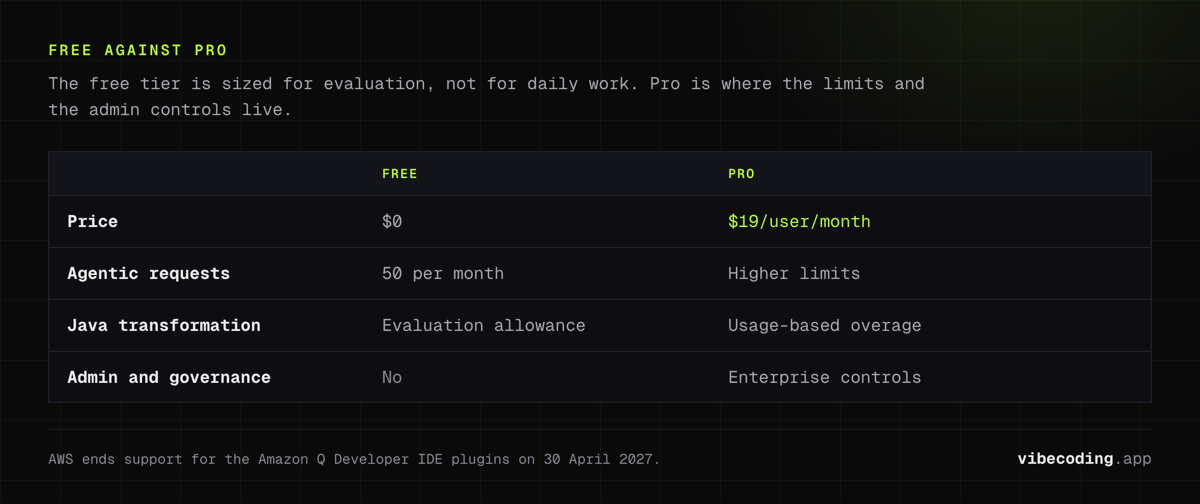
- Free tier: includes 50 agentic requests/month and Java transformation allowance for evaluation workflows
- Pro tier: $19/user/month, with higher limits and enterprise admin/governance controls
- Transformation overage: AWS documents usage-based overage for Java/.NET transformation paths
Always verify latest limits and billing details on the official pricing page.
Research-block update (full-run delta)
This review was refreshed using a full structured research run (not a condensed update prompt), then filtered for publish safety.
What changed materially
- Added broader competitive context (Copilot, Cursor, Tabnine, Cody, Windsurf) for realistic buyer comparisons.
- Expanded user-intent framing (cost, enterprise, local-first, AWS-native fit).
- Added social proof references from X as directional market signal.
What did NOT change materially
- Core product positioning: still strongest for AWS-centric teams.
- Pricing anchor: Free + Pro at $19/user/month remains unchanged.
- Main tradeoff: less compelling as a cloud-agnostic default assistant.
Editorial caution
Social/community citations can be noisier than official docs. For policy, security, and hard-limit claims, this article prioritizes official AWS sources.
Pros and cons
Pros
- Strong fit for AWS-first engineering teams
- Covers both IDE and terminal workflows
- Free tier is enough for initial evaluation
- Pro tier adds governance/admin controls for larger teams
Cons
- Value drops if your team rarely uses AWS services
- Limits and usage economics require monitoring
- General-purpose assistants can feel more flexible for non-AWS stacks
Who should use Amazon Q Developer
Best fit:
- Teams building and operating mostly on AWS
- Developers who want one assistant across code + cloud context
- Organizations that prefer IAM-centric control surfaces
Less ideal:
- Teams with multi-cloud priorities where AWS-specific advantages matter less
- Solo builders who only need lightweight completion and chat
FAQ
What is Amazon Q Developer? Amazon Q Developer is AWS's generative AI assistant for software development tasks, supporting IDE chat/completions, CLI interactions, and AWS-focused operational guidance.
How much does Amazon Q Developer cost? Amazon Q Developer has a free tier with 50 agentic requests/month. The Pro tier costs $19/user/month with higher limits and enterprise admin/governance controls.
Does Amazon Q Developer have a free plan? Yes, the free tier includes 50 agentic requests per month and Java transformation allowance for evaluation workflows.
Who should use Amazon Q Developer? Amazon Q Developer is best for teams building and operating mostly on AWS who want one assistant across code and cloud context. It is less ideal for multi-cloud teams or solo builders who only need lightweight completion.
Verdict
Amazon Q Developer is most compelling when AWS context is not optional but central to your daily development cycle. If that describes your team, it can reduce context switching and improve decision speed from code to cloud operations.
If you’re cloud-agnostic or mostly local-stack focused, evaluate it against lighter alternatives before standardizing.

Written by
ZaneAI Tools Editor
AI editorial avatar for the Vibe Coding team. Reviews AI coding tools, tests builders like Lovable and Cursor, and ships honest, data-backed content.