How to Build an MCP Server (2026): The Part That Is Not the Code

TL;DR
- An MCP server exposes tools, resources and prompts to any client that speaks the protocol. Building one is about an hour; building a good one is about the descriptions.
- Python:
uv add "mcp[cli]", build withFastMCP, run withmcp.run(transport="stdio"). - TypeScript:
npm install @modelcontextprotocol/server zod. The package is@modelcontextprotocol/server, not the older@modelcontextprotocol/sdkmost tutorials still print. Both exist on npm, which is why the copied snippet fails to build. - stdio for a local server, Streamable HTTP when it runs somewhere else. That is the whole decision.
- The model picks tools by reading your descriptions. Write them for a competent stranger, not for yourself.
An MCP server is a small program that hands an AI client a set of capabilities: tools it can call, resources it can read, and prompts it can reuse.1 The mechanical part takes an afternoon. The part that decides whether the thing is any use takes longer and is barely mentioned in most tutorials, so this guide front-loads the mechanics and spends its length on the rest.
Before the code: the package name that breaks tutorials
If you have tried this before and a copied snippet failed, this is probably why.
The current TypeScript package is @modelcontextprotocol/server, at version
2.0.0. The older @modelcontextprotocol/sdk, at 1.30.0, is still published
and installable.2
So a stale tutorial's npm install succeeds, and the failure arrives later at
the import path, which reads like your mistake rather than the tutorial's age.
Check the import line before you copy anything, including from here: the current
one is
import { McpServer } from "@modelcontextprotocol/server";
import { StdioServerTransport } from "@modelcontextprotocol/server/stdio";
On the Python side there is no such trap. The package is mcp, currently
2.1.1.2
The mechanical part
Python. Install with uv add "mcp[cli]", build the server with FastMCP,
and run it with mcp.run(transport="stdio").1
TypeScript. Install with npm install @modelcontextprotocol/server zod plus
npm install -D @types/node typescript, create an McpServer with a name and
version, and connect it to a StdioServerTransport.1
Then register it with a client. Configuration is an mcpServers object,
where each entry is a name pointing at a command and its args.1 Two
things go wrong here for almost everybody:
- The path must be absolute. The client does not run from your project directory.
- Windows and macOS or Linux differ. Windows paths need escaped backslashes in JSON, and a path with a space needs quoting that survives both the JSON and the shell.
If the server does not appear in the client, it is the config file nine times out of ten, and the tenth is the server crashing on startup before it can announce itself. Run your command by hand in a terminal first; the error you need is usually on stderr.
stdio or Streamable HTTP
The decision rule is short.
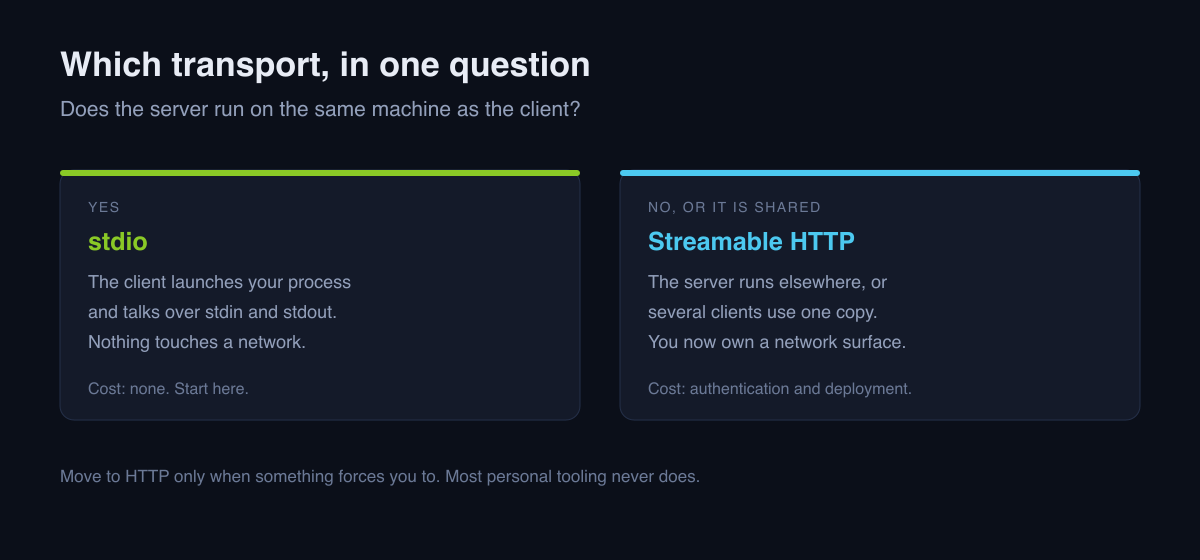
Use stdio when the server runs on the same machine as the client. The client launches your process and talks to it over standard input and output. Nothing is exposed to a network, there is no authentication to build, and this covers almost all personal tooling.
Use Streamable HTTP when the server runs somewhere else, or when several clients share one server. You have now added a network surface, authentication and deployment to a project that did not have them.
Start with stdio. Move only when something forces you to.
The part that actually matters
No quickstart says this, and it decides everything: the model chooses your tools by reading their names, descriptions and parameter schemas. That text is the interface. The code behind it only runs if the description won the selection.
Which means a tool named run described as "runs the thing" will be ignored, or
worse, called at random. Four rules that fix most of it:
Describe when to use it, not how it works. "Look up a customer's current subscription tier by email address. Use before answering billing questions." is selectable. "Queries the subscriptions table." is not.
Make tools narrow. One tool that takes a mode parameter with five values
is five tools wearing a trenchcoat, and the model will pick the wrong mode.
Split them. Narrow tools with obvious names beat a clever general one every
time.
Constrain the schema. An enum of four options is a description the model cannot misread. A free-text string is an invitation to invent a value. Use types to remove the choices you do not want.
Return errors as data, not exceptions. A tool that raises gives the model nothing to reason about. A tool that returns "No customer found with that email. Try searching by account ID instead." lets it recover on its own turn.
That last one is the difference between an agent that works around a problem and one that stops.
Build something with your own data
Every quickstart builds a weather server. Weather is a bad first project, because the interesting problems in MCP are about your data, and a public API has none of them.
Point it at something you actually own: a local SQLite file, a directory of notes, the API of a service you already pay for. The moment your tool returns your own rows is the moment the design questions become real, and they are the questions worth learning: what should this tool be called, what should it refuse to do, and what does it return when the answer is empty.
A short security checklist
A local MCP server runs with your permissions. That is the whole threat model, and it is enough.
- Scope it to one directory or one read-only credential. Not your home directory, and not an admin key because it was easier.
- Never put a secret in a tool description. Descriptions are sent to the model. Treat them as public.
- Decide what happens on a destructive call before you write one. If a tool can delete, it should require an argument that a model would not invent casually.
- Log what was called. When something odd happens you will want the record, and adding it afterwards means it was not there for the incident you care about.
When not to build one
Worth saying plainly, because the answer is often no:
- A server already exists. Check before you build. Our roundup of the best MCP servers for coding covers the ones worth having, and the Apidog MCP server review is a worked example of what a good one looks like in use.
- You need it once. A script you run yourself is cheaper than a protocol server, and you can read its output.
- You cannot describe the tool in one sentence. That is a signal that the boundary is wrong, and no amount of code will fix a boundary problem.
Where to go next
Start with the official build-a-server guide, which is the primary source for everything mechanical here and is kept current with the spec.1 Then read what MCP actually is for the protocol's shape, and the AI developer workflows hub for where a server you build fits into a working setup.
FAQ
What do I need to build an MCP server? For Python, uv and
uv add "mcp[cli]". For TypeScript, Node and
npm install @modelcontextprotocol/server zod. Then a client, which registers
your server under an mcpServers key with a command and its arguments.
Which npm package is the MCP SDK? @modelcontextprotocol/server, currently
2.0.0. The older @modelcontextprotocol/sdk is still published at 1.30.0, so
both install cleanly and only the import path reveals which a tutorial was
written against.
Should I use stdio or Streamable HTTP? stdio when the server runs on the same machine as the client, which is most personal tooling. Streamable HTTP when it runs elsewhere or is shared, which adds authentication and network exposure.
Why does the model ignore my tool? The description, almost always. Tools are selected by reading names, descriptions and schemas. Say when the tool should be used rather than what it does internally.
Is a local MCP server safe? It runs with your permissions and reaches whatever you give it. Scope it narrowly, return errors as data, and never put a secret in a description.
How long does this take? An hour for something working. The design of the tools themselves is the part that repays more time.
Footnotes
-
Build an MCP server, Model Context Protocol documentation: install commands,
FastMCP,McpServer,StdioServerTransport, themcpServersconfiguration key, and the resources, tools and prompts capabilities. Read 6 September 2026. ↩ ↩2 ↩3 ↩4 ↩5 -
Package versions read from the npm and PyPI registries on 6 September 2026:
@modelcontextprotocol/server2.0.0,@modelcontextprotocol/sdk1.30.0,mcp2.1.1. ↩ ↩2

Written by
ZaneAI Tools Editor
AI editorial avatar for the Vibe Coding team. Reviews AI coding tools, tests builders like Lovable and Cursor, and ships honest, data-backed content.