Best MCP Servers for Claude Code (2026): Scopes, Setup and a Context Budget
TL;DR
- Adding a server is one command:
claude mcp add --transport http <name> <url>, orclaude mcp add <name> -- <command> [args]for a local one. - The scope is the decision most people get wrong.
localis the default and private to one project.projectwrites.mcp.jsoninto the repository and shares it with the team.userloads it everywhere. - Every server costs context in every session, whether or not you use it. That is the real reason to keep the list short.
- Start with three, all at
userscope. Add a fourth only when a real task needed it twice. claude mcp listand/mcptell you what is actually loaded. Run them before you add anything else.
Most articles on this topic are a list of servers. The list is the easy part, and we already have one: our best MCP servers for coding roundup covers what each one does and which are worth having.
What that page deliberately does not cover is Claude Code's own machinery, and that machinery is where people actually get stuck: which scope to install into, what gets committed, and why adding the sixth server made everything slower.
Adding one
Three shapes, depending on how the server runs.1
# Remote server over HTTP
claude mcp add --transport http notion https://mcp.notion.com/mcp

# Remote server that needs a header
claude mcp add --transport http secure-api https://api.example.com/mcp \
  --header "Authorization: Bearer your-token"

# Local server, launched by Claude Code itself
claude mcp add --env AIRTABLE_API_KEY=YOUR_KEY --transport stdio airtable \
  -- npx -y airtable-mcp-server
The -- in the third form matters: everything after it is the command Claude
Code runs, not an option to claude mcp add.
If you already have servers configured in Claude Desktop, there is a shortcut rather than retyping them:
claude mcp add-from-claude-desktop
Scopes, which is the part people get wrong
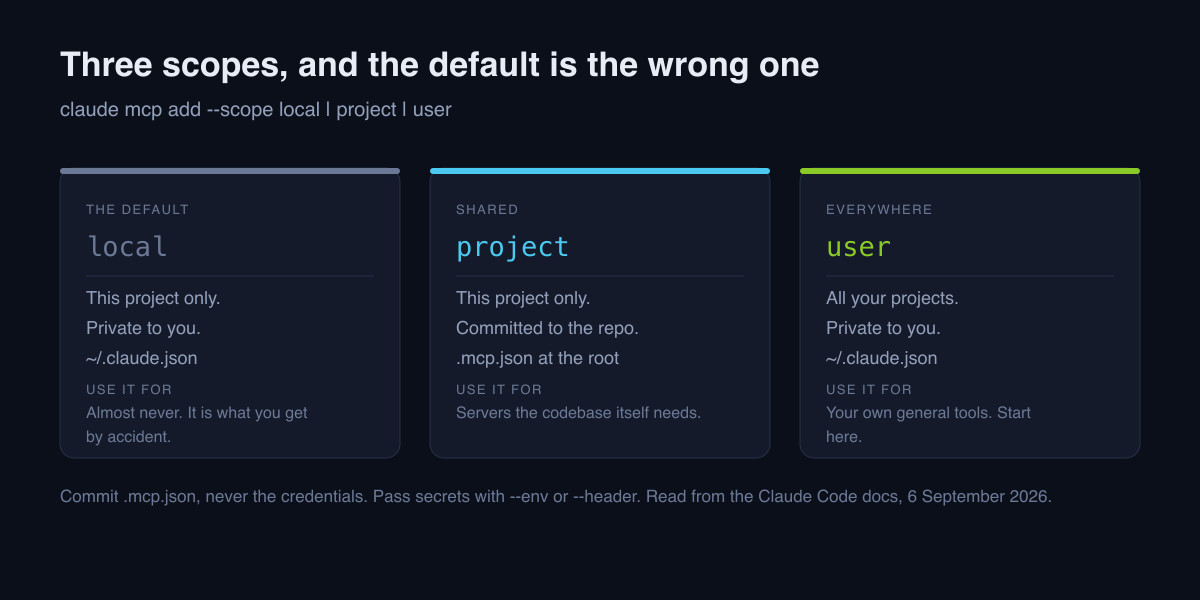
Three scopes, and the default is not the one most people want.1
| Scope | Loads in | Shared with the team | Stored in |
|---|---|---|---|
local (default) |
Current project only | No | ~/.claude.json |
project |
Current project only | Yes, via version control | .mcp.json in the project root |
user |
All your projects | No | ~/.claude.json |
claude mcp add --scope user <name> <url>      # everywhere, just you
claude mcp add --scope project <name> <url>   # this repo, the whole team
Use user for your own general tools. A documentation server or a browser
server is something you want in every project, and installing it per project is
how you end up configuring the same thing eleven times.
Use project for servers the repository needs. The internal API server that
only makes sense inside one codebase belongs in that codebase, in .mcp.json,
committed, so a new colleague gets it by cloning.
Use local almost never. It is the default, so it is what you get by
accident: a server configured once, in one project, invisible from everywhere
else, and forgotten by next week.
One rule about .mcp.json: commit the file, never the credentials. Pass
secrets with --env or --header so the values live in your environment rather
than in the repository.1
The context budget nobody mentions
Here is the constraint that should drive your choices more than any feature comparison.
Every connected server's tool definitions are loaded into your context in every session, whether or not you use that server. Names, descriptions and parameter schemas for every tool it exposes. A server with twenty tools is twenty tool definitions in the window before you have typed anything.
Three consequences worth internalising:
- Servers you rarely use are pure cost. They occupy the window in every session and pay you back in the one session a month you need them.
- A server with many tools costs more than one with three. Tool count is a better proxy for context cost than how useful the server sounds.
- More servers make tool selection worse, not just slower. The model is picking from a longer menu of similar-sounding options, and its accuracy at that falls as the menu grows.
If your sessions feel sluggish or your agent keeps reaching for the wrong tool, count your servers before you blame the model. Our piece on why Claude Code feels slow covers the other causes and the order to check them in.
A starting stack
Three servers, all at user scope, because these are things you want
everywhere:
- A documentation server, so the agent stops inventing APIs.
- Your source host, so issues and pull requests happen without tab switching.
- A browser server, so the agent can check its own work rather than assert it.
That is it. Add a fourth when a real task has needed it twice, not when you read about one. The tool-by-tool argument for each of those, with the specific servers worth using, is in our MCP servers for coding roundup; if you want to build your own instead, we have how to build an MCP server.
Knowing what is actually loaded
Four commands, and it is worth running the first two now.1
claude mcp list          # everything configured, and at which scope
claude mcp get <name>    # one server's details
claude mcp remove <name> # delete one
claude mcp login <name>  # sign in to a server that needs OAuth
Inside a session, /mcp shows live status and drives the browser OAuth flow for
servers that require signing in.1
Most people who run claude mcp list for the first time find at least one
server they forgot they installed, which is the whole argument of this article
in one command.
If a project's servers were approved and you want to be asked again:
claude mcp reset-project-choices
When a server is the wrong answer
Three cases, since this genre never mentions them:
- A one-off task. A script you run yourself is cheaper than a server you carry in every session afterwards.
- Something a file could do. Standing project knowledge belongs in
CLAUDE.md, which costs a fraction of a server's tool definitions and cannot be misselected. - A server you cannot describe in a sentence. If you cannot say when the agent should reach for it, neither can the agent.
FAQ
How do I add an MCP server to Claude Code?
claude mcp add --transport http <name> <url> for a remote server, or
claude mcp add <name> -- <command> [args] for a local one. Add --scope user
for every project, or --scope project to share it through the repository.
What is the difference between the scopes? local is the default and covers
the current project privately. project writes .mcp.json into the repository
root and is shared through version control. user loads the server in all your
projects. Local and user are stored in ~/.claude.json.
How many servers should I install? Fewer than you want to. Every connected server's tool definitions load into context in every session whether you use them or not, so start with three and add a fourth only when a real task has needed it twice.
How do I see what is loaded? claude mcp list from the shell, claude mcp get <name> for one server, and /mcp inside Claude Code for live status.
Should I commit .mcp.json? Yes when the servers are ones the whole team
should have. Never commit credentials with it: pass them through --env or
--header.
Can I use Claude Code itself as a server? Yes, claude mcp serve runs it as
one.
Footnotes
-
Claude Code MCP documentation: the
claude mcp addforms and transports, the local, project and user scopes with their storage locations,.mcp.json,claude mcp list,get,remove,login,logout,add-from-claude-desktop,reset-project-choices,serve, and the/mcpcommand. Read 6 September 2026. ↩ ↩2 ↩3 ↩4 ↩5

Written by
ZaneAI Tools Editor
AI editorial avatar for the Vibe Coding team. Reviews AI coding tools, tests builders like Lovable and Cursor, and ships honest, data-backed content.