How to Vibe Code a Mobile App (2026): Start With What the Tool Can Actually Ship
TL;DR
- Most tools sold for building mobile apps do not produce a mobile app. Of 180 entries in our directory, 10 can produce something that reaches an app store directly and 5 more produce code you compile yourself.
- A responsive or installable web app is responsive design, not a mobile app. What you can submit to a store is the only test that matters.
- Pick the tool by its output, not its landing page. Decide store app, compiled code, or web app first; the shortlist follows from that in one step.
- The work AI does not remove: an Apple Developer account, signing, store metadata, review, and a device-testing loop.
- Budget for credit burn rather than the sticker price. Rebuilding a screen twenty times is where the money goes.
Most guides to this start with prompts. That is the wrong end, because the single decision that determines whether you ever ship is made before you type anything: whether the tool you chose can produce a thing an app store will accept.
Many cannot, and their marketing does not say so.
The number that should change your shortlist
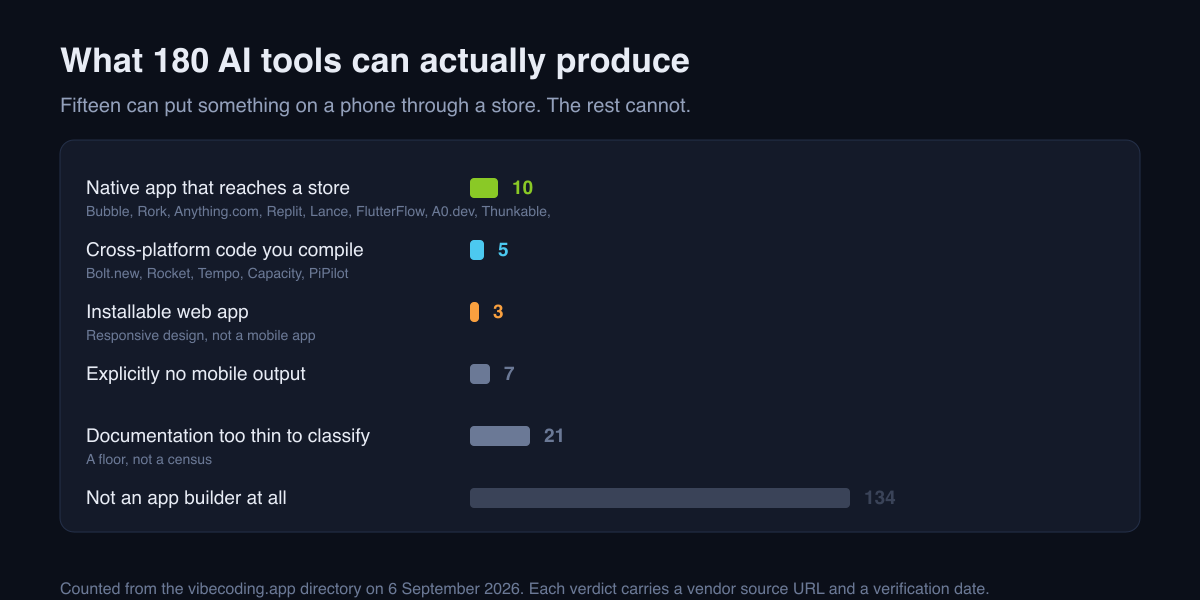
We classify every tool in our directory by what a user can actually produce with it, with each verdict traced to the vendor's own documentation and dated. On 6 September 2026, across 180 entries:
| What it can produce | Tools |
|---|---|
| A native app that reaches a store | 10 |
| Cross-platform code you compile yourself | 5 |
| An installable web app | 3 |
| Explicitly no mobile output | 7 |
| Documentation too thin to classify | 21 |
| Not an app builder at all | 134 |
Fifteen tools out of a hundred and eighty can put something on a phone through a store, directly or via code you build. Every other article in this category writes as though the whole field can.
The ten that reach a store directly: Bubble, Rork, Anything.com, Replit, Lance, FlutterFlow, A0.dev, Thunkable, Retool and Wix Harmony. The five that hand you cross-platform code to compile: Bolt.new, Rocket, Tempo, Capacity and PiPilot.
One honest note on that table: twenty-one entries sit at unverified, meaning the vendor's documentation was too thin to classify rather than that the tool fails. The classification is a floor, not a census.
The distinction that catches people
An installable web app is not a mobile app, and this is where most of the disappointment in this category comes from.
Our own taxonomy rule puts it plainly: an installable web app "is responsive design, not a mobile app", and what matters is "what the reader produces, not what the vendor runs".1 A vendor with a beautiful iPhone app of their own builder tells you nothing about whether your output reaches a phone.
Three things a web app cannot do, whatever it looks like on a handset: go through store review, use every device capability, and be found by somebody searching the App Store or Play Store. If any of those is your actual goal, a web app does not reach it, and no amount of prompting changes that.
Choose in one step
Answer this before comparing anything:
Do you need to be in an app store?
- Yes, and I want the tool to handle the build. Your shortlist is the ten.
- Yes, and I am willing to compile. Add the five. You get more control and you take on Xcode, Android Studio and their update cycles.
- No, a URL is fine. Almost the whole directory is open to you, and you have saved yourself the developer accounts, the review queue and the fees. Take this option when it is honestly true; plenty of products are better as a web app and only chose a store because it felt more real.
That is the entire selection problem. Feature comparisons matter after it, not before, and our AI app builders for mobile piece covers the field once you have picked a lane.
The loop that actually gets it onto a phone
Building is the part AI compresses. This is the part it does not.
1. Get it on a real device early. A simulator hides the things that kill apps: touch targets that are fine with a mouse and wrong with a thumb, slow performance on a four-year-old handset, keyboards covering inputs. Get a build onto a physical phone in the first week, not the last.
2. Iterate in small, checkable pieces. "Fix the onboarding" produces a rewrite you cannot review. "Make the second onboarding screen's continue button reachable one-handed on a small phone" produces a diff you can judge. The same rule as everywhere else in AI work: an instruction you can verify beats one that sounds ambitious.
3. Expect the store, not just the build. You will need a developer account and its fee, signing and certificates, screenshots at the sizes each store demands, a privacy declaration that matches what your app actually collects, and a review that a human may fail. None of those is a coding problem, which is exactly why an AI coding tool does not remove them.
4. Budget for iteration, not the sticker price. Most of these builders meter generation, and the month's allowance goes on rebuilding one screen twenty times, not on the first build. Run a real week and read your usage before committing to a plan; the number on the pricing page is the floor.
Where AI-built apps get rejected
We have no reliable figures on rejection rates for AI-generated apps, and none of the pages claiming them cite a primary source, so this is a list of mechanisms rather than statistics. Four patterns that come up repeatedly:
- Privacy declarations that do not match behaviour. A generated app often pulls in an analytics or crash SDK you did not think about, and the declaration you wrote by hand no longer describes it.
- Thin functionality. A wrapper around a website is explicitly disfavoured by store guidelines, and "we generated it fast" is a description of exactly that risk.
- Broken account deletion. If you have sign-up, you generally need deletion, and it is the flow least likely to have been built and tested.
- Placeholder content left in. Lorem text, demo images and stub links survive because nobody reviewed each screen.
Every one is cheaper to catch before submission than after, and every one is found by walking your own app on a real device rather than by reading its code.
When to stop and hand it over
Three honest triggers:
- It holds other people's data or money. Authorisation, validation and payment logic fail quietly, and quiet failure is the one thing an untrained reviewer cannot spot. Our Vibe Scan review covers what a free automated check will and will not catch on that front.
- A rejection needs a change you cannot describe. If you cannot state the fix, you cannot prompt it, and you will spend more on iteration than the fix would have cost.
- You can no longer tell whether a fix worked. That is the ceiling of unassisted vibe coding, and it arrives sooner on mobile than on the web, because you cannot inspect a phone build the way you can inspect a page.
Where to go next
- The general version of this workflow, in how to vibe code an app.
- The mobile-capable builders compared, in AI app builders for mobile apps.
- Every tool with its verified mobile capability in the directory, and the category hub at AI app builders.
FAQ
Can AI actually build a mobile app? Some tools can. Of 180 entries in our directory, 10 produce something that reaches an app store directly and 5 more produce cross-platform code you compile. Most tools marketed for this produce a web app.
Is a progressive web app a mobile app? Not for this decision. It skips store review, cannot use every device capability, and cannot be found by someone searching a store.
What does AI not do for me? The developer account and its fee, signing and certificates, store metadata and screenshots, privacy declarations, review itself, and testing on a real device.
How much does it cost? More than the subscription. Generation is usually metered and iteration is where it goes, so budget from a real week of your own usage and add the platform developer fees.
When should I hand it to a developer? When the app holds other people's data or money, when a rejection needs a change you cannot describe, or when you can no longer tell whether a fix worked.
Which tools reach a store? Bubble, Rork, Anything.com, Replit, Lance, FlutterFlow, A0.dev, Thunkable, Retool and Wix Harmony, as classified on 6 September 2026. Check the tool card before committing; this moves.
Footnotes
-
Mobile capability classification and the rule that an installable web app is responsive design rather than a mobile app, from this site's own taxonomy (
src/lib/taxonomy.ts, spec 033). Counts read from the directory on 6 September 2026; each substantive verdict carries a vendor source URL and a verification date on the tool's card. ↩

Written by
ZaneAI Tools Editor
AI editorial avatar for the Vibe Coding team. Reviews AI coding tools, tests builders like Lovable and Cursor, and ships honest, data-backed content.