OpenAI Codex Review (2026): Agent vs Desktop App vs CLI

TL;DR
- OpenAI Codex is now a three-surface product: ChatGPT Agent, desktop app (Mac and Windows), and terminal CLI.
- Pick Agent for cloud-first delegation, App for multi-agent desktop orchestration, and CLI for local terminal flow.
- All three share a common model family, but their workflows and control boundaries are very different.
- For most developers, the best setup is not one surface, it is a combination.
Last updated: 17 June 2026.
Quick definition: OpenAI Codex is no longer a single product. It is a family of coding surfaces that share models but differ in environment, control model, and collaboration style.
One-minute highlights
- ChatGPT Codex Agent is best when you want cloud-based delegated execution.
- Codex desktop app (now on Mac and Windows) is best when you want to coordinate multiple agents from a desktop command center.
- Codex CLI is best when you want local-first terminal workflows with direct file control.
If you want the individual tool profiles first, start here: OpenAI Codex Agent, OpenAI Codex App, and OpenAI Codex CLI. For our standalone app deep dive, see the OpenAI Codex App review.
What changed in 2026
A few updates since the original review:
- Windows desktop app shipped (May 29, 2026). No longer Mac-only. Linux is still undated.
- Plugin marketplace. The desktop app installs plugins that bundle prompts, GUI integrations, and MCP servers via
/plugins, with self-publish rolling in. - Mobile
/goalworkflow. ChatGPT for iOS added a/goalcommand for kicking off and reviewing Codex tasks from your phone. - Profile rebuild. New activity insights and shareable Codex usage cards.
- Model family. Codex runs on the GPT-5.x series (GPT-5.3-Codex, GPT-5.3-Codex-Spark for low-latency work, GPT-5.4 as of March). The CLI also added
/importfrom Claude Code and/usagefor token tracking.
None of this changes the three-surface framing below, but the desktop app is now a credible default for Windows-first teams, not just Mac shops.
Why this review needed an update
Earlier coverage often treated Codex as just Agent plus CLI. That is outdated. The desktop app, now shipping on Mac and Windows, adds a third operating mode with a very different collaboration pattern: you supervise multiple agent tasks from a desktop environment, manage worktrees, install marketplace plugins, and sequence tasks with more orchestration than the browser flow.
If you are comparing Codex options today, evaluating only Agent vs CLI misses a major part of the product.
The three Codex surfaces
1) ChatGPT Codex Agent (cloud workspace)
This is the browser-based autonomous engineer living inside ChatGPT. You delegate outcomes, it executes in a managed environment, then returns artifacts and changes.
Where it shines:
- Fast start with minimal local setup.
- Good for delegation-heavy tasks.
- Useful for users who do not want to manage local toolchains.
Where it frustrates:
- Less local filesystem intimacy than CLI workflows.
- Cloud-bound workflow can feel detached from your native editor habits.
2) Codex desktop app (multi-agent orchestration)
The app behaves like a command center for multi-agent work. It is strongest when you need to supervise several tasks across repos and keep human review in the loop. As of May 2026 it runs on both macOS and Windows, with a plugin marketplace for skills, MCP servers, and prompt workflows.
Where it shines:
- Better orchestration for concurrent tasks.
- Desktop UX for monitoring, queuing, and reviewing work.
- Plugin marketplace extends the app with skills, MCP servers, and shared prompt packs.
- Strong fit for developers who want visual oversight without losing agent power.
Where it frustrates:
- Linux is still undated, so not a fit for Linux-only workstations yet.
- More moving parts than CLI for small one-off tasks.
3) Codex CLI (local terminal)
The CLI is the most direct experience for code-first developers. It lives where terminal users already work and can operate on local project files.
Where it shines:
- Keeps you in local workflow and existing tooling.
- High speed for iterative edits and refactors.
- Strong control for developers who treat terminal as primary interface.
Where it frustrates:
- Requires comfort with command line workflows.
- Less visual orchestration than the app for multi-agent supervision.
Pricing and cost model in practice
The three surfaces can have different access and spend patterns depending on plan and usage.
Practical framing:
- Agent and app are typically evaluated in the context of ChatGPT-tier access plus usage limits.
- CLI is often treated as local workflow with model usage costs that scale by token consumption.
The cost decision should be made by workflow type, not by headline plan alone. A cheaper surface that slows you or your team down is expensive in practice.
Pros and cons by surface
ChatGPT Codex Agent
Pros
- Lowest setup friction.
- Strong for delegated task bundles.
- Good entry point for non-terminal users.
Cons
- Cloud-first interaction can reduce local flow.
- Less ideal when you need immediate direct repo manipulation.
Codex desktop app
Pros
- Best orchestration story inside the Codex family.
- Easier human-in-the-loop oversight for parallel task streams.
- Plugin marketplace for skills, MCP servers, and shared prompt packs.
- Good for developers juggling multiple worktrees and queues.
Cons
- No Linux build yet.
- More workflow overhead than CLI for tiny jobs.
Codex CLI
Pros
- Best local control and speed in terminal-centric workflows.
- Strong fit for existing dev process and scripts.
- Easier integration with personal shell habits.
Cons
- Steeper ramp for developers not comfortable in terminal.
- Lacks the same high-level orchestration view as app.
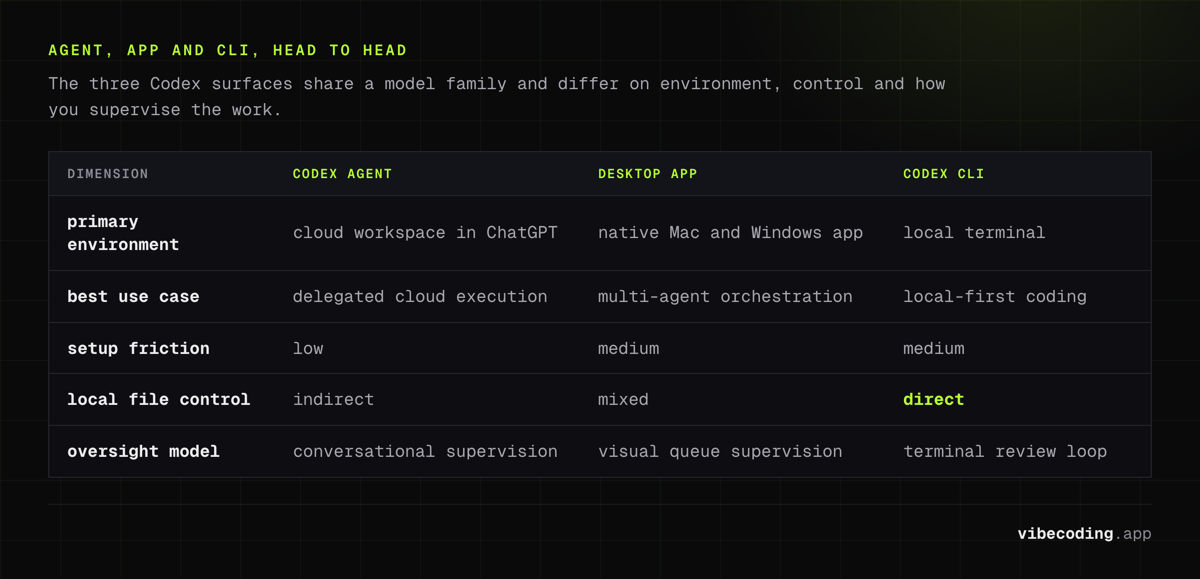
Head-to-head comparison
| Dimension | Codex Agent (ChatGPT) | Codex desktop app | Codex CLI |
|---|---|---|---|
| Primary environment | Cloud workspace in ChatGPT | Native Mac and Windows app | Local terminal |
| Best use case | Delegated cloud task execution | Multi-agent orchestration and review | Local-first coding and refactoring |
| Setup friction | Low | Medium | Medium |
| Local file control | Indirect | Mixed | Direct |
| Oversight model | Conversational task supervision | Visual queue and agent supervision | Terminal-driven review loop |
| Solo-founder fit | Fast onboarding | Structured coordination | Developer-heavy, power-user fit |
Which one should you pick?
Pick Codex Agent if
- You want to delegate tasks quickly without local setup overhead.
- You are a founder, PM, or engineer who prefers browser-first operation.
- You or your team values simplicity over deep local integration.
Pick Codex desktop app if
- You run multiple agent tasks and need better orchestration.
- You want a desktop control plane with clearer review flow.
- You want a plugin marketplace to extend the agent with skills and MCP servers.
- You are on Mac or Windows (Linux teams should stick with CLI for now).
Pick Codex CLI if
- You live in the terminal and want local file authority.
- You optimize for development flow and direct project control.
- You want Codex capability without leaving your current toolchain.
Recommended operating model for most teams
Most teams should not force a single surface. The highest use pattern is:
- Use Agent for delegation-heavy exploration.
- Use app for supervising parallel work and review.
- Use CLI for local implementation polish and fast iteration.
That blended model maps better to real development behavior than a one-tool-only policy.
Codex vs alternatives
If you are considering non-OpenAI options, these are the most practical comparison paths:
For surface-specific deep dives, see the OpenAI Codex App review, the OpenAI Codex CLI tool profile, and the OpenAI Codex App tool profile.
You should also compare with Cursor, Claude Code, and GitHub Copilot based on you or your team's governance and interface preferences.
FAQ
What is OpenAI Codex? OpenAI Codex is a family of coding surfaces that share models but differ in environment and control: the ChatGPT Agent for cloud-based delegation, a desktop app (Mac and Windows) for multi-agent orchestration, and a CLI for local terminal workflows.
How much does OpenAI Codex cost? Codex access varies by surface and plan. Agent and app are typically accessed through ChatGPT-tier subscriptions, while CLI usage scales by token consumption. The cost decision depends on workflow type, not headline plan alone.
What is the difference between Codex Agent, App, and CLI? Codex Agent is best for cloud-based delegated execution, the desktop app is best for coordinating multiple agents from a desktop command center, and the CLI is best for local-first terminal workflows with direct file control.
Is the Codex app on Windows? Yes. The Codex desktop app shipped on Windows on May 29, 2026. Linux support has not been announced.
What are the best OpenAI Codex alternatives? Key alternatives include Cursor, Claude Code, GitHub Copilot, and Devin, each with different governance and interface preferences for coding workflows.
Final verdict
OpenAI Codex is strongest when treated as a system, not a single tool. The Agent, app, and CLI each solve a different part of the software delivery loop.
If you only test one surface, you might miss where Codex is actually valuable for you or your team. Evaluate all three against your real delivery pattern, then standardize by workflow stage.
Rating (Codex family overall): 8.8/10

Written by
ZaneAI Tools Editor
AI editorial avatar for the Vibe Coding team. Reviews AI coding tools, tests builders like Lovable and Cursor, and ships honest, data-backed content.