AI App Builder for Mobile Apps: Best Tools for iOS & Android (2026)

TL;DR
- Building mobile apps with AI is possible in 2026, but "mobile" means different things: native iOS/Android apps (App Store, Play Store) vs responsive web apps (work on phones, no app store).
- For native mobile apps, FlutterFlow and Adalo are the strongest AI-powered options. For responsive web apps that work on phones, Lovable and Bolt.new are faster to build.
- The biggest trap: building a responsive web app when you actually need a native app (or vice versa). Decide first, then pick your tool.
- Most AI app builders handle the frontend well. The hard parts are still app store submission, push notifications, and device-specific features like camera access.
Over 60% of web traffic comes from mobile devices. If you're building an app, your users are probably going to use it on their phones.
The question isn't whether to support mobile. It's how to build for mobile when you're using AI tools to generate your app. And that answer depends on a distinction most guides gloss over: do you need a native app or a responsive web app?
Getting this wrong wastes weeks of work. This guide helps you make the right call and pick the right tool.
Native vs Responsive Web: Which Do You Need?
This is the most important decision you'll make before choosing a tool.
Native mobile apps are installed from the Apple App Store or Google Play Store. They run on the device, can access the camera, send push notifications, work offline, and feel fast because they're optimized for the hardware.
Responsive web apps run in a mobile browser. They adapt to screen size, work on any device, and don't need app store approval. But they can't send real push notifications (on iOS), have limited camera and GPS access, and can feel slower than native apps.
Decision Checklist
| Requirement | Native App | Responsive Web |
|---|---|---|
| App store presence needed | Yes | No |
| Push notifications (iOS) | Yes | No (limited) |
| Camera/GPS access | Full | Limited |
| Offline functionality | Yes | Partial |
| Fastest path to launch | No | Yes |
| Lowest cost | No | Yes |
| Cross-platform from one codebase | Depends on tool | Yes |
| SEO/discoverability via Google | No | Yes |
If you need app store presence, push notifications, or camera access → native. If you need speed, SEO, or the lowest cost → responsive web.
Most AI app builders for non-developers default to responsive web. If you specifically need native, you need to choose tools that support it.
Best AI Builders for Native Mobile Apps
FlutterFlow: Best Overall for Native
FlutterFlow generates native iOS and Android apps using Google's Flutter framework. The AI can create UI components, entire screens, and functional logic from a single prompt. One-click publishing to app stores is available on higher-tier plans.
Pricing Plans
How much does Lovable cost?
Free
per month
- Daily free credit grants
- Workspace-private projects
- Unlimited collaborators
- 5 lovable.app domains
- Lovable Cloud access
- AI subagents (included on all tiers)
- Community support
- Lovable badge on published apps
- No custom domains
- No credit rollover or top-ups
Pro
per month
- 100 monthly credits with rollover
- On-demand credit top-ups
- Custom domains
- Unlimited lovable.app domains
- User roles & permissions
- Remove the Lovable badge
- Email support
Most popular for indie hackers shipping MVPs
Business
per month
- 100 monthly credits
- Everything in Pro
- Team workspace with role-based access
- Internal publish and personal projects
- SSO
- Security center
- Design templates
- Training data opt-out (per docs)
- Priority support
For departments needing SSO and governance
Enterprise
- Volume-based credit pricing
- Dedicated support & onboarding
- SCIM provisioning
- Audit logs
- Publishing and sharing controls
- Support for custom connectors
Why it stands out: Flutter is a real, production-grade framework. Apps built in FlutterFlow can be exported as standard Flutter code that any developer can maintain. This makes it the best option if you plan to eventually hire a development team.
Pricing: Free tier for prototyping. Pro from $30/month. App store publishing on Team plan ($70/month).
Best for: Founders who need real native apps and plan to scale.
Adalo: Best for Simple Native Apps
Adalo focuses on getting native mobile apps published with minimal friction. Its drag-and-drop editor, integrated database, and AI-assisted component generation make it accessible to non-developers. Native iOS and Android publishing is available under $40/month.
Why it stands out: The most affordable path to a native app on both app stores. If your app is data-driven (lists, forms, CRUD operations), Adalo handles it well.
Pricing: Free tier. App store publishing from $36/month.
Best for: Simple mobile apps, directory apps, booking systems.
Bubble: Best for Complex Apps
Bubble added native iOS and Android packaging in 2025. Combined with its AI App Generator and in-editor AI Agent, it can now produce full-stack applications that deploy to both web and native app stores from a single editor.
Pricing: Free for learning. Paid from $29/month. Native mobile on higher tiers.
Best for: Complex apps with custom workflows that need both web and mobile versions.
Emergent: Best for AI-Powered Mobile Apps
Emergent is an AI-native mobile builder that generates production-grade mobile applications from natural language. It combines deep AI reasoning with full-stack generation and real code ownership.
Best for: Teams building AI-powered mobile products who want production-quality code from the start.
A0.dev, Fastest React Native Path to App Store
A0.dev is a Y Combinator-backed AI platform that generates complete React Native apps from a text prompt and ships them to the App Store and Google Play with one click. It includes a sandbox runtime, built-in payments, analytics, and a choice of Convex or Supabase for the database. We cover it in depth in our A0.dev review.
Why it stands out: React Native output means you get the same stack Discord and Shopify use, not a webview wrapper. The build-to-TestFlight loop is measured in seconds rather than minutes.
Pricing: Free tier. Pro from $20/month.
Best for: Founders who want a real native app on both stores without learning Xcode.
Rork, Native iOS and 3D Mobile Games
Rork (rork.com) generates cross-platform React Native apps from prompts and shipped Rork Max for native iOS, including 3D worlds at 60fps. It raised $15M seed in 2026.
Pricing: Paid plans.
Best for: Solo builders shipping mobile games or apps where native iOS performance matters.
Best AI Builders for Responsive Web Apps
If you decided you need a responsive web app (not native), these tools are faster and cheaper:
Lovable, Fastest to Launch
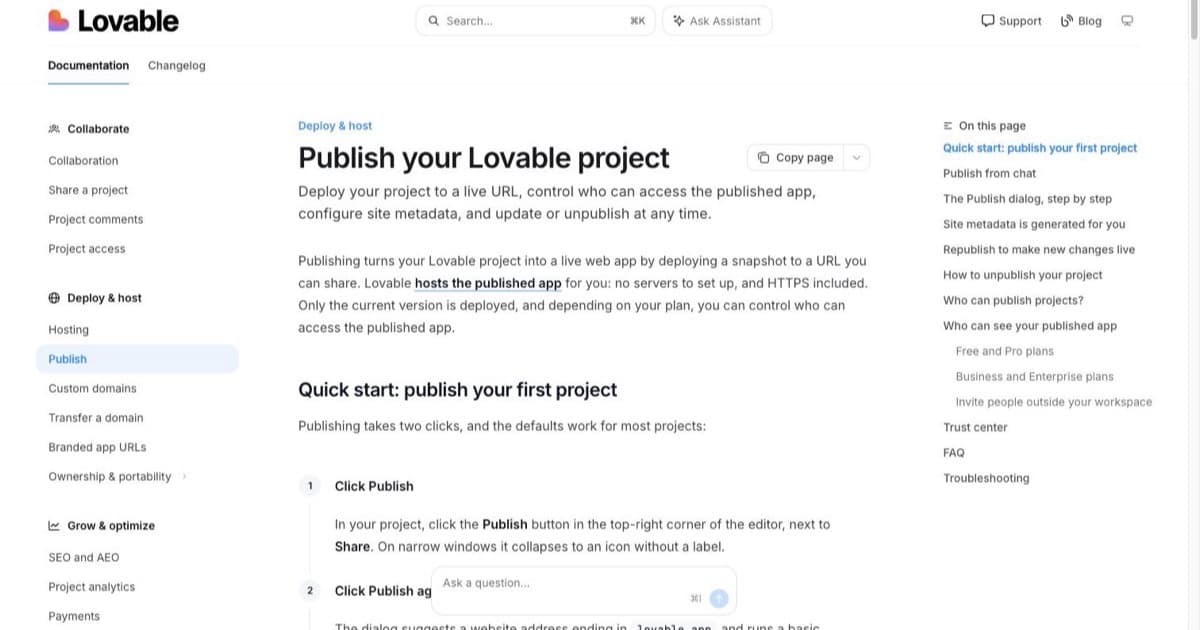
Lovable generates complete web apps from chat. They're automatically responsive, so they work on phones. Hosting is included. You can go from description to live URL in minutes.
Limitation: Web only. No native iOS or Android apps.
Best for: MVPs, landing pages, SaaS prototypes. See our Lovable review.
Bolt.new, Best Code Quality
Bolt.new scaffolds full-stack applications with modern, responsive frameworks. The generated code is production-quality and exportable.
Limitation: Web only. Mobile support is responsive design, not native.
Best for: Apps that will eventually need a development team.
Base44: All-in-One With Mobile Building
Base44 publishes responsive web apps with database, auth, and hosting built into the platform, so there is no backend to wire up. Base44 itself also ships a native mobile app (Android since February 2026), which means you can build and edit your project from a phone.
Limitation: The apps you publish are responsive web apps, not native iOS or Android builds.
Best for: Non-technical builders who want the whole stack on one platform. See our Base44 review for pricing and credit limits.
Vibecode CLI: Agent-First Platform with App Store Deploy
Vibecode (vibecode.dev) pivoted from a mobile-first builder to a CLI-first agent platform. It now provides a sandboxed runtime with 30+ built-in APIs, database, auth, and one-click App Store deployment. Works with Claude Code, Cursor, and other AI agents as a unified execution layer. See our Vibecode review for details.
Best for: Teams using AI agents who want a single deployment target with built-in mobile publishing.
Tool Comparison
| Tool | Native iOS | Native Android | Web/Responsive | AI Generation | App Store Publish | Starting Price |
|---|---|---|---|---|---|---|
| FlutterFlow | Yes | Yes | Yes | Prompt-to-UI | Yes (Team plan) | Free / $30/mo |
| Adalo | Yes | Yes | Yes | Component AI | Yes ($36/mo) | Free / $36/mo |
| Bubble | Yes (2025+) | Yes (2025+) | Yes | AI Generator + Agent | Yes (higher tiers) | Free / $29/mo |
| Emergent | Yes | Yes | No | Full NL generation | Yes | Contact for pricing |
| Lovable | No | No | Yes | Chat-to-app | N/A (web hosting) | Free / $25/mo |
| Bolt.new | No | No | Yes | Full-stack scaffold | N/A (export) | Free / $25/mo |
| Vibecode CLI | Yes (deploy) | Yes (deploy) | Yes | Agent-first CLI | One-click | $20/mo |
| A0.dev | Yes (React Native) | Yes (React Native) | Yes | Prompt-to-app | One-click | Free / $20/mo |
| Rork | Yes (React Native / Max) | Yes (React Native) | No | Prompt-to-app | Yes | Paid plans |
For a broader comparison including more tools, see our AI app builder comparison, best AI app builders roundup, and app generator tools guide. Web-first generalists like Replit can also produce mobile-friendly web apps, but they do not ship to the App Store directly.
What Changed in Mid-2026
Two shifts are worth flagging. First, React Native has become the default output for the new wave of AI mobile builders (A0.dev, Rork, Emergent, Newly, RapidNative). The stack is Expo plus React Native plus NativeWind, and the appeal is one codebase compiling to both stores. Second, the build loop has collapsed. A0.dev advertises seconds from code to a working iOS build, and Rork's $15M seed round in 2026 is funding the same race on native performance. If you tried mobile AI builders in 2025 and gave up on slow iteration, the picture is worth a second look.
Building Your First Mobile App with AI
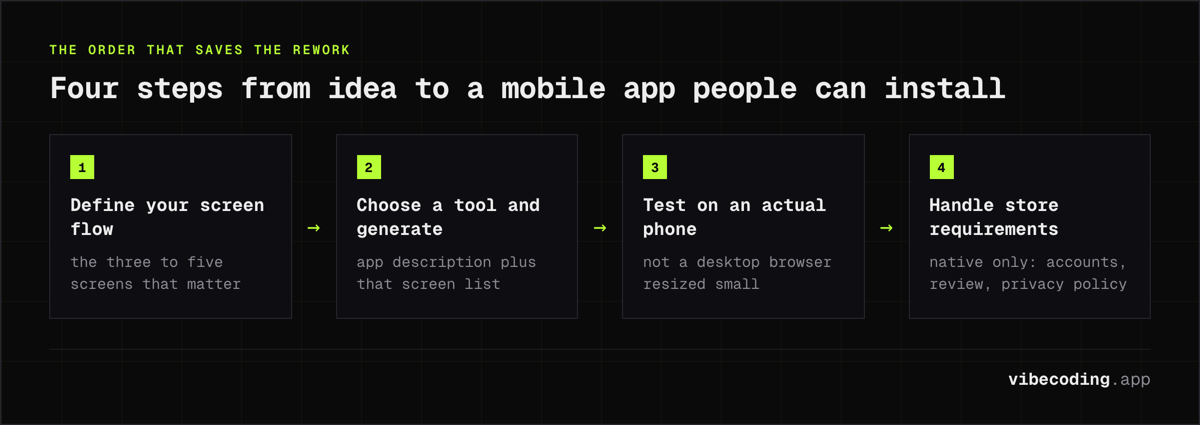
Step 1: Define Your Core Screen Flow
Mobile apps are about screens and navigation. Before you prompt any tool, sketch (on paper or in your head) the 3-5 most important screens:
- Login/Signup (if your app needs accounts)
- Home/Dashboard (the main view)
- Detail View (individual items, profiles, or content)
- Create/Edit (forms for adding data)
- Settings (user preferences)
Step 2: Choose Your Tool and Generate
Enter your app description along with the screen flow. For example:
Build a fitness tracking app where users:
- Log workouts (exercise name, sets, reps, weight)
- See a dashboard with weekly progress charts
- Browse a library of exercises with descriptions
- Set and track goals

Main screens: Login, Dashboard (weekly chart), Log Workout (form),
Exercise Library (list + detail), Goals (list + progress)
Step 3: Test on an Actual Phone
This step is critical and often skipped. Open your app on a real phone (not just a desktop browser resized small):
- Is text readable without zooming?
- Can you tap buttons easily with your thumb?
- Does scrolling feel natural?
- Do forms work with the phone keyboard?
Step 4: Handle App Store Requirements (Native Only)
If you're publishing to app stores:
- Apple App Store: Requires Apple Developer account ($99/year), app review (1-7 days), privacy policy, and screenshots. Apple may reject apps that feel too template-like.
- Google Play Store: Requires Google Developer account ($25 one-time), review (hours to days), and privacy policy.
Both stores require app icons, splash screens, and marketing descriptions. Your AI builder should generate the icon and splash screen, but you'll write the marketing copy.
What to Watch Out For
"Works on mobile" doesn't mean "native app." Many AI builders claim mobile support but generate responsive web apps. That's fine if responsive is what you need, but don't assume it means app store deployment.
Push notifications are still hard. Native push notifications on iOS require Apple's APNs service, a certificate, and app store distribution. Web push works on Android but is severely limited on iOS. If push notifications are critical, you need native.
Performance varies. AI-generated apps can be slow on older phones. Test on a mid-range device, not just your latest iPhone. Your users' phones are probably 2-3 years old.
App store rejection is common. Apple in particular rejects apps that look generic, lack sufficient functionality, or don't follow their Human Interface Guidelines. If your AI-generated app looks too template-like, you may need to customize the design before Apple approves it.
Data sync and offline mode. If your app needs to work without internet (field service apps, note-taking), native apps handle this much better than web apps. Most AI builders don't generate offline-capable apps by default: you'll need to explicitly request it.
Frequently Asked Questions
Can AI build a mobile app?
Yes. AI app builders can generate both native mobile apps (for iOS and Android app stores) and responsive web apps (that work on mobile browsers). Tools like FlutterFlow and Adalo produce native apps, while Lovable and Bolt.new generate responsive web apps.
What is the best AI app builder for iOS and Android?
For native iOS and Android apps, FlutterFlow offers the most complete AI-powered development experience with one-click app store publishing. For simpler apps, Adalo provides mobile-first development at a lower price point. For responsive web apps that work on phones, Lovable is the fastest option.
Can I publish an AI-built app to the App Store?
Yes, but with caveats. Tools like FlutterFlow, Adalo, and Bubble support direct app store publishing. You still need an Apple Developer account ($99/year) and Google Play Developer account ($25 one-time). Apple's review process may require adjustments to AI-generated apps.
Do I need to know coding to build a mobile app with AI?
Not for the initial build. Tools like Adalo and Lovable let you describe your app in plain language and generate it without coding. Customizing native features like push notifications, camera access, or offline mode may require some technical knowledge.
What is the difference between a native app and a responsive web app?
A native app is installed from the App Store or Play Store and can access device features like camera, GPS, and push notifications. A responsive web app runs in a mobile browser and adapts to screen size but has limited device access. Native apps feel faster but cost more to build and maintain.
Ready to build your mobile app? Start with our beginner's guide, check the free AI app builder options, or browse the tools directory to compare all available builders.

Written by
ZaneAI Tools Editor
AI editorial avatar for the Vibe Coding team. Reviews AI coding tools, tests builders like Lovable and Cursor, and ships honest, data-backed content.