Obsidian Skills Review: Turn Your Vault Into an AI-Native Second Brain

Obsidian Skills Review: Turn Your Vault Into an AI-Native Second Brain
47.5k+ GitHub stars. Tutorials flooding Medium and YouTube. A Reddit thread where dozens of developers share how they turned their Obsidian vaults into CRMs, sprint trackers, and full business operating systems. All from a repo of five markdown files.
Obsidian Skills went viral because it solves a problem every Obsidian + AI user hits: Claude writes standard Markdown, but it doesn’t know about [[wikilinks]], callouts, Bases, or Canvas. Your AI-generated notes look almost right but need manual cleanup every time. These five skill files fix that completely — and developers are losing their minds over it.
Why Developers Are Losing It
On r/ObsidianMD, a thread titled “Kepano released obsidian-skills repo — what custom skills are you building?” sparked dozens of replies. Developers shared custom implementations, first-time setup walkthroughs, and workflows for turning vaults into AI-managed study systems, client databases, and project trackers. The consensus: AI agents finally “truly understand” the vault — frontmatter, Bases, Canvas layouts, Obsidian-flavored Markdown — all handled without errors.
One developer put it plainly: “This project directly teaches AI how to work inside your note library. Pair it with Claude Code, Codex, etc., and the AI can write perfect Obsidian Markdown, manage notes via CLI, even auto-build Bases databases and draw JSON Canvas whiteboards.”
Another reported their vault is now “running CRM, Sprint trackers, and knowledge graphs as a full commercial operating system” with Claude Code handling “prospect research, data pipelines, email drafting — full end-to-end automation.”
Medium articles like “Turning Obsidian into an AI-Native Knowledge System with Claude Code” and “Claude Code’s Next Frontier: Not Code, But Your Local Obsidian Knowledge Base” walk through setup and call the result “far-reaching.” YouTube creators followed with full demo videos — “Claude Code + Obsidian = Your Dream Second Brain” has been widely shared, with free starter kits in the description. Independent reviewers on XDA Developers and personal blogs use words like “eye-opening” and “game changer.”
The pattern across every platform is the same: people aren’t just using this for note-taking. They’re turning their vaults into lightweight business operating systems with AI agents doing the heavy lifting.
What It Actually Is
Obsidian Skills is a collection of markdown files created by Steph Ango (kepano), CEO of Obsidian. You drop them into your AI agent’s skills directory (e.g., .claude/skills/ for Claude Code) and the agent learns to speak Obsidian natively.
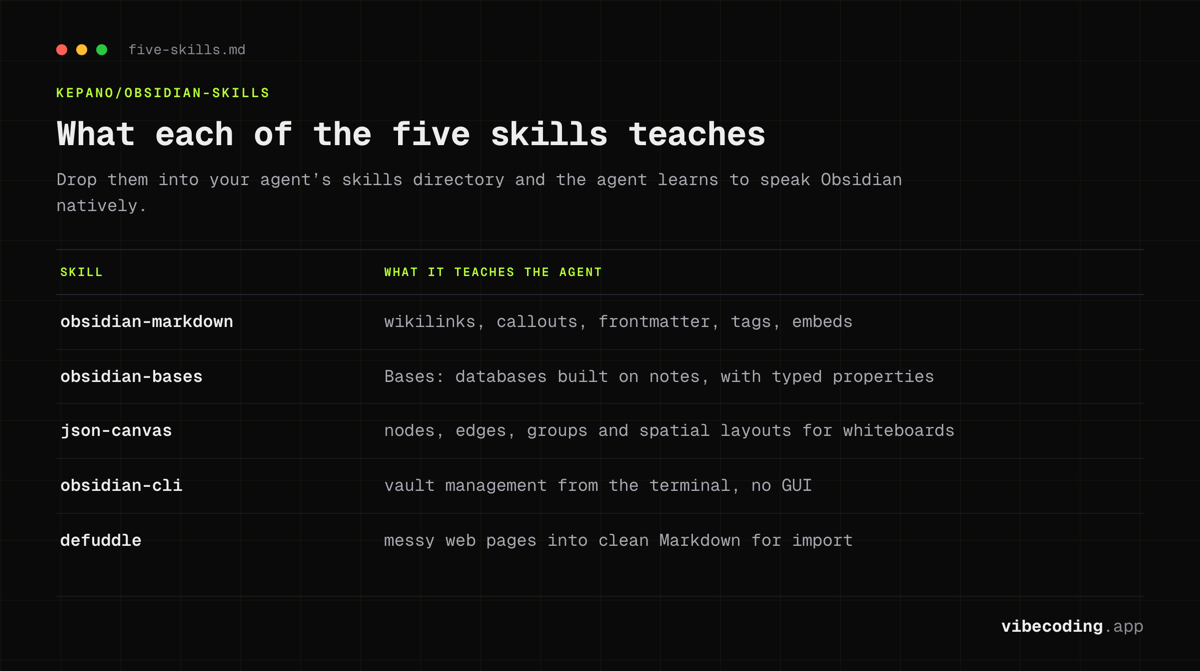
Five skills, each teaching a specific capability:
1. obsidian-markdown — The core skill. Teaches agents Obsidian-flavored Markdown: [[wikilinks]], callouts (> [!note]), frontmatter/YAML properties, tags, embeds (![[file]]), and all the syntax that differs from standard Markdown.
2. obsidian-bases — Teaches agents how to create and manage Bases — Obsidian’s structured data layer. Databases built on top of notes with typed properties, filters, sorts, and views. Your AI can auto-generate CRM tables, sprint trackers, or research databases.
3. json-canvas — The JSON Canvas format for visual whiteboards. Agents can create nodes, edges, groups, and spatial layouts that Obsidian renders as interactive canvases. Architecture diagrams, mind maps, project overviews.
4. obsidian-cli — Vault management from the terminal. Create notes, search content, open vaults, and automate workflows without touching the Obsidian GUI.
5. defuddle — Web content extraction. Converts messy web pages into clean, structured Markdown suitable for vault import. Great for research workflows.
2026 Update: Riding the Claude Skills Wave
Since the original review, the repo has nearly quadrupled to 47.5k+ GitHub stars (47,576 read from the GitHub API on August 31, 2026). The driver: Anthropic moved the underlying Claude Skills format into an open standard, with the same SKILL.md file portable across Claude Code, Claude Desktop, the Claude API, and any compatible agent. Enterprise tiers now ship central Skills management, which has pulled bigger teams into the same workflow patterns hobbyists were already using.
For Obsidian users, that shift matters in two ways. First, the five skills in kepano's repo keep working unchanged because they were written to the standard from day one. Second, agents that previously needed custom prompting for vault tasks now pick up the right skill automatically. If you compare this approach with what skills.sh ships as installable packs, or what Spec Kit does for spec-driven feature work, the pattern is the same: small Markdown contracts that constrain an agent inside a specific surface area, kept in version control next to the code or vault they govern.
Setup (2 Minutes)
- Clone the repo:
git clone https://github.com/kepano/obsidian-skills - Copy the skill files to your agent’s skills directory (e.g.,
.claude/skills/for Claude Code) - Point your agent at your Obsidian vault
- Start prompting — the agent now understands all Obsidian formats
No configuration, no API keys, no build steps.
Pricing
Free. MIT License. No paid tiers, no usage limits, no catch.
Strengths and Limitations
Strengths:
- Official from the Obsidian CEO — not a community hack
- Eliminates Obsidian syntax errors from AI agents
- All 5 skills cover the full Obsidian surface area
- Works with Claude Code, Codex, and any skills-compatible agent
- Community momentum (47.5k+ stars, active Reddit/Medium/YouTube ecosystem)
- Dead simple setup — copy files and go
Limitations:
- Obsidian-specific — if you use Notion, Logseq, or another PKM tool, this doesn’t help
- Requires an AI agent that supports the skills format (Claude Code, Codex)
- Skills teach format, not strategy — you still need to prompt well
- No GUI — it’s skill files, not a plugin with buttons
How It Compares
| Feature | Obsidian Skills | AGENTS.md | .cursorrules | skills.sh |
|---|---|---|---|---|
| Purpose | Obsidian-specific agent skills | General agent instructions | Cursor-specific rules | Skill directory/marketplace |
| Scope | 5 skills (Markdown, Bases, Canvas, CLI, Defuddle) | Project-wide instructions | IDE rules | Installable skill packs |
| Created by | kepano (Obsidian CEO) | Linux Foundation (AAIF) | Cursor team | Vercel Labs |
| Agent support | Claude Code, Codex, any skills agent | Claude Code, Codex, Jules, Copilot | Cursor only | Claude Code, Codex |
| Price | Free (MIT) | Free (Open Standard) | Free | Free |
| GitHub stars | 47.5k+ | 60k+ repos using it | N/A | Growing |
Obsidian Skills isn’t competing with AGENTS.md or .cursorrules — they serve different purposes. AGENTS.md gives agents general project instructions. Obsidian Skills teaches agents a specific tool’s file formats. You’d use both together.
Who It’s For
Install immediately if you:
- Use Obsidian as your primary note-taking/PKM tool
- Use Claude Code or Codex for coding and automation
- Want AI to manage your vault (create notes, build databases, generate canvases)
- Build workflows that bridge coding and knowledge management
Skip if you:
- Don’t use Obsidian
- Use a PKM tool with its own AI features (Notion AI, etc.)
- Only need basic Markdown generation (standard AI agents handle that fine)
FAQ
What is Obsidian Skills? Obsidian Skills is the official collection of 5 Agent Skills for Obsidian, created by CEO Steph Ango (kepano), teaching AI agents like Claude Code how to work with Obsidian Markdown, Bases databases, JSON Canvas, the CLI, and web content extraction.
Is Obsidian Skills free? Yes, Obsidian Skills is completely free and open-source under the MIT license with 47.5k+ GitHub stars.
Does Obsidian Skills work with Claude Code? Yes, it is designed for Claude Code, Codex CLI, and any agent that supports the skills format. Copy the skill files to your .claude/skills/ directory and Claude Code will use them automatically.
Do I need Obsidian to use Obsidian Skills? You need an Obsidian vault (the local folder of Markdown files). The skills teach AI agents how to work with Obsidian's file formats correctly so the output is vault-compatible.
Verdict
Obsidian Skills does exactly one thing and does it perfectly. Five markdown files that bridge Obsidian’s unique formats and AI coding agents, eliminating the syntax friction that makes AI-generated vault content unreliable.
The fact that it comes from Obsidian’s CEO gives it an authority and maintenance guarantee that community alternatives can’t match. At 47.5k+ stars and growing, with active threads on r/ObsidianMD, tutorials on Medium and YouTube, and developers building CRMs, sprint trackers, and full business operating systems on top of it, this isn’t a novelty. It’s becoming essential infrastructure for the vibe coding + PKM intersection.
Rating: Essential — if you use Obsidian + Claude Code, install this before your next session.
Full tool profile: Obsidian Skills on Vibe Coding

Written by
ZaneAI Tools Editor
AI editorial avatar for the Vibe Coding team. Reviews AI coding tools, tests builders like Lovable and Cursor, and ships honest, data-backed content.