Lovable Gift Card 2026: Buy, Redeem, Get Free Credits

TL;DR
Lovable gift cards are real: buy one from the pricing page or from Settings, under Plans and credits usage, and the recipient redeems it as credits. Checked against Lovable's own changelog on 28 August 2026.
- Gift cards: official since December 2025, sold by Lovable itself
- Free plan: 5 daily credits (up to 30 a month), no card required
- LinkedIn Premium perk: 12 months of Pro Lite plus 300 bonus credits for eligible members
- Student discount: up to 50% off Pro, about $12.50 a month
- Promo codes: no permanent public codes; short-lived creator codes go in the "Add promotion code" field at Pro checkout
Yes, Lovable sells gift cards, and they're official. Lovable added them in December 2025, you buy them from the pricing page or from Settings under Plans and credits usage, and the person you're gifting redeems the card as credits in their own workspace. That's the short version, checked against Lovable's changelog on 28 August 2026.
If you landed here looking for a free gift card code, there's no such thing, and anyone selling one isn't Lovable. What does exist is a set of real ways to pay less: a free plan that's enough for a first project, a year of Pro for LinkedIn Premium members, half off for students, referral credits, and the occasional promo event. All of it is below, with the fine print.
See also: Lovable review for the full platform breakdown, Lovable pricing for how credits work, and Lovable alternatives if you're still comparing.
Does Lovable Offer Gift Cards?
It does. Lovable's design lead announced them on 23 December 2025 with a three-step how-to, the official account followed with a link to the pricing page, and the changelog entry for that day reads: "Lovable gift cards are now available, making it easy to gift Lovable to friends, teammates, or clients... Find them in Settings → Plans & credits usage."
Earlier versions of this page said there were no gift cards. That was true until late 2025 and wrong afterwards, so if you read that here before, this is the correction.
Two things to know before you buy one:
- Only lovable.dev sells them. Third-party sites listing "Lovable gift cards" are either selling something for a different company called Lovable (there's a jewellery brand, a label printer and a few others) or reselling something they can't guarantee. Google mixes these up in the results, which is half the reason this page exists.
- The card turns into credits, not into a plan. The recipient gets value in their credit balance. If they're on the free plan, they stay on the free plan with more credits to spend; if they want private projects, they still need to upgrade. More on how credits work further down.
How to Buy a Lovable Gift Card
- Sign in to your Lovable account.
- Go to the pricing page, or open Settings and pick Plans and credits usage.
- Choose the gift card option and an amount.
- Enter the recipient's details and pay. Lovable emails the card.
The amounts on offer and the exact position of the button have moved around since launch, so if the flow looks slightly different from the list above, follow what the page shows you. Lovable hasn't published a public table of denominations; the purchase screen is the source of truth for that.
There's also a direct route at lovable.dev/dashboard/gift-cards once you're signed in, which is where one of the launch posts pointed people.
How to Redeem a Lovable Gift Card
The recipient signs in to the account that should get the credits, opens Settings, goes to Plans and credits usage, and enters the card there. The value shows up in that workspace's credit balance.
A few practical notes from the credit rules in Lovable's docs:
- Credits belong to a workspace. If the recipient has two workspaces, they should redeem in the one they actually build in.
- Bonus credits carry their own expiry, shown in the credit balance details. Lovable hasn't published a separate expiry rule for gift cards, so read the terms in the purchase flow if you're buying for a birthday six months out.
- A gift card doesn't change the plan. Free-plan users still get public projects only until they upgrade.
If the redemption screen has moved by the time you read this, the email that comes with the card has the current steps.
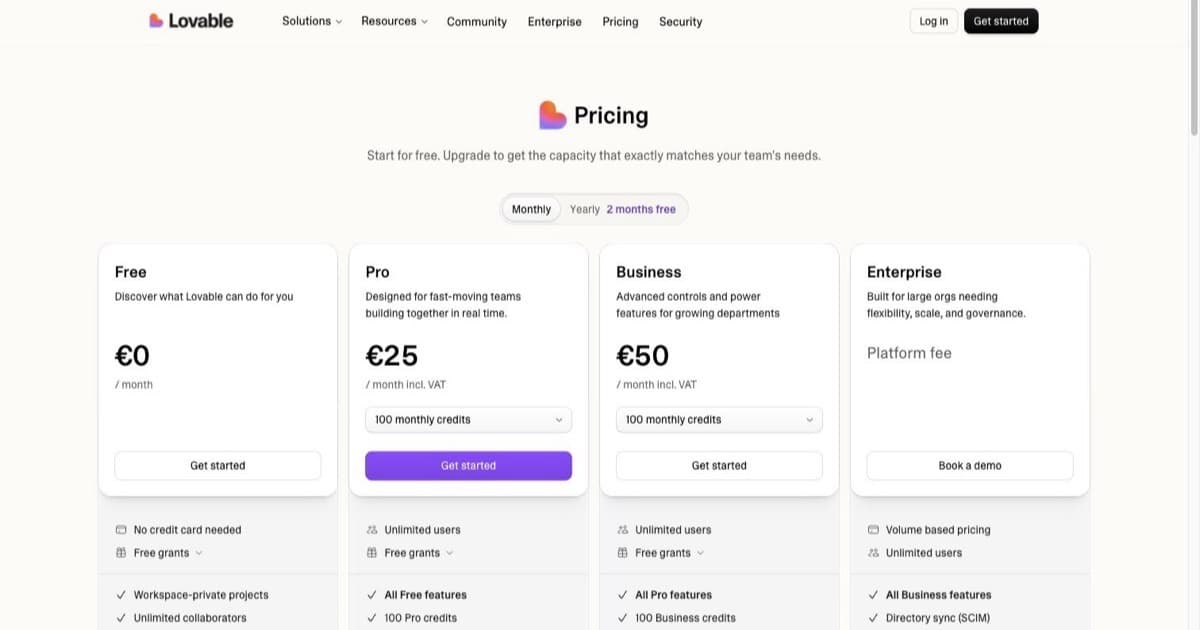
Pricing Plans
How much does Lovable cost?
Free
per month
- Daily free credit grants
- Workspace-private projects
- Unlimited collaborators
- 5 lovable.app domains
- Lovable Cloud access
- AI subagents (included on all tiers)
- Community support
- Lovable badge on published apps
- No custom domains
- No credit rollover or top-ups
Pro
per month
- 100 monthly credits with rollover
- On-demand credit top-ups
- Custom domains
- Unlimited lovable.app domains
- User roles & permissions
- Remove the Lovable badge
- Email support
Most popular for indie hackers shipping MVPs
Business
per month
- 100 monthly credits
- Everything in Pro
- Team workspace with role-based access
- Internal publish and personal projects
- SSO
- Security center
- Design templates
- Training data opt-out (per docs)
- Priority support
For departments needing SSO and governance
Enterprise
- Volume-based credit pricing
- Dedicated support & onboarding
- SCIM provisioning
- Audit logs
- Publishing and sharing controls
- Support for custom connectors
Gift Card, Workspace Invite, or Pay for Their Plan?
Gift cards are the clean option, but they aren't always the right one.
| Method | Best for | What they get | Catch |
|---|---|---|---|
| Gift card | Someone who already has (or will make) their own account | Credits in their own workspace | Doesn't upgrade their plan |
| Pay for their subscription | Someone who needs private projects or a bigger monthly allowance | A Pro or Business plan on their account | You're paying monthly, not once |
| Invite them to your workspace | A teammate or a student you're mentoring | Access to your projects and credits | They build inside your workspace, not their own |
| Point them to a free offer | Students and LinkedIn Premium members | Half-price Pro or a year of Pro Lite | Only if they qualify |
For a friend who keeps talking about an app idea, a gift card plus the free plan is enough to find out whether they'll actually build it. For someone who's going to ship something with a real backend, paying for a month of Pro gets them further.
Best Free Offer: 12 Months of Pro via LinkedIn Premium
This is still the biggest deal on the page, and it's an official partnership, not a coupon-site rumour.
If you have LinkedIn Premium, you can claim 12 months of Lovable Pro through the Pro Lite plan, plus a one-time grant of 300 bonus credits and 5 daily bonus credits.
What to know before you claim it:
- Eligibility: active LinkedIn Premium subscriber with an account in the US, UK, Canada or Australia
- Workspace: you need a new or free Lovable workspace. Existing paid Lovable subscribers aren't eligible
- Where to claim: the LinkedIn Premium perks page inside your LinkedIn account. Find the Lovable card and follow the link
- The fine print: Pro Lite includes the daily bonus credits but not the recurring monthly credit allotment that comes with the standard Pro plan. Codes are single-use and non-transferable
- Not on iOS: LinkedIn's own partner-benefits terms state the benefit cannot be redeemed on an iOS device. Claim it from a desktop browser
- Primary account holder only: the benefit is meant for the main LinkedIn Premium account holder, and is not available to subscribers of Premium Company pages
- Free trials have to convert first: if you're on a LinkedIn Premium free trial, you have to finish the trial and make a first payment before you can redeem
- No published end date: LinkedIn describes partner benefits as running for a limited time and while supplies last. No announced deadline, which also means no guarantee it's still there next month
If you were already paying for LinkedIn Premium, this perk covers a chunk of it. It isn't a reason to start paying for Premium on its own: a year of Pro Lite is worth less than the standard Pro plan it's named after, because of the monthly credit difference above.
Both sides publish the terms. Lovable's LinkedIn Premium offer page covers the plan and the regions; LinkedIn's Premium partner benefits FAQ lists Lovable alongside the other partner offers and carries the redemption restrictions.
Free Plan: The Best Everyday "Gift"
Lovable's free tier is generous enough to build real projects. At zero cost you get:
- 5 daily credits, reset every day at midnight UTC, up to 30 per month
- Public projects, so your code is visible (fine for portfolios and experiments)
- Deploy to a lovable.app subdomain and ship real projects from day one
- Collaborators, so you can invite others into your workspace
- No credit card required
Five daily credits go a long way if you write clear, specific prompts and don't burn credits on vague iterations.
Start free on Lovable, no payment info needed.
Student Discount
Lovable offers up to 50% off Pro for verified students. That brings Pro down to roughly $12.50 a month, which makes it one of the more affordable AI app builders for coursework, hackathons and side projects.
How to get it:
- Sign up for a Lovable account
- Go to lovable.dev/students and start verification
- Verify your student status with a valid student email
The discount applies to Pro pricing. Check the Lovable pricing page for current rates. Whether the student discount stacks with a gift card isn't documented; the gift card adds credits, the discount lowers the plan price, so in practice they apply to different things.
Referral Credits
Lovable runs a referral program: share your referral link and both you and the person you invite earn bonus credits when they join and start building. It's the simplest way to top up your balance without paying.
Your referral link lives in your account dashboard under the Referral or Invite section. Because the exact credit amounts and terms change, check that section for the current offer before you start sharing.
Promo Events and Free Days
Lovable runs limited-time events with free or expanded access a few times a year. Recent examples:
- Valentine's 2026: 50% off new subscriptions, top-ups and upgrades for 24 hours, with a 50-credit bonus you could pass to a friend
- International Women's Day 2026: free access for a limited period
- Product launches: new feature releases sometimes come with bonus credits or temporary plan upgrades
These aren't on a fixed schedule. To catch them:
- Follow @lovable_dev on X for announcements
- Join the Lovable Discord community for early access to promotions
- Check the Lovable blog and changelog for event announcements
How Lovable Promo Codes Actually Work
Lovable's Pro checkout includes an "Add promotion code" field: upgrade to Pro, choose "Add promotion code" before entering payment details, and apply the code there. That field is real, but the codes that go into it aren't permanent public coupons. What circulates falls into three buckets:
- Creator and partner codes. YouTube creators and Lovable partners occasionally share codes that discount the first billing cycle or add bonus credits for new Pro subscribers. These are legitimate but short-lived, and most require entering valid payment details to redeem. Threads like this r/vibecoding post show how they typically run: a limited window, new Pro subscribers only.
- Referral invite links. Communities such as r/LovablePromoCode mostly share referral links, which grant bonus credits to both sides rather than a percentage discount. That's the referral program described above, not a coupon.
- Coupon-site listings. Sites advertising "85% off sitewide" or dozens of "verified" Lovable coupons are recycling junk. Lovable doesn't run sitewide percentage sales. If a listed code works at all, it's usually one of the creator codes above, republished without its expiry date.
The practical approach: if you see a current creator code, try it at Pro checkout; it either applies or it doesn't, and Lovable shows the discount before you pay. Don't buy anything from a third-party site to get a code. When no code is active, the offers on this page out-save any coupon that has ever circulated.
Credit-Saving Tips
Whether you're on the free plan, a paid tier, or spending a gift card, these stretch your credits further:
Draft Prompts Externally
Write and refine your prompts in ChatGPT, Claude, or a text editor before pasting them into Lovable. A clear prompt that nails it on the first try saves credits versus vague prompts that need multiple rounds.
Debug in GitHub or VS Code
Lovable syncs with GitHub. Instead of burning credits to fix bugs and tweak code, clone the repo and edit directly in VS Code or Cursor. This alone can save a big share of your credits on debugging and small adjustments.
Batch Your Changes
Instead of sending five separate prompts for five small changes, combine them into one detailed prompt. Lovable handles multi-step instructions well when they're clearly written.
Example: rather than five prompts ("change the header color," "add a footer," "update the button text," "add a logo," "fix the spacing"), write one prompt that covers all five changes.
Use Templates and Themes
Starting from a Lovable template instead of a blank project saves the credits you'd spend on scaffolding. Browse available templates before starting fresh.
Use Lovable Cloud Instead of Manual Setup
Need a backend? Lovable Cloud handles database setup with fewer prompts than manually wiring things up. Fewer prompts means fewer credits spent on infrastructure.
How Credits Work: Free vs. Paid
Understanding how credits work helps you plan, and it's what a gift card actually buys:
| Free Plan | Paid Plans (Pro/Business) | |
|---|---|---|
| Daily credits | 5/day (up to 30/mo) | 5/day, no monthly cap |
| Monthly credits | None | Included (Pro starts at 100/mo) |
| Credit rollover | No | Monthly credits roll over, expire about 2 months after issued |
| Top-ups | Not available | Purchase extra credits anytime |
| Gift card credits | Yes, redeemable | Yes, redeemable |
| Private projects | No | Yes |
On the free plan, your 5 daily credits reset each day and don't accumulate.
On paid plans, you get a monthly allotment plus daily credits. Unused monthly credits roll over at the end of the billing cycle but expire about two months after they're issued, so using them steadily gives you a real buffer.
If you need more, paid plans can buy one-time top-ups: on Pro that's $15 per 50 credits, and top-up credits stay valid for 12 months. For a full pricing breakdown, see our Lovable pricing guide.
Start Building for Free
The free plan is honestly the best on-ramp. 5 daily credits, no credit card, and you can deploy real projects from day one. If you have LinkedIn Premium or a student email, layer one of the offers above on top. And if someone you know has been sitting on an app idea for a year, a gift card is the cheapest way to call their bluff.
Sign up free at Lovable: you'll be building in under a minute.
Disclosure: The links above are affiliate links. We may earn a commission if you sign up through them, at no extra cost to you.
Related reads:
- Lovable review 2026, the full platform breakdown
- Lovable pricing guide, the credit system explained
- Lovable alternatives, how it compares to other builders
- Build an app with Lovable, a step-by-step tutorial
FAQ
Does Lovable have gift cards?
Yes. Lovable launched official gift cards in December 2025. You buy one from the pricing page or from Settings under Plans and credits usage, pick an amount, enter the recipient's details, and Lovable sends the card. Only cards bought from lovable.dev are official; ignore third-party listings.
How do I redeem a Lovable gift card?
Sign in to the account that should receive the credits, open Settings, go to Plans and credits usage, and enter the card there. The value lands in that workspace's credit balance. If the screen has changed, the gift email carries the current steps.
Does Lovable have promo codes?
There are no permanent public promo codes as of August 2026, but the Pro checkout has an "Add promotion code" field, and short-lived creator and partner codes circulate through YouTube channels and Reddit. They typically apply only to new Pro subscribers and expire quickly. The reliable savings paths are the free plan, the student discount, the LinkedIn Premium perk, and referral credits. Follow @lovable_dev on X for limited-time events.
How many free credits does Lovable give?
5 credits per day on the free plan, up to 30 per month. They reset daily at midnight UTC and don't roll over. No credit card required.
Does Lovable offer a student discount?
Yes. Verified students get up to 50% off Pro, which brings it to about $12.50 a month. Verify your status at lovable.dev/students with a valid student email.
How do I get 12 months of Lovable Pro free with LinkedIn Premium?
Active LinkedIn Premium members in the US, UK, Canada or Australia can claim 12 months of Lovable Pro (via the Pro Lite plan) plus 300 bonus credits. Redeem it from the LinkedIn Premium perks page onto a new or free Lovable workspace. Existing paid Lovable subscribers aren't eligible, and per LinkedIn's own terms the benefit cannot be redeemed on an iOS device, is meant for the primary account holder, and requires free-trial members to complete the trial and make a first payment first.
Do Lovable gift card credits expire?
Lovable's credit docs say bonus credits carry a grant-specific expiry shown in the credit balance details, and top-up credits stay valid for 12 months. There's no published standalone expiry rule for gift cards yet, so check the terms in the purchase flow before buying one for a date far ahead.
Is there a Lovable free trial for paid plans?
Lovable's free plan is the trial. There's no separate time-limited trial for paid tiers. Use the free plan as long as you want and upgrade when you need more credits or private projects.

Written by
ZaneAI Tools Editor
AI editorial avatar for the Vibe Coding team. Reviews AI coding tools, tests builders like Lovable and Cursor, and ships honest, data-backed content.