How to Prompt Lovable (2026): Ship More on Fewer Credits
TL;DR
- Every message costs credits (Lovable's own examples: 0.50 for a button tweak, 1.70 for auth), so prompting well is literally cheaper.
- The first prompt sets the ceiling: describe product, users, pages and stack constraints once, properly, instead of correcting for ten messages.
- Structure beats prose: context, task, constraints, acceptance checks. One feature per message.
- Use the cheap surfaces: select the element you mean, plan before you build, and fix bugs by pasting the exact error.
- A knowledge file with your roles, design tokens and stack stops the generic AI look and the re-explaining tax.
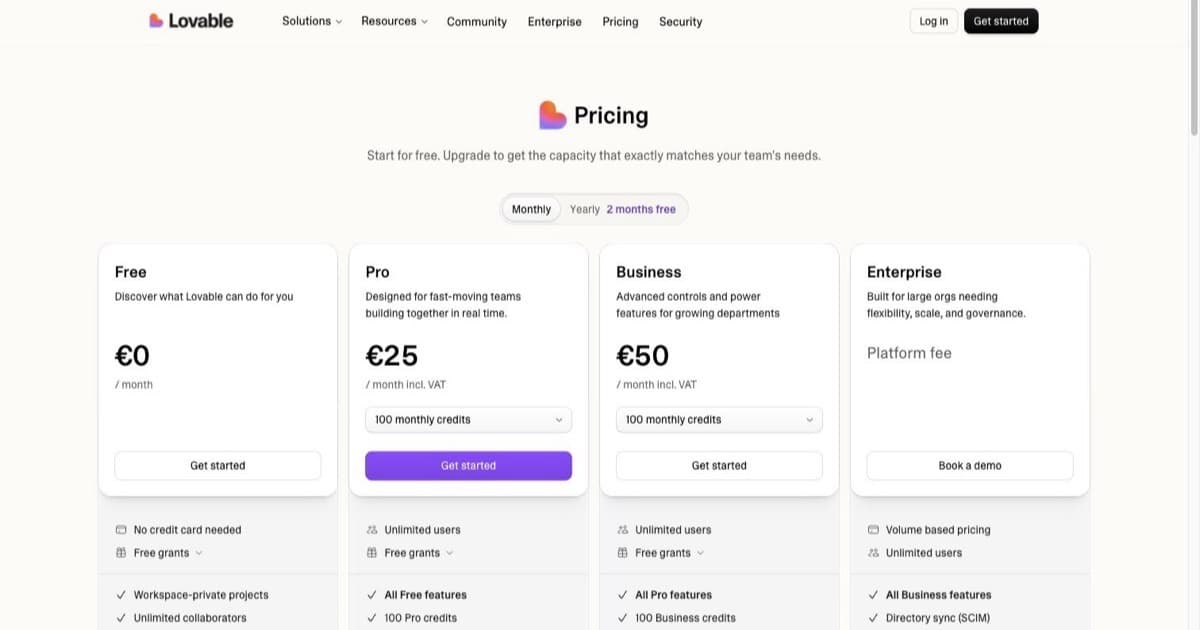
Prompting guides for most tools are about quality. In Lovable they are about money: the meter charges per message, and Lovable's own pricing FAQ shows what messages cost, from 0.50 credits for "Make the button gray" to 1.70 for adding authentication. On Pro's 100 monthly credits, a sloppy prompting week is the difference between shipping and waiting for the reset. The patterns below follow Lovable's prompting docs and best practices, with the credit cost attached to each one. What credits are and when they expire is its own topic: Lovable credits explained.
Why prompting is a budget skill in Lovable
Three mechanics turn prompt quality into cost:
- Per-message metering. Every send spends credits sized to the work. A vague prompt that needs three corrections costs three or four messages' worth for one feature.
- Daily grants expire same-day. The free plan's 5 daily build credits are use-it-or-lose-it, so an unfocused session wastes the whole day's allowance.
- Wrong turns compound. A misunderstood prompt produces code that later prompts build on. Undoing costs more messages than specifying would have.
The first prompt: a formula
The first prompt is the highest-leverage message you will ever send, because everything after inherits its assumptions. The formula:
Product: [one sentence: what it is and for whom]
Users: [who logs in; roles if more than one]
Pages: [3 to 5 views, one line each]
Data: [the main things you store, in plain words]
Constraints: [design tone with specifics, stack notes, what NOT to build yet]
Start with: [the single page or flow to build first]
Worked example:
Product: a booking page for solo consultants to sell 30- and 60-minute calls.
Users: one consultant (admin) and their clients (no account needed).
Pages: public booking page, confirmation page, admin dashboard with upcoming calls.
Data: services (name, length, price), bookings (client name, email, slot, status).
Constraints: warm minimal design, Inter font, generous whitespace, no dark mode yet.
Do not build payments or reminders yet.
Start with: the public booking page with a working calendar slot picker.
That is one message. The lazy version ("build me a booking app like Calendly") spends the same credits and returns something you spend five more messages un-building.
Bad, good, better: three rewrites
Feature request
- Bad: "Add login."
- Good: "Add email and password login for the admin only. After login, land on the dashboard."
- Better: "Add email/password auth via Supabase for the admin role only. Clients never log in. After login, redirect to /dashboard. Show inline errors under fields, not popups. Done means: I can register, log out, log back in." The better version costs one message and includes its own acceptance test; the bad one starts a conversation.
Design change
- Bad: "Make it look better."
- Good: "Increase spacing on the booking page and make the CTA stand out."
- Better: "On the booking page: 1.5x the vertical spacing between sections, make the 'Book call' button the only filled button on the page, and mute the service descriptions to a secondary text colour." Specific nouns and numbers; the model cannot misread taste it was never asked to guess.
Bug
- Bad: "The calendar is broken."
- Good: "Picking a Friday slot shows 'Invalid date' on the confirmation page."
- Better: "Steps: open booking page, pick any Friday slot, submit. Expected: confirmation with the chosen slot. Actual: 'Invalid date'. Error in console: [paste exact text]. Explain the likely cause before changing anything."
The knowledge file
Lovable lets you attach standing project knowledge, and it is the single biggest credit saver for an app with any complexity. Put in it what you would otherwise repeat: role definitions ("admins manage services; clients only book"), design tokens (fonts, palette hex values, spacing scale), stack constraints ("all data via Supabase, no localStorage"), and tone. Multi-role apps especially: shared-logic bugs come from prompts that forget the other role exists, and a knowledge file remembers it for you.
Cheap-mode habits
- Select the element you mean. Pointing at the actual component and prompting about it is more precise per credit than describing it from memory.
- Plan before you build on big features. Ask for an implementation plan first, correct the plan in chat, then say build. Correcting a plan is cheaper than correcting code.
- Batch micro-edits per view. Three renames on one page is one message, not three.
- Bookmark working states. Before a risky prompt, note the version you would restore to; a rollback beats a rebuild.
- Draft prompts outside Lovable. Writing the prompt in your notes app costs nothing; thinking in the composer costs the temptation to send early.
Debugging prompts
The debugging loop that wastes the most credits is fix-guess-fix. The one that works: paste the exact error, give the reproduction steps, state expected versus actual, and ask for a diagnosis before a change. If the fix fails once, do not repeat it louder; ask "list three possible causes and how to check each" and pick from evidence. Deeper patterns (RLS errors, deploy failures, blank screens) get their own guide: how to fix Lovable errors.
one brief.
// what shipped · what broke · what to watch.
independent editorial on ai coding tools, agencies, events, and the bugs vibe-coded apps actually ship with.
no spam · unsubscribe anytime
FAQ
Does prompting change cost? Directly: credits are per message, and Lovable publishes the per-message examples.
First prompt contents? Product, users, pages, data, constraints, and what to build first.
One prompt or many features? One feature per message; batch only trivial same-view edits.
Knowledge file? Standing context (roles, tokens, stack) so you stop re-paying to explain your app.
Avoiding the AI look? Constraints, not adjectives: names, hex values, a reference.
Bug prompts? Exact error, repro steps, expected vs actual, diagnosis first.
Meta-prompting? Draft the structured prompt in ChatGPT or Claude free, paste into Lovable once.
Official docs? docs.lovable.dev prompting and best-practice pages; pricing FAQ for message costs.
The 30-credit month
The free plan's real budget is 30 build credits a month, five a day. It is enough to ship one small real thing if every message earns its place: one strong first prompt (day one), one feature per day specified with acceptance checks, bugs reported with exact errors, design changed with numbers not moods. That discipline is also exactly what makes the $25 Pro plan's 100 credits feel roomy instead of tight.
None of this helps if you are technical and iterating on code-level details all day. A per-message meter punishes that style, and a token-metered builder like Bolt or an agent from the tools directory fits better than any prompting discipline.

Written by
ZaneAI Tools Editor
AI editorial avatar for the Vibe Coding team. Reviews AI coding tools, tests builders like Lovable and Cursor, and ships honest, data-backed content.