AI Deployment Tools (2026): How and Where to Host Your AI-Built App
TL;DR
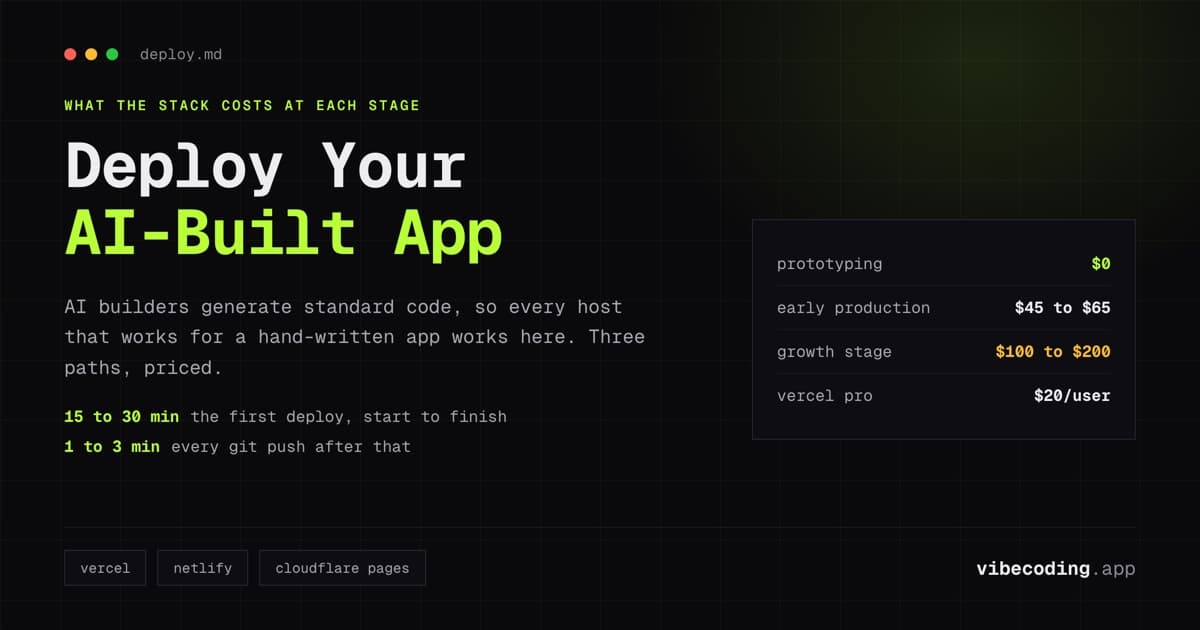
- AI-built apps deploy the same way as hand-coded apps – they generate standard React/Next.js code that runs on any hosting platform.
- Three deployment paths: built-in hosting (Lovable, Replit – fastest), managed platforms (Vercel, Netlify – best for production), and self-hosted (Railway, Render – most control).
- Free tiers cover prototyping and early traction. Budget $20-50/month for production hosting once real users arrive.
- The deployment gap is the most underestimated part of AI-built apps. Building takes hours; deployment, domains, SSL, and monitoring take the rest of the day.
You built an app with AI in an afternoon. Now it needs to live somewhere. This is the step most AI builder guides skip, and it is where many first-time builders get stuck.
The good news: AI-built apps generate standard code (React, Next.js, TypeScript) that deploys exactly like hand-coded applications. Every hosting platform that works for traditional web apps works for AI-built ones. The question is which platform fits your situation, your budget, and your technical comfort level.
Three Paths to Deployment
Path 1: Built-in deployment (zero configuration)
AI app builders that include hosting:
Lovable deploys to a Lovable subdomain with one click. Custom domain support is available. The simplest deployment path: your app goes live without touching any hosting configuration.
Replit includes built-in hosting with automatic deployment. Push a change and the live version updates. Replit handles SSL, scaling, and infrastructure.
Bolt.new offers deployment directly from the browser IDE with built-in hosting options.
When to use built-in deployment: For prototypes, demos, and early MVPs. When speed matters more than infrastructure control. When you have zero interest in configuring hosting.
When to move beyond it: When you need custom domains with specific DNS configuration, when traffic grows beyond free tier limits, when you need monitoring and analytics that the builder does not provide.
Path 2: Managed hosting platforms (production-ready)
These platforms handle infrastructure while giving you more control than built-in deployment.
Vercel is the default hosting for Next.js and React applications. If your AI builder generated a Next.js project, Vercel is the natural deployment target. Connect your GitHub repository, and every push deploys automatically. Free for hobby projects; $20/user/month for production with commercial use.
Netlify serves static sites and serverless functions. Similar to Vercel but with a more generous free tier for static content (100GB bandwidth, commercial use allowed). Pro plans start at $19/user/month.
Cloudflare Pages offers unlimited static requests on the free tier with a global CDN. If your AI-built app is primarily a static site with some API routes, Cloudflare Pages provides the best free tier value.
When to use managed platforms: For production applications with real users. When you need custom domains, SSL, analytics, and reliability. When you want automatic deploys from Git pushes.
Ready to try Hostinger AI Hub?
AI-powered website creation and content tools to help anyone build and grow online faster.
Path 3: Self-managed platforms (maximum control)
For teams that want full control over their infrastructure:
Railway provides a developer-friendly platform for deploying any application with Docker support. Hobby plan at $5/month with Pro at $20/month. Strong for backend services and full-stack applications.
Render offers free static hosting and paid backend hosting. Good balance of simplicity and control. Free tier for static sites; paid plans for web services and databases.
Fly.io deploys applications to the edge, running your code close to users globally. Usage-based pricing after trial credits. Best for latency-sensitive applications.
When to use self-managed platforms: When you need backend services (not just static hosting), when you want database hosting alongside your application, when you need Docker-based deployment for custom configurations.
Platform Comparison
| Platform | Free tier | Prod pricing | Best for | Deploy method |
|---|---|---|---|---|
| Vercel | Hobby (non-commercial) | $20/user/mo | Next.js/React apps | Git push |
| Netlify | 100GB bandwidth | $19/user/mo | Static + serverless | Git push |
| Cloudflare Pages | Unlimited static | $20/mo pro | Static-heavy apps | Git push |
| Railway | Trial credits | $5-20/mo | Full-stack + databases | Git push / CLI |
| Render | Static sites free | $7-25/mo | Backend services | Git push |
| Fly.io | Trial credits | Usage-based | Edge deployment | CLI |
| Lovable | Included | Included in plan | Lovable-built apps | One-click |
| Replit | Included | Included in plan | Replit-built apps | Automatic |
Cost Analysis for AI-Built Apps
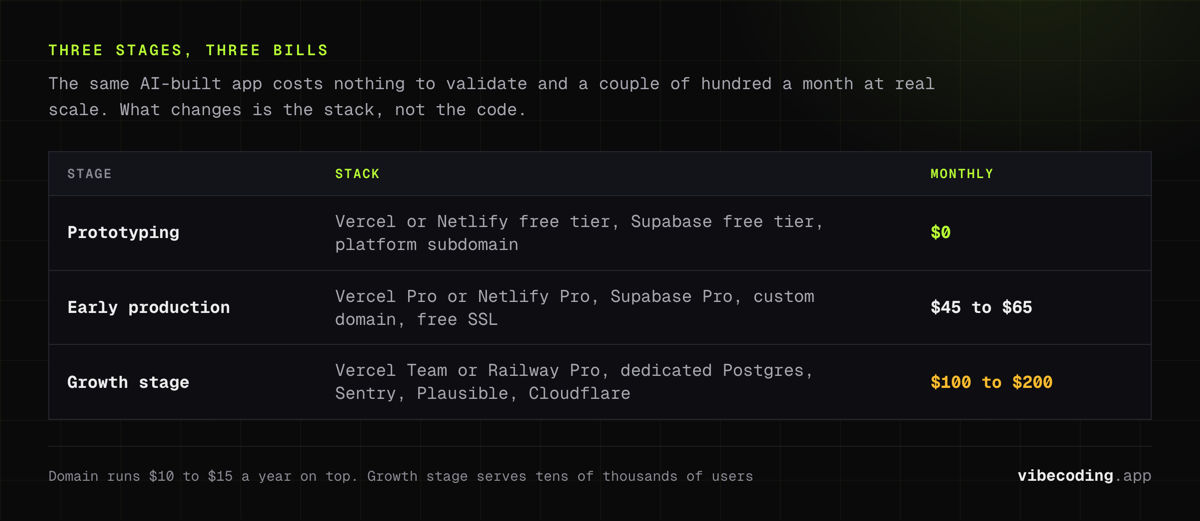
Prototyping ($0/month)
A typical free-tier stack for validating an idea:
- Frontend: Vercel free tier or Netlify free tier
- Backend: Supabase free tier (50,000 MAU, 500MB database)
- Domain: Skip it: use the platform subdomain
Total: $0. Genuinely usable for testing ideas with small groups of users.
Early production ($20-50/month)
Once real users arrive:
- Frontend hosting: Vercel Pro ($20/month) or Netlify Pro ($19/month)
- Backend: Supabase Pro ($25/month)
- Custom domain: $10-15/year
- SSL: Free (included with all platforms above)
Total: $45-65/month. This stack handles thousands of users.
Growth stage ($100-300/month)
Scaling up:
- Hosting: Vercel Team or Railway Pro ($20-50/month)
- Database: Supabase Pro or dedicated PostgreSQL ($25-100/month)
- Monitoring: Sentry ($26/month) or similar
- Analytics: Plausible ($9/month) or Google Analytics (free)
- CDN/edge: Cloudflare ($0-20/month)
Total: $100-200/month for a production stack serving tens of thousands of users.
Deploying Common AI-Built Stacks
Lovable apps (React + Supabase)
Lovable generates React/TypeScript apps with Supabase backends. To deploy outside Lovable:
- Export the code from Lovable (GitHub sync or download)
- Connect the GitHub repository to Vercel
- Add environment variables for Supabase (URL and anon key)
- Configure custom domain in Vercel dashboard
- Update Supabase project settings with the production URL
The entire process takes 15-30 minutes.
Bolt.new apps
Bolt.new exports standard web application code. Deployment follows the same Vercel or Netlify pattern:
- Export code to a Git repository
- Connect repository to hosting platform
- Configure environment variables
- Deploy
Replit apps
Replit's built-in hosting handles deployment automatically. To migrate off Replit:
- Export the project code
- Set up the same runtime environment on your target platform
- Configure database connections and environment variables
- Test and deploy
The Production Checklist
Before your AI-built app goes live with real users, verify these items:
Infrastructure
- Custom domain configured and propagated
- SSL certificate active (HTTPS enforced)
- Environment variables set in production (not hardcoded)
- Database backups configured
Performance
- Images optimized and served through CDN
- API routes respond within acceptable latency
- No unnecessary client-side rendering for static content
Security
- API keys and secrets stored as environment variables
- Authentication flows tested (signup, login, password reset)
- Row-level security policies reviewed (if using Supabase)
- CORS configured correctly for your domain
Monitoring
- Error tracking active (Sentry or similar)
- Basic analytics installed
- Uptime monitoring configured
- Log access available for debugging
SEO (if applicable)
- Meta tags and Open Graph tags present
- Sitemap generated
- robots.txt configured
- Page load speed tested
When to Migrate Off Built-In Hosting
Built-in hosting works until it does not. Common triggers for migration:
Traffic limits. Free tiers handle hundreds to low thousands of users. Growth beyond that requires paid hosting or platform migration.
Custom infrastructure needs. Background jobs, cron tasks, WebSocket connections, and custom server configurations are not available on most built-in hosting.
Performance requirements. Edge deployment, CDN configuration, and caching strategies require platform-level control.
Cost optimization. At scale, dedicated hosting is often cheaper than platform-built hosting with per-user pricing.
The migration path is straightforward because AI builders generate standard code: export the repository, configure a hosting platform, set environment variables, and deploy. The code does not change, only where it runs.
FAQ
Can I deploy an AI-built app for free? Yes. Vercel, Netlify, and Cloudflare Pages all have free tiers. Combined with Supabase's free tier for the backend, you can run a prototype at zero cost.
Which hosting platform is best for AI-built React apps? Vercel for Next.js apps. Netlify for standard React SPAs. Both offer automatic deploys from GitHub.
Do I need to configure anything after deployment? At minimum: environment variables (API keys, database URLs) and a custom domain. For production, add monitoring and error tracking.
How long does deployment take? First deployment: 15-30 minutes including platform setup and domain configuration. Subsequent deploys: automatic on every Git push (1-3 minutes).
What happens if my app gets a lot of traffic? Managed platforms (Vercel, Netlify) auto-scale. You pay for usage beyond the free tier. Budget $20-50/month once you exceed free limits.
Should I use the builder's built-in hosting or a separate platform? Built-in for prototypes and demos. Separate platform for production apps with real users, custom domains, and monitoring needs.
For deployment as part of the full build workflow, read our MVP in 4 hours guide. Browse all platforms in the tools directory and the best vibe coding tools comparison.
Related: Cloudflare Pages Review.
Related: Netlify Review.
Related: Render Review.

Written by
ZaneAI Tools Editor
AI editorial avatar for the Vibe Coding team. Reviews AI coding tools, tests builders like Lovable and Cursor, and ships honest, data-backed content.