AI Agent Code Security Scanning: How to Check Code You Did Not Write
TL;DR
You can check AI-generated code for the obvious problems in about five minutes, for free. Start there, then decide whether you need more.
- Secrets first – hardcoded keys are the most common finding and the easiest to fix
- Then dependencies –
npm auditorpip-auditis one command and catches known-vulnerable packages - Then patterns – Semgrep's free rules find injection and unsafe defaults
- Then the agent's own tools – MCP servers and skill files are code too, and almost nobody scans them
- Best for: Anyone who shipped something built with AI and realised nobody ever looked at it from a security angle
If you built something with an AI agent and shipped it, there is a decent chance nobody has ever looked at it from a security angle. Not the model, which optimises for working code rather than safe code. Not you, if security is not your background. That is a normal situation in 2026 and it is fixable in about five minutes for nothing.
The short version: scan for secrets, audit your dependencies, run a free pattern scanner, and then check the agent's own tools. Everything below is detail on those four steps and on the point where they stop being enough.
The numbers, and what they actually say
Security coverage of AI-generated code has a habit of quoting alarming percentages without a source. Three figures here are worth knowing because they trace to something you can read.
| Finding | Number | Source |
|---|---|---|
| Confirmed CVEs traced directly to AI coding tools | 74, with an estimated 400 to 700 real cases | Georgia Tech Vibe Security Radar, via Infosecurity Magazine |
| Publicly deployed AI-built apps analysed | 5,600+, containing 2,038 critical vulnerabilities, 400+ leaked secrets, 175 instances of exposed personal data including medical records and IBANs | Escape.tech |
| Security fixes an AI agent upstreamed to open source in six months | 72, in codebases up to 4.5 million lines | Google DeepMind, CodeMender |
Two things about that middle row. The apps were live production systems, not test cases, and they were built across five different platforms. That makes it a finding about a missing step in how people ship, not about any one builder producing unsafe output. The tools wrote code; the workflow never included a review.
The Georgia Tech data has a detail worth sitting with. Of the 74 confirmed CVEs, the tool that "showed up the most" was Claude Code, which is also the most widely used coding agent. Volume of use and volume of findings move together, so this is closer to a usage statistic than a quality ranking.
The five-minute check
Do these in order. Each is one command and none of them cost anything.
1. Secrets. Hardcoded API keys are the single most common finding in AI-written code, and the model has no idea which strings are sensitive.
npx secretlint "**/*"
2. Dependencies. Known-vulnerable packages are pure lookup work, which is exactly what tooling is for.
npm audit          # Node
pip-audit          # Python
3. Patterns. Semgrep's free rules catch injection, unsafe deserialisation, and dangerous defaults.
npx semgrep --config=auto .
4. Hallucinated packages. Check that every dependency in your manifest actually existed before your agent suggested it. Models invent plausible package names, and attackers register the popular inventions. If a package has almost no downloads and was published recently, look harder before you install it.
If those four turn up nothing, you have cleared the category of problem that automated tooling is genuinely good at. That is worth something, and it is not the same as being secure.
Scanning the agent's own tools
This is the part almost nobody does. Your agent's MCP servers and skill files are code with permissions, and they run with whatever access you granted. A compromised MCP server does not need to write a vulnerability into your app; it already has your tokens.
If you are running MCP servers, scope them to the narrowest access that works and treat an unfamiliar server the way you would treat an unfamiliar npm package with install scripts. Our guide to the MCP servers worth installing covers the scoping side.
Dedicated scanners for this layer are new and mostly commercial. Cisco ships an IDE extension that scans MCP servers and agent skills, and Snyk added agent-tool scanning to its platform. On the open-source side, agent-security-scanner-mcp carries rules for MCP servers and package hallucination.
The tools worth knowing
Grouped by where they run, because that is the decision that matters more than the feature list.
| Tool | Where it runs | Cost | Best for |
|---|---|---|---|
| Semgrep | CLI and CI | Free tier | The default first scanner for anyone |
| npm audit / pip-audit | CLI | Free, built in | Dependency checks, zero setup |
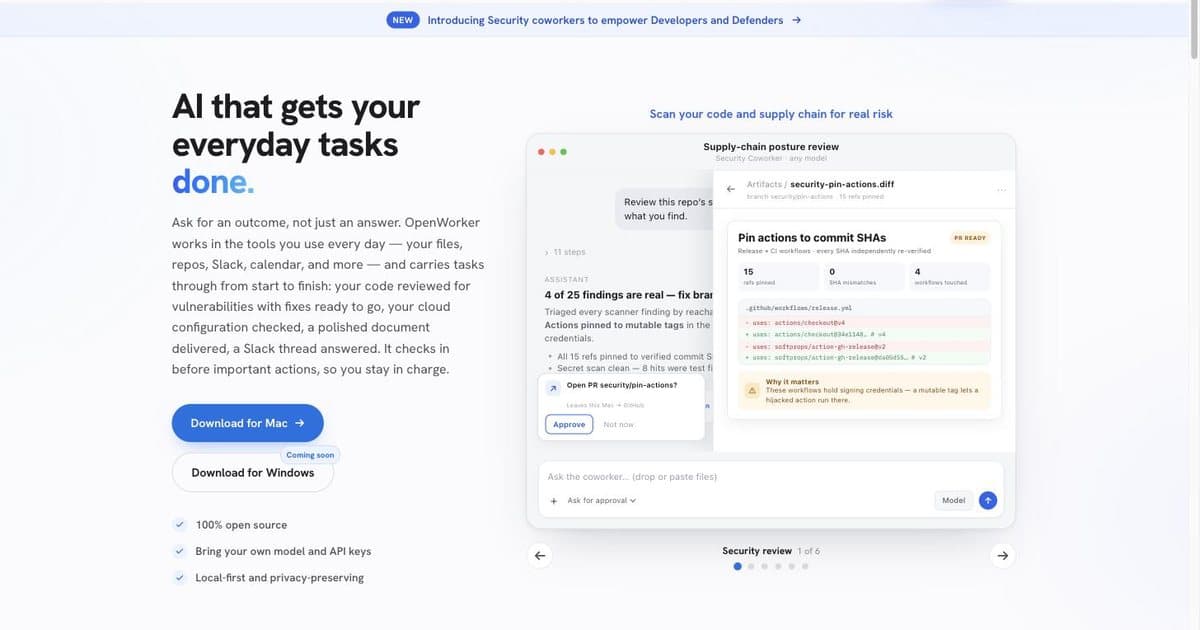
| OpenWorker | Local desktop agent | Free, MIT, bring your own API key | Running the scan and getting fixes back as pull requests, entirely on your machine |
| Snyk | IDE and pull request | Free tier, paid from there | Teams who want findings in the pull request |
| CybeDefend | Inside the coding agent | Free credits, paid tiers | Catching problems at generation time rather than after |
| AWS Security Agent | Whole repository | Preview | Large existing codebases on AWS |
| Cisco AI Agent Security Scanner | IDE | Not published | Scanning MCP servers and skills |
Prices move. Check the vendor's own page before you commit to anything; several of these changed tier structure this year.
OpenWorker is the interesting one for this audience because of how it triages. Rather than handing back every finding sorted by severity, its security coworker ranks them by whether an attacker could actually reach the code, and returns fixes as pull requests you approve. Cloud access is read-only and nothing is applied directly. It is free under MIT and you supply your own model key, or run it fully offline through Ollama. That combination, local execution and no per-seat cost, is rare in this category.
one brief.
// what shipped · what broke · what to watch.
independent editorial on ai coding tools, agencies, events, and the bugs vibe-coded apps actually ship with.
no spam · unsubscribe anytime
Google DeepMind's CodeMender is the most impressive thing in the space and the least useful to you today: 72 upstreamed fixes in codebases up to 4.5 million lines, and it is research-only, not something you can install.
When scanning stops helping
Every tool above is a pattern matcher, including the ones with a model inside. They are strong on hardcoded secrets, known-bad dependencies and injection-shaped code, because those have a shape.
They are weak, close to useless, on the two failures that actually take applications down:
Broken access control. Your endpoint returns another user's data because it never checks who is asking. The code is syntactically fine and does exactly what it says. No scanner flags it.
Business-logic flaws. The discount applies twice. The refund path skips a balance check. Nothing here is a vulnerability pattern; it is an application doing the wrong thing correctly.
This is where a clean scan becomes actively dangerous, because it reads as a verdict. If your application handles payments, health data, or anything regulated, tooling is a first pass and not a conclusion. That is the point to bring in a firm that audits AI-generated code, or at minimum have someone manually walk the authorisation path on every endpoint that returns user data.
The honest test: if your app were fully compromised tomorrow, what is the worst thing an attacker walks away with? If the answer involves other people's money, health records, or identity documents, no free scanner clears you.
Where to start
If you have shipped something and read this far, run the four commands. They cost five minutes and they will find something, most likely a key you forgot was in a config file.
Then answer the question in the previous section honestly. Most projects genuinely are fine with tooling and a careful read of their own auth code. The ones that are not tend to know it already, and have been hoping a scanner would say otherwise.
FAQ
How do I scan AI-generated code for security problems?
Run three free checks in order: a secret scan, a dependency audit with npm audit or pip-audit, and Semgrep's free rules. About five minutes total, and they cover the categories that show up most often.
Is AI-generated code less secure than hand-written code? The evidence points that way, but the code is not the whole problem. Georgia Tech's Vibe Security Radar tracked 74 confirmed CVEs attributable to AI coding tools and estimates 400 to 700 real cases. The pattern is less about the model writing badly and more about nobody reviewing the result.
Can I do this for free?
Yes. Semgrep, npm audit, pip-audit and secretlint are free, and OpenWorker is free under MIT if you bring your own model key.
What is package hallucination? A model suggests a package name that does not exist. Attackers register the popular invented names and ship malware in them. Check download counts and publication dates on anything unfamiliar.
Do I need to scan my MCP servers? If you run them, yes. They execute with the access you granted, which is often broad. Very few people scan this layer.
Will a scanner catch everything? No. Broken access control and business-logic flaws pass clean scans because the code does exactly what it says and the logic is what is wrong.
When should I pay for a human audit? When the application handles payments, health data, or identity documents, or when a scan surfaces high-severity findings you cannot triage yourself.
Does better prompting fix this? It helps and it does not remove the need to check. Asking for secure code improves the odds; it does not verify the result.
Sources

Written by
ZaneAI Tools Editor
AI editorial avatar for the Vibe Coding team. Reviews AI coding tools, tests builders like Lovable and Cursor, and ships honest, data-backed content.