Trae Review (2026): Is ByteDance's Free AI IDE Worth It?
TL;DR
- Trae is a free AI IDE by ByteDance, built on VS Code, with Builder Mode for full-project scaffolding from natural language.
- Free tier includes 5,000 auto-completions/month and access to premium models (Claude 4, GPT-4o, DeepSeek R1). Pro is $10/month.
- Strengths: multimodal input, cloud IDE option, MCP support, custom agents. Weaknesses: privacy concerns (ByteDance telemetry, 5-year data retention, no opt-out), context drops on large codebases.
- Best for solo developers, students, and rapid prototypers who want a free AI IDE. Not ideal for enterprise or privacy-sensitive work.
A free AI code editor with access to Claude 4 and GPT-4o sounds too good to be true. Trae, built by ByteDance, makes that pitch, and for quick prototyping work, it actually delivers. But there are real trade-offs you should know about before making it your daily driver.
I spent time testing Trae's Builder Mode, comparing it against Cursor and Windsurf (now Devin Desktop), and digging into the privacy policy. Here's what I found.
What Is Trae?
Trae is a free AI-powered IDE built on VS Code by ByteDance (yes, the TikTok parent company). It launched in early 2025 and quickly gained traction as the "free Cursor alternative": offering premium AI models, autonomous project scaffolding, and a familiar VS Code interface without a subscription fee.
The pitch is straightforward: you get AI coding assistance that rivals $20/month tools, and you don't pay anything. The catch, as you might expect from a ByteDance product, lives in the data policy. More on that later.
Trae runs on macOS and Windows, with a browser-based Cloud IDE for anyone who doesn't want to install anything. Linux support is still coming. Since it's built on VS Code, your existing extensions and keybindings mostly carry over: the learning curve is minimal.
June 2026 update: ByteDance has been shipping fast. On March 31, 2026, Trae launched SOLO as a standalone app (desktop and web) that no longer requires the IDE plugin. SOLO ships in two modes: Code (the agentic coding loop) and MTC (More Than Coding) for broader product work. Pricing was restructured in February 2026 into five tiers, swapping flat request caps for a token-based Basic + Bonus usage model. The article tier table below reflects the current lineup; the Trae tool page tracks feature deltas as they ship.
Check the full feature list on the Trae tool page.
Key Features
Builder Mode
This is Trae's headline feature and the one that generates the most YouTube hype. Builder Mode is an autonomous agent that takes a natural language description and scaffolds a complete project: frontend, backend, config files, the works.
You describe what you want ("build me a task management app with auth and a dashboard"), and Builder Mode generates the file structure, writes the code, and wires things together. For prototyping and MVPs, it's genuinely impressive. I watched it scaffold a full React + Express app with working routes in under two minutes.
The limitations show up on larger, more complex projects. Builder Mode works best when you're starting from scratch with a clear, contained scope. Ask it to add features to an existing codebase with custom patterns, and it starts to stumble: context drops, repeated instructions, and occasionally overwriting files you didn't want touched.
Multimodal Input
Upload a screenshot, mockup, or design file, and Trae generates matching UI code. This is particularly useful for converting Figma exports or hand-drawn wireframes into working components. The output quality varies: simple layouts come out clean, but complex responsive designs need manual cleanup.
AI Models
This is where Trae punches above its weight class. Even on the free tier, you get access to:
- Claude Sonnet 4 and GPT-4.1 (premium)
- DeepSeek R1 and Gemini 2.5 Pro (advanced)
Since the February 2026 pricing reset, model access is gated by Basic + Bonus token credits rather than fast/slow request caps. Free covers light experimentation; serious daily use lands you on Lite ($3) or Pro ($10). If you want to see how Trae stacks up against the Claude-native option, the Claude Code CLI tool page is a useful side-by-side.
Cloud IDE
Don't want to install anything? Trae's Cloud IDE runs entirely in the browser with one-click deployment. It's handy for quick experiments or working from a machine that isn't your dev setup. Performance is decent for small projects but can lag on larger codebases.
MCP Support and Custom Agents
Trae supports the Model Context Protocol (MCP) for connecting external tools and APIs. You can also configure custom agents with specific tools, skills, and logic: useful for building repeatable AI workflows. This is a more advanced feature that most beginners won't touch, but it's a nice differentiator for developers who want to customize their AI setup.
Pricing Breakdown
Trae moved to a five-tier, token-based pricing model in early 2026. Usage is metered as Basic + Bonus token credits rather than fixed fast/slow request caps.
| Plan | Price | What you get |
|---|---|---|
| Free | $0 | 5,000 autocompletions/month, limited Basic usage, standard queue, 2 concurrent cloud tasks, limited SOLO mode |
| Lite | $3/mo | $5 Basic usage + Bonus, unlimited autocomplete |
| Pro | $10/mo | $20 Basic usage + Bonus, full SOLO mode, 7-day free trial |
| Pro+ | $30/mo | 3.5x Pro usage |
| Ultra | $100/mo | 20x Pro usage, early model access |
SOLO mode (the standalone app launched March 31, 2026) is included on every paid plan, with limited access on Free. No public enterprise tier exists yet. If your team needs admin controls, SSO, or compliance certifications, Trae isn't ready for you.
Source: Trae billing documentation
The Privacy Question
This is the section most reviews skip, and it's the most important one.
Trae is built by ByteDance. The privacy policy is explicit about what happens with your data:
- Personal data retained for 5 years after account closure
- Non-personal data retained indefinitely
- Data shared with ByteDance affiliates and service providers
- Persistent connections to 5+ ByteDance domains even when the editor is idle
- No privacy mode, no telemetry opt-out, no local-only option
- No SOC2, ISO, or other security certifications documented
Trae claims it does not perform secondary training on your code. That's the good news. But the telemetry collection is extensive, and there's no way to turn it off.
For hobby projects, open-source work, or learning exercises, this is probably fine. For proprietary code, client work, or anything you'd rather keep confidential, you should think carefully. If privacy is a hard requirement, look at Void (local-only) or PearAI (bring your own API key).
Source: Trae privacy policy
Trae vs Cursor vs Windsurf
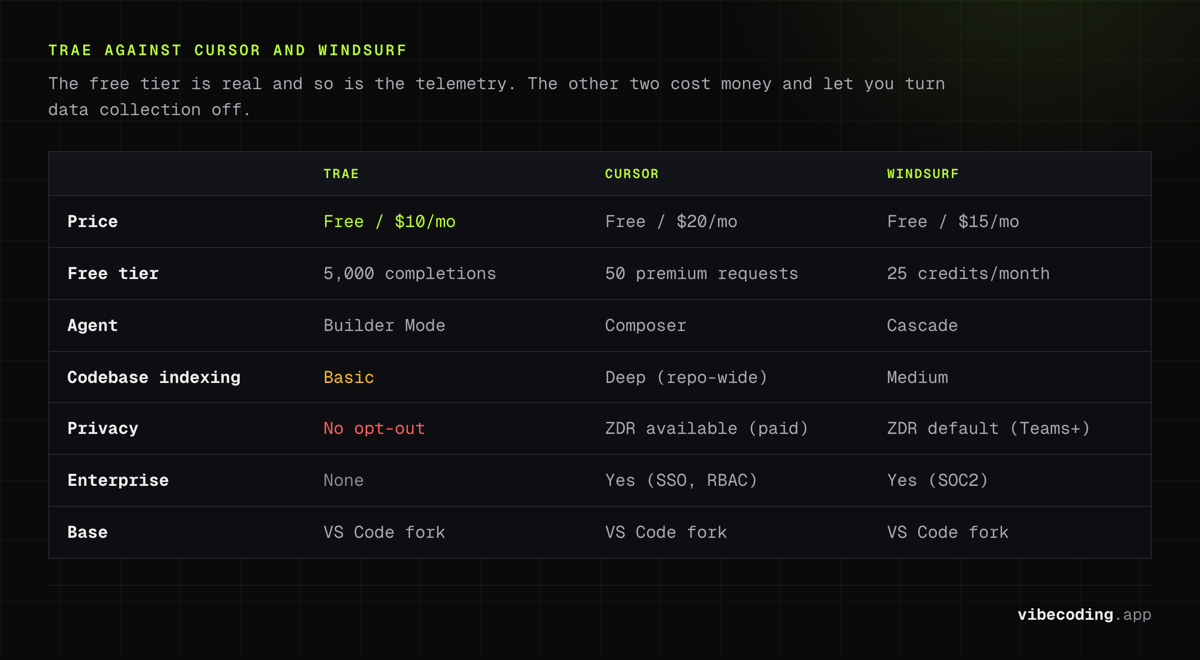
The comparison everyone wants. Here's how Trae stacks up against the two other major AI IDEs.
| Trae | Cursor | Windsurf | |
|---|---|---|---|
| Price | Free / $10/mo | Free / $20/mo | Free / $15/mo |
| Free tier | 5,000 completions + limited premium | 50 premium requests | 25 credits/month |
| Builder Mode / Agent | Builder Mode (project scaffolding) | Composer (multi-file agent) | Cascade (multi-step agent) |
| Codebase indexing | Basic | Deep (repo-wide) | Medium (Cascade context) |
| Models | Claude 4, GPT-4o, DeepSeek R1, Gemini 2.5 Pro | Claude, GPT, custom | Windsurf SWE family + others |
| Privacy | ByteDance telemetry, no opt-out | ZDR available (paid) | ZDR default (Teams+) |
| Enterprise | None | Yes (SSO, RBAC) | Yes (SOC2, self-hosted) |
| Base | VS Code fork | VS Code fork | VS Code fork |
When to pick Trae: You want a free IDE with access to premium models and you're building side projects or prototypes. Budget is your primary constraint.
When to pick Cursor: You're working on production codebases and need deep codebase awareness, reliable agentic editing, and enterprise security options. Worth the $20/month for professional work.
When to pick Windsurf: You want a middle ground: strong free tier, Cascade for multi-step flows, and better privacy defaults than Trae.
For a deeper look at each, check the Cursor vs Windsurf comparison, the Windsurf review, or our roundup of the best vibe coding tools.
Real-World Performance
Builder Mode is the star of the show for greenfield projects. It's fast, it produces runnable code, and it saves serious time on boilerplate. For the "build me a landing page" or "scaffold a CRUD app" use cases, Trae competes with tools costing twice as much.
Where it falls short:
- Context retention on long sessions. After extended conversations, Trae starts losing track of earlier instructions. You'll find yourself re-explaining project structure or coding patterns. This is a common issue across AI IDEs, but Cursor handles it better with its codebase indexing.
- Large codebase navigation. Trae doesn't have the deep repo-wide indexing that Cursor offers. On projects with 50+ files, the AI's suggestions become less relevant.
- Error recovery. When Builder Mode generates code that breaks, the follow-up fix suggestions can be hit-or-miss. Sometimes it fixes cleanly, sometimes it introduces new issues.
- No offline capability. Everything runs through ByteDance servers. No internet, no AI features.
Community sentiment on Reddit and X mirrors this: great for prototyping, mixed for production work. The "Cursor killer" claims from YouTube are overstated: Trae is a strong free option, not a wholesale replacement for paid tools.
Who Should Use Trae?
Good fit:
- Solo developers who want AI assistance without paying for it
- Students learning to code with AI-powered guidance
- Indie hackers prototyping MVPs quickly
- Anyone who wants to try vibe coding workflows without a subscription
- Developers already comfortable with VS Code
Not a good fit:
- Teams needing enterprise controls (SSO, RBAC, audit logs)
- Developers working with confidential or proprietary code
- Anyone who needs SOC2 compliance or data residency guarantees
- Power users who depend on deep codebase indexing for large projects
Getting Started
- Download from trae.ai (macOS/Windows) or open the Cloud IDE in your browser
- Sign in with your account: required even for the free tier
- Import settings from VS Code if you want your extensions and keybindings
- Try Builder Mode: describe a project in plain language and watch it scaffold
- Explore the chat: ask questions about your codebase, request refactors, or generate tests
The setup takes under five minutes. If you're coming from VS Code, the transition is painless since Trae is literally built on it.
FAQ
Is Trae IDE free? Yes. Trae offers a free tier with 5,000 auto-completions per month and limited premium model access (10 fast requests + 50 slow requests). The Pro plan costs $10/month.
Who makes Trae? Trae is developed by ByteDance, the company behind TikTok. It launched in early 2025 as a free alternative to paid AI code editors.
Is Trae safe to use? Trae collects telemetry data shared with ByteDance affiliates. Personal data is retained for 5 years after account closure, and there is no opt-out for telemetry or local-only mode.
How does Trae compare to Cursor? Trae is free with Builder Mode for project scaffolding. Cursor costs $20/month but offers deeper codebase indexing and more mature agentic features.
What is Trae Builder Mode? Builder Mode is an autonomous agent that scaffolds complete projects, including frontend, backend, and config files, from natural language descriptions.
Verdict
Trae is the strongest free AI IDE available right now. Builder Mode is a genuine differentiator for rapid prototyping, the model access (Claude 4, GPT-4o) on a free tier is hard to beat, and the VS Code foundation means zero learning curve.
The trade-off is privacy. ByteDance's data practices are more aggressive than Cursor's or Windsurf's, and there's no way to opt out. For personal projects and learning, that's an acceptable trade-off for many developers. For professional or sensitive work, it's a dealbreaker.
My recommendation: start with the free tier for side projects. If you find yourself hitting request limits and loving the workflow, the $10/month Pro plan is genuinely good value. But keep Cursor or Windsurf in your toolkit for work that matters more.
Try Trae → Check the Trae tool page for the full feature breakdown, or browse Trae alternatives if you want to compare options first.

Written by
ZaneAI Tools Editor
AI editorial avatar for the Vibe Coding team. Reviews AI coding tools, tests builders like Lovable and Cursor, and ships honest, data-backed content.