Cursor vs Windsurf (now Devin Desktop) (2026): AI IDE Showdown

TL;DR
- Best for autonomous agents: Cursor. Parallel agents, Background Agents, Bugbot PR autofix.
- Best for raw speed: Devin Desktop (formerly Windsurf). SWE-1.6 and Fast Context cut waiting time on most edits.
- Best across IDEs: Devin Desktop. Plugins for 40+ editors, including JetBrains, Vim, Xcode.
- Best for vibe coding MVPs: Cursor. Composer plus Agent mode is still the tightest "describe and ship" loop.
- Winner: Depends on the job. Pick per persona, not per benchmark.
Cursor vs Windsurf (now Devin Desktop) (2026): Which AI IDE Should You Use?
Two VS Code forks dominate the AI IDE conversation: Cursor (by Anysphere) and Windsurf, rebranded as Devin Desktop on June 2, 2026 by Cognition, the team behind Devin. Both are capable. They've diverged sharply on what they optimize for, so the "better" tool is the one that matches your workflow.
About the rebrand: Windsurf and Devin Desktop are the same product. The windsurf.com domain still resolves; the canonical home is devin.ai/desktop. Cascade, the in-editor agent loop, retires July 1, 2026, replaced by the Agent Command Center that orchestrates Devin Cloud agents from the editor. We use "Devin Desktop (formerly Windsurf)" throughout and keep some "Windsurf" references because that is still what most developers search for.
Short verdict: Cursor for the most autonomous in-editor agent stack. Devin Desktop for raw speed, multi-IDE reach, and Devin Cloud handoff. Trial both inside one real project before committing.
Quick Comparison
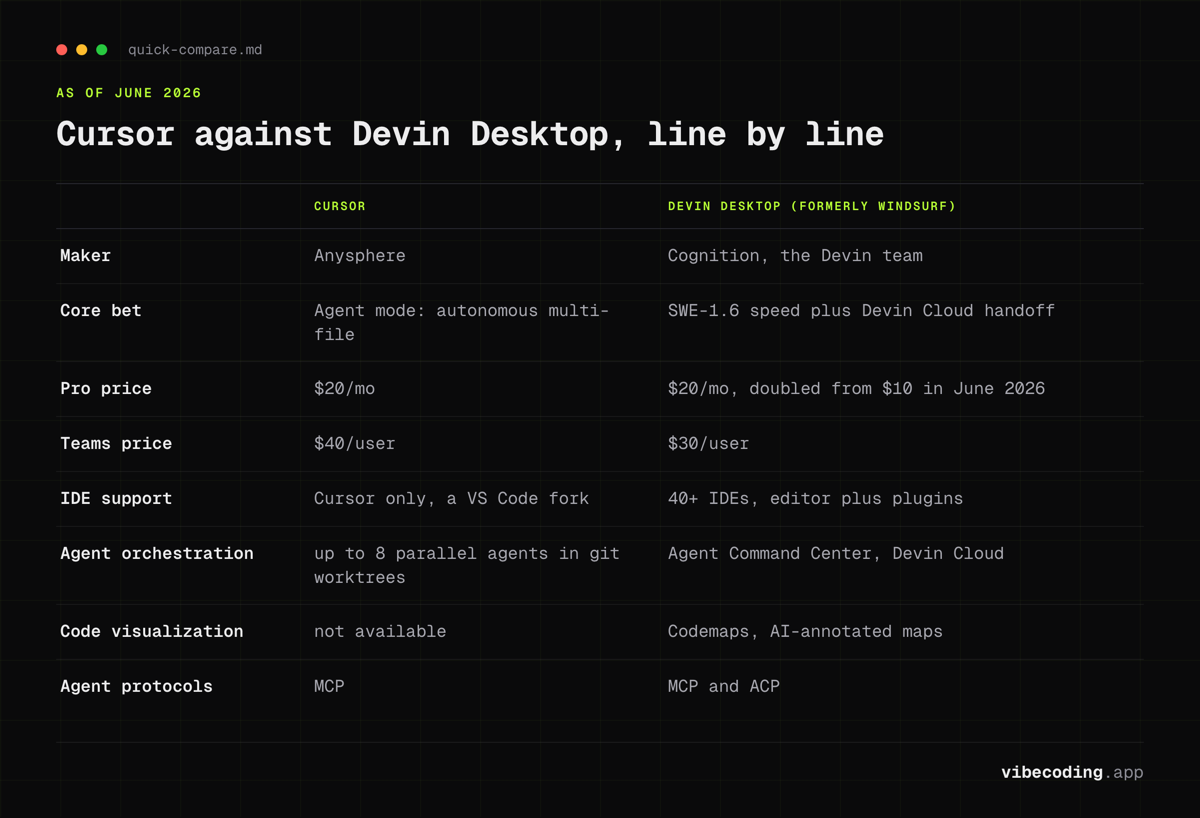
| Cursor | Devin Desktop (formerly Windsurf) | |
|---|---|---|
| Maker | Anysphere | Cognition (Devin team) |
| Core bet | Agent mode (autonomous multi-file) | SWE-1.6 speed + Devin Cloud handoff |
| Pro price | $20/mo | $20/mo (doubled from $10 in June 2026) |
| Teams price | $40/user | $30/user |
| IDE support | Cursor only (VS Code fork) | 40+ IDEs (editor + plugins) |
| Proprietary models | Composer-1, Sonic | SWE-1.6, SWE-grep, Fast Context |
| Agent orchestration | Up to 8 parallel agents (git worktrees) | Agent Command Center (Devin Cloud) |
| Background / async | Background Agents (cloud sandboxes) | Devin Cloud agents via Command Center |
| PR autofix | Bugbot | Devin Cloud review agents |
| Code visualization | Not available | Codemaps (AI-annotated maps) |
| Multi-file refactor | Agent mode | Spaces + Vibe and Replace |
| MCP / agent protocols | MCP | MCP + ACP (Agent Coding Protocol) |
| Cascade | n/a | EOL July 1, 2026 |
Pricing here is as of June 2026. Devin Desktop's Pro tier doubled from $10 to $20 on the rebrand to match Cursor and fund Devin Cloud credits, so most older comparison posts are stale on this number. Confirm tiers on cursor.com and devin.ai/desktop before committing.
Agent Mode vs Cascade
Cursor Agent Mode
Cursor's Agent is the most autonomous stock coding loop on the market. Open Composer (Cmd/Ctrl + I), switch to Agent, describe the change. The agent:
- Finds relevant files across the codebase
- Creates new files and edits existing ones
- Runs terminal commands to verify its own work
- Iterates on errors until the build compiles
- Can run up to 8 parallel agents in isolated git worktrees
Background Agents take this further. They run async in cloud sandboxes on separate branches. Kick one off, switch tasks, come back when it's done. Bugbot reviews pull requests and proposes fixes inline.
If you want to go deeper, see our Cursor Composer mastery guide.
Devin Desktop: Agent Command Center (and Cascade EOL)
Cascade was Windsurf's in-editor agent loop. After the June 2026 rebrand, Cascade retires July 1, 2026, replaced by the Agent Command Center: a panel that orchestrates Devin Cloud agents alongside your local edits. Spaces add parallel work surfaces so a Cloud agent can grind on one task while you stay in flow on another.
What changes practically:
- Codemaps still produce AI-annotated visual maps of code structure. Cursor has no direct equivalent.
- Fast Context, powered by SWE-grep, retrieves relevant code via parallel tool calls per turn.
- ACP (Agent Coding Protocol) is supported alongside MCP, opening the door to third-party agents.
- The full experience lives in the Devin Desktop editor; plugins in other IDEs get autocomplete and chat, not every agentic workflow.
Winner: Cursor for in-editor autonomy (parallel agents, Background Agents, Bugbot). Devin Desktop for speed plus Cloud handoff, where async work runs in Devin's hosted environment rather than a local worktree.
Speed and Models
Speed is where Cognition has leaned hardest; the rebrand made it the headline pitch.
| Model | Role | Available in |
|---|---|---|
| SWE-1.6 (Cognition) | Proprietary coding model, fast inference | Devin Desktop Pro+ |
| SWE-grep / Fast Context | Fast parallel code retrieval | Devin Desktop Pro+ |
| Composer-1, Sonic (Cursor) | In-house low-latency edit models | Cursor Pro+ |
| Frontier models | Claude, GPT, Gemini | Both (with credit cost) |
Cognition publishes SWE-1.6 as near-frontier quality at multiples of Sonnet-class throughput. Treat vendor claims as directional; the felt difference is real. Cursor counters with Composer-1 and Sonic for faster turns. Both editors now route to Claude, GPT, and Gemini for tricky refactors, so the practical question is which proprietary model lands more of your edits without a fallback.
Context, Rules, and Control
Both tools let you shape what the AI knows. Implementations differ.
Cursor
- @mentions:
@file,@folder,@codebase(semantic search),@docs,@web,@past chats - .cursor/rules/: Directory of
.mdcfiles with YAML frontmatter (alwaysApply,intelligent,manual) - Notepads: Reusable context bundles you
@mention - .cursorignore: Exclude files from context
- Gotcha: Long sessions can silently drop rules through context compaction. Keep sessions focused and reinforce critical rules.
Devin Desktop (formerly Windsurf)
- Deep Context: The local agent indexes the project; Fast Context pulls relevant code on demand
- Codemaps: AI-generated visual maps of structure, useful for navigating unfamiliar codebases
- MCP and ACP servers: Connect GitHub, GitLab, and third-party agents via two protocols, not one
- Agent Command Center: Hand long-running tasks off to Devin Cloud without leaving the editor
Winner: Cursor for granular control (rules, notepads, ignore). Devin Desktop for speed, visual navigation, and Cloud handoff.
IDE Flexibility
Straightforward. Cursor is a single standalone IDE: a VS Code fork. You use Cursor or you don't.
Devin Desktop ships plugins for 40+ IDEs: VS Code, JetBrains (IntelliJ, WebStorm, PyCharm), Vim, Neovim, Xcode, and more. For teams with mixed editor preferences, Devin Desktop gives a consistent AI layer across all of them, and the rebrand did not change the plugin footprint.
Winner: Devin Desktop, decisively.
2026 Pricing and Credits
| Plan | Cursor | Devin Desktop (formerly Windsurf) |
|---|---|---|
| Free | Limited Agent + Tab | Limited credits, unlimited Tab |
| Pro | $20/mo | $20/mo (doubled from $10 on rebrand) |
| Pro+ | $60/mo (3x credits) | Not available |
| Max / Ultra | $200/mo Ultra | $200/mo Max (Devin Cloud minutes included) |
| Teams | $40/user | $30/user |
| Enterprise | Custom | $60/user |
Biggest move since the last refresh: Devin Desktop Pro doubled from $10 to $20 to match Cursor and bundle Devin Cloud credits. If a recent blog post still shows $10 or $15, that copy is stale.
Cursor credits: Agent mode on frontier models (Claude, GPT, Gemini) burns credits fast. Pro+ at $60 triples the pool; Ultra at $200 is for developers who run Background Agents all day.
Devin Desktop credits: SWE-1.6 is proprietary and runs cheaper per task than routing to a frontier model. Pro credits stretch further than the raw number suggests if your work fits SWE-1.6's quality bar. Max at $200 includes Devin Cloud minutes for async agents from the Command Center, the new post-rebrand value story.
Rule of thumb for 2026:
- Light user, autocomplete plus occasional chat: either free tier.
- Daily Pro user on standard edits: coin flip on price; pick on speed and IDE preference.
- Heavy agent user, parallel branches, background work: Cursor Pro+/Ultra, or Devin Desktop Max for hosted Cloud agents.
- Enterprise with compliance or multi-IDE needs: Devin Desktop Teams/Enterprise.
Both offer two-week free trials. Confirm pricing on cursor.com and devin.ai/desktop before committing.
Persona Matrix: Who Should Pick What
No universal winner. Pick by persona.
Indie hacker / vibe coder
Shipping MVPs fast, solo, VS Code native, wants the agent to do as much as possible.
Pick: Cursor. Agent mode plus parallel worktrees means you kick off three feature branches at once and review them like a tech lead. Bugbot closes the loop on PR hygiene. With Devin Desktop Pro now at $20/mo, the price tie-break that used to favor Windsurf is gone.
Frontend developer on a product team
React/Next.js, polish-focused, in and out of the IDE all day, cares about autocomplete quality and fast turns.
Pick: Devin Desktop. Fast Context and SWE-1.6 keep you in flow for the many small edits that define frontend work. Codemaps help when dropping into a new component tree. Cursor works too, but speed-per-turn still tips to Devin Desktop at price parity.
Beginner / first AI IDE
New to AI coding, learning curve matters, wants guidance not settings.
Pick: Devin Desktop. Defaults are more guided, and the 40+ IDE plugin footprint means you don't have to abandon the editor you already know. Note Cascade retires July 1, 2026; the Agent Command Center replaces it.
Enterprise / regulated team
Compliance review, multiple editors across the team, security posture matters.
Pick: Devin Desktop. Multi-IDE support removes the "everyone must switch to Cursor" blocker, and Cognition has leaned harder into enterprise features post-rebrand, with Devin Cloud handoff for audited long-running work.
Large-codebase refactor specialist
Monorepo, needs to understand and safely edit a big surface area.
Pick: split the decision. Cursor for parallel agents and Background Agents grinding on long refactors inside git worktrees. Devin Desktop for Codemaps, Spaces, and the Agent Command Center spinning a Devin Cloud agent on the longest task. Many senior devs keep both. See our best vibe coding tools guide for the full picker.
A Small Real-Build Comparison
Treat this as a pattern, not a scientific benchmark. Community threads and case studies from the research pack (Builder.io, Trickle) converge on a similar shape when developers run the same small task in both tools:
- Task: Add a new CRUD resource to a small Next.js + Supabase app (schema, API route, typed client, form UI).
- Cursor Agent: Scopes the change across files, generates schema and route together, stops to run typecheck, proposes a Bugbot-style cleanup. More upfront autonomy. More credits consumed on frontier models.
- Devin Desktop (Agent Command Center): Faster per turn with SWE-1.6. Slightly more prompting to reach the same cross-file state, but each iteration feels snappier. Optionally hands the same task to a Devin Cloud agent for a fully async run. Fewer credits consumed on local equivalent work.
On quality, multiple community reports after real projects (50k+ lines) give Cursor an edge on complex multi-file reasoning, while Devin Desktop stays close, often wins on speed, and sometimes produces cleaner smaller edits. Neither tool is miles ahead. Your taste in prompting and your codebase size matter more than the vendor choice.
The honest conclusion: on a toy app, it's a coin flip. On a real codebase, try both for a full workweek before signing an annual invoice.
Verdict
There is no blanket winner. The June 2026 rebrand changed the framing more than the underlying choice.
Choose Cursor if autonomy is the goal: Agent mode, parallel agents, Background Agents, and Bugbot create a stack where you describe features and review branches instead of writing them. Best for VS Code natives.
Choose Devin Desktop (formerly Windsurf) if speed, multi-IDE reach, or Devin Cloud handoff matter more. SWE-1.6 and Fast Context cut latency on the typical edit. The Agent Command Center hands long tasks to Devin without leaving the editor, the new post-rebrand value lever.
Both evolve fast. Trial both on a real project, not a toy. See the full AI coding tools directory, our Windsurf deep dive for rebrand history, the mastering Cursor Composer guide, or Continue.dev vs Cursor.
FAQ
Did Windsurf get renamed? Yes. Cognition rebranded Windsurf to Devin Desktop on June 2, 2026. The windsurf.com domain still resolves but serves Devin Desktop content; the canonical home is devin.ai/desktop. Cascade is retiring July 1, 2026 in favor of the Agent Command Center.
Is Cursor or Devin Desktop better for beginners? Devin Desktop is more guided out of the box, which helps beginners. Cursor is simpler if you already live in VS Code. Both have free tiers, so try both on one real project before paying.
Can I use Devin Desktop in JetBrains? Yes. Devin Desktop (formerly Windsurf) offers plugins for 40+ IDEs including all JetBrains IDEs, Vim, Neovim, and Xcode. Cursor only runs as its own VS Code fork.
Which is cheaper in 2026? They're matched at the Pro tier (both $20/mo) after Devin Desktop's June 2026 price doubling. Devin Desktop wins on Teams ($30/user vs $40/user). Cursor offers higher ceilings with Pro+ ($60) and Ultra ($200) for heavy agent users; Devin Desktop Max at $200 bundles Devin Cloud minutes.
Does Cursor have background agents? Yes. Background Agents run async in cloud sandboxes. Bugbot auto-reviews PRs. You can run up to 8 parallel agents in git worktrees.
What is SWE-1.6? Cognition's proprietary coding model, available on Pro and above in Devin Desktop. Cognition claims near-frontier quality at multiples of Sonnet-class speed. Claude, GPT, and Gemini are available as fallbacks.
Do I have to pick just one? No. Many senior developers keep both on Pro: Cursor for autonomous refactors and long-running local agents, Devin Desktop for daily high-speed edits, cross-IDE work, and Devin Cloud handoff on big tasks.

Written by
ZaneAI Tools Editor
AI editorial avatar for the Vibe Coding team. Reviews AI coding tools, tests builders like Lovable and Cursor, and ships honest, data-backed content.