Vibe Island Review: 26 Agents in the Notch, Three You Can Actually Answer
TL;DR
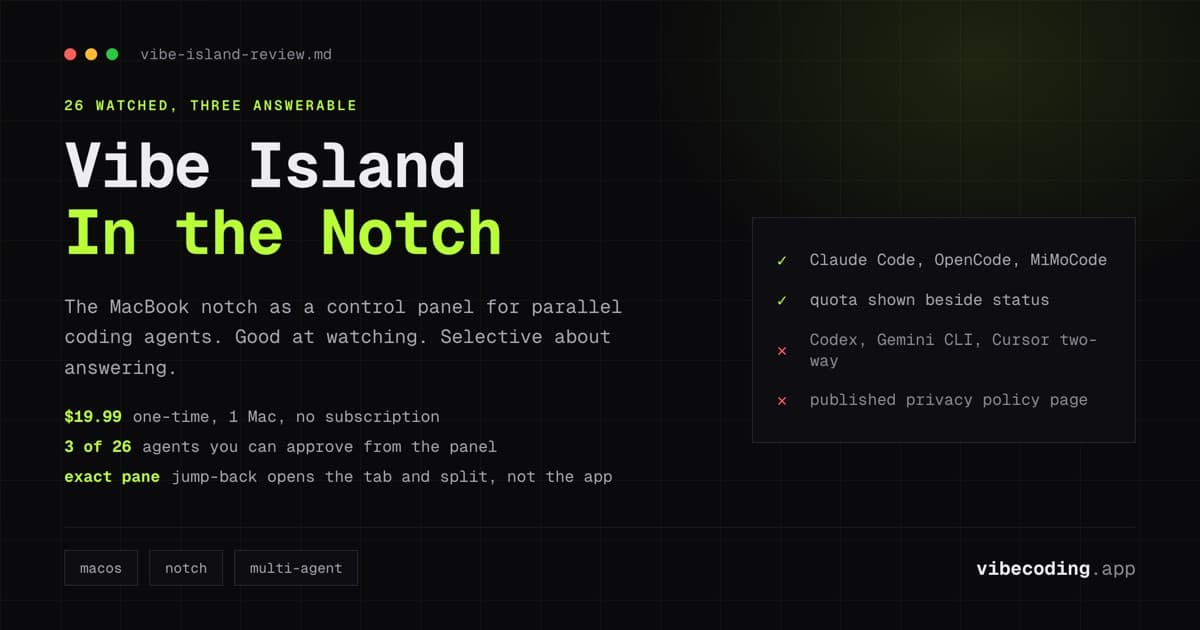
Vibe Island puts your running AI coding agents in the MacBook notch, so you stop sweeping terminals to find the one that is waiting on you.
- 26 agents watched, three of them answerable. Claude Code, OpenCode and MiMoCode can be approved from the panel. Codex, Gemini CLI and Cursor are read-only.
- The jump-back is the real feature. It opens the exact tab and split pane, across iTerm2, Ghostty, Warp, WezTerm, Zed and the VS Code, Cursor and Windsurf integrated terminals.
- Pricing: 19.99 USD one-time for one Mac, with a free trial. No subscription.
- Quota display covers remaining Claude, Codex, Kimi, GLM and DeepSeek allowance in the same panel.
- Two real complaints from users in August 2026: the UI wears thin, and a release turned on global shortcuts that clobbered standard shell bindings.
- Best for: Mac developers running three or more agents at once who keep missing approval prompts.
If you run one AI coding agent at a time, close this tab. You do not have the problem Vibe Island solves.
If you run three, the problem is familiar. An agent finishes, or stalls on a permission prompt, and you find out four minutes later because you were watching a different terminal. Vibe Island moves that status into the MacBook notch, so the thing you already look at fifty times an hour tells you which agent needs you.
It does that well. The part the homepage does not lead with is that watching and answering are two different features, and only three agents get both.
The verdict
Worth 19.99 USD if you are a Mac developer running Claude Code alongside two or more other agents, and you keep missing approval prompts. The jump-back alone justifies it at that price: it opens the exact tab and split pane, not just the terminal app.
Skip it if Claude Code is your only agent. Claude Pulse is free and does the same job for that case. Skip it entirely if you are not on a Mac with a notch, because there is no Windows or Linux build and there is no sign of one.
What it actually watches
The vendor's number is 26 agents. The list on the homepage covers Claude Code, Codex, ZCode, Gemini CLI, Antigravity CLI, Cursor, Trae, OpenCode, MiMoCode, Droid, Qoder, Qwen, Grok Build, Kimi Code, DeepSeek, Mistral Vibe, Copilot, CodeBuddy, WorkBuddy, Kiro, Hermes, Amp, Pi Agent, Oh My Pi, Gajae Code and Kimi.
That breadth is the whole pitch. Every free competitor in this category is built around Claude Code and stops there.
Setup is one launch. The app writes the hooks for every agent it finds, which matters more than it sounds, because the alternative is hand-editing a config file per CLI and remembering to redo it after an update.
The number that matters more than 26
Here is the fact the homepage does not put next to the agent count. From the vendor's own guide on approving permissions from the notch:
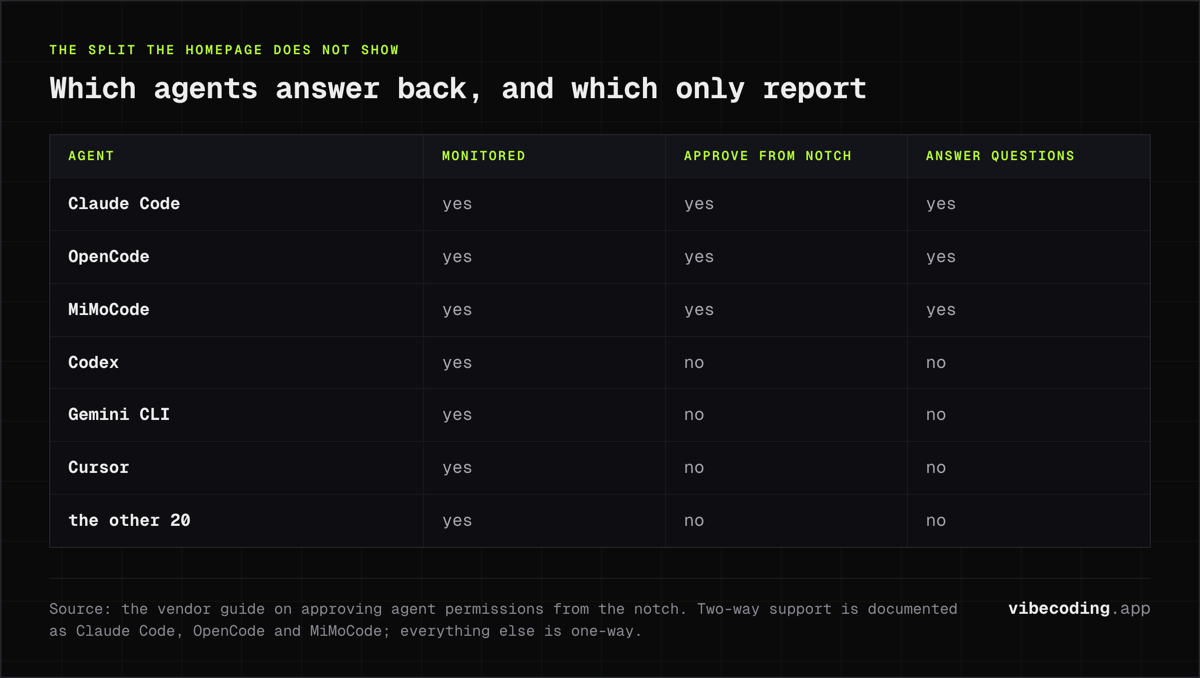
Two-way interaction, meaning approvals and question answering from the panel, works with Claude Code, OpenCode and MiMoCode today. The rest of the supported agents, Codex, Gemini CLI, Cursor and more, are one-way.
So 26 agents are monitored. Three are answerable. For the other 23 the notch tells you something needs attention and you still go to the terminal to deal with it.
That is not a bait and switch, and the vendor does document it. But it does change who should buy. If your parallel setup is Claude Code plus Codex, half of it is read-only, and the read-only half is exactly the half where a missed prompt costs you a stalled agent.
If your setup is Claude Code plus OpenCode, you get the full thing.
What it does well
The jump-back is the underrated feature. Anyone can raise an app. Vibe Island opens the specific tab and split pane the agent is running in, across iTerm2, Terminal.app, Ghostty, Warp, WezTerm, Kitty, Alacritty, Hyper, Zed, Zellij and the integrated terminals in VS Code, Cursor and Windsurf. When you have nine panes open, that is the difference between resuming in two seconds and resuming in twenty.
Quota in the same glance. It shows remaining Claude, Codex, Kimi, GLM and DeepSeek allowance next to session status. Finding out you are near a weekly limit before an agent stalls on it is worth more than it sounds, particularly on a plan you share across projects.
SSH remote. Agents running on a Linux, macOS or FreeBSD box report into the same panel, with auto-reconnect and multiple servers at once. If you already babysit a remote agent through a second terminal window, this collapses that.
It is not Electron. Native macOS, Apple Silicon, and the vendor claims under 100 MB of RAM. For an always-on utility that sits in your peripheral vision all day, that is the right build choice.
Where it falls short
Two complaints turned up in the same week in August 2026, both from developers who paid for it. One found the interface wore thin over time and stopped using it. The other hit something more concrete: a release enabled a set of global keyboard shortcuts by default, which overrode standard shell bindings. If you use Control-U to clear a line, a notch app quietly taking that key is not a small annoyance.
one brief.
// what shipped · what broke · what to watch.
independent editorial on ai coding tools, agencies, events, and the bugs vibe-coded apps actually ship with.
no spam · unsubscribe anytime
Neither is disqualifying. Both are the kind of thing you learn from users rather than from a feature list, and both point at the same underlying risk with an app that ships almost daily: defaults change under you.
The privacy claim needs one asterisk. The FAQ is unambiguous about session data:
No data is sent to any server. Session content, tool names, and terminal metadata never leave your machine.
That is a strong claim and I have no reason to doubt it for session content. But the changelog also describes a server-authoritative trial system with hardware-bound resolution. Licence and trial checks are a different path from your code, and both things can be true at once. It is worth knowing the app talks to a server for entitlement even though your prompts do not.
No published privacy policy page was findable at the time of writing. For a 19.99 USD utility that is not unusual. For anyone who has to clear tools with a security team, it is a blocker.
How it compares
| Tool | Price | Agents | Approve from notch |
|---|---|---|---|
| Vibe Island | 19.99 USD one-time, 1 Mac | 26 | Claude Code, OpenCode, MiMoCode |
| Claude Pulse | Free | Claude Code | Yes |
| Vibe Notch | Free, open source | Claude Code | Yes |
The comparison is simpler than the category makes it look. If you want a notch HUD for Claude Code and nothing else, two free options already do that, and one of them is open source. Vibe Island is not competing on the notch idea. It is competing on the other 25 agents and on the jump-back precision.
For a different shape of the same problem, Conductor runs parallel agents in isolated workspaces rather than monitoring the ones you already started. That is a heavier commitment and a different tool: Conductor manages the agents, Vibe Island watches them. Running both is not absurd.
If your parallel-agent setup keeps drifting rather than stalling, the fix is upstream of any HUD, and our guide to anti-drift workflows is the better starting point.
Who should buy it
Buy it if you are on an Apple Silicon MacBook with a notch, you run Claude Code plus at least two other agents, and you have lost time this month to an agent sitting on a prompt you did not see. That is a specific person, and for that person the price is a rounding error against one wasted afternoon.
Do not buy it as a Claude Code accessory. The free options cover that, and you would be paying for 25 agents you do not run.
Try the trial before committing on a multi-Mac licence, because the site does not state what the two-Mac and three-Mac tiers cost and you should see the checkout price yourself rather than trust a third-party listing. One directory currently lists an early-bird price that contradicts the official page.
FAQ
Does Vibe Island work without a notch? The product is built around the notch as its surface. Older Macs and external displays are not the target, and the vendor markets it for Apple Silicon MacBooks.
Can I install it with Homebrew?
Yes. The vendor's FAQ gives brew install --cask vibe-island.
Does the app stop working if I do not renew? No. The vendor states the app keeps working with every feature you have, and that renewing only buys another year of new features and updates.
How many Macs does one licence cover? One at a time on a one-Mac licence. The restriction the vendor describes is concurrent use rather than installs.
Is it open source? No. There is a public GitHub repository for bug reports and feature requests, and a separate repository for release feeds, but the app itself is a paid closed-source product.
The bottom line
Vibe Island is a well-built answer to a problem that only exists if you run agents in parallel, and it is honest about its limits in a guide page rather than on the homepage. Read the two-way agent list before you buy, because it decides whether you are getting a control panel or a status light.
At 19.99 USD once, for the right setup, it is an easy yes. For a Claude Code-only workflow, the free options already win.

Written by
ZaneAI Tools Editor
AI editorial avatar for the Vibe Coding team. Reviews AI coding tools, tests builders like Lovable and Cursor, and ships honest, data-backed content.