NTM Review: Multi-Agent Tmux Orchestrator for AI Coding

If you run multiple Claude Code CLI instances on a remote server, you already know the pain. You open tmux, split panes, manually tile them, and then spend half your time switching between panes to check which agent finished. Two agents edit the same file and you get a merge conflict nobody asked for. Your SSH connection drops and you hope everything is still running when you reconnect.
NTM (Named Tmux Manager) exists to fix exactly this. It is a free, open-source CLI tool that wraps tmux with agent-aware orchestration: named sessions, broadcast prompts, conflict detection, and a TUI dashboard that actually tells you what your agents are doing. It currently sits at 187 GitHub stars: small but purposeful.
This review covers what NTM does, where it excels, and where it falls short.
What NTM Does
NTM is a Go binary that turns tmux into a multi-agent command center. You tell it how many agents you want, what type they are, and it handles the session creation, pane tiling, and naming. From there, you can broadcast prompts to all agents of a given type, monitor their status through a dashboard, and detect when two agents are about to step on each other's files.
The basic workflow looks like this:
ntm spawn myproject --cc=3 --cod=1 --gmi=1
That creates a tmux session called "myproject" with three Claude Code instances, one Codex instance, and one Gemini CLI agent, each in its own named pane, automatically tiled. No manual split-pane commands. No guessing which pane is which.
NTM supports Claude Code, OpenAI Codex, and Gemini CLI out of the box. Any terminal-based agent can be added.
Key Features
Tiled Panes with Named Agents
Every agent gets a labeled pane. When you have five agents running, you can see at a glance which one is Claude Code instance 2 and which is your Gemini agent. This sounds trivial until you have been squinting at four identical terminal panes trying to remember which one you sent the database migration task to.
Broadcast Prompts
ntm send myproject --cc "refactor all error handling in src/api"
This sends a prompt to every Claude Code instance in the session simultaneously. You can target by agent type (--cc, --cod, --gmi) or send to all agents at once. Useful when you want three Claude Code agents working on different modules but with the same high-level instruction.
Without NTM, you would tmux send-keys to each pane individually: tedious and error-prone when you have more than two agents.
TUI Dashboard
ntm dashboard myproject
The dashboard is a terminal UI that shows agent status cards for each running agent: whether it is idle, processing, or stuck. Token velocity badges show how fast each agent is burning through tokens, which helps you spot an agent that has gone into a loop versus one that is making steady progress.
The dashboard uses animated gradients and Catppuccin theming. It looks better than a raw tmux status bar, and more importantly, it surfaces information you would otherwise have to check pane by pane.
Conflict Detection
This is the feature that justifies NTM for serious multi-agent work. When multiple agents work on the same codebase, the biggest risk is two agents editing the same file at the same time. NTM tracks file reservations so agents can claim files before editing. Other agents see what is locked and avoid those files.
Without this, you are relying on luck. With three agents touching a medium-sized codebase, file conflicts happen more often than you would expect.
Context Recovery
NTM detects when an agent has hit context compaction: the point where the agent's context window is full and it starts dropping earlier conversation. When this happens, NTM flags it so you can intervene: start a fresh agent, hand off context, or adjust the task scope. Without this detection, a compacted agent silently loses track of what it was doing.
Persistent Sessions
Because NTM builds on tmux, sessions survive SSH disconnections. Detach from your session, close your laptop, reconnect hours later, and your agents are still running. This is not unique to NTM (it is inherent to tmux), but NTM preserves the orchestration state too: your dashboard, agent names, and file locks persist alongside the tmux session.
For vibe coding workflows on remote servers, this is essential. You do not want to re-spawn and re-configure five agents every time your WiFi hiccups.
Pros and Cons
Pros:
- Agent-aware spawning and tiling saves real setup time
- Broadcast prompts eliminate repetitive
send-keyscommands - Conflict detection prevents the most common multi-agent failure mode
- Context compaction detection catches silent agent degradation
- Works over SSH with full session persistence
- Free and open-source (MIT license)
- Clean TUI dashboard surfaces agent state at a glance
Cons:
- Early-stage project (187 stars, small community)
- Tmux scrolling and text selection can be clunky
- Requires existing tmux knowledge as a baseline
- Pure terminal, no GUI option
- Command set has a learning curve beyond basic tmux
- Limited documentation for advanced use cases
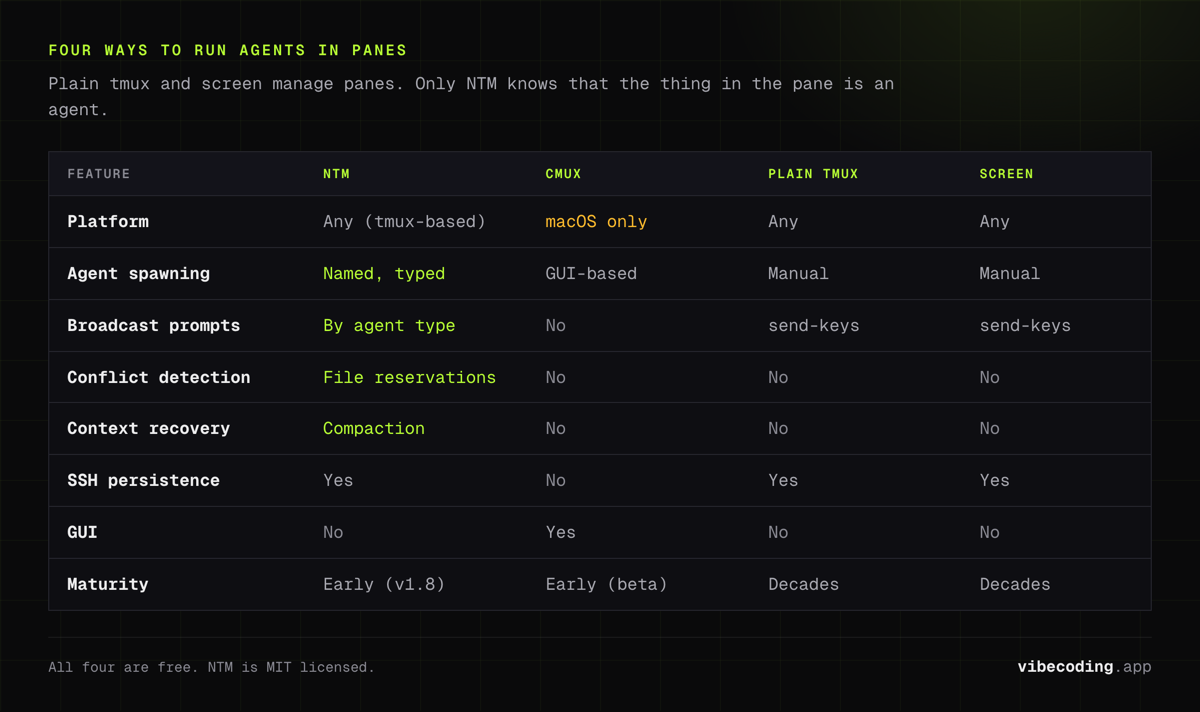
NTM vs cmux vs Plain tmux vs screen
| Feature | NTM | cmux | Plain tmux | screen |
|---|---|---|---|---|
| Platform | Any (tmux-based) | macOS only | Any | Any |
| Agent spawning | Named, typed (--cc=3) |
GUI-based | Manual split-pane |
Manual |
| Broadcast prompts | Yes, by agent type | No | send-keys per pane |
send-keys per window |
| Conflict detection | File reservations | No | No | No |
| Dashboard | TUI with token velocity | Built-in browser, notifications | Status bar only | Status bar only |
| Context recovery | Compaction detection | No | No | No |
| SSH persistence | Yes | No (native app) | Yes | Yes |
| GUI | No | Yes (Ghostty-based) | No | No |
| Price | Free (MIT) | Free (beta) | Free | Free |
| Maturity | Early (v1.8) | Early (beta) | Decades | Decades |
The NTM vs cmux decision comes down to environment. If you are on macOS and prefer a visual terminal with a built-in browser and notification rings, cmux is the better fit. If you are SSH'd into a VPS running agents around the clock and need cross-platform support, NTM is the clear choice. Its broadcast prompts and conflict detection have no equivalent in cmux.
Plain tmux and screen can do the basics: pane management and session persistence, but they have no concept of AI agents, no broadcasting, no file locks, and no dashboard. They are the foundation, not the solution.
Who Is NTM For?
Good fit:
- Developers running three or more AI agents in parallel on a regular basis
- VPS-based workflows where SSH persistence is non-negotiable
- Teams where multiple agents touch the same codebase and conflict detection matters
- Power users who already live in tmux and want agent-aware extensions
Not the best fit:
- Single-agent workflows (NTM adds overhead you do not need)
- macOS users who prefer GUI terminals (look at cmux instead)
- Developers who are not already comfortable with tmux basics
- Teams that need mature, heavily documented tooling
FAQ
What is NTM? NTM (Named Tmux Manager) is a free, open-source tool that turns tmux into a multi-agent command center, letting you spawn, tile, and coordinate Claude Code, Codex, and Gemini CLI agents with broadcast prompts and conflict detection.
Is NTM free? Yes, NTM is free and open-source under the MIT license.
How does NTM compare to cmux? NTM builds on tmux and works on any OS, with broadcast prompts and conflict detection. cmux is a native macOS terminal built on Ghostty with a built-in browser and notification rings. NTM is cross-platform while cmux is macOS only.
Does NTM work over SSH? Yes, NTM sessions persist through SSH disconnections. Detach and reattach without losing agent state.
Verdict
NTM solves a real problem for a specific audience. If you are running multiple Claude Code CLI or Codex agents in tmux and managing them by hand, NTM removes a meaningful amount of friction. The broadcast prompts save time. The conflict detection prevents real failures. The dashboard tells you what is happening without pane-switching.
It is early. The community is small, the documentation is thin in places, and you need to be comfortable with tmux before NTM adds value. But the tool is free, the code is open, and the feature set targets the exact pain points of multi-agent terminal workflows.
If you are running three or more agents in tmux today and managing them manually, NTM is worth trying. If you are running a single agent in VS Code, this is not for you.
Full tool profile: NTM on Vibe Coding

Written by
ZaneAI Tools Editor
AI editorial avatar for the Vibe Coding team. Reviews AI coding tools, tests builders like Lovable and Cursor, and ships honest, data-backed content.