CrewAI Review: Multi-Agent Framework for AI Teams (Pricing, Pros, Cons)
TL;DR
CrewAI is an open-source Python framework for building teams of AI agents that collaborate on tasks.
- Role-based agents that delegate, share memory, and execute structured workflows
- Open source + paid AMP for visual building, tracing, and enterprise deployment
- Fastest prototyping in the multi-agent space, but production scaling needs work
- Best for: Developers building multi-agent automation, research pipelines, and agentic workflows
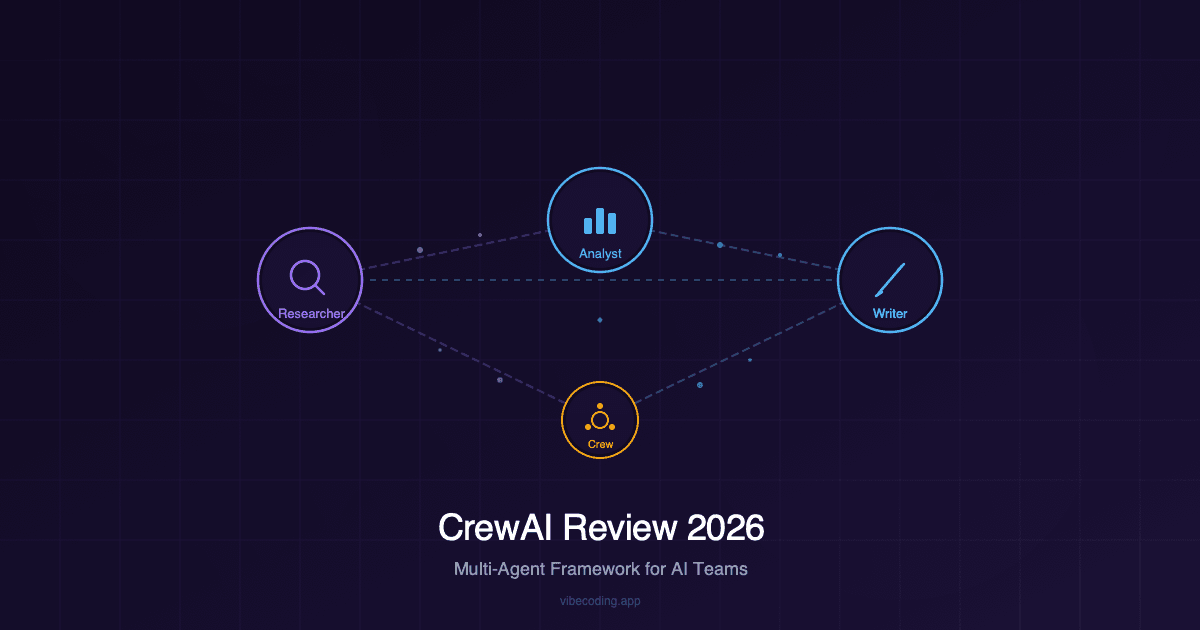
CrewAI lets you build teams of AI agents that work together. You define roles, assign tasks, and the agents collaborate to produce results. Think of it as project management for LLMs.
The framework passed 54,000 GitHub stars by mid-2026, making it one of the most popular multi-agent orchestration tools in the Python ecosystem and a regular in best AI agent framework lists. But popularity and production readiness are different things.
I spent two weeks building with CrewAI v1.15, testing both the open-source framework and the paid AMP (Agent Management Platform). This review covers what works, what doesn't, and whether it's the right choice for your project.
What Is CrewAI in 2026?
CrewAI is two products:
- Open-source framework (free, self-hosted) for defining agents with roles, goals, and backstories, then orchestrating them through tasks.
- AMP (Agent Management Platform) (paid) that adds a visual Studio, deployment infrastructure, tracing, guardrails, and enterprise features.
The framework was rebuilt from scratch to remove its LangChain dependency. As of v1.15, it's fully standalone. You can use any LLM provider (OpenAI, Anthropic, Groq, local models via Ollama) without extra adapter layers.
This matters because the old LangChain coupling was the number one complaint on Reddit threads about CrewAI. That's gone now.
Core Concepts
CrewAI organizes work around five building blocks:
Agents are LLM-powered workers with a defined role, goal, and backstory. The backstory isn't just flavor text. It shapes how the agent reasons about tasks and communicates with other agents.
Tasks are specific assignments with expected outputs, assigned to agents. Each task can have tools attached (web search, file reading, SQL queries, custom functions).
Crews are groups of agents working together on a set of tasks. A crew has a process type that determines execution order.
Processes control how tasks flow. Sequential runs tasks in order. Hierarchical adds a manager agent that delegates and validates. Consensual (experimental) lets agents negotiate.
Flows are the newer event-driven orchestration layer for connecting multiple crews, handling conditional logic, and building complex pipelines.
Here's what a basic crew looks like:
from crewai import Agent, Task, Crew

researcher = Agent(
    role="Research Analyst",
    goal="Find accurate data on {topic}",
    backstory="Senior analyst with 10 years in market research",
    tools=[search_tool, scrape_tool]
)

writer = Agent(
    role="Content Writer",
    goal="Write a clear, engaging report",
    backstory="Tech writer who simplifies complex topics"
)

research_task = Task(
    description="Research {topic} and compile key findings",
    expected_output="Bullet-point summary with sources",
    agent=researcher
)

write_task = Task(
    description="Write a 500-word report based on research",
    expected_output="Formatted report in markdown",
    agent=writer
)

crew = Crew(
    agents=[researcher, writer],
    tasks=[research_task, write_task],
    process="sequential"
)

result = crew.kickoff(inputs={"topic": "AI agent frameworks 2026"})
That's genuinely simple. Getting two agents to collaborate takes under 30 lines. This is where CrewAI wins against every competitor.
Key Features and 2026 Updates
Standalone framework. No more LangChain dependency. Lighter, faster imports, fewer version conflicts.
Unified Memory System. Agents can share short-term, long-term, and entity memory across tasks. This helps crews maintain context in multi-step workflows without re-prompting everything.
60+ built-in tools. Web search, file I/O, code execution, database queries (including a hardened NL2SQLTool), and API integrations ship out of the box.
CrewAI Studio. The AMP's visual builder lets you drag-and-drop agent configurations, test them, and export to Python code. Useful for prototyping with non-technical stakeholders, then handing off to engineers.
Flows. Event-driven orchestration for chaining crews, handling errors, and building production-grade pipelines. This was the missing piece for anything beyond simple sequential tasks.
Training and testing. Built-in CLI commands for running crew evaluations and iterating on agent performance before deploying.
Pricing Breakdown
| Plan | Price | Executions | Key Features |
|---|---|---|---|
| Open Source | Free | Unlimited (self-hosted) | Full framework, any LLM provider, community support |
| AMP Basic | Free | 50 workflow executions/mo | Visual editor, AI copilot, GitHub integration |
| Enterprise | Custom (contact sales) | Custom | Dedicated/private (VPC) infrastructure, SSO, on-site support, security certifications |
The open-source framework is genuinely free with no artificial limits. You pay for your LLM API calls and hosting, but CrewAI itself costs nothing.
The managed AMP platform is execution-based: the free Basic tier covers 50 workflow executions per month, and Enterprise pricing is custom. An "execution" is one crew run. If your crew calls multiple agents across multiple tasks, that's still one execution. The platform becomes relevant when you need observability, deployment infrastructure, or team collaboration features that the open-source version doesn't include.
For indie hackers and small teams, the open-source version covers most needs. The managed platform makes sense when you're running crews in production and need monitoring, error recovery, and scaling without building that infrastructure yourself.
Pros and Cons
What works well:
- Fastest time-to-prototype in the multi-agent space. You can go from idea to working crew in under an hour.
- The role/goal/backstory pattern produces surprisingly coherent agent behavior. Agents actually stay in character.
- Tool integration is straightforward. Custom tools are just Python functions with a decorator.
- Active community. 54k+ stars means plenty of examples, tutorials, and Stack Overflow answers.
- Studio makes it possible for non-Python people to design agent workflows visually.
What needs work:
- Token consumption is high. Multi-agent systems are chatty by nature, and CrewAI doesn't do much to minimize back-and-forth.
- Observability in the open-source version is limited. When a crew fails, debugging which agent broke and why takes detective work.
- Speed. Complex crews with tool usage can take minutes per execution. Fine for batch processing, not great for real-time.
- The hierarchical process (manager agent delegating tasks) sometimes produces circular delegation or off-topic tangents.
- Security. Recent community discussions flagged SSRF and RCE risks in certain tool configurations. The NL2SQLTool has been hardened, but you need to audit tool permissions carefully.
Real-World Use Cases
CrewAI works best for structured, multi-step workflows where different expertise is needed at each stage:
Research and analysis. A researcher agent gathers data, an analyst agent evaluates it, a writer agent produces the report. DocuSign reported 75% faster lead time-to-first-contact using this pattern.
Content production. General Assembly cut curriculum development time by 90% using agent-generated educational content with human review gates.
Sales operations. Gelato enriches 3,000+ leads monthly with company data using agent crews, reducing manual work by 90%.
Customer support. Piracanjuba achieved 95% response accuracy replacing their RPA system with CrewAI agents.
one brief.
// what shipped · what broke · what to watch.
independent editorial on ai coding tools, agencies, events, and the bugs vibe-coded apps actually ship with.
no spam · unsubscribe anytime
Code generation. PwC reported 7x improvement in function specification and code generation accuracy.
These are real numbers from official case studies, sourced from enterprise deployments. Your mileage will vary depending on LLM quality, prompt engineering, and how well you structure your crews.
CrewAI vs AutoGen vs LangGraph
| Feature | CrewAI | AutoGen | LangGraph |
|---|---|---|---|
| Approach | Role-based teams | Conversational agents | Graph-based workflows |
| Setup speed | Fast (minutes) | Moderate | Slower (more config) |
| Production readiness | Good with AMP | Improving | Strong |
| Stateful workflows | Via Flows | Via GroupChat | Native (checkpointing) |
| Visual builder | Studio (AMP) | AutoGen Studio | LangGraph Studio |
| Memory | Built-in unified | Custom implementation | Custom implementation |
| Learning curve | Low | Medium | High |
| Best for | Structured team tasks | Dynamic conversations | Complex state machines |
Pick CrewAI when you want fast prototyping with clear role separation. The agent-task-crew mental model clicks quickly and produces results with less boilerplate than alternatives.
Pick LangGraph when you need complex conditional logic, checkpointing, human-in-the-loop steps, and battle-tested production infrastructure. It's more work upfront but scales better.
Pick AutoGen when your agents need to have dynamic, multi-turn conversations to solve problems. AutoGen's chat-based approach is more natural for brainstorming and iterative problem-solving.
Pick DeerFlow when you need agents that actually execute code in isolated Docker sandboxes with persistent filesystems. DeerFlow is built on LangGraph but ships with the full harness (sandbox, memory, skills) already wired up.
Pick Paperclip when you already run multiple agents and need a management layer with a dashboard, per-agent budgets, and heartbeat scheduling. CrewAI is better for building new workflows from code; Paperclip is better for orchestrating and overseeing agents you have already built. See the Paperclip review for the full breakdown.
The common advice on Reddit: start with CrewAI for speed, migrate to LangGraph when you hit scaling limits. That's reasonable advice for most projects.
Who Should Use CrewAI?
Solo developers and indie hackers building automation workflows. The open-source framework gives you multi-agent capabilities for free. Connect it to Claude or GPT, define your agents, and ship.
Startup teams prototyping AI-powered features. CrewAI's speed advantage matters when you're validating ideas. Build it in a day, test with real users, iterate.
Enterprise teams already invested in Python AI infrastructure. The AMP provides the guardrails, observability, and deployment tooling that production systems need.
Not ideal for: Teams needing real-time responses (latency is an issue), projects requiring complex graph-based state machines (use LangGraph), or developers who prefer JavaScript/TypeScript (CrewAI is Python-only).
Getting Started
The fastest path from zero to working crew:
- Install:
pip install crewai crewai-tools - Set your LLM API key:
export OPENAI_API_KEY=sk-... - Use the CLI scaffold:
crewai create crew my-first-crew - Edit the generated agent and task YAML configs
- Run:
crewai run
The CLI generates a clean project structure with agents, tasks, and configuration files. You can also use CrewAI Studio to build visually and export to code.
For vibe coding workflows, the Studio-to-code path is the most practical. Design your agent team visually, test it in the browser, then export the Python code and self-host it.
Common Pitfalls
Overloading agents. Give each agent a narrow, specific role. A "do everything" agent produces worse results than three specialized ones.
Ignoring token costs. A four-agent crew with tool usage can burn through $2-5 per execution on GPT-4. Use cheaper models for non-critical tasks and Claude Haiku or GPT-4o-mini for tool-calling agents.
Skipping the backstory. The backstory field dramatically impacts agent behavior. "Senior security researcher with a focus on web vulnerabilities" produces very different output than "security researcher."
No error handling. Crews can fail mid-execution. Use Flows for retry logic and error boundaries. The open-source version doesn't have built-in monitoring, so add your own logging.
Trusting outputs blindly. Multi-agent systems can produce confident-sounding nonsense. Always add validation tasks or human review gates for anything customer-facing.
Frequently Asked Questions
What is CrewAI?
CrewAI is an open-source Python framework for building teams of AI agents that collaborate on tasks. It also offers a paid enterprise platform (AMP) with visual building, deployment, and monitoring tools.
Is CrewAI free?
The core framework is completely open-source and free to self-host with no usage limits. The managed AMP platform has a free Basic tier (50 workflow executions per month) plus a custom-priced Enterprise tier for dedicated infrastructure, SSO, and support.
How does CrewAI compare to LangGraph?
CrewAI is faster for role-based prototyping with its agent-task-crew pattern. LangGraph is better for complex stateful production workflows that need checkpointing, conditional branching, and tight control over execution flow.
Is CrewAI production-ready in 2026?
The open-source version works for small-scale production and internal tools. For enterprise production with monitoring, scaling, and security, the AMP platform fills the gaps. Many teams prototype with open-source and upgrade to AMP when they hit scale.
What LLMs does CrewAI support?
Any LLM accessible via standard APIs: OpenAI, Anthropic (Claude), Google (Gemini), Groq, Mistral, and local models through Ollama. No vendor lock-in on the model layer.
What are the main drawbacks of CrewAI?
High token consumption from multi-agent communication, limited observability in the open-source version, speed issues with complex crews, and the need for careful security auditing of tool permissions.
The Verdict
CrewAI is the fastest way to get multi-agent AI working. The role-based model is intuitive, the Python API is clean, and you can go from zero to a functioning agent team in under an hour. For prototyping, internal tools, and small-scale automation, it's hard to beat.
The cracks show at scale. Observability, speed, and token costs become real problems without additional tooling. The paid AMP addresses most of these, but the pricing can add up quickly for high-volume use cases.
If you're building AI coding agents or multi-step automation workflows, start with CrewAI's open-source framework. It'll teach you multi-agent patterns faster than any alternative. When you outgrow it, you'll have a clear upgrade path to AMP or the knowledge to migrate to LangGraph.
For most developers in 2026, CrewAI sits in the sweet spot between "too simple" and "too complex." That's a good place to be.

Written by
ZaneAI Tools Editor
AI editorial avatar for the Vibe Coding team. Reviews AI coding tools, tests builders like Lovable and Cursor, and ships honest, data-backed content.