Multi-Agent Software Development: The Complete Guide for Developers (2026)
TL;DR
- Multi-agent software development uses specialized AI agents working in parallel: one plans, another codes, another reviews, instead of a single do-everything model.
- Four major frameworks power this in 2026: CrewAI (rapid deployment, $99/mo cloud), LangGraph (complex graphs, free library), AutoGen (fully open-source), and ChatDev (virtual company simulation).
- The biggest risk isn't capability: it's plumbing. Research shows 13.2% of failures come from reasoning-action mismatches, and communication costs can exceed $10/task.
- Start with two agents (coder + reviewer), add more only when you can observe and control every handoff.
You've probably used a single AI agent to write code: Cursor, Claude Code, Copilot. You prompt, it generates, you review. That loop works fine until your project outgrows it.
Multi-agent development is what happens when you stop asking one model to do everything and start assigning specialized agents to different parts of the workflow. One agent plans. Another writes code. A third reviews it. A fourth runs tests. They coordinate, hand off work, and: ideally: don't step on each other.
The keyword is "ideally." I've watched multi-agent setups produce conflicting changes, duplicated work, and codebases harder to debug than the ones they started with. The hardest part isn't the agents, but the plumbing.
This guide covers what actually works: coordination patterns, the real set of frameworks, failure modes you'll hit, and how to set up your first multi-agent workflow without losing control.
What Multi-Agent Development Actually Looks Like
Single-agent development is a conversation. You talk to one model, it responds, you refine. Multi-agent development is a team simulation: multiple models with distinct roles working on different aspects of the same project.
Here's what that means in practice:
Single-agent workflow:
You → prompt → Agent → code → You → review → repeat
Multi-agent workflow:
You → spec → Planner Agent → tasks
                ↓
        Coder Agent (feature A)  +  Coder Agent (feature B)
                ↓                          ↓
            Reviewer Agent ← ← ← ← ← ← ←
                ↓
            Test Agent → results → You
The difference is specialization and parallelism. Each agent gets a narrower scope, which means it can do that thing better. And because they work in parallel, your total cycle time drops.
Atlassian measured an 89% increase in PRs per engineer after adopting AI agents across their workflow. That kind of throughput gain doesn't come from a faster single agent: it comes from distributing work.
Why Multi-Agent Matters Now
A year ago, multi-agent was mostly academic. ChatDev simulated a software company in a research paper. MetaGPT benchmarked role-playing agent patterns. Interesting, but not something you'd ship production code with.
That changed fast. In early 2026, the tooling caught up with the theory:
- VS Code 1.109 (January 2026) shipped multi-agent orchestration, letting you run Claude, Codex, and Copilot agents in parallel from a single interface. Version 1.110 added parallel subagents.
- Claude Code Agent Teams launched with Opus 4.6 (February 2026), adding direct agent-to-agent communication via shared mailbox, no central supervisor required.
- OpenAI Codex announced parallel subagent support in March 2026, making multi-agent native to their cloud coding environment.
- Anthropic's Code Review now dispatches multiple parallel analysis agents: one for bugs, another for security, another for architecture: before human review.
MetaGPT is hitting 85.9%: 87.7% Pass@1 on code generation benchmarks with its multi-role approach. Organizations report 20-30% faster workflow cycles with multi-agent setups. The projected figure of 40% of enterprise apps featuring task-specific AI agents by end of 2026 (up from under 5% in 2025) reflects this shift.
This isn't hype. The pattern works. But only if you handle the coordination.
Five Coordination Patterns That Actually Work
Not every multi-agent setup needs the same architecture. Google's Agent Development Kit documentation identifies five patterns that cover most real-world scenarios.
1. Hierarchical (Supervisor Pattern)
One agent acts as a supervisor, delegating tasks to worker agents and collecting results.
When to use it: You have a clear decomposition of tasks and want centralized control. This is the default pattern in most developer workflows with AI.
Example: Claude Code's subagent system works this way. You run a main agent that spawns specialized subagents for research, implementation, and testing (see the Claude Code subagents guide for how to configure them). Anthropic's own multi-agent research system uses a lead orchestrator with parallel sub-agents for web and workspace search.
2. Sequential (Pipeline Pattern)
Agents run in a fixed order, each processing the output of the previous one.
When to use it: Your workflow has clear stages: plan, code, review, test: where each stage depends on the previous one.
Example: MetaGPT uses this pattern with Standard Operating Procedures that define the handoff between each role. ChatDev extends this with a 7-role pipeline: CEO → CPO → CTO → Programmer → Reviewer → Tester → Designer.
3. Parallel (Fan-Out Pattern)
Multiple agents work on independent tasks simultaneously.
When to use it: Your tasks don't depend on each other. Writing frontend and backend code for different features. Running different types of tests. Building separate components.
Example: VS Code Agent HQ lets you run Claude, Codex, and Copilot agents in parallel from a single interface. Git worktrees give each agent its own working copy, preventing merge conflicts during parallel work.
4. Handoff (Dynamic Routing)
An agent works on a task until it hits a boundary, then passes it to a more specialized agent.
When to use it: When tasks start general but need specialist handling partway through. A coding agent encounters a database migration and hands it to a database-specialist agent.
Example: LangGraph's handoff mechanism routes tasks between agents based on the type of work detected.
5. Network (Peer-to-Peer)
Agents communicate directly with each other, sharing discoveries and coordinating without a central supervisor.
When to use it: Complex projects where agents need to react to each other's findings in real time.
Example: Claude Code Agent Teams use a shared mailbox system for direct agent-to-agent communication. Google's A2A protocol standardizes this pattern for cross-provider agent collaboration.
Pattern Comparison
| Pattern | Coordination Cost | Parallelism | Control | Best For |
|---|---|---|---|---|
| Hierarchical | Low | Medium | High | Most projects, clear task decomposition |
| Sequential | Very low | None | High | Pipeline workflows, staged delivery |
| Parallel | Medium | High | Medium | Independent tasks, speed-critical work |
| Handoff | Medium | Low | Medium | Specialist routing, mixed-domain work |
| Network | High | High | Low | Complex projects, real-time collaboration |
Frameworks and Tools for Multi-Agent Development
For current pricing on every layer of the stack, from coding agents to observability, see the agentic engineering tools roundup.
The Big Four Frameworks
If you're building custom multi-agent pipelines beyond what IDE tools offer, four frameworks dominate in 2026:
CrewAI: The fastest path from zero to working multi-agent crew. You define agents with roles, goals, and backstories, then assign them to tasks. The role-playing pattern (researcher, writer, reviewer) extends naturally to coding workflows.
- Pricing: Open-source core (free). Cloud: Free tier (50 executions), Basic $99/mo (100 executions), higher tiers $500+/mo for production.
- Best for: Rapid prototyping, teams that want agents running quickly without deep graph knowledge.
- Pattern support: Hierarchical, Sequential.
LangGraph: Graph-based orchestration for stateful multi-agent workflows. You define agents as nodes and their interactions as edges in a directed graph. More powerful than CrewAI, but steeper learning curve.
- Pricing: Library is free (MIT license). LangSmith platform: Developer free (up to 100k traced nodes), Plus $39/seat + usage.
- Best for: Complex control flows, production systems that need fine-grained state management.
- Pattern support: All five patterns.
AutoGen (Microsoft): Conversational multi-agent framework focused on group chat patterns and human-in-the-loop workflows. Multiple agents discuss and collaborate in a shared conversation.
- Pricing: Completely free and open-source. You only pay for LLM API calls.
- Best for: Research, experimentation, teams who want maximum control without vendor lock-in.
- Pattern support: Network, Parallel, Hierarchical.
ChatDev: Simulates a virtual software company with role-based agents (CEO, CTO, Programmer, Reviewer, Tester, Designer). The original paper demonstrated that specialized role-playing agents could produce working applications through structured collaboration. Version 2 added zero-code DevAll mode.
- Pricing: Free and open-source.
- Best for: Learning multi-agent patterns, full-pipeline simulation, academic research.
- Pattern support: Sequential (pipeline), Hierarchical.
Framework Comparison
| Framework | Price (OSS) | Cloud Pricing | Learning Curve | Production-Ready |
|---|---|---|---|---|
| CrewAI | Free | From $99/mo | Low-Medium | Yes |
| LangGraph | Free (MIT) | From $39/seat | Medium-High | Yes |
| AutoGen | Free | N/A (self-host) | Medium | Experimental |
| ChatDev | Free | N/A (self-host) | Medium | Research-grade |
IDE-Level Tools
For most developers, IDE tools are the practical entry point, no framework setup required:
Claude Code: Subagents run in isolated context windows. Agent Teams add peer-to-peer communication. Boris Cherny, its creator, runs 5 agents in parallel in his own workflow.
Cursor: Agent mode with multi-file editing. Not native multi-agent, but works well for single-agent workflows that need IDE integration. You can run multiple instances for parallel work.
VS Code Agent HQ: Run Claude, Codex, and Copilot from a single interface. Parallel subagents, agent sessions management, and native browser integration for visual debugging.
If you want agents sandboxed away from your host machine rather than merely partitioned by file, that is a separate layer. Our VibeKit review covers the open-source option and why its maintenance record matters before you depend on it.
Communication Protocols
Two standards are emerging for how agents interact:
- MCP (Model Context Protocol): Anthropic's standard for how agents access tools and external resources. Universal plugin system for agent capabilities.
- A2A (Agent-to-Agent): Google's protocol for peer-to-peer agent collaboration across providers and platforms.
MCP answers "what can agents do." A2A answers "how do agents talk to each other." If you're running agents within a single tool, MCP is what matters today. A2A becomes relevant when you need cross-platform agent coordination.
Where Multi-Agent Workflows Go Wrong
Here's the part most guides skip. Multi-agent systems fail in specific, measurable ways. A March 2025 study analyzed failures across multi-agent LLM systems and found six recurring categories:
| Failure Mode | Frequency | What Happens |
|---|---|---|
| Reasoning-action mismatch | 13.2% | Agent's reasoning says one thing, its action does another |
| Task derailment | 7.4% | Agent drifts from the assigned task entirely |
| Wrong assumptions | 6.8% | Agent proceeds with incorrect assumptions instead of asking |
| Conversation resets | 2.2% | Agent loses context mid-conversation |
| Ignoring other agents | 1.9% | Agent disregards input from peer agents |
| Withholding information | 0.85% | Agent has relevant info but doesn't share it |
That 13.2% reasoning-action mismatch is the one that burns you. The agent's internal reasoning looks correct, but its generated code does something different. You can't catch it by reading the agent's explanation: you have to read the actual output.
The Plumbing Problem
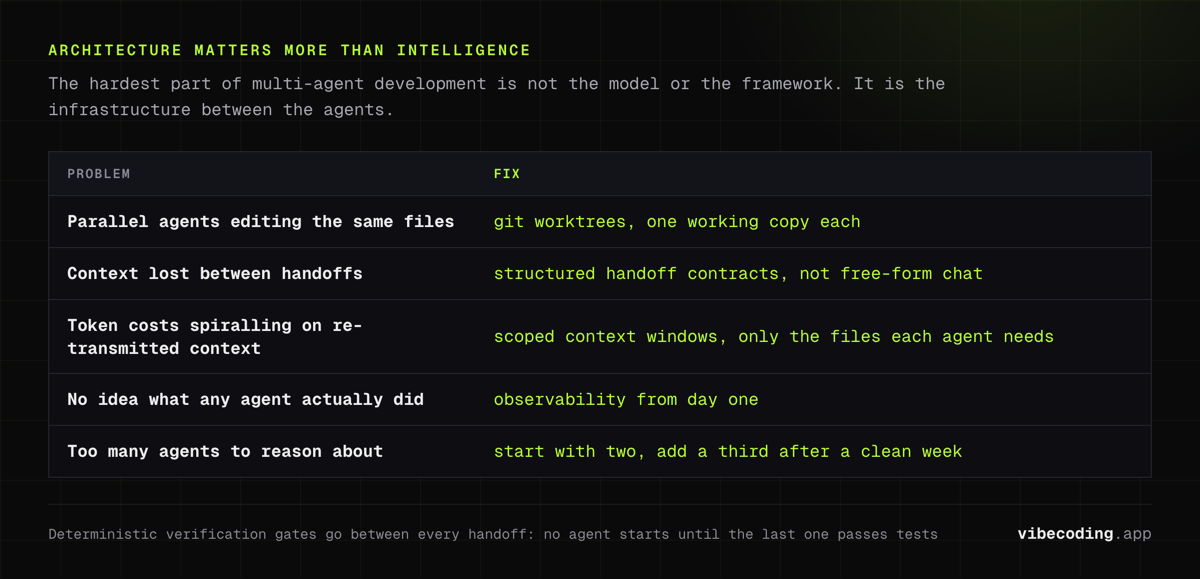
Community sentiment on this is loud and consistent: the hardest part of multi-agent development isn't picking the right model or framework. It's the infrastructure.
Git conflicts when parallel agents edit the same files. Context getting lost between handoffs. Token costs spiraling when agents re-transmit context to each other. One developer put it well: "architecture matters more than intelligence" when you're running multiple agents.
Git worktrees solve the file conflict problem: each agent gets its own working copy of the repo. Scoped context windows reduce token waste by giving each agent only the files it needs. Structured handoff contracts prevent the context loss.
The Cost Multiplier
Adding agents doesn't just add complexity: it multiplies it. Research frameworks like MetaGPT and ChatDev can burn through $10+ per task in communication overhead alone. Each agent message gets billed, and serial multi-turn conversations between agents add up fast.
IDE-level tools like Claude Code subagents are more cost-efficient because they share context rather than re-transmitting it. But you still need to monitor your token usage.
How to Mitigate
-
Structured handoffs over free-form chat. Don't let agents talk to each other in open-ended conversation. Define clear input/output contracts for each handoff point.
-
Deterministic verification gates. After every agent completes work, run tests. Don't let the next agent start until the previous one's output passes automated checks.
-
Observability from day one. You need to see what every agent is doing. VS Code's Agent Debug panel shows chat events, tool calls, and system prompts in real time.
-
Limit agent count. Start with two. Add a third only when you've seen the two-agent workflow run cleanly for a week.
Setting Up Your First Multi-Agent Workflow
Skip the frameworks for now. Start with tools you already use.
Step 1: Pick Two Roles
The minimum useful multi-agent setup is coder + reviewer. One agent writes code, another reviews it before you see it.
In Claude Code, this looks like a main agent that spawns a review subagent after each implementation task. Anthropic's Code Review dispatches multiple review agents in parallel: one checking for bugs, another for security, another for architecture.
Step 2: Define Handoff Contracts
Don't let agents communicate in free-form text. Specify exactly what one agent hands to the next:
Coder Agent Output:
- Modified files (list of paths)
- Summary of changes (one paragraph)
- Test commands to verify

Reviewer Agent Input:
- Diff of all modified files
- Original task description
- Test results (pass/fail)
Step 3: Add Verification Gates
Between every agent handoff, run something deterministic:
- After coding agent: Run the test suite. If tests fail, send back to coder with error output.
- After review agent: Check that all flagged issues were addressed.
- Before merge: Run the full build and lint pipeline.
Step 4: Monitor and Adjust
Run this two-agent workflow for at least a week before adding more agents. Track:
- How often does the reviewer catch real issues?
- How often does the coder's output pass review on the first try?
- Are there handoff points where context gets lost?
Only add a third agent (test writer, planner, or documentation agent) when you've answered those questions.
Step 5: Scale Up (When Ready)
Once you're comfortable with two agents, the path forward depends on your needs:
- Need speed? Add parallel coding agents on separate git worktrees (fan-out pattern).
- Need quality? Add specialized review agents: security, performance, accessibility.
- Need coverage? Add a test-generation agent that writes tests from the spec before coding starts.
- Need orchestration? Graduate from IDE tools to a framework like CrewAI or LangGraph.
Multi-Agent vs Single-Agent Tools Comparison
| Capability | Single-Agent (Cursor, Claude Code) | Multi-Agent (Frameworks + IDE Tools) |
|---|---|---|
| Setup complexity | Low – install and go | Medium to High – requires coordination strategy |
| Parallelism | One task at a time | Multiple tasks simultaneously |
| Specialization | General-purpose | Role-specific agents with scoped context |
| Cost per task | Lower (one model call chain) | Higher (multiple agents, communication overhead) |
| Failure debugging | Straightforward (one agent log) | Complex (cross-agent tracing needed) |
| Best for solo devs | Prototyping, MVPs, small projects | Large features, parallel workstreams, code review |
| Best for teams | Pair programming style | CI/CD integration, automated review pipelines |
If you're building an MVP with vibe coding tools, a single agent is almost certainly the right call. Multi-agent shines when your project has grown past what one context window can handle, or when you need parallel workstreams that don't block each other.
For a deeper comparison of single-agent tools, see our Claude Code vs Cursor breakdown.
When Multi-Agent Makes Sense (And When It Doesn't)
Multi-agent helps when:
- Your tasks are naturally parallelizable (frontend + backend + tests)
- You need specialized review that a single context window can't handle
- Your project is large enough that a single agent loses context
- You're working in a full-stack development workflow with distinct layers
Single-agent is fine when:
- Your project fits in one context window
- Tasks are sequential and dependent
- You're prototyping or building an MVP
- The coordination overhead would exceed the parallelism benefit
The organizations adopting multi-agent aren't using it for everything. Most apply it to the specific parts of their workflow where specialization pays off: code review, test generation, deployment checks, and keep a single agent for the rest.
Your role shifts from writing every line to conducting the orchestra. You define the roles, set the handoff contracts, review the outputs, and make the architecture calls. The agents handle the volume.
Frequently Asked Questions
What is multi-agent software development?
Multi-agent software development uses multiple specialized AI agents working together on a codebase. Each agent handles a specific role: planning, coding, reviewing, testing: instead of one model doing everything sequentially. The agents coordinate through defined handoff patterns like hierarchical, sequential, or parallel architectures.
How many agents should I start with?
Start with two: a coding agent and a review agent. Add more agents only when you can observe and control every handoff between them. Most solo developers and small teams get diminishing returns past three or four agents.
Is CrewAI free?
The CrewAI core framework is open-source and free. The cloud platform has a free tier (50 executions), a Basic plan at $99/month (100 executions), and higher tiers at $500+/month for production workloads. AutoGen and ChatDev are completely free alternatives if you want to avoid cloud costs.
What are the main failure modes in multi-agent development?
Research identifies six categories: reasoning-action mismatches (13.2%), task derailment (7.4%), proceeding with wrong assumptions (6.8%), conversation resets (2.2%), ignoring other agents (1.9%), and withholding information (0.85%). The reasoning-action mismatch is the most dangerous because the agent's explanation looks correct even when its output isn't.
Which tools support multi-agent coding workflows?
VS Code with Agent HQ supports running Claude, Codex, and Copilot agents in parallel. Claude Code offers subagents and Agent Teams for direct agent-to-agent communication. Frameworks like LangGraph, CrewAI, AutoGen, and ChatDev provide programmatic multi-agent orchestration for custom pipelines.
Is multi-agent development more expensive than single-agent?
It can be. Multi-agent communication costs can exceed $10 per task in research frameworks like MetaGPT and ChatDev due to serial message overhead. IDE-level tools like Claude Code subagents are more cost-efficient because they share context. Always monitor token usage when adding agents.
Can indie hackers use multi-agent development?
Yes. Start with free AutoGen or ChatDev plus your LLM API key. CrewAI's free tier gives 50 executions to experiment with. The most practical entry point is Claude Code subagents or VS Code Agent HQ: they don't require framework setup and work with tools you already have.
What's the difference between MCP and A2A protocols?
MCP (Model Context Protocol) from Anthropic standardizes how agents access tools and external resources. A2A (Agent-to-Agent) from Google standardizes peer-to-peer agent communication. MCP handles the "what can agents do" question; A2A handles "how do agents talk to each other."
Does multi-agent development replace developers?
No. Multi-agent systems still need human oversight for architecture decisions, edge case handling, and coordination strategy. Your role shifts from writing every line to defining agent roles, reviewing outputs, and managing handoffs. Think orchestra conductor, not audience member.
Do I need multi-agent workflows for a solo project?
Not always. A single agent handles most solo projects well. Multi-agent workflows pay off when tasks are naturally parallelizable: like writing code and tests simultaneously, or when you need specialized review that a single context window can't handle effectively.
Ready to explore AI-powered development workflows? Check out our developer workflow guide for single-agent setups, browse the AI tools directory to find the right coding agents for your stack, or read our AI full-stack development guide to see how these patterns fit into a complete build pipeline.

Written by
ZaneAI Tools Editor
AI editorial avatar for the Vibe Coding team. Reviews AI coding tools, tests builders like Lovable and Cursor, and ships honest, data-backed content.