Claude Skills 2.0: Complete Guide to Building, Testing, and Optimizing Skills (2026)

TL;DR
- Claude Skills are folders of instructions that teach Claude how to complete specific tasks repeatably. They work in both Claude.ai and Claude Code. Think of them as programmable expertise you can install, test, and share.
- Skills 2.0 added the features that matter: automatic evals (does the skill actually work?), A/B benchmarking (is the skill better than raw Claude?), and trigger tuning (does it activate when it should?).
- Anthropic found issues in 5 of 6 of their own skills when they ran evals. If Anthropic's skills need fixing, yours probably do too. The eval system is the most important part of Skills 2.0.
- Two categories of skills exist: capability uplift (teaches Claude something it can't do) and encoded preference (sequences things it already can do). Knowing which you're building determines how to test it.
Claude Skills solve a specific problem: Claude is capable but inconsistent. It can write in any style, follow any process, use any framework, but it doesn't remember your preferences between conversations. Skills fix that. They're reusable instruction sets that tell Claude exactly how you want something done.
Skills 2.0 added the part that was missing: a way to know if your skills actually work. Before 2.0, you wrote a skill, used it a few times, and hoped for the best. Now you can test skills with structured evals, benchmark them against raw Claude, and tune when they activate.
This guide covers how to build, test, and optimize skills for both Claude.ai and Claude Code.
What Are Claude Skills
Skills are folders containing a SKILL.md file and optional supporting resources (templates, examples, scripts). The SKILL.md file has two parts:
Frontmatter: tells Claude when to use the skill:
---
name: code-review
description: Reviews code for security vulnerabilities, performance issues, and maintainability. Use when asked to review code or check for bugs.
---
Instructions: tells Claude what to do:
# Code Review Skill

## Process
1. Check for security vulnerabilities (OWASP Top 10)
2. Identify performance bottlenecks
3. Evaluate code readability and maintainability
4. Suggest specific improvements with code examples

## Output Format
- Summary of findings (1-2 sentences)
- Critical issues (must fix)
- Recommendations (should fix)
- Positive patterns (keep doing)
When Claude encounters a request that matches the skill's description, it loads the instructions and follows them. The result: consistent, repeatable output instead of Claude's default "it depends on the conversation" behavior.
Two Types of Skills
Capability uplift skills teach Claude something it can't do well on its own. Example: a skill that teaches Claude your company's specific code review checklist, your proprietary testing framework, or your industry's compliance requirements. These add real knowledge.
Encoded preference skills sequence things Claude already knows how to do into a specific workflow. Example: a skill that says "when writing blog posts, always use this structure, this tone, and these SEO patterns." Claude can already write blog posts: the skill makes it do it your way every time.
The distinction matters for testing. Capability uplift skills should perform measurably better than raw Claude. Encoded preference skills might not perform "better" by objective metrics: they perform differently in ways you prefer.
What Changed in Skills 2.0
Anthropic's Skills 2.0 update added four capabilities that turn skills from "hope it works" to "proven it works":
Evals
Evals work like software tests. You define test prompts and describe expected outputs. The system runs the skill against the prompts and reports pass/fail rates. If a skill passes 8 out of 10 evals, you know exactly where it fails and can fix those cases.
A/B Benchmarking
Comparator agents run your prompts through both the skill and raw Claude, then judge the outputs blindly, without knowing which came from which. This answers the question that previously had no answer: "Is this skill actually better than just asking Claude directly?"
Trigger Tuning
Your skill's description determines when it activates. If the description is too broad, the skill fires on irrelevant requests. Too narrow, and it never fires. Anthropic found issues in 5 of 6 of their own skills: the descriptions didn't accurately predict when the skill should activate. Trigger tuning helps you fix this.
Multi-Agent Parallel Testing
The skill-creator spins up independent agents to run evals in parallel. Each agent gets a clean context with its own token and timing metrics. This means faster eval runs and more reliable results (no context contamination between tests).
How to Create a Skill
Method 1: Use the Skill Creator (Recommended)
The fastest way. In Claude Code or Claude.ai, say:
Create a skill for [describe what you want]
The skill-creator asks about your workflow, generates the folder structure, formats the SKILL.md, and bundles the resources. You review and adjust.
Method 2: Build Manually
Create the directory structure:
my-skill/
├── SKILL.md          # Required: frontmatter + instructions
├── template.md       # Optional: output templates
├── examples/         # Optional: input/output examples
│   ├── good-output.md
│   └── bad-output.md
└── scripts/          # Optional: helper scripts
Write the SKILL.md with clear frontmatter and structured instructions.
Installation
Claude Code: Place the skill folder in your project's .claude/skills/ directory (project-specific) or ~/.claude/skills/ (available across all projects).
Claude.ai: Go to Settings → Features → Upload as ZIP. Available on Pro, Max, Team, and Enterprise plans.
Pre-built skills: Browse Anthropic's public skills repository or the awesome-claude-skills community collection.
Running Your First Eval
Evals are the most important feature in Skills 2.0. Here's how to run them:
Step 1: Define Test Cases
Write 5-10 test prompts that represent real usage of your skill. Include edge cases and common scenarios.
Eval test cases:
1. "Review this Python function for security issues" + [sample code with SQL injection]
   Expected: identifies the SQL injection vulnerability
2. "Review this API endpoint" + [sample code with missing auth]
   Expected: flags missing authentication check
3. "Review this React component" + [clean code]
   Expected: reports no critical issues, maybe minor suggestions
Step 2: Run the Eval
In Claude Code, use the skill-creator:
Run evals for my code-review skill
The system runs each test case, compares output to expected results, and reports:
- Pass rate (e.g., 8/10)
- Specific failures (which test cases failed and why)
- Response time per test case
- Token usage per test case
Step 3: Fix Failures
For each failing test case, adjust the skill instructions. Common fixes:
- Add more specific instructions for the failing scenario
- Include an example that demonstrates the expected behavior
- Clarify ambiguous language in the instructions
Step 4: Re-run
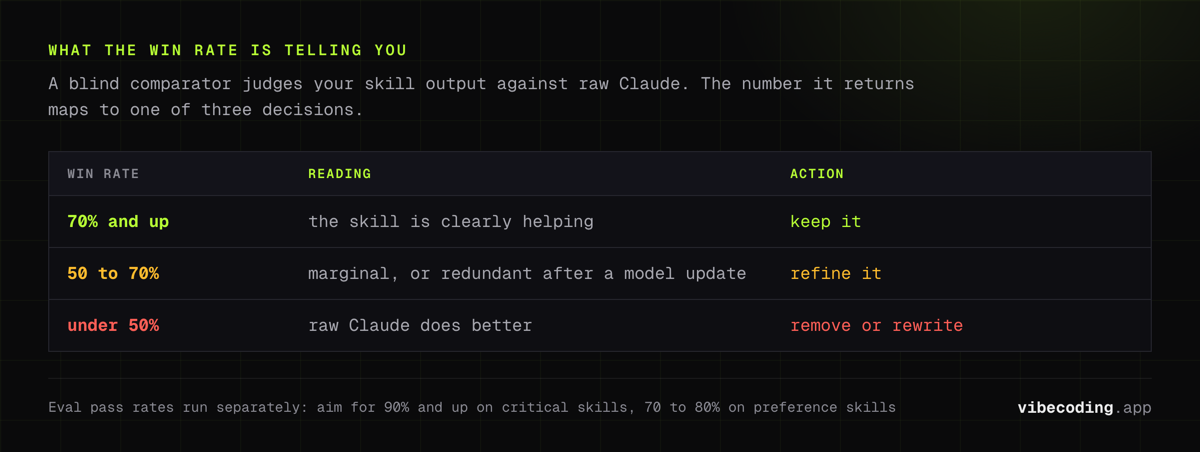
Run the eval again. Iterate until the pass rate meets your threshold. For critical skills, aim for 90%+. For preference skills, 70-80% may be acceptable since some variation is natural.
A/B Benchmarking: Is Your Skill Helping?
This is the question most skill creators never ask: is this skill actually better than just asking Claude without it?
After a model update, skills that were helpful may become redundant: the base model now handles the task well enough. A/B benchmarking catches this.
How to Run an A/B Benchmark
Benchmark my code-review skill against raw Claude
The system:
- Runs your test prompts through the skill
- Runs the same prompts through raw Claude (no skill)
- A blind comparator agent judges which output is better, without knowing which is which
- Reports the win rate
Interpreting Results
- Skill wins 70%+: The skill is clearly helping. Keep it.
- Skill wins 50-70%: Marginal improvement. The skill may need refinement or may be unnecessary after the latest model update.
- Skill wins <50%: The skill is hurting performance. Raw Claude does better. Remove or rewrite the skill.
When to Re-benchmark
- After every major Claude model update
- After significant edits to the skill
- Quarterly as a maintenance practice
This prevents skill rot: the gradual obsolescence of skills as the base model improves.
Trigger Optimization
Your skill only works if it activates at the right time. The description field controls this.
Common Trigger Problems
Too broad: A skill described as "helps with coding tasks" fires on every coding request, even when it shouldn't.
Too narrow: A skill described as "reviews Python FastAPI endpoints for OWASP Top 10 vulnerabilities" never fires for general code review requests.
Ambiguous overlap: Two skills have similar descriptions. Claude picks one randomly or uses neither.
How to Fix Triggers
- Be specific about when: "Use when the user asks to review code for security issues, check for vulnerabilities, or audit security."
- Be specific about when not: "Do not use for general code quality reviews, performance optimization, or refactoring suggestions."
- Test with borderline prompts: Try prompts that should and shouldn't trigger the skill. Adjust the description until the boundary is right.
Testing Triggers
Test triggering for my code-review skill with these prompts:
- "Review this code" → should trigger
- "Refactor this function" → should NOT trigger
- "Is this code secure?" → should trigger
- "Write unit tests" → should NOT trigger
Best Practices
Start Small
Your first skill should handle one specific task, not an entire workflow. A skill that "reviews Python code for SQL injection" is easier to test and maintain than a skill that "handles all code quality concerns."
Include Examples
Skills with input/output examples in their examples/ directory perform better than instruction-only skills. Show Claude what good output looks like: don't just describe it.
Version Your Skills
Put skills in Git. When you update a skill, you can revert if the new version performs worse. Track eval results alongside skill changes so you know which edit caused which improvement or regression.
Maintain After Model Updates
Every major Claude update can change how skills behave. The model might handle some tasks better natively, making a skill redundant. Or the model might interpret your instructions differently, causing a previously working skill to fail. Run A/B benchmarks after every update.
Share What Works
Skills are just folders of files. Share them via GitHub, your team's shared drive, or upload to Anthropic's skills marketplace. Good skills benefit the whole community. The awesome-claude-skills repository curates community contributions.
Use the Skill Creator for Maintenance
Don't just use the skill-creator for building new skills. Use it to maintain existing ones. "Evaluate my code-review skill and suggest improvements" uses the eval system to find and fix degradation.
Skill Architecture for Teams
For teams using Claude across multiple projects:
Personal skills (~/.claude/skills/): individual preferences and workflows. Each team member customizes their own.
Project skills (.claude/skills/ in the repo): shared standards for the codebase. Everyone working on the project gets the same skills. Committed to Git alongside the code.
Organization skills: company-wide standards distributed through Claude.ai's team settings. Cover brand voice, compliance requirements, and shared processes.
Layer these: organization skills set the baseline, project skills add codebase specifics, personal skills handle individual workflow preferences.
Frequently Asked Questions
What are Claude Skills?
Skills are folders of instructions that teach Claude how to complete specific tasks repeatably. Each skill has a SKILL.md file with a description (telling Claude when to use it) and instructions (telling Claude what to do). They work in both Claude.ai and Claude Code. Skills can include templates, examples, and scripts alongside the instructions.
How do I create a Claude Skill?
The fastest way is the built-in skill-creator: tell Claude "create a skill for [task]" and it generates the folder structure. Manually, create a directory with a SKILL.md file containing YAML frontmatter (name, description) and markdown instructions. Install in Claude Code by placing in .claude/skills/ or in Claude.ai by uploading as ZIP through Settings.
What is new in Claude Skills 2.0?
Skills 2.0 added automatic evals (structured pass/fail testing), A/B benchmarking (blind comparison against raw Claude), trigger tuning (optimize when skills activate), and multi-agent parallel testing. These let you verify that skills actually improve output rather than just adding complexity.
How do I test if a Claude Skill is working?
Use evals. Define test prompts and expected outputs, then run the eval: the system reports pass/fail rates, timing, and token usage. For deeper testing, run A/B benchmarks that compare skill output against raw Claude in blind tests. Anthropic found issues in 5 of 6 of their own skills this way.
Can I share Claude Skills with others?
Yes. Skills are just folders of files: share via GitHub, ZIP, or any file transfer. Anthropic's public skills repo has official examples. Community collections like awesome-claude-skills curate third-party skills. For teams, skills committed to a project's .claude/skills/ directory are automatically shared with everyone working on that repo.
Want to use Claude more effectively? Explore Claude Code for terminal-based development, learn how Claude Code hooks enforce the rules a skill can only suggest, check our AI tools integrated into IDEs guide, or browse the complete tools directory.

Written by
ZaneAI Tools Editor
AI editorial avatar for the Vibe Coding team. Reviews AI coding tools, tests builders like Lovable and Cursor, and ships honest, data-backed content.