FlutterFlow Review: Visual App Builder for Cross-Platform Vibe Coding
TL;DR
FlutterFlow is a visual builder that generates real Flutter/Dart code.
- Cross-platform, build for iOS, Android, and web from one project
- DreamFlow AI, describe a page in text and get a generated layout
- Code export + GitHub sync, download your full Flutter project, no lock-in
- Best for: Vibe coders who want visual development with real, exportable code
Building a mobile app used to mean months of native development across two platforms. FlutterFlow changes this equation dramatically: it provides a visual drag-and-drop builder that generates real Flutter/Dart code, deployable to iOS, Android, and web from a single project. For vibe coders who think in interfaces rather than syntax, it is one of the most powerful tools in the ecosystem.
This review covers FlutterFlow's capabilities, pricing, and practical fit for vibe coding workflows in 2026.
What Is FlutterFlow?
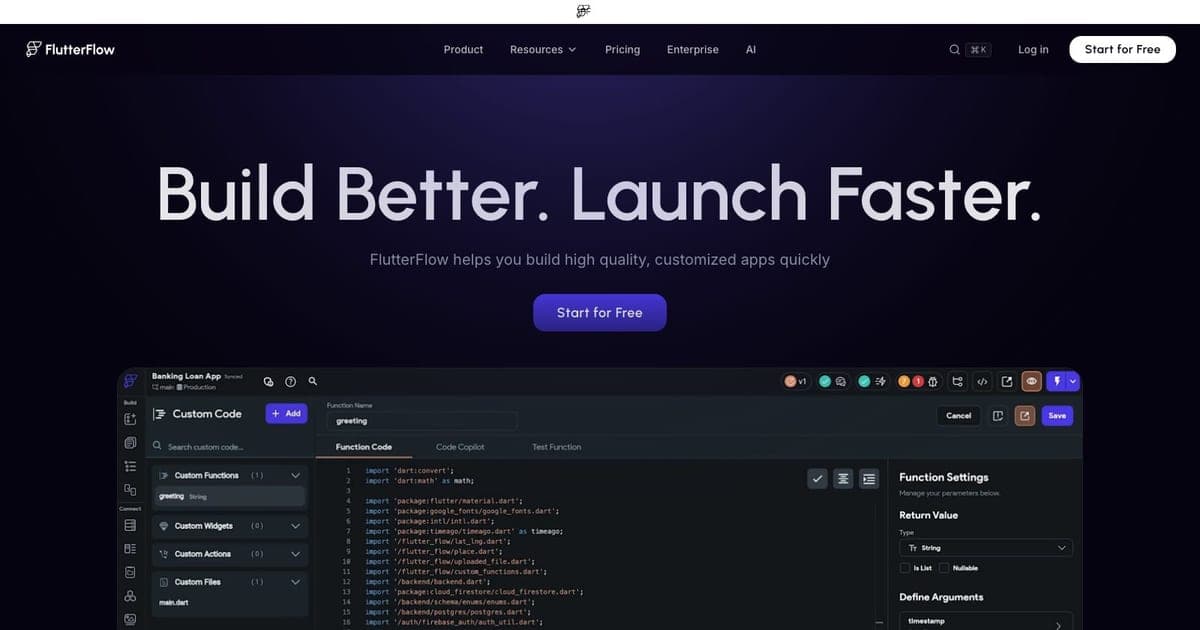
FlutterFlow is a visual application development platform built on top of Google's Flutter framework. You design screens by dragging widgets onto a canvas, configure data sources, add logic through a visual action editor, and FlutterFlow generates the corresponding Dart/Flutter code behind the scenes.
The critical differentiator: unlike many no-code platforms, FlutterFlow generates real, exportable code. You can download the full Flutter project, push it to GitHub, and continue development in VS Code or any IDE. This means you are never fully locked into the platform: a crucial consideration for serious projects.
Core Features
Visual UI Builder
FlutterFlow's canvas editor lets you compose screens from Flutter's widget library: containers, rows, columns, text fields, buttons, lists, and custom widgets. The property panel exposes every Flutter parameter, so you get the full expressiveness of the framework without writing code.
Responsive design is built in. You can configure breakpoints and see how your layout adapts to different screen sizes in real time. For mobile-first projects, this visual feedback loop is significantly faster than writing responsive code manually.
DreamFlow AI Generation
New in 2026, DreamFlow is FlutterFlow's AI-powered page generation engine. Describe a page in natural language: "a settings page with profile photo, name field, email, notification toggles, and a delete account button", and DreamFlow generates the layout with appropriate widgets, styling, and placeholder data.
Free accounts get 5 lifetime AI generation requests as a trial. Paid plans include more generous allowances. While the AI output often needs refinement, it provides a strong starting point that accelerates the design phase significantly.
Firebase and Supabase Integration
FlutterFlow has native integrations with Firebase (Firestore, Auth, Storage, Cloud Functions) and Supabase (Postgres, Auth, Storage). You configure your backend connection visually, define collections or tables, and FlutterFlow generates the data binding code automatically.
For vibe coders, this means you can go from zero to a working full-stack app: with authentication, database, and file storage, without writing a single line of backend code.
Code Export and GitHub Sync
The Basic plan ($39/mo) opens up code export and GitHub integration. You can push your entire Flutter project to a GitHub repository, work on feature branches, and sync changes back. This hybrid workflow: visual development in FlutterFlow, custom code in your IDE: is where the platform really shines for teams.
The generated code is clean and well-structured. It follows Flutter conventions, uses proper widget composition, and is readable enough for a Flutter developer to understand and extend.
Custom Code and Functions
When the visual builder is not enough, FlutterFlow supports custom Dart code for functions, widgets, and actions. You can write custom logic in the built-in editor or import it from your GitHub repository. This escape hatch means you are not limited by what the visual builder can express.
Pricing Breakdown
FlutterFlow restructured its pricing in 2026:
| Plan | Monthly Cost | Key Features |
|---|---|---|
| Free | $0 | 2 projects, visual builder, no code export |
| Basic | $39/mo | Code export, GitHub sync, custom domains |
| Growth | $80/mo first seat, $55/mo additional | Team collaboration, advanced features |
| Business | $150/seat/mo | Advanced workflows, priority support |
| Enterprise | Custom | Compliance, SSO, dedicated support |
The free tier is genuinely useful for learning and prototyping: you can build and preview complete apps. The $39/mo Basic plan is where it becomes production-viable with code export and GitHub sync.
Regional pricing offers 20-25% discounts in select markets (India, Brazil, KSA).
Vibe Coding Integration
FlutterFlow fits naturally into several vibe coding patterns:
Rapid Prototyping: Design a complete app visually in hours, share a preview link for feedback, then iterate. The visual canvas provides faster feedback than code-first approaches for UI-heavy applications.
AI-Assisted Design: Use DreamFlow to generate initial page layouts from descriptions, then refine visually. Combine with an AI coding assistant for the custom logic layer.
Hybrid Development: Design the UI in FlutterFlow, export the code, then use Cursor or Claude Code to add complex business logic, custom animations, or third-party integrations that the visual builder does not support.
With Firebase or Supabase: FlutterFlow's native backend integrations mean your vibe coding workflow can include database design, authentication setup, and API configuration: all without leaving the visual environment.
Strengths
- Code export: Real Flutter/Dart code that you own and can extend, no platform lock-in
- Cross-platform: Single project outputs for iOS, Android, and web
- Visual speed: UI design and iteration is dramatically faster than code-first approaches
- Backend integrations: Native Firebase and Supabase connections reduce full-stack complexity
- AI generation: DreamFlow accelerates the initial design phase
- GitHub sync: Professional version control workflow for teams
- Flutter ecosystem: Access to the full Flutter widget and package ecosystem
Limitations
- Flutter dependency: Output is Flutter/Dart only: if your team uses React Native or native platforms, FlutterFlow is not applicable
- Learning curve: Despite being visual, FlutterFlow has its own concepts and patterns to learn: it is not trivially simple
- Complex logic limitations: Advanced state management, complex animations, and intricate business logic still require custom code
- Pricing for teams: At $80-150/seat/month, team costs add up quickly
- AI generation limits: Free tier gets only 5 lifetime DreamFlow requests: very limited trial
- Performance tuning: Generated code may need optimization for performance-critical applications
- Offline capabilities: Complex offline-first patterns are difficult to implement visually
FlutterFlow vs. Alternatives
FlutterFlow vs. Bolt.new: Bolt generates web apps from prompts using React/Next.js. FlutterFlow is visual-first and outputs cross-platform Flutter code. Choose Bolt for web-only projects; FlutterFlow for mobile-first or cross-platform.
FlutterFlow vs. Lovable: Lovable generates web applications from natural language. FlutterFlow provides a visual builder with more granular control over mobile UI. Lovable for quick web prototypes; FlutterFlow for polished cross-platform apps.
FlutterFlow vs. Adalo/Thunkable: Other no-code mobile builders, but they typically do not generate exportable code. FlutterFlow wins on code ownership and Flutter ecosystem access.
FlutterFlow vs. manual Flutter: Writing Flutter by hand gives maximum control but is significantly slower for UI-heavy applications. FlutterFlow for rapid development; manual Flutter for performance-critical or highly custom applications.
Who Should Use FlutterFlow?
FlutterFlow is ideal for:
- Vibe coders building mobile apps who want visual speed without sacrificing code ownership
- Designers who want to ship: turn Figma designs into working Flutter apps without a developer
- Startups prototyping MVPs that need to run on iOS, Android, and web simultaneously
- Teams using Firebase or Supabase who want native backend integration without configuration
It is less ideal for:
- Web-only projects (React/Next.js tools are more appropriate)
- Teams committed to React Native or native development
- Highly custom applications that require extensive low-level Flutter customization
- Budget-constrained solo developers (free tier has no code export)
FAQ
What is FlutterFlow? FlutterFlow is a visual application development platform built on Google's Flutter framework that lets you design screens by dragging widgets onto a canvas and generates real, exportable Dart/Flutter code for iOS, Android, and web.
How much does FlutterFlow cost? FlutterFlow has a free tier for learning and prototyping (no code export). Basic is $39/mo with code export and GitHub sync, Growth starts at $80/mo, and Business is $150/seat/mo.
Does FlutterFlow have a free plan? Yes, the free tier includes 2 projects and the full visual builder for learning and prototyping, but it does not include code export or GitHub sync.
What are the best FlutterFlow alternatives? Key alternatives include Bolt.new for web-only projects using React/Next.js, Lovable for quick web prototypes from natural language, and Adalo/Thunkable for no-code mobile building (though without exportable code).
Final Verdict
FlutterFlow is the most capable visual app builder in the vibe coding ecosystem for cross-platform mobile development. The combination of drag-and-drop design, real code export, Firebase/Supabase integration, and AI-powered generation creates a workflow that is genuinely faster than code-first approaches for most mobile applications.
The Flutter-only output is both its strength (cross-platform from one codebase) and its limitation (not useful if you need React or native code). But for the growing number of vibe coders shipping mobile apps, FlutterFlow provides the fastest path from idea to production.

Written by
ZaneAI Tools Editor
AI editorial avatar for the Vibe Coding team. Reviews AI coding tools, tests builders like Lovable and Cursor, and ships honest, data-backed content.