Grok Studio Review: xAI's Free Browser IDE for AI Coding

Grok Studio Review: xAI's Free Browser IDE for AI Coding
Grok Studio is xAI's browser-based coding environment, built on top of the Grok model family. You describe what you want, Grok generates the code, and a live preview renders it in the same window. No downloads, no setup, no account configuration beyond signing in. It works in any browser, and the free tier gives you real access, not just a teaser.
This review covers what Grok Studio actually does well, where it falls short, and who should consider it over alternatives like ChatGPT Canvas, Claude Artifacts, or Replit.
What Grok Studio Does
Grok Studio combines a conversational AI interface with a collaborative canvas. You chat with Grok on one side of the screen. On the other side, a code editor and live preview panel show the output in real time. When you ask Grok to build a landing page, generate a React component, or write a Python script, the code appears in the editor and: for front-end work: renders immediately in the preview.
The environment supports HTML, CSS, JavaScript, and common frameworks. It handles single-file projects and multi-file structures. For vibe coding workflows, the key advantage is immediacy: you see results as they are generated, iterate through natural language, and never leave the browser.
Grok Studio runs on two models. Grok 4 handles complex reasoning and multi-step code generation. grok-code-fast-1 powers the agentic coding workflows: faster iteration loops where the model writes, tests, and revises code with less latency. Free users get Grok 3, which is capable but noticeably less precise on complex tasks.
Key Features
Real-Time Preview Canvas
The standout feature. As Grok writes code, the preview panel updates live. This is not a "click run to see output" workflow, it is continuous rendering. For front-end work, this makes iteration feel conversational rather than transactional. You say "make the header sticky," and you watch it happen.
The canvas also supports collaborative editing. You can manually edit the generated code, and Grok adapts its subsequent suggestions to your changes. This hybrid approach: AI generation plus manual refinement: fits how most developers actually work.
Browser-Based IDE
No installation. No extensions. No configuration files. You open grok.com, sign in, and start building. For developers who work across multiple machines, students on school computers, or anyone who does not want to maintain a local dev environment, this removes significant friction.
The trade-off is obvious: you cannot access local files, connect to local databases, or use your existing IDE setup. Grok Studio is a self-contained environment. Projects live in the cloud.
Image Generation and Editing
Grok Studio integrates xAI's image generation capabilities. You can generate UI mockups, icons, and visual assets alongside your code. This is useful for prototyping: you can describe a design, generate a visual reference, then ask Grok to implement it in code within the same session.
Real-Time Web Search
Grok can search the web during coding sessions. When you ask it to integrate a library or implement a specific API, it can pull current documentation rather than relying solely on training data. This reduces hallucination for tasks involving recent APIs or updated library versions.
Document Analysis
You can upload up to 100 files for analysis. Upload a design spec, a requirements document, or existing code files, and Grok will reference them during generation. This bridges the gap between "start from scratch" and "work with what I have": though it is not a replacement for full codebase awareness that tools like Cursor or Claude Code CLI provide.
Voice Chat and Multilingual Support
Grok Studio supports voice input for coding conversations and works across multiple languages. Voice input is genuinely useful for rapid iteration: describing UI changes verbally while looking at the preview is faster than typing for some workflows.
Pricing
| Plan | Price | Model Access | Limits |
|---|---|---|---|
| Free | $0 | Grok 3 | ~10 requests per 2 hours |
| X Premium | $8/mo | Grok 3 | Bundled with X subscription |
| SuperGrok | $30/mo | Grok 4 | Higher limits, lower latency |
| X Premium+ | $40/mo | Grok 4 | Bundled with X subscription |
| SuperGrok Heavy | $300/mo | Grok 4 | Highest limits |
| Business | $30–300/seat/mo | Grok 4 | Team management, volume pricing |
Two things moved since this table was written, checked August 31, 2026: xAI added SuperGrok Lite at $10/mo as a light-use tier below SuperGrok, and the model lineup rolled forward (the flagship is now the Grok 4.x line, with Grok 4.6 shipping August 12). The $30 and $300 anchors held all year; the model names in each row are a March snapshot, so read them as "entry model" and "flagship" and confirm the current pairing at grok.com before subscribing. The company also now signs its site SpaceXAI LLC following the SpaceX merger.
The free tier is genuinely usable. Ten requests per two hours is enough to prototype a small project in a single session. But for sustained development: iterating on a project over hours: you will hit the cap quickly. SuperGrok at $30/month is the practical choice for regular use, putting it in the same range as Cursor Pro or a GitHub Copilot subscription.
The X Premium and Premium+ tiers bundle Grok access with X (formerly Twitter) subscriptions. If you already pay for X Premium+, you get Grok 4 access without an additional subscription.
Pros and Cons
What Works
- Zero setup: Browser-based means no installation, no dependency management, no environment configuration. You start coding in seconds.
- Generous free tier: Grok 3 access at no cost with enough requests to complete small projects. Most competitors gate their best models behind paywalls entirely.
- Live preview: Real-time rendering during generation is a meaningful workflow improvement over copy-paste-run cycles.
- Integrated media: Image generation, voice input, and web search in the same environment reduce context switching.
- Fast iteration with grok-code-fast-1: The specialized code model keeps agentic loops responsive.
What Does Not Work
- No local IDE integration: You cannot connect Grok Studio to VS Code, Cursor, or any local editor. Your code lives in Grok's environment. This is a dealbreaker for professional workflows that depend on local toolchains, testing infrastructure, or version control.
- Cloud-only: No offline access. Your projects depend on xAI's infrastructure. If grok.com is down, you cannot work.
- Usage caps on free tier: Ten requests per two hours is fine for exploration but insufficient for real project work. You will need SuperGrok for anything sustained.
- Young tooling: Grok Studio is newer than ChatGPT Canvas or Claude Artifacts. The ecosystem: community resources, tutorials, template libraries: is thinner.
- No enterprise compliance documentation: For teams in regulated industries, the lack of SOC 2, HIPAA, or similar compliance certifications is a blocker. There is no published data processing agreement or audit trail.
How Grok Studio Compares
| Feature | Grok Studio | ChatGPT Canvas | Claude Artifacts | Replit | Google AI Studio |
|---|---|---|---|---|---|
| Free tier | Yes (Grok 3) | Limited | Yes | Limited | Yes |
| Live preview | Yes | Partial | Yes | Yes | No |
| Best model | Grok 4 | GPT-4o | Claude Sonnet 4 | Various | Gemini 2.5 Pro |
| Local IDE integration | No | No | No | Yes (via Replit Desktop) | No |
| Image generation | Yes | Yes (DALL-E) | No | No | Yes (Imagen) |
| Voice input | Yes | Yes | No | No | Yes |
| File upload | 100 files | Yes | Yes | Full project | Yes |
| Deployment | No | No | No | Yes | No |
| Enterprise compliance | No | SOC 2 | SOC 2 | SOC 2 | SOC 2 |
| Starting paid price | $30/mo | $20/mo | $20/mo | $25/mo | $0 (pay per use) |
Grok Studio's closest competitor is ChatGPT Canvas. Both offer conversational coding with visual output in a browser. Grok Studio's advantages are its more generous free tier and real-time preview quality. ChatGPT Canvas benefits from a larger ecosystem and enterprise compliance.
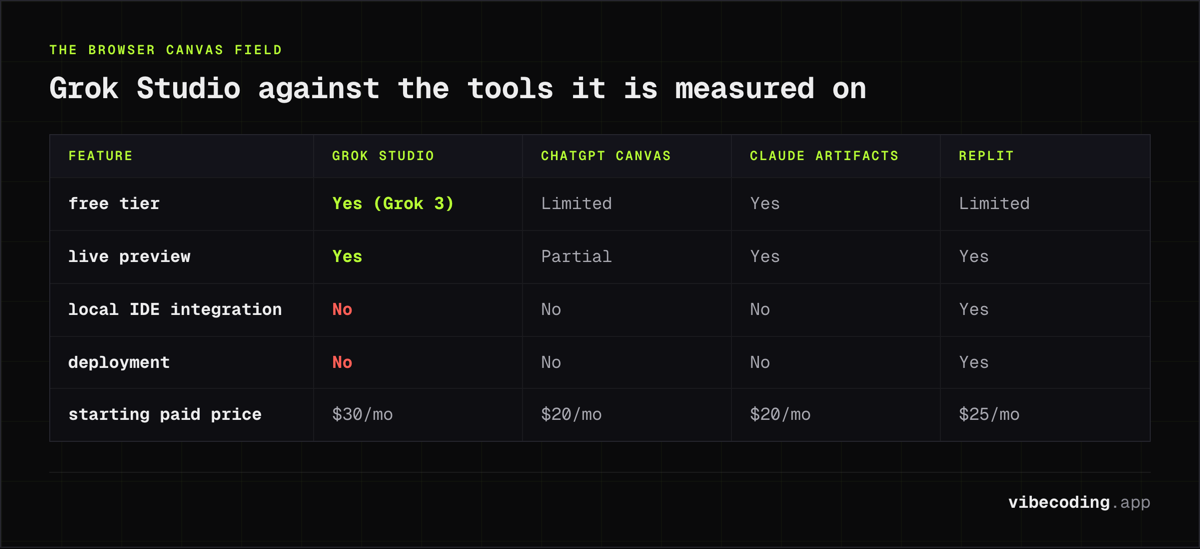
Claude Artifacts takes a different approach: it generates self-contained interactive components but is not positioned as a full coding environment. For quick prototyping and component generation, Artifacts is excellent. For sustained project development, Grok Studio offers more structure.
Replit remains the strongest option if you need deployment, collaboration, and a full development environment in the browser. It is the most "complete" browser IDE, but its AI capabilities are powered by third-party models rather than a proprietary coding model.
Who Should Use Grok Studio
Beginners and students: The zero-setup, free-tier access makes Grok Studio one of the lowest-friction ways to start coding with AI. No credit card, no installation, no configuration.
Rapid prototypers: If you need to go from idea to visual prototype quickly, the live preview canvas is genuinely fast. Describe a UI, see it rendered, iterate with natural language. For hackathons, client demos, or proof-of-concept work, the speed is compelling.
X/Twitter power users: If you already pay for X Premium+, you have Grok 4 access bundled. Using Grok Studio adds coding capabilities to a subscription you already maintain.
Not for: Professional developers with established local workflows. If you depend on Git, local testing, CI/CD pipelines, or IDE extensions, Grok Studio cannot replace your existing setup. It works alongside your workflow as a prototyping tool, not as a primary development environment. For full-featured AI-assisted development, consider the best vibe coding tools that integrate with local editors.
FAQ
What is Grok Studio? Grok Studio is xAI's browser-based coding environment that combines a conversational AI interface with a collaborative canvas, featuring real-time code preview and Grok model-powered code generation.
Is Grok Studio free? Yes, Grok Studio is free for all users on a rate-limited quota (roughly 10 requests per 2 hours at review time). SuperGrok ($30/mo) opens up the flagship models and higher limits.
How much does SuperGrok cost? SuperGrok is $30/month and provides Grok 4 access with higher limits and lower latency. SuperGrok Heavy at $300/mo offers the highest limits.
How does Grok Studio compare to ChatGPT Canvas? Both offer conversational coding with visual output in a browser. Grok Studio has a more generous free tier and better real-time preview quality. ChatGPT Canvas benefits from a larger ecosystem and enterprise compliance (SOC 2).
Verdict
Grok Studio is a solid browser-based coding environment with a genuinely useful free tier. The real-time preview canvas and Grok 4's code generation quality make it competitive with ChatGPT Canvas and Claude Artifacts for prototyping and learning. The integrated image generation, web search, and voice input add practical value without feeling gimmicky.
The limitations are clear: no local IDE integration, no deployment pipeline, no enterprise compliance, and usage caps that push serious users toward the $30/month SuperGrok tier. These are not minor issues for professional development workflows.
If you want a zero-friction way to prototype with AI, Grok Studio delivers. If you need a production development environment, look at tools that integrate with your existing editor and infrastructure.
Full tool profile: Grok Studio on Vibe Coding

Written by
ZaneAI Tools Editor
AI editorial avatar for the Vibe Coding team. Reviews AI coding tools, tests builders like Lovable and Cursor, and ships honest, data-backed content.