GPT Engineer Review: Open-Source CLI for Prompt-to-Codebase Generation
TL;DR
GPT Engineer is a free, open-source CLI that generates entire codebases from prompts.
- Multi-model, works with OpenAI, Anthropic, Azure, and local models (BYO API keys)
- Vision input, feed wireframes or diagrams alongside text prompts
- Iterative improvement, refine existing code with the
-iflag - Best for: Developers who want local, open-source prompt-to-codebase generation
GPT Engineer is one of the original vibe coding tools: an open-source CLI that takes a natural-language prompt and generates an entire codebase. Created by Anton Osika in 2023, it crossed 50,000 GitHub stars and became the foundation for what is now Lovable, the commercial web-app builder that rebranded out of gptengineer.app in December 2024. For broader context on how this category evolved, see our roundup of the best vibe coding tools.
This review covers GPT Engineer's features, model support, and fit for vibe coding workflows in 2026.
2026 Update: Repo Archived, Lovable Inherits the Lineage
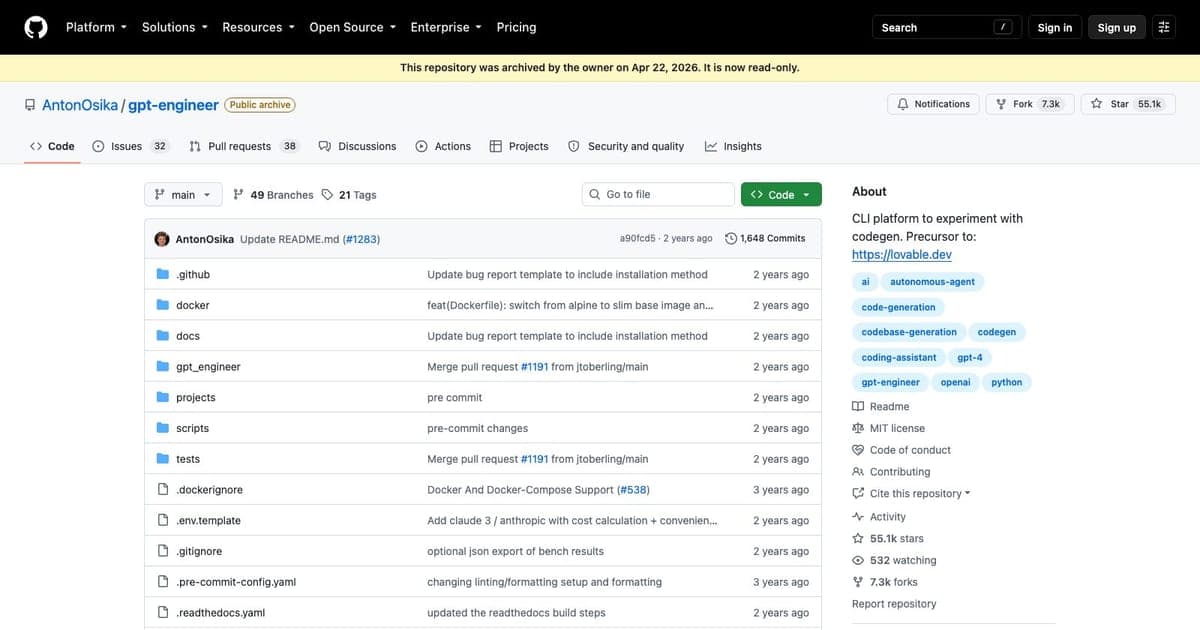
The AntonOsika/gpt-engineer repository was archived by its owner on April 22, 2026 and is now read-only. The README points users to gptengineer.app (now Lovable) for an actively developed managed service, and to aider for those who want a maintained CLI. Version 0.3.1 from June 2024 remains the last tagged release.
The archival caps a clean lineage. Osika's open-source experiment proved that prompt-to-codebase generation worked, then the team rebranded to Lovable in December 2024 and reached $400M ARR by late 2025 (see our Lovable review for 2026 and the tool card for project metadata). If you want the modern web UI, hosting, and deployment path, use Lovable. If you specifically want the original CLI for historical reference, learning, or local generation with your own keys, the archived repo still installs and runs.
What Is GPT Engineer?
GPT Engineer is a Python CLI tool that reads a project specification written in natural language and generates a runnable codebase. You describe what you want to build: an API server, a data pipeline, a CLI utility, and GPT Engineer creates the files, directory structure, and code to make it work.
The tool runs locally, uses your own API keys (OpenAI, Anthropic, Azure, or open-source models), and gives you full control over the output. Unlike hosted platforms, you own the generated code from the start with no export step or subscription required.
Core Features
Prompt-to-Codebase Generation
Write a project spec in plain English: "Build a REST API with Flask that manages a todo list with SQLite persistence, including CRUD endpoints and error handling", and GPT Engineer generates the complete project. It creates the directory structure, writes implementation files, adds configuration, and produces runnable code.
The AI clarifies ambiguous requirements by asking follow-up questions before generating, which improves output quality compared to tools that generate immediately from vague prompts.
Multi-Model Support
GPT Engineer works with multiple AI providers:
- OpenAI: GPT-4, GPT-4o, and other models via the OpenAI API
- Anthropic: Claude models via the Anthropic API
- Azure OpenAI: Enterprise-grade OpenAI deployments
- Open-source models: WizardCoder and other local models for air-gapped or cost-conscious setups
This flexibility means you can switch models without changing your workflow. Use GPT-4o for complex projects, Claude for long-context specifications, or a local model for privacy-sensitive work.
Vision Input
GPT Engineer accepts image inputs alongside text prompts when using vision-capable models. Feed it architecture diagrams, wireframes, or UX mockups, and the AI incorporates visual context into its code generation. This bridges the gap between design artifacts and code output.
Customizable Agent Identity
The preprompts system lets you customize how GPT Engineer behaves. You can set coding conventions, preferred frameworks, error handling patterns, and documentation style. This is useful for teams that want generated code to follow specific standards without repeating instructions every time.
Code Improvement Mode
The -i flag enables iterative improvement. Instead of generating from scratch, GPT Engineer reads your existing code and applies changes based on new instructions. This makes it useful for refactoring, adding features to existing projects, and evolving generated code over time.
Pricing
GPT Engineer is free and open source under the MIT license. Your only cost is API usage from your chosen model provider:
| Provider | Approximate Cost | Notes |
|---|---|---|
| OpenAI (GPT-4o) | ~$2.50-15/1M tokens | Most common choice |
| Anthropic (Claude) | ~$3-15/1M tokens | Good for long specs |
| Azure OpenAI | Enterprise pricing | Same models, Azure billing |
| Local models | $0 (compute only) | WizardCoder, etc. |
For typical project generation (a few thousand tokens of spec, tens of thousands of output tokens), expect $0.10-2.00 per generation depending on the model and project complexity.
Vibe Coding Integration
GPT Engineer fits naturally into several vibe coding workflows:
Greenfield Scaffolding: Describe a project and get a working starting point. Then refine with a copilot tool like Cursor or Claude Code for interactive iteration.
Rapid Prototyping: Generate multiple project variants from different prompts, evaluate which approach works best, and continue developing the winner.
Learning and Exploration: Generate codebases in unfamiliar frameworks to understand patterns and structure, then study the output to learn.
Automation Pipelines: Script GPT Engineer into CI/CD or tooling pipelines to auto-generate boilerplate, test harnesses, or utility code.
Strengths
- Free and open source: No subscription, no vendor lock-in, MIT license
- Multi-model flexibility: Swap between OpenAI, Anthropic, Azure, or local models
- Vision input: Architecture diagrams and wireframes as generation context
- Clarification step: AI asks questions before generating, improving output quality
- Customizable behavior: Preprompts system for coding conventions and standards
- Code improvement mode: Iterate on existing code, not just generate from scratch
Limitations
- CLI-only interface: No web UI or visual editor: terminal users only
- No hosted option: You manage API keys, dependencies, and Python environment yourself
- Output quality varies: Complex projects may need significant manual refinement
- No real-time collaboration: Single-user CLI tool, not designed for team workflows
- Python dependency: Requires Python 3.8+ environment setup
- Archived repo: As of April 22, 2026 the GitHub repo is read-only; no further releases are planned
GPT Engineer vs. Alternatives
GPT Engineer vs. Lovable: Lovable is the commercial evolution of GPT Engineer: it offers a web UI, hosting, and deployment. GPT Engineer is the free CLI for developers who want direct control and model flexibility.
GPT Engineer vs. Claude Code CLI: Claude Code is an interactive agentic tool that works within your existing project. GPT Engineer generates entire projects from scratch. Claude Code for iterative development; GPT Engineer for greenfield generation.
GPT Engineer vs. Devin: Devin is a fully autonomous agent with its own IDE. GPT Engineer is a simpler generate-and-review tool. Devin for end-to-end task completion; GPT Engineer for quick codebase scaffolding.
GPT Engineer vs. Bolt.new: Bolt is a hosted web app builder with instant preview. GPT Engineer is a local CLI with full model flexibility. Bolt for visual web apps; GPT Engineer for any project type with any model.
Who Should Use GPT Engineer?
GPT Engineer is ideal for:
- Open-source enthusiasts who want free, transparent AI code generation
- Developers who need model flexibility: switch between providers without tool changes
- CLI-first workflows where terminal tools integrate into scripting and automation
- Privacy-conscious teams that need to run code generation with local models
It is less ideal for:
- Non-technical users (Lovable or Bolt.new offers a friendlier experience)
- Teams wanting real-time collaboration features
- Developers who prefer visual, browser-based coding environments
FAQ
What is GPT Engineer? GPT Engineer is a free, open-source Python CLI tool that reads a project specification in natural language and generates a complete, runnable codebase with files, directory structure, and implementation code.
Is GPT Engineer free? Yes, GPT Engineer is free and open source under the MIT license. Your only cost is API usage from your chosen model provider, typically $0.10-2.00 per generation.
Is GPT Engineer open source? Yes, GPT Engineer is fully open source under the MIT license with no subscription, no vendor lock-in, and support for multiple AI model providers.
What are the best GPT Engineer alternatives? Lovable is the commercial web-app builder evolution of GPT Engineer. Claude Code CLI is better for iterative development in existing projects. Bolt.new offers a hosted visual web app builder with instant preview.
Final Verdict
GPT Engineer holds a unique position in the vibe coding ecosystem: it is the open-source, model-agnostic foundation that proved prompt-to-codebase generation works. While commercial tools like Lovable, Bolt, and Devin have added polish, hosting, and team features, GPT Engineer remains the best option for developers who want maximum control, zero cost, and the ability to swap AI models freely.
Its value is strongest as a scaffolding tool: generate a project skeleton, then switch to an interactive copilot for refinement. The clarification step and customizable preprompts make its output more intentional than raw model prompting, and the vision input adds a design-aware dimension that few CLI tools offer.

Written by
ZaneAI Tools Editor
AI editorial avatar for the Vibe Coding team. Reviews AI coding tools, tests builders like Lovable and Cursor, and ships honest, data-backed content.