Enterprise AI App Builders (2026): Security, Compliance, and Team Features Compared

TL;DR
- Enterprise AI app builders differ from startup tools on five dimensions: SSO/SCIM, SOC 2 compliance, data privacy guarantees, audit logging, and self-hosting options.
- GitHub Copilot Enterprise leads on compliance maturity (SOC 2 Type II, ISO 27001). Cursor Business offers the strongest AI-assisted development experience with enterprise controls. Replit Teams provides the most complete platform.
- The real enterprise question is not which tool is best – it is how to adopt AI tooling without compromising security posture or compliance requirements.
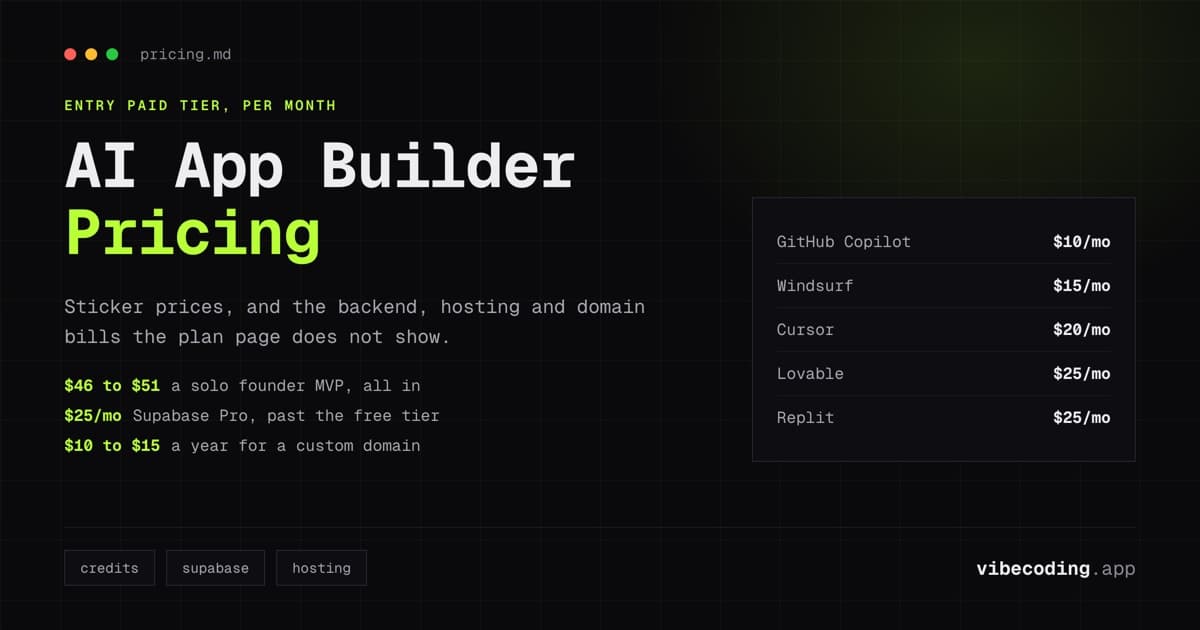
- Budget $20-40/user/month for individual tool licenses. The ROI case is strong: even 20% developer productivity gains exceed the licensing cost within weeks.
Enterprise adoption of AI development tools has moved past the experiment phase. Engineering teams are evaluating these tools for organization-wide deployment, and the evaluation criteria are fundamentally different from what indie hackers and solo founders care about.
This guide covers what enterprise decision-makers need to evaluate: security posture, compliance certifications, identity management, data privacy, audit capabilities, and team administration. The tools that win on features for individual developers are not always the tools that pass enterprise procurement.
The Enterprise Evaluation Framework
Five dimensions separate enterprise-ready AI tools from consumer-grade ones:
1. Identity and access management
SSO (Single Sign-On): Does the tool support SAML or OIDC for centralized authentication through your identity provider (Okta, Azure AD, Google Workspace)?
SCIM provisioning: Can you automatically provision and deprovision user accounts through your identity management system?
Role-based access control: Can you define who can use which features, access which projects, and administer which settings?
2. Compliance certifications
SOC 2 Type II: Has the vendor completed a SOC 2 Type II audit covering security, availability, and confidentiality? This is the minimum bar for most enterprise procurement processes.
ISO 27001: Is the vendor certified under the international information security management standard?
GDPR: Does the vendor comply with EU data protection requirements, including data processing agreements and right to deletion?
HIPAA: For healthcare organizations: does the vendor support BAA (Business Associate Agreement) execution?
3. Data privacy and code handling
Training on your code: Does the vendor use your code to train AI models? Enterprise tools must guarantee that private code is never used for model training.
Data retention: How long does the vendor retain code snippets, prompts, and suggestions? Can you configure retention policies?
Data residency: Can you specify where your data is processed and stored (US, EU, specific regions)?
4. Audit and monitoring
Audit logs: Does the tool provide comprehensive logs of all AI interactions, who used it, what was generated, when?
Usage analytics: Can administrators see team-wide usage patterns, adoption metrics, and cost tracking?
Integration with SIEM: Can audit logs be exported to your security information and event management system?
5. Deployment and infrastructure
Cloud hosting: Standard SaaS deployment managed by the vendor.
Self-hosted / on-premises: Can you run the tool on your own infrastructure for maximum data control?
VPC deployment: Can the tool run in your virtual private cloud for network isolation?
Pricing Plans
How much does Lovable cost?
Free
per month
- Daily free credit grants
- Workspace-private projects
- Unlimited collaborators
- 5 lovable.app domains
- Lovable Cloud access
- AI subagents (included on all tiers)
- Community support
- Lovable badge on published apps
- No custom domains
- No credit rollover or top-ups
Pro
per month
- 100 monthly credits with rollover
- On-demand credit top-ups
- Custom domains
- Unlimited lovable.app domains
- User roles & permissions
- Remove the Lovable badge
- Email support
Most popular for indie hackers shipping MVPs
Business
per month
- 100 monthly credits
- Everything in Pro
- Team workspace with role-based access
- Internal publish and personal projects
- SSO
- Security center
- Design templates
- Training data opt-out (per docs)
- Priority support
For departments needing SSO and governance
Enterprise
- Volume-based credit pricing
- Dedicated support & onboarding
- SCIM provisioning
- Audit logs
- Publishing and sharing controls
- Support for custom connectors
Enterprise Readiness Comparison
| Feature | GitHub Copilot Enterprise | Cursor Business/Enterprise | Windsurf Teams | Replit Teams |
|---|---|---|---|---|
| SSO (SAML) | Yes | Yes (Enterprise) | Yes | Yes |
| SCIM provisioning | Yes | Yes (Enterprise) | Limited | Limited |
| SOC 2 Type II | Yes | In progress | In progress | In progress |
| ISO 27001 | Yes | No | No | No |
| No training on code | Yes (Business+) | Yes (Business+) | Yes (Teams+) | Yes (Teams+) |
| Audit logs | Comprehensive | Available | Available | Available |
| GDPR compliance | Yes | Yes | Yes | Yes |
| Self-hosted option | No (GitHub managed) | No | No | No |
| Admin dashboard | Yes | Yes | Yes | Yes |
| IP indemnity | Yes (Enterprise) | No | No | No |
| Pricing | $39/user/mo | $40/user/mo (Teams) | $30/user/mo | $35-40/user/mo |
Tool-by-Tool Enterprise Assessment
GitHub Copilot Enterprise – Most compliance-mature
GitHub Copilot has the strongest enterprise compliance story. SOC 2 Type II certified, ISO 27001 certified, with comprehensive audit logging and SAML/SCIM support inherited from GitHub Enterprise.
Enterprise strengths: IP indemnity protects against copyright claims on generated code. No training on private code (Business and Enterprise tiers). Comprehensive audit trails tracking every Copilot interaction. Integration with existing GitHub Enterprise infrastructure.
Enterprise limitations: Tied to the GitHub ecosystem. Organizations using GitLab or Bitbucket cannot use Copilot without GitHub adoption. The AI capability (inline completions, chat) is less advanced than Cursor's Composer for complex multi-file tasks.
Best for: Organizations already on GitHub Enterprise that need the safest compliance posture and IP protection.
Cursor Business – Best AI-assisted development experience
Cursor offers the most capable AI-assisted development environment with enterprise controls layered on top. The Composer feature handles complex multi-file tasks that Copilot cannot match.
Enterprise strengths: Teams tier ($40/user/month) includes SSO and admin controls. Enterprise tier adds SAML/SCIM, dedicated account management, volume discounts, and custom roadmap input. Privacy mode prevents code from being used for training.
Enterprise limitations: Compliance certifications are less mature than GitHub Copilot. SOC 2 is in progress but not yet completed as of 2026. No IP indemnity. No self-hosted option.
Best for: Engineering teams that prioritize developer productivity and AI capability over compliance maturity. Organizations where security team can evaluate based on vendor security documentation rather than requiring SOC 2 Type II.
Windsurf Teams – Budget-friendly enterprise option
Windsurf (formerly Codeium) offers enterprise features at the lowest price point. The Cascade agent mode provides strong autonomous task handling.
Enterprise strengths: $30/user/month: significantly cheaper than Copilot Enterprise or Cursor Business. SSO support, team management, no training on team code. Terminal-aware AI that can run commands and react to output.
Enterprise limitations: Smaller company with less enterprise track record. Compliance certifications are developing. Fewer Fortune 500 references than GitHub or Cursor.
Best for: Cost-conscious engineering organizations that want enterprise controls without premium pricing.
Replit Teams – Most complete platform
Replit provides a complete development environment with built-in database, hosting, and collaboration, not just an AI coding assistant. The AI Agent handles autonomous multi-step development.
Enterprise strengths: All-in-one platform reduces vendor count. Real-time collaboration for team pair programming. Built-in deployment means fewer infrastructure decisions. Agent 3 handles complex tasks autonomously.
Enterprise limitations: Less established in enterprise procurement channels. Platform lock-in for hosting and deployment. Compliance certifications are developing.
Best for: Organizations that want a managed development platform, not just an AI assistant. Teams building internal tools and prototypes where platform lock-in is acceptable.
Open-source alternatives – Maximum control
For organizations with strict data sovereignty requirements:
Continue.dev: Open-source AI coding assistant that runs in VS Code or JetBrains. Choose your AI model (Claude, GPT, or local models). Self-hosted with zero data leaving your network.
Cline: Open-source autonomous coding agent for VS Code. Self-hostable with local model support.
Best for: Organizations that cannot send code to any external service. Government, defense, and highly regulated industries.
The Enterprise ROI Case
Enterprise AI tool licenses cost $20-40/user/month. The productivity case:
Conservative estimate: 15-20% productivity gain on routine coding tasks (boilerplate, tests, documentation). For a developer earning $150,000/year, that represents $22,500-30,000 in annual productivity value: against $240-480 in annual licensing cost.
Measured gains: Organizations report 25-50% improvement in task completion speed for standard development work. The gains are highest on repetitive tasks and lowest on novel architectural work.
Break-even: A developer needs to save approximately 15 minutes per week to justify a $40/month license. Most developers report saving hours per week.
The ROI question is not whether AI tools pay for themselves, they do, quickly. The question is whether the security and compliance posture meets your organization's requirements.
Enterprise Adoption Checklist
For IT leaders evaluating AI development tools:
Security review
- Vendor provides SOC 2 Type II report (or equivalent)
- Private code is not used for model training
- Data retention policies align with organizational requirements
- Audit logs meet compliance and legal hold requirements
Identity management
- SAML SSO integration with corporate identity provider
- SCIM provisioning for automated user lifecycle management
- Role-based access control for feature and project access
Procurement
- Vendor accepts enterprise contract terms
- IP indemnity coverage (if required)
- SLA commitments for availability and support
- Data processing agreement for GDPR compliance
Rollout planning
- Pilot group identified (10-20 developers)
- Success metrics defined (velocity, quality, satisfaction)
- Training materials prepared for developer onboarding
- Feedback collection process established
FAQ
Which enterprise AI tool has the best compliance? GitHub Copilot Enterprise: SOC 2 Type II, ISO 27001, and IP indemnity. The most procurement-friendly option.
Can we self-host AI coding tools? Open-source options (Continue.dev, Cline) support self-hosting with local models. No major commercial tool offers full self-hosted deployment yet.
How much does enterprise AI tooling cost per developer? $20-40/user/month for individual tools. Most organizations deploy 1-2 tools, totaling $30-60/user/month.
Will AI tools see our proprietary code? On enterprise tiers, major vendors guarantee no training on your code. Code is processed for suggestions but not retained or used for model improvement. Verify specific data handling in the vendor's security documentation.
How do we measure ROI? Track: task completion velocity, PR turnaround time, developer satisfaction surveys, and code review cycle time. Compare metrics before and after AI tool adoption over a 90-day pilot.
For detailed pricing across all tools, read our pricing comparison. For trust and quality considerations, see trusting AI-generated apps. Browse all platforms in the tools directory.

Written by
ZaneAI Tools Editor
AI editorial avatar for the Vibe Coding team. Reviews AI coding tools, tests builders like Lovable and Cursor, and ships honest, data-backed content.