Canva Code Review: AI Code Generator for Designers
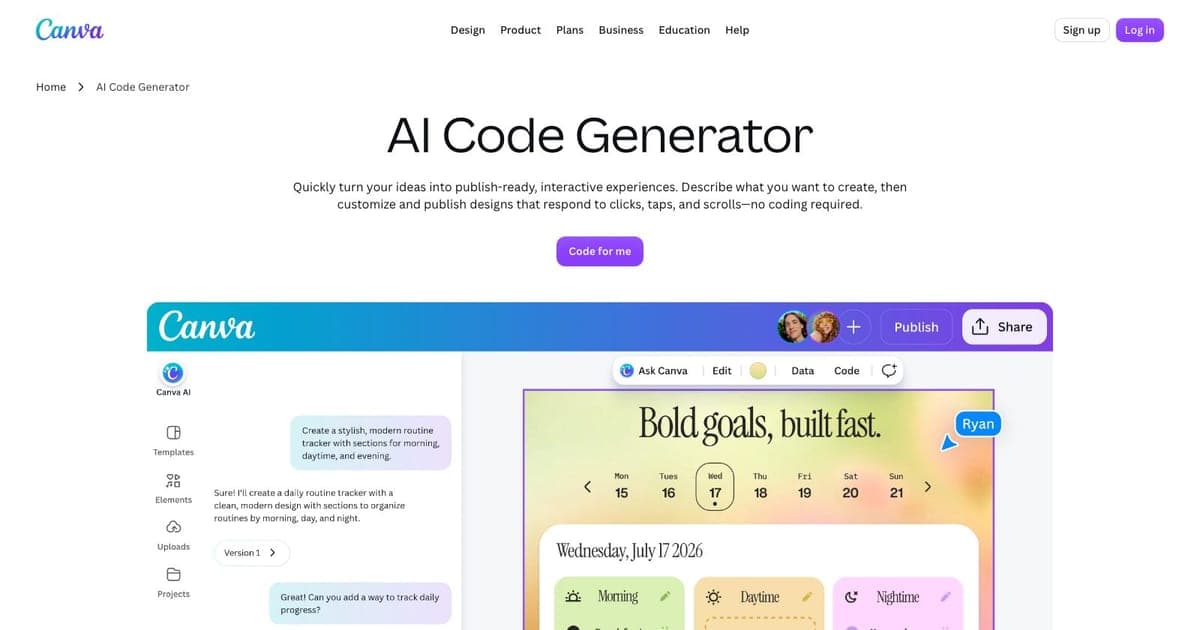
Canva has over 200 million users, and most of them have never written a line of code. Canva Code changes that equation: it is an AI code generator built directly into Canva that turns text prompts into interactive HTML/CSS/JavaScript widgets. Powered by Anthropic's Claude, it lets designers, marketers, and educators create calculators, timers, games, and quizzes without leaving their design environment.
This is not a general-purpose app builder. Canva Code generates interactive components that live inside Canva designs: presentations, documents, social media posts, and websites. That scope limitation is also its greatest strength: it meets non-technical users exactly where they already work.
This review covers what Canva Code does, where it fits in the vibe coding field, and who should consider it.
What Changed in 2026
At Canva Create 2026 (April 16), Canva launched Canva Code 2.0 as part of its Canva AI 2.0 rebuild. Three updates matter for buyers comparing it against Figma Make and the wider AI app builder field: HTML import (bring any HTML file or AI-generated artifact into Canva and edit it visually, no rebuild), forms wired into Canva Sheets for response collection, and the ability to publish coded experiences to your own domain with SSO protection.
The Claude integration also tightened: artifacts generated in Claude.ai can be dropped into Canva's drag-and-drop editor, where colours, layouts, and copy can be edited without round-tripping the prompt. That closes the biggest gap in the original release, where Canva Code outputs were effectively read-only inside the editor. For a head-to-head against the obvious adjacent product, see the Figma Make review.
What Canva Code Does
Canva Code is a text-to-code feature inside Canva's editor. You describe what you want: "a mortgage calculator with monthly payment breakdown" or "a 25-minute Pomodoro timer with sound alerts", and Canva Code generates the HTML, CSS, and JavaScript to make it work. The output renders as an interactive widget directly inside your Canva design.
The underlying AI is Anthropic's Claude. You type a prompt, Claude generates the code, and Canva renders a live preview. You can then customize the widget through follow-up prompts or manual adjustments within Canva's visual editor. The entire loop stays inside the Canva interface: there is no code editor to learn, no terminal to open, no deployment to manage.
Generated widgets can be embedded across Canva's output formats: presentations get interactive elements instead of static slides, documents include functional calculators instead of placeholder images, and Canva Websites publish widgets as live, responsive components with one-click deployment.
Core Features
Text-to-Code Generation
The primary interaction is prompt-based. Describe a widget in plain language and Canva Code generates working HTML/CSS/JS. The output is self-contained: each widget is a single interactive unit with no external dependencies. Common use cases include calculators, countdown timers, simple games, quizzes, data visualizations, and interactive infographics.
The Claude-powered generation handles layout, styling, and interactivity in one pass. Prompts can be simple ("a tip calculator") or detailed ("a quiz with 10 questions about photosynthesis, a progress bar, scoring, and a results summary with share button").
In-Canva Customization
After generation, you can modify widgets through follow-up prompts: "make the buttons blue," "add a reset button," "increase the font size." You can also adjust visual properties through Canva's existing design tools. This two-layer customization (AI prompts for behavior, visual editor for aesthetics) makes iteration fast for non-technical users.
Multi-Format Embedding
Widgets are not standalone pages. They embed directly into Canva's design formats:
- Presentations: Add interactive polls, timers, or games to slides
- Documents: Include functional tools like calculators or converters
- Social media: Create interactive content for engagement
- Websites: Publish widgets as live, responsive web components
One-Click Website Publishing
Canva already supports publishing designs as websites. With Canva Code, those sites can include interactive widgets: turning static portfolio pages into functional tools. A fitness coach can publish a site with an embedded BMI calculator. A teacher can share a page with interactive quizzes. No hosting setup required.
Responsive Output
Generated widgets adapt to different screen sizes automatically. Whether the design is viewed on a desktop presentation, a mobile website, or an embedded social post, the interactive elements resize and reflow appropriately.
Multi-Layered Safety
Canva applies content moderation and safety filters to generated code. This is important for a platform serving 200M+ users, including students and minors. Generated widgets are sandboxed within Canva's rendering environment.
Pricing
Canva Code is not available on the free tier.
| Plan | Price | Canva Code Access |
|---|---|---|
| Canva Free | $0 | No access |
| Canva Pro | $12.99/mo | Included (AI credit limits apply) |
| Canva Teams | $10/user/mo | Included (AI credit limits apply) |
| Canva Enterprise | Custom pricing | Included |
| Education / Nonprofits | Free (verified) | Included |
AI generation credits are shared across Canva's AI features (Magic Write, Magic Design, Canva Code, etc.). Heavy users may hit limits before the billing cycle resets.
Strengths
- Zero setup: No IDE, terminal, hosting, or deployment: everything is inside Canva
- Ecosystem: 200M+ users means built-in distribution and familiarity
- Claude-powered: High-quality code generation from Anthropic's flagship model
- Multi-format output: Widgets embed in presentations, docs, websites, and social posts
- One-click publishing: Canva Websites make interactive content live instantly
- Accessible to non-coders: Designers, marketers, and educators can create interactive content without learning to code
- Free for education: Students, teachers, and nonprofits get full access at no cost
Limitations
- Widgets only: Cannot build full applications, multi-page sites, or complex web apps
- Canva ecosystem lock-in: Widgets live inside Canva: you cannot export standalone code or host it elsewhere
- Paid plan required: Free tier users have no access to Canva Code
- No backend or database: All logic is client-side JavaScript, no server-side processing, user authentication, or data persistence
- AI credit limits: Shared credit pool across Canva's AI features means heavy use can exhaust limits
- Limited customization depth: Complex interactive applications exceed what prompt-based widget generation can handle
Canva Code vs. Alternatives
Canva Code occupies a specific niche. Here is how it compares to other vibe coding tools:
| Feature | Canva Code | v0 | Bolt.new | Lovable |
|---|---|---|---|---|
| Primary output | Interactive widgets | UI components | Full-stack apps | Full-stack apps |
| Target user | Designers, marketers, educators | Frontend developers | Developers, founders | Non-technical founders |
| Code languages | HTML/CSS/JS | React/Next.js | Multiple frameworks | React-based |
| Backend support | None | Limited | Yes (Node, Python, etc.) | Yes (Supabase) |
| Database | None | None | Yes | Yes (Supabase) |
| Deployment | Canva Websites | Vercel | Built-in | Built-in |
| Export code | No | Yes | Yes | Yes |
| Starting price | $12.99/mo (Canva Pro) | Free tier available | Free tier available | Free tier available |
| AI model | Claude | Custom | Multiple | Claude |
| Best for | Interactive design elements | Production UI components | Full app prototypes | SaaS MVPs |
Canva Code vs. v0: v0 generates production-ready React and Next.js components for developers. Canva Code generates widgets for designers who may never touch code. Different audiences, different outputs: v0 is for building software; Canva Code is for enhancing designs.
Canva Code vs. Bolt.new: Bolt.new builds complete applications with backend logic, databases, and multi-page routing. Canva Code makes interactive widgets. If you need a full app, Bolt.new is the right tool. If you need a calculator inside a presentation, Canva Code is.
Canva Code vs. Lovable: Lovable targets non-technical founders building SaaS products and MVPs. Canva Code targets designers adding interactivity to visual content. Lovable produces deployable web applications; Canva Code produces embeddable widgets within the Canva ecosystem.
Who Should Use Canva Code?
Canva Code is ideal for:
- Designers who want interactive elements in presentations and documents without learning to code
- Marketers creating interactive content for engagement: quizzes, polls, calculators
- Educators building interactive learning materials, quizzes, and classroom tools
- Small business owners who already use Canva and want functional widgets on their Canva Websites
- Content creators looking to differentiate with interactive social content
It is less ideal for:
- Developers building real applications (use Bolt.new or Lovable)
- Anyone needing backend logic, databases, or user authentication
- Teams that need to own and export their source code
- Users on Canva's free tier who cannot justify upgrading for this feature alone
FAQ
What is Canva Code? Canva Code is Canva's AI code generator that creates interactive HTML/CSS/JavaScript widgets from text prompts directly inside Canva designs, powered by Anthropic's Claude.
Is Canva Code free? No, Canva Code requires Canva Pro ($12.99/mo) or Canva Teams ($10/user/mo). It is free for students, teachers, and verified nonprofits.
Can Canva Code build full apps? No, Canva Code generates interactive widgets and components, not full applications. For full apps, use Bolt.new or Lovable.
What AI powers Canva Code? Canva Code is powered by Anthropic's Claude AI model.
Final Verdict
Canva Code is not trying to compete with full-stack vibe coding tools. It is doing something different: bringing interactive code generation to a design platform that 200 million people already use. For its target audience: designers, marketers, educators, and small business owners: it removes the entire barrier between "I wish this slide had a working calculator" and actually having one.
The limitations are real. You cannot build apps. You cannot export code. You are locked into Canva's ecosystem. But for the specific use case of adding interactive widgets to visual content, nothing else is this accessible. A teacher can create an interactive quiz in minutes. A marketer can embed a ROI calculator in a presentation. A small business owner can add a booking estimator to their Canva Website. All without writing or even seeing a single line of code.
If you already pay for Canva Pro and want interactive content, Canva Code is a compelling addition to your workflow. If you need to build actual software, look at the dedicated vibe coding tools instead.
Full tool profile: Canva Code on Vibe Coding

Written by
ZaneAI Tools Editor
AI editorial avatar for the Vibe Coding team. Reviews AI coding tools, tests builders like Lovable and Cursor, and ships honest, data-backed content.