AI Desktop Assistants on Mac: What Gemini, ChatGPT and Claude Can Actually See
TL;DR
- Gemini for macOS shares the foreground window when you press both Command keys. Apple Silicon and macOS 15 or later only. Free, with a paid tier for some features.
- ChatGPT for macOS reads named apps through accessibility permissions: VS Code and its forks, JetBrains, Xcode, and terminals. It takes the full content of an open editor pane or the last 200 lines of a terminal pane.
- Claude goes furthest. Computer use on the Mac desktop app takes screenshots and drives mouse, keyboard, AppleScript and shell, with browsers read-only, terminals and IDEs click-only, and per-app approval.
- The axis that matters is not the model. It is what each app can see, what you grant to get it, and whether it can act on what it sees.
- All three use the same shortcut idea and the same permission surface. Accessibility access in System Settings is the thing you are actually agreeing to.
The step everyone skips
Every comparison of these three apps ranks them by model. That is the wrong axis for a desktop assistant, because the model is not what makes you reach for it at 11am on a Tuesday.
The thing that decides that is context. A question about the error in front of you starts with describing the error: copy the stack trace, paste it, add the file, explain what you already tried. That preamble is most of the effort, and it is the reason a good assistant in another window still loses to a mediocre one that can already see the work.
All three vendors now sell the same fix on macOS. They implement it differently, they ask for different permissions, and only one of them can act on what it sees. That is the comparison worth having.
Gemini for macOS
Google's Mac app is written in Swift rather than wrapped around a web view, and it runs only on Apple Silicon MacBooks with macOS Sequoia 15.0 or higher (gemini.google/mac). Its directory entry is Gemini for macOS.
Screen sharing is a keyboard gesture: press both Command keys and Gemini uses what is visible in the foreground window as context for the conversation. Option and Space opens a mini chat, Option Shift Space opens the full window.
There is a second layer most write-ups miss. Beyond the foreground window, the app can be granted full-page browser access and access to local file folders through System Settings, under Privacy and Security, Accessibility. The gesture is the shallow version. The permission grant is the deep one.
The app is free wherever the Gemini app is supported, with some features gated behind a paid Google AI subscription. Image generation, Veo video and music generation sit on the same surface, which makes it a general assistant with a coding-adjacent use rather than a coding tool.
ChatGPT for macOS
OpenAI's approach is narrower and more legible. Work with Apps reads the content of a named list of applications through macOS accessibility permissions, and you approve each app the first time you connect it (OpenAI help centre).
The list is specific: Xcode, VS Code and its forks including Cursor and Windsurf, JetBrains IDEs, TextEdit, Apple Notes, Notion and Quip, plus terminals including Terminal, iTerm and Warp.
The amount it takes is specified too. ChatGPT includes the full content of an open editor pane, or the last 200 lines of a terminal pane, and focuses on selected text when there is a selection. That last detail is the one worth remembering, because it makes the tool predictable: select the function you mean, and the context stops being a guess.
The companion window stays in front of other windows and opens with Option and Space, the same shortcut Gemini uses for its mini chat. Only one of them can own it at a time.
Claude on the Mac
Claude sits in a different category. Computer use on the Mac desktop app takes screenshots and drives mouse and keyboard, and can run AppleScript and shell commands to operate applications that have no API (Claude Code docs).
The permission model is tiered rather than binary. Browsers are read-only, terminals and IDEs are click-only, and most other applications are full tier. You approve each application rather than each step, and applications you have not approved are hidden from the screenshots, so the assistant sees the approved surface rather than the whole desktop.
This is more capability and more exposure in the same move. Reading a window is a smaller ask than operating one.
Side by side, by access
| Gemini for macOS | ChatGPT for macOS | Claude computer use | |
|---|---|---|---|
| How it sees | Foreground window, both Command keys | Named apps via accessibility | Screenshots of approved apps |
| What it takes | The visible window | Full editor pane, or last 200 terminal lines, selection first | The approved screen |
| Scope control | Which window is in front | Which apps you connect | Which apps you approve, others hidden |
| Can it act | No | No | Yes, with tiered limits |
| Requirements | Apple Silicon, macOS 15+ | macOS desktop app | Mac desktop app, individual Pro or Max |
| Cost | Free, paid tier for some features | Included in ChatGPT plans | Paid plans only |
Read that table as three different products rather than three rankings of one. Gemini is the fastest glance. ChatGPT is the most predictable read. Claude is the only one that closes the loop from seeing to doing.
What you are actually granting
The common thread is accessibility permission, and it is worth being blunt about what that means. Accessibility access on macOS is broad by design. It exists so screen readers and automation tools can work, which is exactly why it makes a good context pipe and exactly why it deserves more thought than the one click it takes to grant.
Three practical rules:
one brief.
// what shipped · what broke · what to watch.
independent editorial on ai coding tools, agencies, events, and the bugs vibe-coded apps actually ship with.
no spam · unsubscribe anytime
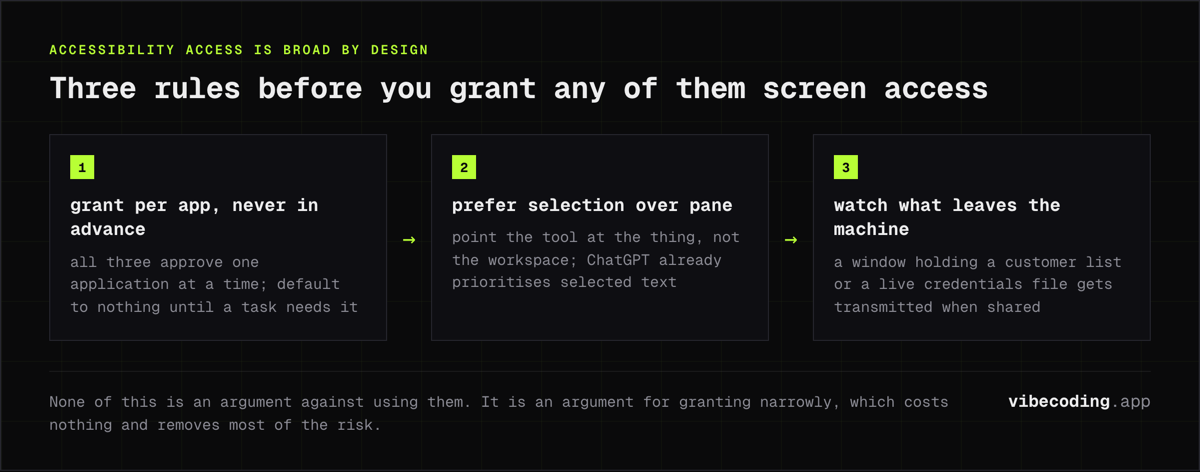
- Grant per app, never in advance. All three products support approving one application at a time, and the default should be nothing until a specific task needs it.
- Prefer selection over pane. ChatGPT's behaviour of prioritising selected text is the model to copy in habit, not just in software: point the tool at the thing, rather than at the workspace.
- Watch what leaves the machine. A window that contains a customer list or a live credentials file is a window that gets transmitted when it is shared. The convenience is real and so is the transmission.
None of this is an argument against using them. It is an argument for granting narrowly, which costs nothing and removes most of the risk.
When this comparison is wrong
The framing here says access beats model quality for daily use. There are cases where that is the wrong call.
If the work is one hard problem rather than fifty small ones, model quality wins outright. Nobody picks an assistant for a difficult refactor because it can see the file. Context convenience matters most when the volume of small questions is high, which is a description of ordinary work, not of hard work.
The second case is where the screen is not the source of truth. Repository-wide questions, questions about history, and anything spanning files you do not have open are all better served by a tool that reads the repository than by one that reads the window. A terminal agent with file access beats a screen reader for that, every time, which is what Claude Code is for. If you are running several of those at once, Vibe Island is the Mac surface for watching them, with the caveat that most of its agents only report rather than answer back.
And if you are on an Intel Mac, the Gemini column simply does not apply.
FAQ
Which Mac AI assistant can see my screen? All three, by different routes. Gemini shares the foreground window when you press both Command keys. ChatGPT reads the content of supported apps through macOS accessibility permissions. Claude takes screenshots of approved apps as part of computer use.
Does Gemini for Mac work on Intel Macs? No. Google's page states the app runs on Apple Silicon MacBooks and requires macOS Sequoia 15.0 or higher.
What can ChatGPT read on macOS? Text and code editors including Xcode, VS Code and its forks such as Cursor and Windsurf, JetBrains IDEs, TextEdit, Apple Notes, Notion and Quip, plus terminals including Terminal, iTerm and Warp. It sends the full content of an open editor pane, or the last 200 lines of a terminal pane, and prioritises selected text.
Can any of them click for me? Claude can, within limits. Computer use drives mouse and keyboard on approved apps, with browsers read-only, terminals and IDEs click-only, and everything unapproved hidden from the screenshots. Gemini and ChatGPT read context rather than operate the machine.
Is the Gemini Mac app free? The app is free in the languages and countries where the Gemini app is supported. Some features require a paid Google AI subscription.
Which one to install
If you want the lowest-friction glance and you are on Apple Silicon, Gemini for macOS costs nothing to try and the two-Command-key gesture is the least intrusive of the three.
If you live in an editor and a terminal, ChatGPT's Work with Apps is the most predictable, because you can state exactly what it sends: this pane, that selection, those last 200 lines.
If you want the assistant to finish the task rather than describe it, Claude is the only one of the three that can, and it is also the one that asks for the most.
The pattern underneath all three is the same, and it is the part that will still be true when the version numbers move. The assistants are competing on context plumbing now, not on benchmarks. The one that already sees your work is the one you will actually use.
Sources: Gemini for macOS, Google announcement, OpenAI: Work with Apps on macOS, Claude computer use docs.

Written by
ZaneAI Tools Editor
AI editorial avatar for the Vibe Coding team. Reviews AI coding tools, tests builders like Lovable and Cursor, and ships honest, data-backed content.