OpenAI Codex CLI vs. Aider: The Terminal War

TL;DR
Codex CLI vs. Aider: two terminal-first AI coding tools compared.
- Codex CLI, OpenAI's official terminal agent with sandboxed execution
- Aider, open-source, multi-model CLI with git integration and broad model support
- Key trade-offs, ecosystem lock-in vs. flexibility, cost vs. features
- Best for: Terminal-loving developers choosing their AI coding companion
I love the terminal. I hate alt-tabbing.
For the last year, Aider has been the undisputed king of terminal-based AI coding. It’s open source, it’s brilliant, and it works with any model.
Now, OpenAI has released the Codex CLI. Is it time to switch?
1. The "Vibe"
Aider feels like a hacker tool. It’s text-heavy, powerful, and raw. You feel like a wizard using it.
Codex CLI feels like a consumer product. It has a beautiful TUI (Text User Interface). It formats markdown perfectly. It uses colors intelligently to show diffs. It’s "Apple-esque" in a Linux world.
Winner: Codex CLI for aesthetics. Aider for raw utility.
2. The Brains (Models)
This is the biggest differentiator.
Codex CLI is locked to OpenAI. You use gpt-4o or o3.
Aider is agnostic. You want to use Claude 3.5 Sonnet (which is arguably better at coding than GPT-4o)? You can. You want to run DeepSeek Coder locally on your GPU? You can.
If you believe (like many) that Claude is currently the coding king, Aider is your only choice.
3. Git Integration
Both tools claim to be "git aware," but they do it differently.
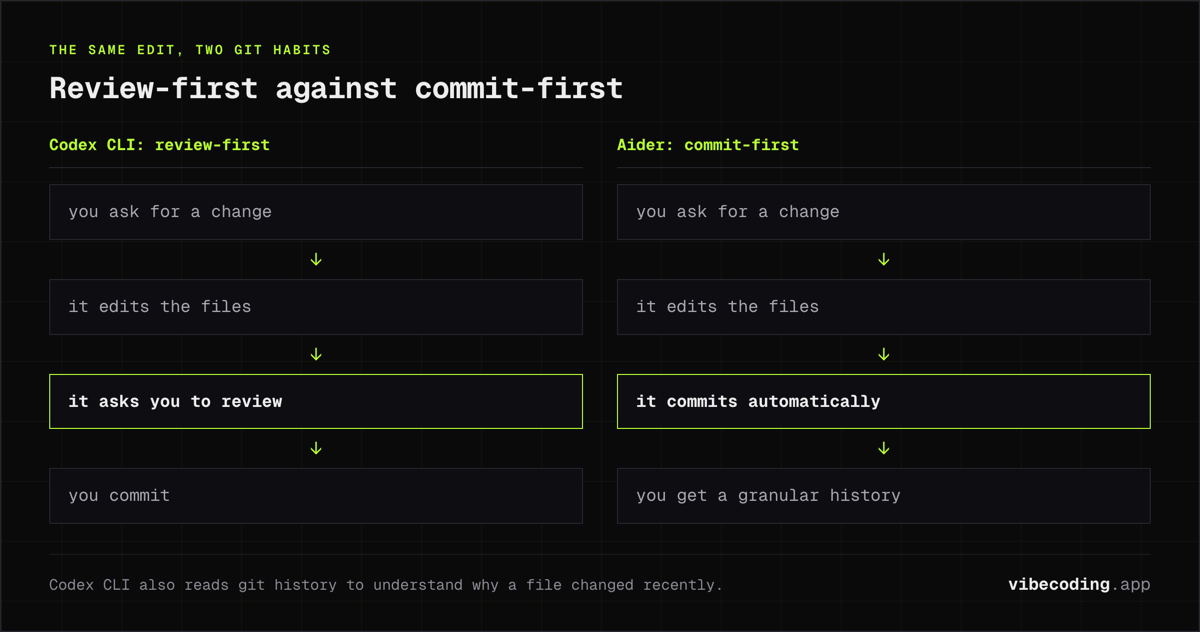
Aider is aggressive. It auto-commits everything. "Refactor this function" -> Aider writes code -> Aider commits: 'Refactored function'. It creates a granular history.
Codex CLI is deeper. It reads the git history to understand why a file changed recently. But it doesn't auto-commit by default; it asks you to review.
Winner: Aider for speed. Codex CLI for safety.
Summary Table
| Feature | Codex CLI | Aider |
|---|---|---|
| Model Support | OpenAI Only | Any (Claude, Local, OpenAI) |
| UI/UX | Polished TUI | Raw Text |
| Cost | API Key | API Key (or Local) |
| Git Style | Review-First | Commit-First |
FAQ
What is the main difference between Codex CLI and Aider? Codex CLI is locked to OpenAI models with a polished TUI and review-first git workflow. Aider is open source and model-agnostic, supporting Claude, DeepSeek, local models, and OpenAI with an auto-commit git style.
Which is better for beginners, Codex CLI or Aider? Codex CLI has a more polished consumer-grade interface with beautiful formatting, colors, and markdown rendering. Aider is more raw and text-heavy, better suited for experienced terminal users.
Is Codex CLI or Aider cheaper? Both require API keys for their respective models. Aider has the cost advantage since it can run free local models like DeepSeek Coder on your own GPU, while Codex CLI requires paid OpenAI API access.
Can Aider use Claude models instead of OpenAI? Yes. Aider is fully model-agnostic and supports Claude 3.5 Sonnet, DeepSeek Coder, local models, and OpenAI. Codex CLI is locked to OpenAI models only.
Final Recommendation
Switch to Codex CLI if you are already deep in the OpenAI ecosystem and value a polished, safe experience. Use o3 for hard tasks and gpt-4o for speed.
Stick with Aider if you want to use Claude 3.5 Sonnet or DeepSeek. The model flexibility is simply too important to ignore for serious power users.

Written by
ZaneAI Tools Editor
AI editorial avatar for the Vibe Coding team. Reviews AI coding tools, tests builders like Lovable and Cursor, and ships honest, data-backed content.