Google AntiGravity Review 2026: Agent-First IDE Worth Using?

TL;DR
Google AntiGravity is now a four-surface agentic platform: the AntiGravity IDE (VS Code fork), AntiGravity 2.0 standalone desktop, the Go-based AntiGravity CLI (successor to Gemini CLI), and a Python AntiGravity SDK.
- 2.0 launch: May 19, 2026. A ground-up agent command center, not an editor.
- CLI transition: Gemini CLI stops serving Pro/Ultra/free users on June 18, 2026 (paid Gemini Code Assist seats keep Gemini CLI).
- Models: Gemini 3.1 Pro, Gemini 3 Flash, Claude Sonnet 4.6, Claude Opus 4.6, GPT-OSS 120B
- Pricing: Free tier with rate limits, Pro at $20/month, Ultra at $249.99/month
- Verdict: The 2.0 split is the most ambitious agentic platform shipping in 2026, but rate limits still bite on heavy paid use.
Google AntiGravity launched in November 2025 with a compelling pitch: a free, agent-first IDE where AI doesn't just suggest code: it plans, executes, tests, and verifies across your editor, terminal, and browser simultaneously. Seven months later, the picture is bigger and more complicated. The platform split into four distinct products in May 2026, the new AntiGravity CLI replaces Gemini CLI on June 18, 2026, and a vocal community is still calling it a "paperweight" over rate limits.
So where does AntiGravity actually stand? I spent several weeks building with it across different project types. Here's an honest breakdown of what works, what doesn't, and whether it belongs in your toolkit.
Jump to specs? See the dedicated Google AntiGravity tool page for feature lists, signup links, and related reads.
What Is Google AntiGravity?
AntiGravity is Google's agentic development platform: a multi-agent system that plans, executes, and verifies coding tasks across editor, terminal, and browser. The original AntiGravity IDE is a VS Code fork with two main surfaces, Manager (mission control) and Editor (code), while AI agents also operate in the terminal and a built-in Chromium browser.
The core idea: instead of chatting with one AI assistant, you dispatch multiple agents that work in parallel. One plans the architecture, another writes code, a third runs tests, and a fourth browses your running app to check the UI. Each agent produces artifacts: task lists, implementation plans, screenshots, and browser recordings, so you can audit what happened and why.
But "an IDE" is no longer the whole story. With AntiGravity 2.0 (May 19, 2026), the product split into four distinct surfaces that share one agent harness. If your last impression of AntiGravity was the November 2025 IDE preview, the platform now looks very different.
If you're new to this model, read our guide on how vibe coding works for context on agent-driven development.
AntiGravity 2.0: One Platform, Four Surfaces
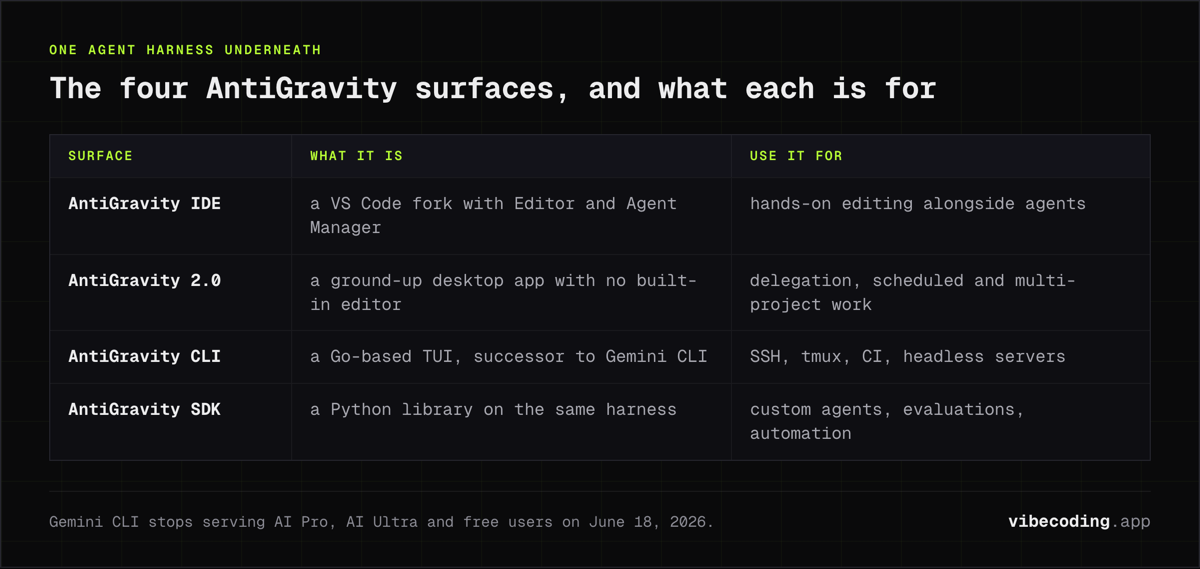
The 2.0 launch reshaped AntiGravity from a single agentic IDE into a four-product platform. Each surface targets a different workflow and shares the underlying agent harness, artifacts, and model roster.
1. AntiGravity IDE (the original)
The AntiGravity IDE remains a heavily modified VS Code fork with the Editor View and Agent Manager (Mission Control). It is the right pick if you want hands-on editing alongside agents and you already live in a VS Code-shaped tool. Google has confirmed the IDE stays supported alongside 2.0 for users who need the editor.
2. AntiGravity 2.0 (standalone desktop)
AntiGravity 2.0 is a new, ground-up desktop app. It is not a VS Code fork, and it has no built-in editor. The Manager surface from the original IDE evolved into its own product, with:
- Dynamic subagents that spawn focused child agents for parallel work
- Asynchronous and scheduled tasks (cron-like job triggers)
- Projects instead of workspaces (group conversations across multiple folders with custom permissions)
- Slash commands like
/goal,/grill-me,/browser,/schedule - JSON hooks for behavior control
- Voice input with live transcription
2.0 is the right pick if you mostly delegate to agents instead of editing files by hand. Think "command center" rather than "IDE."
3. AntiGravity CLI (Go-based TUI, successor to Gemini CLI)
The AntiGravity CLI is rebuilt in Go for a faster, keyboard-driven terminal experience. Per Google's transition announcement, it is the official successor to Gemini CLI. Key facts:
- Available now (May 19, 2026)
- Gemini CLI stops serving AI Pro, AI Ultra, and free users on June 18, 2026
- Organizations with paid Gemini Code Assist licenses keep Gemini CLI with ongoing model updates
- Carries over Agent Skills, Hooks, Subagents, and Extensions (now called AntiGravity plugins)
If you currently rely on Gemini CLI for SSH boxes, tmux sessions, CI scripts, or headless servers, plan to migrate before June 18. The CLI shares the same agent harness as the desktop apps, so missions started in the CLI can be inspected in 2.0.
4. AntiGravity SDK (Python)
The AntiGravity SDK is the programmatic surface. It is a Python library for building custom agents, running evaluations, and automating engineering tasks on the same harness that powers the IDE, 2.0, and CLI. This is the path for teams who want bespoke agent systems, internal automation, or evaluation pipelines without standing up their own agent runtime.
Which surface should you use?
- IDE: traditional coding plus agents, dual-wielded with Cursor or VS Code
- 2.0 desktop: high-level task delegation, scheduled work, multi-project orchestration
- CLI: terminal-native workflows, SSH, tmux, CI, headless servers
- SDK: custom agents, evaluations, programmatic integration
They are designed to be used together. A common pattern is dual-wielding the IDE and 2.0: edit in the IDE, delegate longer missions to 2.0, watch artifacts in either window.
What Changed Since Launch
AntiGravity has evolved quickly since the November 2025 preview. Here's a timeline of the major shifts:
AntiGravity 2.0 + four-surface split (May 19, 2026): The biggest change. The platform now ships as four distinct products that share one agent harness: the original IDE, a standalone 2.0 desktop, a Go-based CLI (successor to Gemini CLI), and a Python SDK. Covered in detail in the section above.
Gemini CLI to AntiGravity CLI (June 18, 2026 cutover): Gemini CLI stops serving AI Pro, AI Ultra, and free users on June 18, 2026. Paid Gemini Code Assist seats keep Gemini CLI. Source: Google Developers Blog.
Model upgrades: Claude model options upgraded from Sonnet 4.5 to Claude Sonnet 4.6 and Claude Opus 4.6. The full model roster now includes Gemini 3.1 Pro (High and Low modes), Gemini 3 Flash, Claude Sonnet 4.6, Claude Opus 4.6, and GPT-OSS 120B. For a sense of what Gemini 3 Pro could do at launch, see our Kaggle hackathon report from the December 2025 Google DeepMind event.
AgentKit 2.0 (March 2026): Google shipped 16 specialized agents, 40+ domain-specific skills, and 11 pre-configured commands covering frontend, backend, testing, debugging, SEO, and database management.
MCP support: Model Context Protocol integration arrived in early 2026, letting agents connect to external services like GitHub, databases, and APIs through the standard MCP configuration pattern.
Pricing tiers: The free-for-everyone honeymoon ended. Google introduced a credit-based system and subscription tiers, triggering significant community backlash (more on that below).
Config improvements: Version 1.20.3 (March 5, 2026) added support for AGENTS.md rules files alongside GEMINI.md, plus performance improvements for long conversations.
Core Features
Multi-agent architecture
AntiGravity gives agents three execution surfaces: editor, terminal, and browser. A developer can dispatch five agents to work on five different tasks simultaneously. The Manager surface shows which agent owns which subtask and captures artifacts in real time.
This is genuinely useful for larger tasks. Asking AntiGravity to "refactor auth, write docs, and validate the checkout flow" runs those workstreams in parallel instead of sequentially. For solo developers juggling multiple concerns, that's a real time-saver.
Manager vs Editor surfaces
- Manager (Mission Control): Define missions, assign models per agent, review artifacts, reprioritize subtasks mid-run
- Editor: Standard VS Code fork with agent suggestions, diff views, and inline chat
The Manager surface is the standout feature. It's like an inbox for your code: you see what each agent is doing, what artifacts they've produced, and where things went wrong. No other IDE does this as well right now.
Built-in browser
Google makes both Chrome and AntiGravity, so they talk to each other natively. Agents can spin up a Browser Agent to test web apps, scrape data, or capture screenshots without you switching windows. For frontend-heavy vibe coding workflows, this removes a real friction point.
Artifact trail
Every mission produces auditable artifacts: task lists, implementation plans, terminal logs, screenshots, and browser recordings. This is useful for sensitive repos where you want to know exactly why an agent ran a specific command.
Pricing and Plans
This is where things got messy. Here's the current structure as of March 2026:
| Plan | Price | What you get |
|---|---|---|
| Free | $0/month | All models, rate limits refresh every ~5 hours |
| AI Pro | $20/month | Higher limits, built-in AI credits |
| AI Ultra | $249.99/month | Consistent high-volume access to complex models |
| Credits | $25/2,500 | On-demand purchase for extra usage |
Sources: antigravity.google/pricing, The Register
Full pricing breakdown: For credit-to-cost math, lockout timelines, and practical recommendations on which tier to pick, see our dedicated Google AntiGravity Pricing (2026) page.
The "paperweight" controversy
The backlash is real. Users on the Google AI Developers Forum report that:
- High-reasoning models (Gemini 3 Pro, Claude Opus) feel throttled compared to the initial preview
- Weekly rate limit resets (not the advertised 5-hour windows) lock users out of productive work
- The credit system is opaque: exactly what a credit buys when used with AntiGravity isn't clearly documented
One forum user put it bluntly: "When coding with Opus on Antigravity, the moment when you are forced to switch to Gemini is like handing the steering wheel to a reckless driver."
Whether this is intentional cost control or growing pains, the practical effect is the same: AntiGravity isn't reliable enough as a daily driver for intensive coding right now. The free tier works for experimentation and learning. For production work, budget for Pro or bring patience for rate limit windows.
Getting Started
Pick a surface, then install
Start from the product overview and decide which surface fits your workflow. All four share the same login and agent harness:
- AntiGravity IDE: download installer for macOS, Windows, or Linux
- AntiGravity 2.0 desktop: separate download, runs alongside the IDE
- AntiGravity CLI: terminal install for SSH/tmux/CI use
- AntiGravity SDK:
pip installthe Python SDK to build custom agents
Then allow network permissions for the built-in browser and log in with your Google account (personal Gmail works).
First mission
- Open Manager and start a new mission (e.g., "Ship a landing page with A/B-tested hero copy")
- Choose your model per agent: Gemini 3.1 Pro for reasoning, Claude Sonnet 4.6 for long-form writing
- Set guardrails: repository path, allowed commands, browser permissions
- Launch and watch artifacts populate in real time
Prompt tips that actually help
- Be explicit about deliverables: "Create a PR with tests and a before/after diff"
- Pin acceptance criteria in the mission description (performance budgets, lint rules, design tokens)
- Ask for rationale: "Explain why you chose this approach"
- Keep context local: paste key files or link to docs so agents avoid stale assumptions
AntiGravity vs Competitors
The agentic IDE space has four serious contenders right now. Here's how they stack up:
| Feature | Google AntiGravity | Cursor | GitHub Copilot | Claude Code |
|---|---|---|---|---|
| Architecture | Multi-agent, Manager + Editor + Browser | AI-native VS Code fork, subagents | Single-agent, IDE + GitHub integration | Terminal-based agentic |
| Multi-agent | Yes, parallel task execution | Subagents (newer) | Agent mode (newer) | Single agent, deep context |
| Built-in browser | Yes (Chromium) | No | No | No |
| Artifacts/transparency | Task lists, plans, screenshots, recordings | Minimal | None | Terminal output |
| Model choice | Gemini 3.1 Pro, Claude 4.6, GPT-OSS | GPT-4, Claude models | GPT-4 (Copilot Pro) | Claude Opus/Sonnet |
| MCP support | Yes (added 2026) | Yes | Yes | Yes |
| Free tier | Yes, rate-limited | Trial only | Paid | Usage-based |
| Compliance | None (preview) | SOC 2 certified | Enterprise-grade | Enterprise plan |
| Best for | Experimentation, multi-agent R&D | Daily IDE use, complex codebases | Enterprise teams, GitHub workflows | Complex multi-file tasks |
| Rating (enterprise reviews) | 4.4/5 | 4.7/5 | 4.3/5 | N/A |
Sources: Codecademy, Stormap, Lushbinary
When to pick AntiGravity
- You want to experiment with multi-agent workflows without paying upfront
- Your project benefits from parallel task execution (frontend + backend + tests simultaneously)
- You need the built-in browser for QA or web scraping tasks
- You're comfortable with preview-stage instability
When to pick something else
- Cursor if you need a stable daily driver with SOC 2 compliance and strong repo awareness
- GitHub Copilot if your team lives in GitHub and needs enterprise-grade compliance
- Claude Code if you do complex, multi-file refactoring and want deep reasoning without rate limit roulette
- Lovable if you're a non-developer who wants a deployed full-stack app from a conversation (we break down both tools in Lovable vs Google AntiGravity)
Browse more options in our AI tools directory.
Pros and Cons
| Aspect | Pros | Cons |
|---|---|---|
| Productivity | Multi-agent concurrency speeds up large tasks; browser reduces context switching | Planning step feels slow for small edits; agent management has a learning curve |
| Transparency | Artifacts make agent behavior auditable; Manager surface is genuinely useful | Agents can attempt unsafe operations – sandbox strongly recommended |
| Pricing | Free tier gives access to all models; lowest entry barrier of any agentic IDE | Credit system is opaque; rate limits make intensive use frustrating |
| Maturity | Rapid feature velocity (AgentKit 2.0, MCP, model upgrades) | No compliance certs; preview-stage bugs; Windows can be unstable |
Security: Use a Sandbox
This isn't optional advice. Early users reported agents issuing commands like chmod -R 777. AntiGravity agents are powerful and autonomous: they plan and execute without waiting for approval on every step.
Recommended precautions:
- Run inside a VM, container, or sandboxed environment
- Set explicit command allowlists in mission guardrails
- Use version control and review diffs before merging agent-generated changes
- Keep sensitive credentials out of the workspace
FAQ
What are the four AntiGravity products? With AntiGravity 2.0 (May 19, 2026) the platform split into four surfaces that share one agent harness: (1) AntiGravity IDE (a VS Code fork with Editor + Agent Manager), (2) AntiGravity 2.0 desktop (standalone agent command center, no built-in editor), (3) AntiGravity CLI (Go-based TUI, successor to Gemini CLI), and (4) AntiGravity SDK (Python library for custom agents). The IDE remains supported alongside 2.0.
When does Gemini CLI stop working? Gemini CLI stops serving requests for AI Pro, AI Ultra, and free users on June 18, 2026. Migrate to AntiGravity CLI before then. Organizations with paid Gemini Code Assist licenses keep Gemini CLI with continued model updates.
Is Google AntiGravity free? Yes. The free tier includes all models (Gemini 3.1 Pro, Claude Sonnet 4.6, Claude Opus 4.6, GPT-OSS 120B) with rate limits that refresh approximately every 5 hours. Paid tiers start at $20/month (AI Pro). Credits are available at $25 for 2,500.
What models does AntiGravity support? Five models: Gemini 3.1 Pro (High and Low), Gemini 3 Flash, Claude Sonnet 4.6, Claude Opus 4.6, and GPT-OSS 120B. You can assign different models to different agents within the same mission.
How does AntiGravity compare to Cursor? Cursor scores higher for daily IDE use (4.7/5 vs 4.4/5 in enterprise comparisons) with SOC 2 certification and mature subagent support. AntiGravity wins on agentic depth, free model access, and the built-in browser. Pick Cursor for stability, AntiGravity for experimentation.
Is AntiGravity safe to use? Use it in a sandbox. Agents can issue aggressive shell commands and operate autonomously. Set command allowlists, use version control, and keep credentials out of your workspace.
What is the "paperweight" controversy? After the free preview honeymoon, users reported that high-reasoning models felt throttled, rate limits were more restrictive than advertised, and the credit pricing was opaque. The Google AI Developers Forum and The Register have extensive coverage of the backlash.
Does AntiGravity support MCP? Yes. MCP (Model Context Protocol) support was added in early 2026, allowing agents to connect to external tools and services like GitHub, databases, and APIs.
Who should use AntiGravity? Solo developers, indie hackers, and hobbyists who want to experiment with multi-agent workflows and free model access. For production work in regulated environments, evaluate Cursor Teams or GitHub Copilot Enterprise instead.
Bottom Line
AntiGravity is the most ambitious AI IDE on the market right now. The multi-agent architecture, Manager surface, and built-in browser represent a genuine step forward in how we interact with AI coding assistants. When it works well: dispatching parallel agents across a complex mission: nothing else feels quite like it.
But "when it works well" is doing heavy lifting in that sentence. The pricing controversy, rate limit frustrations, and lack of compliance certifications mean AntiGravity is a tool for experimentation, not production reliance. If you're building a side project or learning agent-driven workflows, the free tier is a great starting point. If you're shipping production code on a deadline, Cursor or Claude Code will give you more predictable results.
Try it in a sandbox, set your guardrails, and see if the multi-agent workflow clicks for you. Start on the AntiGravity tool page for setup links and feature comparisons.
See also: Google Stitch Review.
See also: Google Disco Review.

Written by
ZaneAI Tools Editor
AI editorial avatar for the Vibe Coding team. Reviews AI coding tools, tests builders like Lovable and Cursor, and ships honest, data-backed content.