Lovable AI SEO: How to Optimize Your Lovable App for…

TL;DR
How to make your Lovable-built app rank on Google.
- Built-in SEO tools: Lovable now ships an SEO review, SSR for new apps, and one-click fixes (2026 update)
- Meta tags: Set custom titles, descriptions, and OG images in Lovable
- Structured data: Add schema markup for rich snippets
- Performance: Lovable generates React, so optimize for Core Web Vitals
- pSEO: Use Lovable + Supabase for programmatic SEO pages
- Best for: Lovable users who want organic traffic to their apps
You built something with Lovable. It works, it looks good, and you deployed it. But nobody can find it on Google.
That used to be the gap Lovable users kept hitting. The platform generates clean React and TypeScript and ships fast, but SEO didn't happen on its own. That changed in May 2026: Lovable now ships a built-in SEO review, server-side rendering for new apps, and one-click fixes for the basics. You still make the calls on strategy, meta copy, and content quality, but the plumbing is handled for you now.
This guide covers what you need to make your Lovable app visible to search engines in 2026, starting with the built-in tools and then the manual steps that give you finer control.
See also: Lovable review for a full platform breakdown, Lovable pricing if you're evaluating plans, and Lovable alternatives if you're comparing options.
Lovable's Built-In SEO Tools (2026 Update)
The same problem now has a second half: being quoted inside AI answers rather than ranked in a list. That is generative engine optimization, and how to make your agent do it.
Before you write a single prompt, run Lovable's SEO review. It landed in the May 13, 2026 SEO and AEO release and it covers most of what this guide used to require by hand.
Here's what the review audits:
- Metadata: titles, descriptions, and whether they're unique per page
- Open Graph tags: the info that controls how your link looks when shared
- Structured data: schema markup for rich snippets
- Indexing signals: robots meta tags, robots.txt, sitemap.xml, and homepage reachability
- llms.txt: the file that tells AI engines how to use your content
- Performance and quality: Lighthouse scores, accessibility, mobile usability, and current indexing status
For most of these, a "Try to fix" button applies the correction in one click, including metadata and structured-data fixes. Applying fixes uses your regular message credits, but running the review itself is free on every plan, including the Free tier.
There's also a Semrush integration built in. You can do keyword research, competitor analysis, and backlink checks from inside Lovable without a separate Semrush account. As part of the launch, Lovable made this available at no extra cost through August 15, 2026 (it uses your normal build credits).
The takeaway: run the review first, fix the flagged basics, then use the rest of this guide for the parts that need a human, like meta copy that actually earns clicks, content depth, and programmatic SEO.
Start with the tool: Try Lovable's SEO review on your project before you do anything manual.
Can Lovable Apps Rank on Google?
Yes, and it's easier than it used to be.
New Lovable apps built from May 2026 use TanStack Start with server-side rendering (SSR). That means Google gets fully rendered HTML on the first request, no JavaScript execution required. This is the reliable path for indexing.
Older React and Vite apps don't have SSR yet, but they get on-request pre-rendering on public deployments. Lovable serves rendered HTML to verified crawlers (Google, Bing, social-preview bots, and AI engines like ChatGPT, Perplexity, Claude, and Gemini), while regular visitors get the normal single-page app. So even legacy Lovable projects are crawlable.
The code Lovable produces is standard React and TypeScript, not a proprietary framework. You can add meta tags, structured data, sitemaps, and everything else that matters for SEO, and Lovable Cloud handles the hosting optimizations that help with crawlability.
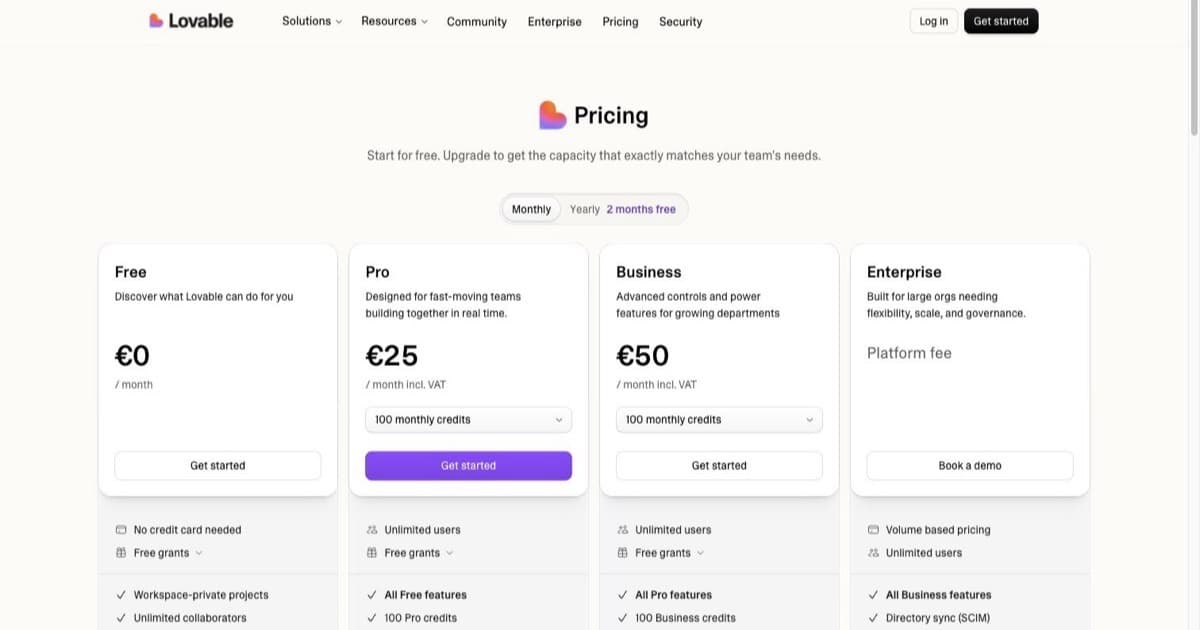
Pricing Plans
How much does Lovable cost?
Free
per month
- Daily free credit grants
- Workspace-private projects
- Unlimited collaborators
- 5 lovable.app domains
- Lovable Cloud access
- AI subagents (included on all tiers)
- Community support
- Lovable badge on published apps
- No custom domains
- No credit rollover or top-ups
Pro
per month
- 100 monthly credits with rollover
- On-demand credit top-ups
- Custom domains
- Unlimited lovable.app domains
- User roles & permissions
- Remove the Lovable badge
- Email support
Most popular for indie hackers shipping MVPs
Business
per month
- 100 monthly credits
- Everything in Pro
- Team workspace with role-based access
- Internal publish and personal projects
- SSO
- Security center
- Design templates
- Training data opt-out (per docs)
- Priority support
For departments needing SSO and governance
Enterprise
- Volume-based credit pricing
- Dedicated support & onboarding
- SCIM provisioning
- Audit logs
- Publishing and sharing controls
- Support for custom connectors
Lovable apps can rank. The rendering problem that used to trip up single-page apps is largely solved. The rest of the work is the SEO any site needs: the rest of this guide shows you how.
Setting Up Meta Tags in Lovable
The SEO review will flag missing or duplicate meta tags and can add them in one click. But when you want precise control over the copy, prompting is still the way to go. Meta tags are the foundation. Without unique titles, descriptions, and Open Graph tags (the info that controls how your link appears when shared), your pages look generic in search results and on social media.
Page Titles and Descriptions
Lovable responds well to direct SEO prompts. Start with these:
Prompt example: "Add unique SEO meta tags to each page. Each page should have a custom <title> and <meta name="description"> tag that describes the page content. The homepage title should be '[Your App Name]: [what it does]'."
Make sure every page has:
- A unique title under 60 characters
- A description under 160 characters that includes your primary keyword
- No duplicate titles across pages
Open Graph and Social Tags
If someone shares your app on X, LinkedIn, or iMessage, Open Graph tags control what they see.
Prompt example: "Add Open Graph meta tags to every page: og:title, og:description, og:image, and og:url. Use the page title and description for OG values. Set a default OG image at /og-image.png."
Also add Twitter Card tags:
Prompt example: "Add Twitter Card meta tags with twitter:card set to summary_large_image, twitter:title, twitter:description, and twitter:image."
Canonical URLs
If your app is accessible at multiple URLs (trailing slashes, query parameters), canonical URLs tell Google which version is the "real" one. This avoids duplicate content issues.
Prompt example: "Add a <link rel="canonical"> tag to each page pointing to the preferred URL."
Structured Data and Schema Markup
Structured data tells Google what your content actually is: a product, a FAQ, a how-to guide. It's how you get rich snippets (those enhanced search results with star ratings, FAQ dropdowns, or step-by-step previews). JSON-LD is the format Google recommends. Lovable's SEO review can add structured data in one click, and you can also prompt for it directly when you want a specific schema type.
For a FAQ section:
"Add FAQ schema markup using JSON-LD to the FAQ section on the homepage. Each question and answer pair should be included in the structured data."
For a product page:
"Add Product schema markup using JSON-LD. Include the product name, description, price, currency, and availability."
For a how-to page:
"Add HowTo schema markup with JSON-LD. Break the instructions into steps with name and text fields."
Common Schema Types for Lovable Apps
| Schema Type | Use Case | Rich Snippet Result |
|---|---|---|
| FAQPage | FAQ sections | Expandable Q&A in search results |
| Product | SaaS tools, marketplaces | Price, availability, ratings |
| HowTo | Tutorials, guides | Step-by-step preview |
| Organization | Company pages | Knowledge panel info |
| BreadcrumbList | Multi-page apps | Breadcrumb trail in results |
After adding structured data, run your deployed URL through Google's Rich Results Test. Fix any syntax errors that slip through.
Programmatic SEO with Lovable
Programmatic SEO (pSEO) means generating hundreds or thousands of pages from a database: directory sites, tool comparison pages, city-specific landing pages, glossary terms. Each page targets a unique long-tail keyword (a specific, lower-competition search phrase).
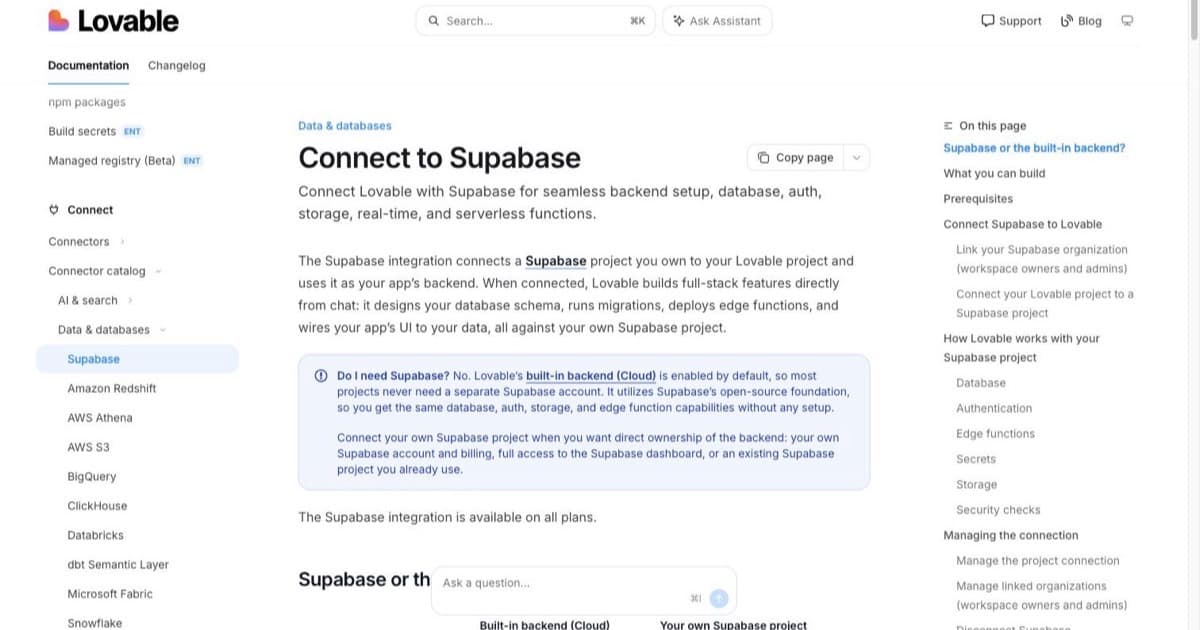
Lovable + Supabase is a strong stack for this, and with SSR now available on new apps, those generated pages render server-side for cleaner indexing.
How It Works
-
Set up your database: Use Lovable Cloud or connect Supabase. Create a table with your page data: tool names, descriptions, features, pricing, categories.
-
Build a dynamic template: Prompt Lovable to create a page that pulls data from the database.
Prompt example: "Create a dynamic page template at
/tools/<slug>that fetches tool data from the Supabase 'tools' table by slug. Display the tool name, description, features list, pricing, and a CTA button." -
Generate unique meta tags per page: Each dynamic page should have its own title and description pulled from the database.
Prompt example: "For each dynamic tool page, set the page title to '[Tool Name]: Features, Pricing & Review' and the meta description to the first 150 characters of the tool description."
Create a sitemap: Submit all generated URLs to Google.
Prompt example: "Generate a sitemap.xml that includes all dynamic tool page URLs from the database."
pSEO Content Quality
Google penalizes thin pages. Each one needs:
- At least 300 words of unique content (not just database fields)
- Internal links to related pages
- A clear value proposition for the visitor
If you've got 200 tools but each page is just a name and a one-line description, Google will ignore them. Add comparisons, use cases, and contextual content.
See also: Build an app with Lovable tutorial for a step-by-step walkthrough of the Lovable + Supabase stack.
Performance and Core Web Vitals
Google uses Core Web Vitals (page speed and responsiveness metrics) as a ranking factor. It's a tie-breaker rather than a trump card, but for comparable pages it can decide who wins. Three numbers matter, measured at the 75th percentile of real visits:
- LCP (Largest Contentful Paint): How fast the main content loads. Target: under 2.5 seconds.
- INP (Interaction to Next Paint): How quickly the app responds to user input. Target: under 200ms. INP replaced First Input Delay in 2024 and is the metric most sites fail, so it's worth watching.
- CLS (Cumulative Layout Shift): How much the page layout jumps around during load. Target: under 0.1.
Lovable generates React with Tailwind CSS: generally fast out of the box thanks to purged CSS bundles and proper code splitting. But you can push it further.
Optimization Tips
Lazy load images: Got a lot of images? Prompt Lovable to add lazy loading.
"Add loading="lazy" to all images below the fold. Keep the hero image eager-loaded."
Minimize API calls on page load: Every Supabase query on mount adds latency. Batch requests where possible.
"Combine the three Supabase queries on the homepage into a single query or use parallel fetching with Promise.all."
Optimize fonts: Custom fonts block rendering. Use font-display: swap or stick with system fonts.
Add image alt text: This is SEO and accessibility. Every <img> tag needs descriptive alt text.
"Add descriptive alt text to all images in the app. Use the format '[what the image shows]: [context]'."
Test your deployed app with PageSpeed Insights, the Lighthouse score in Lovable's SEO review, or Chrome DevTools Lighthouse.
Lovable Cloud and SEO
Lovable Cloud deploys your app to a subdomain (yourapp.lovable.app) or a custom domain. A few things matter for SEO:
- Custom domain: Always use one. Subdomains on
lovable.appshare domain authority with every other Lovable project. Custom domains require a paid plan. - HTTPS: Provided by default. Google requires it.
- CDN and caching: Lovable Cloud handles edge caching for global performance.
- Rendering: New apps render server-side via TanStack Start, and older apps get on-request pre-rendering for crawlers. The old no-SSR limitation is largely gone. If you want full control over rendering for a heavily content-driven site, you can still export the code and deploy to Vercel or Netlify.
Recommended SEO Tools to Pair with Lovable
You don't need expensive tools to start. Google Search Console (indexing, sitemaps, search queries) and PageSpeed Insights (Core Web Vitals) cover most of what you need, and both are free. Lovable's built-in SEO review and its Semrush integration cover keyword research and on-page checks without leaving the editor.
For technical audits, Screaming Frog crawls up to 500 URLs on its free tier. When you're ready to scale, Ahrefs (Lite from ~$129/mo) handles keyword research and backlink analysis, and Semrush (Pro from ~$140/mo) offers a full SEO suite with site audits.
Common SEO Mistakes with AI-Built Apps
These keep coming up with AI-built apps. Lovable's SEO review now catches most of them, but it's worth knowing what to look for:
-
Missing or duplicate meta tags: The review flags these, but you still write the copy. Generic or repeated titles waste your best ranking real estate.
-
No sitemap: Without a sitemap, Google discovers your pages slower. The review flags a missing sitemap.xml and can generate one.
-
No robots.txt: Tell search engines what to crawl and what to skip. The review checks for this too.
-
Missing image alt text: AI builders often generate
<img>tags without alt attributes. This hurts both SEO and accessibility. -
Ignoring page speed: Loading a heavy dashboard with no code splitting tanks your Core Web Vitals. Split routes and lazy load where possible.
-
No internal linking: Your pages should link to each other. This spreads page authority and helps Google understand your site structure.
-
Thin content: Rendering is handled now, but Google still ignores pages with nothing to say. Depth and usefulness are on you.
-
Not setting up Google Search Console: It's free, takes five minutes, and tells you exactly how Google sees your site. There's no reason to skip this.
Start Building Your SEO-Ready App
Lovable gives you a fast path from idea to deployed app, and now the SEO basics come with it. Run the built-in review, fix the flagged items, write meta copy that earns clicks, and you're most of the way there in an afternoon.
Start building with Lovable and use the prompts in this guide to set up SEO from day one.
Disclosure: The link above is an affiliate link. We may earn a commission if you sign up through it, at no extra cost to you.
Related reads:
- Lovable review 2026, Full platform breakdown
- Lovable pricing guide, Plans and credits explained
- Lovable alternatives, How Lovable compares to other builders
- Build an app with Lovable, Step-by-step tutorial
- Lovable vs Cursor vs Claude, Comparison for different workflows
FAQ
Does Lovable have built-in SEO tools?
Yes, as of the May 2026 update. Lovable ships an SEO review that audits metadata, Open Graph tags, structured data, robots.txt, sitemap.xml, llms.txt, and Lighthouse performance, then applies most fixes with a one-click "Try to fix" button. New apps also get server-side rendering by default. The review is free on every plan.
Does Lovable generate SEO-friendly code?
Yes. Lovable generates standard React and TypeScript, and new apps now render server-side by default. The built-in SEO review flags missing meta tags, structured data, and sitemaps, and can add most of them in one click. You can still prompt for anything the review misses.
Can Google index a Lovable app?
Yes. New Lovable apps built from May 2026 use server-side rendering, so Google gets fully rendered HTML on the first request. Older React and Vite apps use on-request pre-rendering that serves rendered HTML to verified search and AI crawlers. Either way, your content is indexable.
How do I add a sitemap to my Lovable app?
Run Lovable's SEO review, which flags a missing sitemap.xml and can generate one. You can also prompt Lovable: "Create a sitemap.xml file in the public directory that lists all pages of the app." For dynamic pages, generate the sitemap from your database. Submit the sitemap URL in Google Search Console.
Is Lovable Cloud good enough for SEO?
For most projects, yes. Lovable Cloud provides HTTPS, CDN caching, and custom domain support. New apps render server-side, and older apps get pre-rendering for crawlers, so the old no-SSR limitation is largely gone. For a heavily content-driven site you can still export to Vercel or Netlify if you want full control.
How do I check if my Lovable app passes Core Web Vitals?
Run your deployed URL through PageSpeed Insights, or use the Lighthouse score inside Lovable's SEO review. Both show your LCP, INP, and CLS with specific recommendations. Aim for green on all three: LCP under 2.5s, INP under 200ms, CLS under 0.1.
Can I do programmatic SEO with Lovable?
Yes. Connect Lovable to Supabase, create a table with your page data, and build a dynamic template that generates unique pages from the database. Each page needs its own meta tags and enough real content to avoid thin-page penalties.
What is the best way to add Open Graph tags in Lovable?
The fastest way is Lovable's SEO review, which flags missing Open Graph tags and adds them in one click. If you want manual control, prompt Lovable to set og:title, og:description, og:image, and og:url per page. Test the output with opengraph.xyz.

Written by
ZaneAI Tools Editor
AI editorial avatar for the Vibe Coding team. Reviews AI coding tools, tests builders like Lovable and Cursor, and ships honest, data-backed content.