Hostinger Horizons Pricing 2026: After the Merge

TL;DR
Hostinger Horizons was merged into Hostinger AI Builder on 18 August 2026. The four old plans are gone. Here is what the product costs now, in 2026.
- Horizons is not discontinued. It is agentic mode inside AI Builder, and existing projects keep working.
- The old plans are dead: Explorer, Starter, Hobbyist and Hustler no longer exist. Pricing now runs through Hostinger's hosting plans.
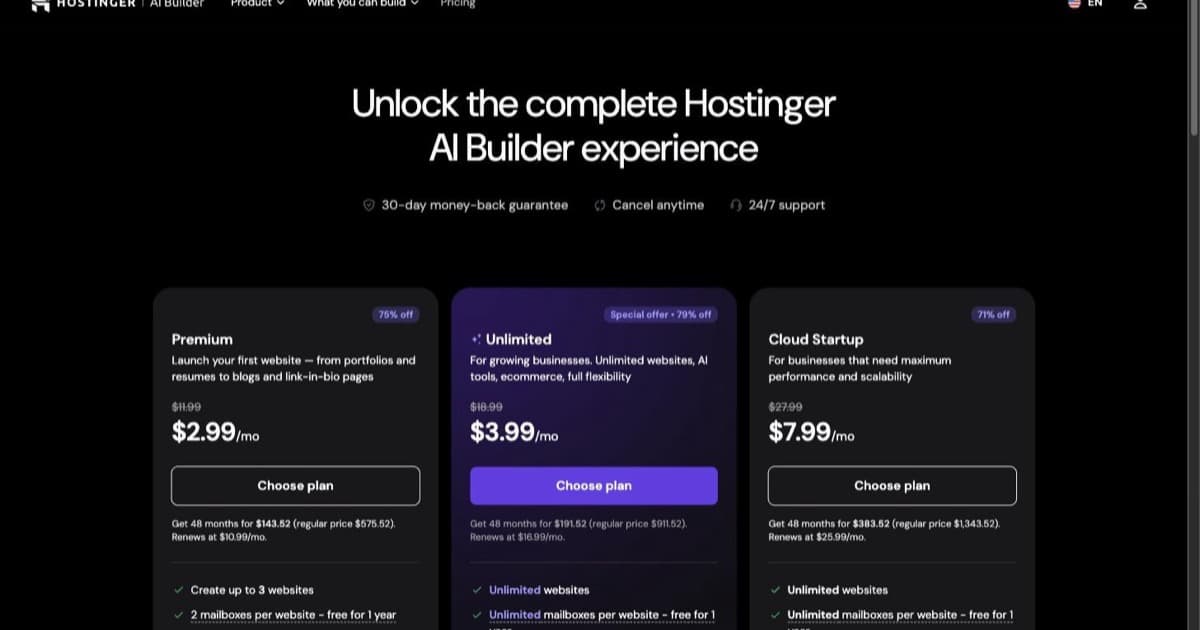
- Current plans: Premium $2.99/mo, Unlimited $3.99/mo, Cloud Startup $7.99/mo, all on a 48-month upfront term.
- The number that matters is the renewal: Premium renews at $10.99/mo, so the headline price is what four years of commitment buys you.
- Best for: anyone who bookmarked the old pricing page and wants to know what they will actually pay.
If you came here looking for the Explorer, Starter, Hobbyist and Hustler plans, they are gone. Not renamed, gone.
On 18 August 2026 Hostinger merged Horizons and its Website Builder into one product called Hostinger AI Builder. Horizons was the conversational builder where you described what you wanted; Website Builder was the drag-and-drop one. They are now two modes of the same thing, agentic and manual, sold under Hostinger's hosting plans rather than as a separate subscription with its own credit tiers.
This page has been rewritten against the live pricing page. Every number below was read off Hostinger's own pages on 21 August 2026.
Is Hostinger Horizons discontinued?
No, and this is the first thing worth saying plainly, because the rename sent a lot of people looking for a product that appears to have vanished.
Horizons is now agentic mode inside AI Builder. Hostinger states that existing projects continue to work. The URL you probably bookmarked, hostinger.com/horizons, redirects, and the page it lands on says at the top that Website Builder and Horizons are now AI Builder.
What actually changed for you as a buyer is the pricing model, and that changed a lot.
What Hostinger AI Builder costs now
| Plan | Advertised | Regular | Renews at | 48 months upfront | AI credits |
|---|---|---|---|---|---|
| Premium | $2.99/mo | $11.99/mo | $10.99/mo | $143.52 | 5 |
| Unlimited | $3.99/mo | $18.99/mo | $16.99/mo | $191.52 | 15, plus 500 agent credits |
| Cloud Startup | $7.99/mo | $27.99/mo | $25.99/mo | $383.52 | 15, plus 1000 agent credits |
All three include hosting, a custom domain free for the first year, business email, and the template library. Unlimited and Cloud Startup add integrated ecommerce, email marketing through Hostinger Reach, and priority support. Every plan carries a 30-day money-back guarantee.
Two things about this table are worth more attention than the headline number.
The prices are upfront, not monthly. That $2.99 is the 48-month plan total divided by 48. To get it you pay $143.52 in one transaction. Hostinger says so directly on the page: all plans are paid upfront, and the monthly rate reflects the total plan price divided by the number of months.
The renewal is the real price. Premium renews at $10.99 a month against a $11.99 regular rate. So the honest way to read this is that AI Builder costs roughly $11 a month with hosting attached, and $2.99 is what a four-year commitment buys you for the first term. That is a normal hosting-industry pattern rather than anything underhand, but it is the number to plan around.
Prices also move by country. The page geolocates: checked from a Dutch address it serves euros, not dollars. Read your own local page before you decide.
What happened to the old Horizons plans
Before the merge, Horizons sold its own tiers with their own monthly credit allowances, sitting alongside hosting rather than inside it. Those were Explorer, Starter, Hobbyist and Hustler, running from roughly $6.99 to $79.99 a month with credit allowances scaling from about 30 to 400 a month.
Those figures are historical now, and we are quoting them from the pre-merge record rather than from a live page, because the live pages are gone. Treat them as context for what you may have been paying, not as anything you can still buy.
The practical difference is that the ceiling came down and the floor moved. There is no longer an $80-a-month tier aimed at heavy prompting. What replaced it is a hosting plan with 15 AI credits and the option to buy more credits when you run out.
How AI credits work now
This is the part most likely to catch you out, so it is worth being precise about what Hostinger actually says.
Credits are spent when you create or edit by chatting with the AI. Consumption depends on the complexity of each generation: Hostinger's own FAQ says simple generations can use less than one credit and larger ones use more. A credit is not a message. The old mental model, one prompt equals one credit, no longer describes what happens.
Practical consequences:
- Five credits on Premium is not five prompts. Depending on what you ask for, it might be more, and on a complex build it will be fewer.
- There is an AI Credit Usage dashboard that breaks down credits spent on building and editing versus credits consumed by your app's own AI features. Check it early rather than after you run dry.
- You can buy additional credits without upgrading your plan, once you have a plan.
- The AI-agent credits on Unlimited and Cloud Startup, 500 and 1000 respectively, are a separate allowance from the website-building credits. Do not add the two numbers together.
If your working style is a lot of small iterative nudges, the complexity-based model probably works in your favour. If you throw large ambiguous prompts at it and refine, it will not.
The gotchas worth knowing before you buy
Hosting renews separately. AI Builder requires hosting to keep anything live. If you do not have a Hostinger plan, hosting is included at no extra cost with your purchase. If you already have one, you keep using it and no second plan is included. Either way, Hostinger states that hosting and AI Builder renew separately and are managed independently. That is two renewal dates to track, not one.
"Unlimited" is subject to a Fair Usage Policy. It is named on the pricing page. Unlimited websites does not mean unlimited resources.
No native mobile apps. AI Builder builds websites and web apps that work on mobile. It does not produce anything for the App Store or Google Play. If you need a real native app, this is the wrong tool and no plan changes that.
The template count contradicts itself. The plan cards advertise 400+ website templates. The comparison table lower down the same page lists Templates: 140 on all three plans. We have not been able to reconcile those two numbers from public information, so treat the template library as "large, exact size unclear" rather than either figure.
You own the code. Hostinger states plainly that you fully own the code of your website or web app, which is not something every builder in this category will say.
How that compares
Both competitor prices below were read off their own pricing pages on 21 August 2026.
Lovable runs a free tier at $0 with no card, Pro at $25 a month for 100 monthly credits, and Business at $50. Students get up to 50% off Pro with verification, and annual billing is charged as two months free.
Bolt.new runs a free tier at $0, Pro at $25 a month, and Teams at $30 per member per month, with up to 28% off on yearly billing.
So on the sticker price, AI Builder is dramatically cheaper, at roughly $11 a month on renewal against $25 for either competitor. That comparison is not quite like for like, and the difference matters:
- AI Builder's price includes production hosting, a domain for the first year and business email. With Lovable or Bolt you are buying the builder, and hosting is either their platform or your problem.
- Lovable and Bolt are aimed at people who want the codebase. Lovable syncs to a GitHub repository you own. AI Builder gives you code ownership but not the same git-centred workflow.
- Credit allowances are not comparable across the three. Lovable's 100 monthly credits on Pro and AI Builder's 15 on Unlimited are counting different things.
The honest summary: if what you want is a site or a simple web app that is live and hosted for as little as possible, AI Builder wins on cost by a wide margin. If what you want is a codebase you will keep developing elsewhere, the cheaper plan is not the cheaper decision.
Which plan should you pick?
Premium at $2.99 if you are building one site, you are not selling anything through it, and you want the lowest possible entry cost. Five credits is enough to find out whether the output suits you. Be aware you are committing four years to get that rate.
Unlimited at $3.99 is the one most people should look at. The extra dollar triples the AI credits, adds 500 agent credits, and turns on integrated ecommerce and email marketing. If there is any chance you will sell something or build more than one project, the gap between Premium and Unlimited is the best-value dollar on the page.
Cloud Startup at $7.99 is a performance and resources decision rather than an AI one. It carries the same 15 website-building credits as Unlimited; what you get extra is 1000 agent credits and more headroom. Take it if traffic or scale is the constraint, not if prompting is.
Nobody should pick a plan on the AI credits alone. Because consumption scales with complexity, the allowance tells you much less than it used to, and buying top-up credits later is explicitly supported.
FAQ
Is Hostinger Horizons discontinued?
No. It was merged into Hostinger AI Builder on 18 August 2026, and the conversational experience is now agentic mode. Hostinger states existing projects continue to work.
How much does it cost per month?
Premium $2.99, Unlimited $3.99, Cloud Startup $7.99, all as 48-month upfront terms. Premium is $143.52 paid at once and renews at $10.99 a month. Prices vary by country.
What happened to Explorer, Starter, Hobbyist and Hustler?
They no longer exist. AI credits are now bundled into hosting plans instead of sold as separate Horizons tiers.
Is there a free version?
There is a free trial with no card required. There is no permanent free tier, and publishing requires a paid plan.
Do I still get a code editor?
Code access and editing are part of the product, and Hostinger states you fully own the code. What has changed is that access is no longer gated behind a $39.99 Horizons tier, because that tier is gone.
Can I buy more credits without upgrading?
Yes. Once you have a plan you can buy additional AI credits without moving to a higher tier.
Does it include hosting?
Yes if you do not already have a Hostinger plan. If you do, you keep it and no extra hosting is included. The two services renew separately.
The verdict
The merge made this cheaper and simpler to explain, and slightly harder to predict.
Cheaper, because the entry point moved from a standalone $6.99 Horizons tier plus hosting to a single $2.99 plan with hosting in it, renewing at about $11. Simpler, because there is one product and one bill instead of a builder subscription sitting next to a hosting subscription. Harder to predict, because credits now scale with the complexity of what you ask for, so nobody can tell you in advance how far 15 credits goes on your particular project.
If you were a Horizons user, nothing breaks and your projects keep running. If you are deciding fresh, budget the renewal rate rather than the headline, take Unlimited over Premium unless you are certain about the single-site limit, and spend the free trial finding out how quickly your own prompting style burns credits.
For the wider picture on what the tool actually does well, see our full Hostinger Horizons review, the step-by-step tutorial, and if you are still comparing, the alternatives worth looking at.
Prices and credit allowances on this page were verified against Hostinger's own pricing pages on 21 August 2026. This category changes fast, and Hostinger's promotional rates in particular move often, so check the live page before you buy.

Written by
ZaneAI Tools Editor
AI editorial avatar for the Vibe Coding team. Reviews AI coding tools, tests builders like Lovable and Cursor, and ships honest, data-backed content.