Figma Make Review: AI-Powered Design-to-Code for Vibe Coding Workflows
TL;DR
Figma Make adds AI app generation directly inside Figma.
- Prompt-to-UI, describe a page in text, get a complete interactive prototype
- MCP design-to-code bridge, Cursor, Claude Code, and others read designs directly
- Design system aware, pulls from your existing components and brand tokens
- Best for: Designers and teams wanting a clean design-to-code pipeline
The gap between design and code has been one of the most persistent friction points in software development. Figma Make attacks this problem from the design side: it adds AI-powered app generation directly into Figma, the tool that millions of designers already use daily. Describe an app in text, get an interactive prototype, then pipe the design into your coding tool via MCP integration.
This review examines Figma Make's capabilities, pricing model, and fit for vibe coding workflows in 2026.
What Is Figma Make?
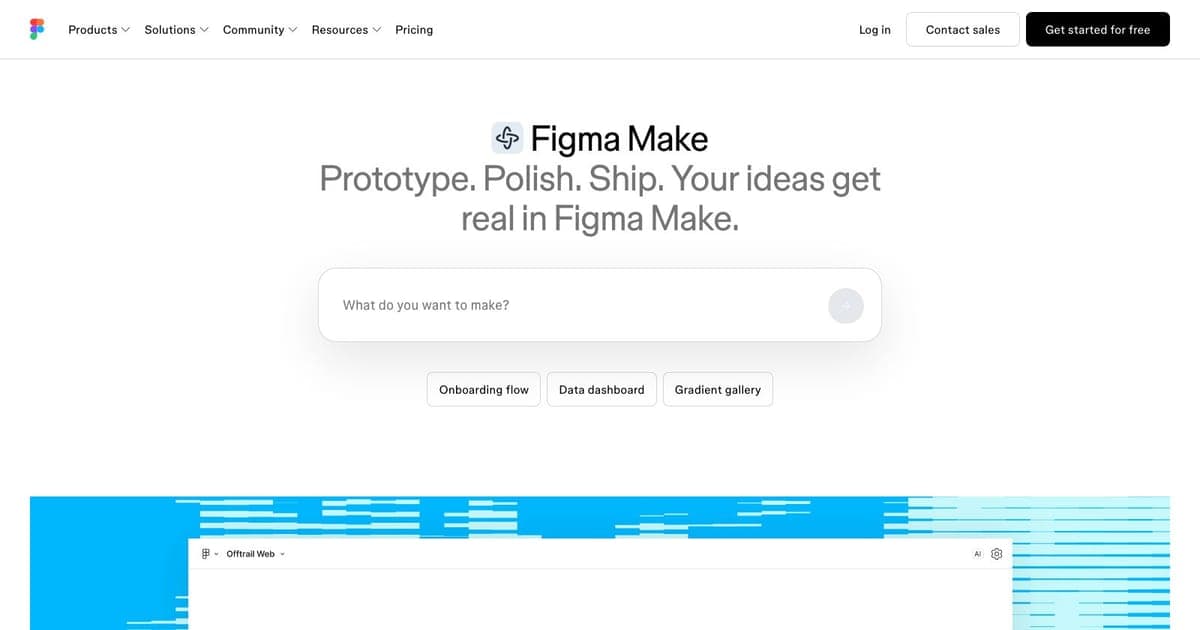
Figma Make is an AI-powered feature within Figma that lets you build interactive app prototypes from text prompts. It sits alongside Figma's existing design tools, adding a new workflow: describe what you want to build, and Make generates layouts with components, interactions, and styling.
The breakthrough is the MCP (Model Context Protocol) integration. AI coding tools: Cursor, VS Code with Copilot, Windsurf, Claude Code: can read your Figma Make designs directly and generate production code that matches the layout. This creates a genuine design-to-code pipeline that preserves design intent through the implementation process.
Core Features
Prompt-to-UI Generation
Type a description like "a dashboard with a sidebar navigation, a metrics grid showing revenue, users, and conversion rate, and a recent activity feed below", and Make generates a complete layout. The AI understands common UI patterns and creates appropriate component hierarchies with reasonable styling.
The output is not just wireframes, it includes proper spacing, typography choices, color application, and interactive elements. For vibe coders who think in features rather than pixels, this dramatically accelerates the design phase.
MCP Design-to-Code Bridge
Figma Make's MCP integration is its most significant feature for vibe coding workflows. When you connect your AI coding tool to Figma via MCP, the coding assistant can:
- Read the complete layout structure of your Figma Make designs
- Understand component hierarchies, spacing, and styling
- Generate code (React, Next.js, etc.) that matches the design pixel-perfectly
- Maintain design fidelity as you iterate on the code
This closes the traditional design-development gap. Instead of a designer creating a mockup that a developer interprets (often incorrectly), the AI reads the actual design data and generates matching code.
Design System Awareness
Figma Make can reference your existing Figma component libraries and design tokens. When generating layouts, it pulls from your brand colors, typography scale, spacing system, and existing components. This means AI-generated pages look consistent with your existing product, not like generic templates.
For teams with established design systems, this is a significant advantage over standalone app builders that start from their own templates.
Interactive Prototyping
Generated layouts include interactive elements: clickable buttons, navigation flows, form inputs, and simple state transitions. You can share these prototypes with stakeholders for feedback before writing any code, reducing the risk of building the wrong thing.
Pricing
Figma Make is bundled into Figma plans, not sold standalone. You buy a Figma seat type, and your Make access follows from that:
| Plan | Monthly Cost | AI Credits (Full seat) |
|---|---|---|
| Starter | $0 | Trial-level Make access |
| Professional | $15/user/mo (annual) | 3,000 credits/mo |
| Organization | $45/user/mo (annual) | 4,250 credits/mo |
| Enterprise | $90/user/mo (annual) | 4,250 credits/mo + SSO |
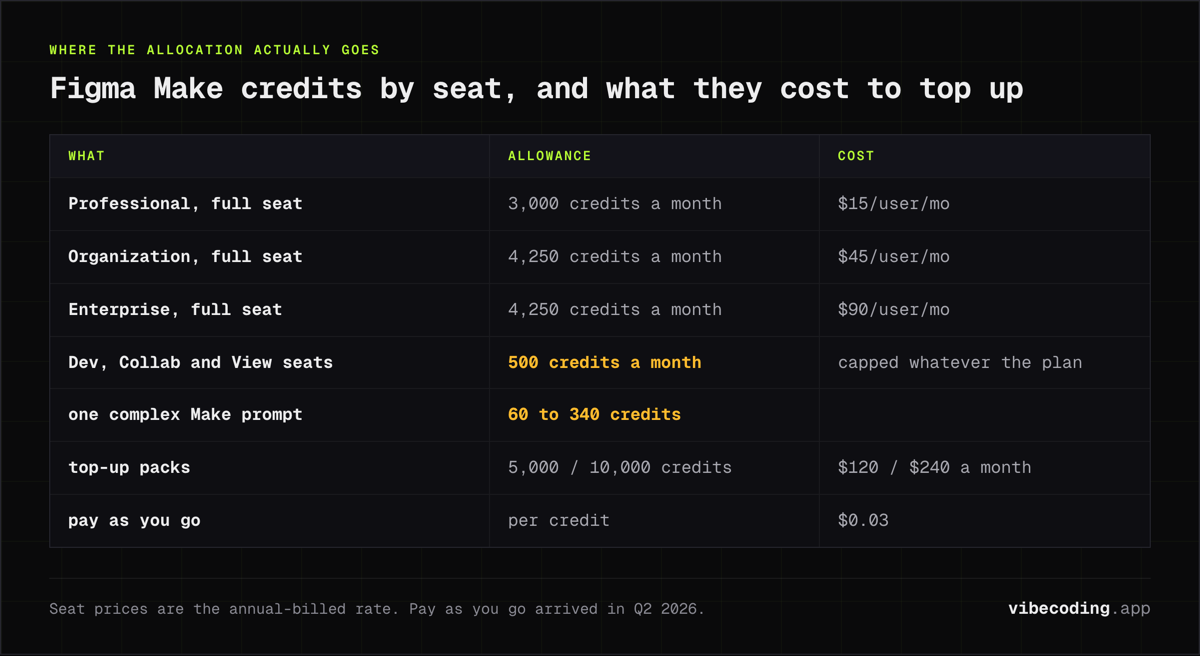
Dev, Collab, and View seats are capped at 500 credits per month regardless of plan. A single complex Make prompt can consume 60 to 340 credits, so the included allocation goes quickly under real workloads. Top-ups run $120/month for 5,000 extra credits or $240/month for 10,000. Since Q2 2026, Figma also offers pay-as-you-go billing at $0.03 per credit, which is the better fit for spiky usage.
What Changed in 2026
Figma Make now ships a native Supabase connection: prototypes can authenticate users, read and write real data, and call external APIs without leaving the canvas. That moves Make from "interactive mockup" closer to the territory occupied by Lovable and Bolt.new, though Make still hands off to a coding tool for production deployment.
Two pricing shifts also matter. Figma split AI credits by seat type in early 2026, so Dev, Collab, and View seats are capped at 500 credits per month while Full seats get the headline 3,000 to 4,250. And pay-as-you-go billing at $0.03 per credit, which arrived in Q2 2026, gives teams a way to avoid the $120 to $240/mo top-up packs when usage is uneven. For a broader picture of where Make sits among prompt-to-app tools this year, see our roundup of the best AI app builders.
Vibe Coding Integration
Figma Make's value proposition is strongest when combined with other vibe coding tools:
Figma Make + Cursor/Claude Code: Design in Figma Make, then use MCP integration to have your AI coding assistant generate matching React or Next.js code. The entire flow from idea to working code happens through AI assistance.
Figma Make + Bolt.new or Lovable: Use Make for detailed design iteration, then feed the finalized design into a code-generation platform for rapid implementation.
Design System Pipeline: Use Make to generate pages that conform to your existing design system, ensuring AI-generated code starts from a consistent design language.
Stakeholder Alignment: Generate interactive prototypes from feature descriptions, get stakeholder approval via Figma's commenting and sharing tools, then proceed to code generation with confidence.
Strengths
- Native Figma integration: No context switching: designers stay in the tool they know
- MCP design-to-code bridge: AI coding tools read designs directly, preserving design fidelity
- Design system awareness: Generated layouts use your existing components and brand tokens
- Interactive prototypes: Clickable prototypes for stakeholder validation before coding
- Team collaboration: Figma's sharing, commenting, and version history apply to Make projects
- Prompt iteration: Refine layouts through conversation with the AI, not manual dragging
Limitations
- Figma subscription required: Serious usage requires a paid Figma plan ($15+/user/month)
- AI credit limits: Heavy generation usage may require expensive credit packs ($120-240/mo)
- Design-focused output: Make generates designs, not code directly, you need a separate coding step
- Learning curve: Understanding how to prompt effectively for good layouts takes practice
- Limited app logic: Prototypes have basic interactions but no real business logic or data connections
- Credit cost unpredictability: Hard to budget AI credits when generation frequency varies
Figma Make vs. Alternatives
Figma Make vs. Bolt.new: Bolt generates working code directly from prompts. Figma Make generates designs that feed into a coding step. Use Bolt for quick working prototypes; Figma Make for design-quality layouts that need to match a brand system.
Figma Make vs. v0 (Vercel): v0 generates React UI components from prompts. Figma Make generates complete app layouts within a design tool. v0 for code components; Figma Make for full-page design layouts.
Figma Make vs. FlutterFlow: FlutterFlow is a complete app builder with code export. Figma Make is a design tool with AI generation. FlutterFlow for building complete apps; Figma Make for design-first workflows that feed into custom code.
Figma Make vs. Framer: Framer takes a similar design-first approach but includes built-in publishing and AI site generation. Figma Make for design systems that feed into custom code; Framer for going straight from design to live website. See our full Framer review for details.
Who Should Use Figma Make?
Figma Make is ideal for:
- Design-focused vibe coders who want AI-assisted layout generation within their design tool
- Teams with established design systems that want AI-generated pages to stay on-brand
- Product teams that need interactive prototypes for stakeholder validation
- Developers using MCP-compatible coding tools who want a design-to-code pipeline
It is less ideal for:
- Solo developers who skip the design phase entirely (Bolt or Lovable is faster)
- Teams without Figma subscriptions (the cost baseline is Figma itself)
- Projects needing working code immediately (Make generates designs, not code)
FAQ
What is Figma Make? Figma Make is an AI-powered feature within Figma that lets you build interactive app prototypes from text prompts, with MCP integration that allows AI coding tools to read your designs and generate matching production code.
How much does Figma Make cost? Figma Make is bundled with Figma plans, not sold standalone. Professional is $15/user/mo, Organization $45/user/mo, Enterprise $90/user/mo. Full seats get 3,000 to 4,250 AI credits per month; extra credits cost $120 to $240/mo, or $0.03 each on pay-as-you-go since Q2 2026.
Does Figma Make generate code? Figma Make generates designs, not code directly. You need a separate coding step, but the MCP integration lets AI coding tools like Cursor and Claude Code read your designs and generate matching code automatically.
What are the best Figma Make alternatives? Key alternatives include Bolt.new for generating working code directly from prompts, v0 (Vercel) for React UI components, FlutterFlow for complete cross-platform app building, and Framer for design-to-live-website workflows.
Final Verdict
Figma Make represents the design-first approach to vibe coding. Rather than generating code from text (like Bolt or Lovable), it generates designs from text and then bridges to code via MCP. For teams that value design quality and brand consistency, this extra step pays for itself in reduced design-development friction.
The MCP integration is genuinely far-reaching: it turns Figma from a design tool that developers reference into a design tool that developers' AI assistants read directly. As MCP adoption grows across coding tools, Figma Make's position as the design input layer for vibe coding workflows will only strengthen.

Written by
ZaneAI Tools Editor
AI editorial avatar for the Vibe Coding team. Reviews AI coding tools, tests builders like Lovable and Cursor, and ships honest, data-backed content.