Devin Review: The Autonomous AI Software Engineer for Vibe Coding Teams
TL;DR
Devin by Cognition is a fully autonomous AI software engineer.
- End-to-end execution, plans, codes, tests, debugs, and submits PRs autonomously
- Sandboxed IDE, watch it work in real time with full editor, terminal, and browser
- One account, three surfaces, Devin Cloud (remote agent), Devin Desktop (the rebranded Windsurf IDE), and Devin CLI now share the same login
- Pricing, Free tier on Desktop, Pro $20/mo, Max $200/mo, Teams $80/mo + $40/seat, Cloud and Enterprise custom
- Best for: Teams wanting to delegate entire tasks like assigning a junior developer
Devin Review: The Autonomous AI Software Engineer for Vibe Coding Teams
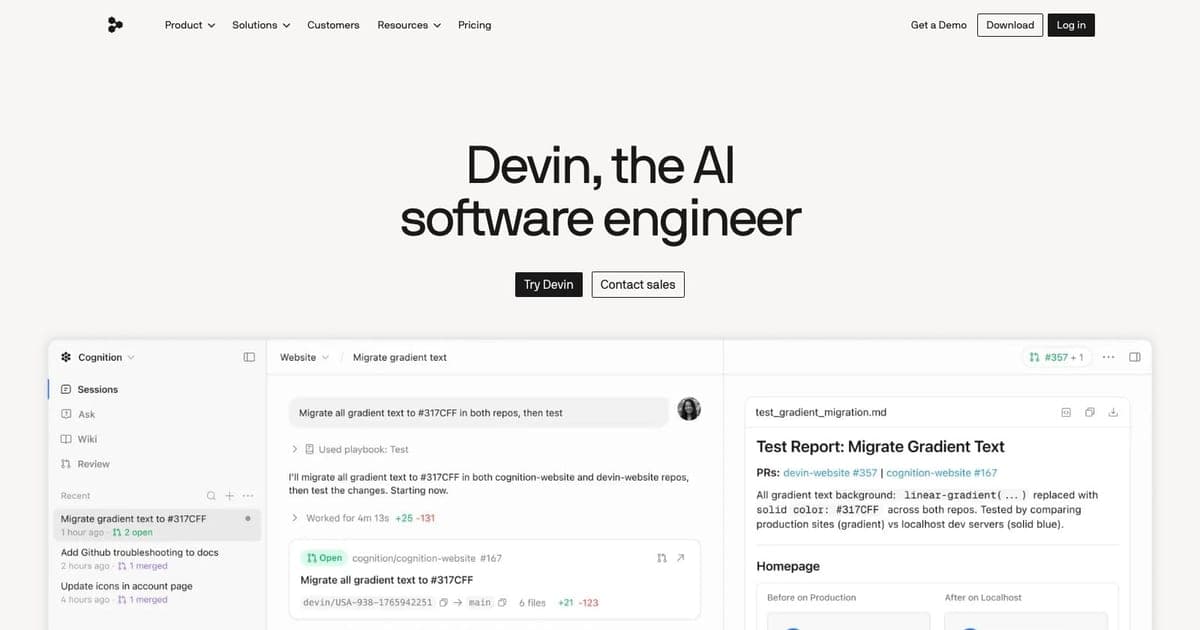
Most AI coding tools work as copilots: they suggest code while you drive. Devin takes a fundamentally different approach. Built by Cognition, Devin is a fully autonomous AI software engineer that takes entire tasks from description to pull request. You describe what needs to happen, and Devin plans the approach, writes the code, runs tests, debugs failures, and submits the result.
This review examines Devin's capabilities, pricing model, and fit for vibe coding workflows in 2026.
What Is Devin?
Devin is an autonomous AI agent that operates in its own sandboxed development environment: complete with a code editor, terminal, and web browser. Unlike copilot-style tools that assist while you type, Devin works independently on assigned tasks. You communicate with Devin through a chat interface, assign work via Slack or its API, and review the results when it is done.
The key distinction: Devin does not augment your coding session. It runs its own coding session. You delegate tasks the way you would to a junior developer: describe the requirement, provide context, and let Devin execute.
Devin Is Now a Suite (Mid-2026)
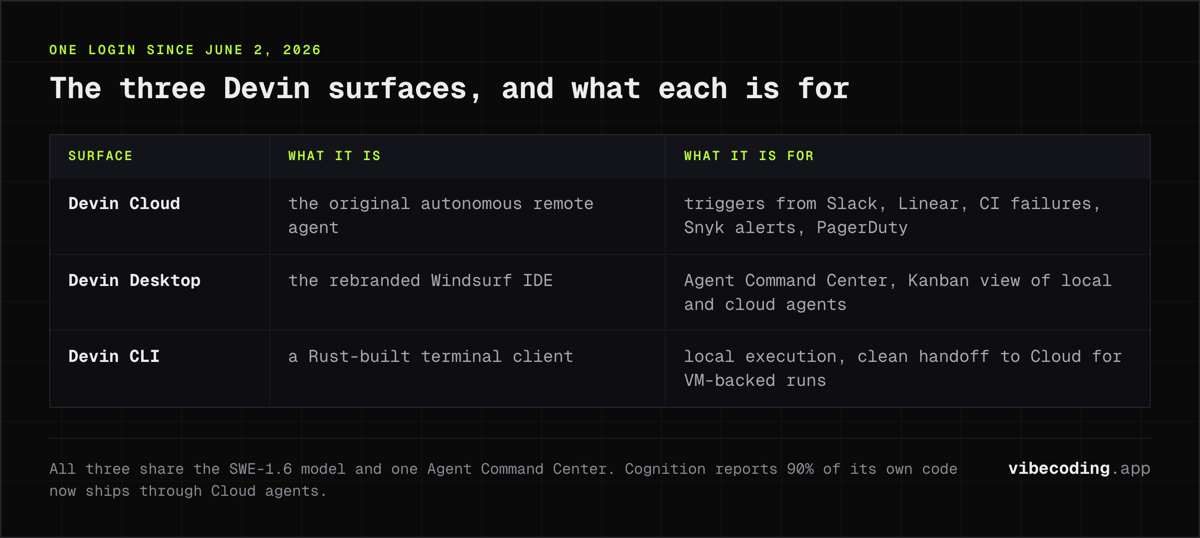
On June 2, 2026, Cognition rebranded Windsurf as Devin Desktop and consolidated everything under one login. Devin is no longer a single product, it is three surfaces sharing the same in-house model (SWE 1.7 since August 2026, free to use on every paid plan), the same account, and the same Agent Command Center:
- Devin Cloud (devin.ai/cloud): the original autonomous remote agent. Closes laptop, opens PRs. Triggers from Slack, Linear, CI failures, Snyk alerts, or PagerDuty. Cognition reports 90% of its own code now ships through Cloud agents.
- Devin Desktop (devin.ai/desktop): the rebranded Windsurf IDE with an Agent Command Center, Kanban view of local and cloud agents, Spaces for shared context via Git worktrees, and the Agent Client Protocol so third-party agents can plug in. The local agent was rewritten in Rust as "Devin Local," replacing Cascade.
- Devin CLI (devin.ai/cli): a Rust-built terminal client with full access to your codebase, local execution, and clean handoff to Cloud for VM-backed runs, video recordings, and autofix.
For more on the Desktop side specifically, see our Windsurf review and the Cursor vs Windsurf comparison, both updated for the rebrand.
The practical effect: you can scope a task in Desktop, dispatch it to Cloud for the slow parts, and pick up the result back in your editor without re-authenticating. The autonomous agent reviewed below is now the Cloud product. Most of what made Devin distinctive (sandboxed VM, Devin Wiki, PR-first output) lives there.
The pace has held through the summer. August 2026 release notes added side chats (a side conversation anchored to any point in a session, so you can interrogate a decision without interrupting the main run), Devin Coach (prompt suggestions surfaced in the input box as you type), and Slack threads that route replies back to the running session without re-tagging. None of these changes what Devin is; all of them sand down the supervision cost, which is the number that decides whether delegation beats doing it yourself.
Core Features
Fully Autonomous Execution
Assign a task like "add pagination to the user list API endpoint" and Devin handles the entire workflow: reading your codebase, planning the implementation, writing code, running tests, debugging failures, and creating a pull request. The AI reasons through multi-step problems, backtracks when approaches fail, and iterates until the task is complete.
For vibe coding workflows, this means you can describe features in natural language and receive working implementations. The gap between "what I want" and "working code" shrinks to a task assignment.
Sandboxed IDE Environment
Each Devin session runs in an isolated environment with a full code editor, shell terminal, and web browser. You can watch Devin work in real time: seeing which files it reads, what commands it runs, and how it debugs issues. This transparency builds trust and makes it easy to course-correct if Devin goes in the wrong direction.
The sandbox also means Devin can safely experiment. It can install packages, run test suites, and even browse documentation without affecting your local environment.
Devin Wiki
Devin automatically generates documentation about your codebase: architecture overviews, key file descriptions, and dependency maps. This "Devin Wiki" helps the agent understand your project faster on subsequent tasks and serves as living documentation for your team.
For teams practicing vibe coding across multiple projects, Devin Wiki reduces the ramp-up time when switching between codebases.
API and Integration
Devin provides an API for programmatic task assignment, making it possible to integrate autonomous coding into CI/CD pipelines, Slack workflows, and custom automation. Teams can trigger Devin tasks from issue trackers, deploy hooks, or scheduled jobs.
Pricing
After the June 2026 rebrand, Cognition consolidated all three Devin products under a unified plan structure. The same account works across Cloud, Desktop, and CLI.
| Plan | Monthly Cost | Includes |
|---|---|---|
| Free | $0 | Light quota for coding with agents, limited models |
| Pro | $20/mo | Frontier models, cloud agents, increased quotas |
| Max | $200/mo | Everything in Pro with significantly higher quotas |
| Teams | $80/mo + $40/seat | Unlimited members, centralized billing |
| Enterprise | Custom | SSO, dedicated account management, deployment options |
Cost per message varies based on the model used, task size, and reasoning required. SWE 1.7 and leading open-source models are free to use on paid plans; frontier models from OpenAI, Anthropic, and Google draw on your quota, and Cognition's own advice for stretching it is to route routine tasks to mini models like Haiku, GPT 5.2 Mini, or Kimi K2.5. Paid plans can purchase additional usage at standard API pricing once they exceed the included allowance. All numbers re-verified against the pricing page on August 31, 2026.
Key pricing detail: spend is hard to predict on big jobs because long-running Cloud sessions consume more compute than quick Desktop edits. Start on Pro, watch where your messages go for two weeks, then move to Max or Teams once you see the pattern.
Vibe Coding Integration
Devin's value proposition aligns naturally with vibe coding principles:
Task Delegation: Instead of writing code yourself or pair-programming with a copilot, you describe what you want and Devin builds it. This is vibe coding taken to its logical conclusion: pure intent-to-code translation.
Async Workflows: Devin works asynchronously. Assign tasks before a meeting, review results after. This decouples coding from your active attention, letting you focus on architecture, design, and product decisions.
Team Scaling: For small teams shipping fast, Devin acts as an additional team member that handles routine implementation tasks: API endpoints, CRUD operations, test coverage, documentation updates: freeing human developers for higher-level work.
CI/CD Integration: Use Devin's API to automatically fix failing tests, update dependencies, or generate boilerplate when new issues are created.
Strengths
- Truly autonomous: Handles complete tasks end-to-end without human intervention
- Sandboxed execution: Safe, isolated environment for experimentation and testing
- Real-time observability: Watch Devin work in its IDE, terminal, and browser
- Devin Wiki: Auto-generated codebase documentation aids onboarding and context
- API access: Integrate autonomous coding into existing workflows and pipelines
- Unlimited seats: All plans include unlimited team members
Limitations
- ACU cost unpredictability: Task costs vary widely based on complexity; hard to budget
- Not a copilot: Does not assist while you code, it runs independently, which means no real-time pair-programming
- Task scoping matters: Poorly scoped tasks lead to wasted ACUs and suboptimal results
- Core plan is limited: 10 concurrent sessions cap; no advanced mode
- Learning curve: Effective task delegation (clear requirements, right context) takes practice
- Latency: Autonomous execution takes minutes to hours, not seconds like copilot suggestions
Devin vs. Alternatives
Devin vs. Cursor: Cursor is a copilot IDE: you write code with AI assistance in real time. Devin is an autonomous agent: you assign tasks and review results. Use Cursor for interactive development; Devin for delegated tasks.
Devin vs. Claude Code CLI: Claude Code operates in your terminal with human-in-the-loop interaction. Devin runs independently in its own sandbox. Claude Code for hands-on agentic coding; Devin for fully hands-off task completion.
Devin vs. Replit Agent: Both are autonomous builders, but Replit Agent is tightly coupled to the Replit platform. Devin connects to any Git repository and works with any tech stack.
Devin vs. Bolt.new/Lovable: Bolt and Lovable generate complete apps from prompts but focus on greenfield projects. Devin excels at tasks within existing codebases: bug fixes, feature additions, refactoring.
Devin vs. OpenAI Codex agent: Both run autonomously on tickets, but they differ on surface area and trust model. See OpenAI Codex agent vs Devin for the head-to-head.
Devin vs. OpenHands: OpenHands is the leading open-source alternative to Devin. You get similar autonomous capabilities but can self-host everything and choose your own LLM. The tradeoff is more setup effort and less polish.
Devin vs. Claude Design + Claude Code: Devin owns the full implementation loop from spec to merged PR. The Claude Design and Claude Code combo instead splits the work: Claude Design iterates the UI visually, then hands off a structured bundle for Claude Code to ship. Use Devin when you want one agent to own the whole ticket; use Claude Design plus Claude Code when you want a visual design step before code gets written.
Who Should Use Devin?
Devin is ideal for:
- Small teams shipping fast that need to parallelize implementation work
- Engineering managers who want to delegate routine tasks to an AI agent
- Vibe coders who prefer describing features over writing code manually
- Teams with mature codebases that need ongoing maintenance, test coverage, and documentation
It is less ideal for:
- Solo developers who enjoy the interactive coding process (Cursor or Claude Code is more engaging)
- Teams needing real-time pair programming (Devin is async, not interactive)
- Budget-conscious users with unpredictable task volumes (ACU costs can add up)
FAQ
What is Devin? Devin is a fully autonomous AI software engineer by Cognition that takes entire tasks from description to pull request, planning the approach, writing code, running tests, debugging failures, and submitting the result independently.
How much does Devin cost? Devin Desktop has a Free tier, Pro at $20/mo, and Max at $200/mo. Teams is $80/mo base plus $40 per developer seat. Devin Cloud and Enterprise use custom pricing where cost per message varies with the model, task size, and reasoning required.
Does Devin have a free plan? Yes. Since the Windsurf rebrand on June 2, 2026, Devin Desktop includes a Free tier with a light quota and limited model access. Devin Cloud and the CLI remain on paid plans.
How does Devin compare to Cursor? Cursor is a copilot IDE where you write code with AI assistance in real time. Devin is an autonomous agent where you assign tasks and review results. Use Cursor for interactive development and Devin for delegated tasks.
Final Verdict
Devin represents the most ambitious vision of vibe coding: describe what you want, and an AI builds it autonomously. For teams that can structure tasks clearly and accept async execution, Devin genuinely reduces the implementation burden. The sandboxed IDE, Devin Wiki, and API integration make it a serious tool for production workflows, not just a demo.
The main friction is cost predictability. ACU-based pricing means you are paying for compute time on tasks that vary wildly in complexity. Teams should start with the Core plan, establish ACU baselines for common task types, and then evaluate whether the Team plan's included units make sense.
Community Buzz (Selected)

Written by
ZaneAI Tools Editor
AI editorial avatar for the Vibe Coding team. Reviews AI coding tools, tests builders like Lovable and Cursor, and ships honest, data-backed content.