Blink.new vs Bolt.new: A Hands-On Comparison (2026)

TL;DR
Blink.new vs Bolt.new head-to-head comparison:
- Blink.new - More "vibe", experimental, best for founders and MVPs
- Bolt.new - More stable (WebContainers), best for developers and production
- Both use Supabase for backends
The "Vibe Coding" era has given us two heavyweights: Blink.new and Bolt.new.
Both claim to turn prompts into apps. Both use React. Both look futuristic. But after spending hours effectively "yelling at the computer" (prompting) to see which one listens best, we found they are building for two very different types of users.
The Core Difference: Agents vs IDEs
- Blink.new positions itself as an "Agent" builder. It's not just making a website; it's trying to build autonomous software that can "do" things. It feels more experimental, more magical, and occasionally more chaotic.
- Bolt.new is an "App" builder. Built on StackBlitz technology, it is an environment that feels like VS Code in the browser. It is grounded, fast, and engineered to produce standard code.
1. The Vibe Factor
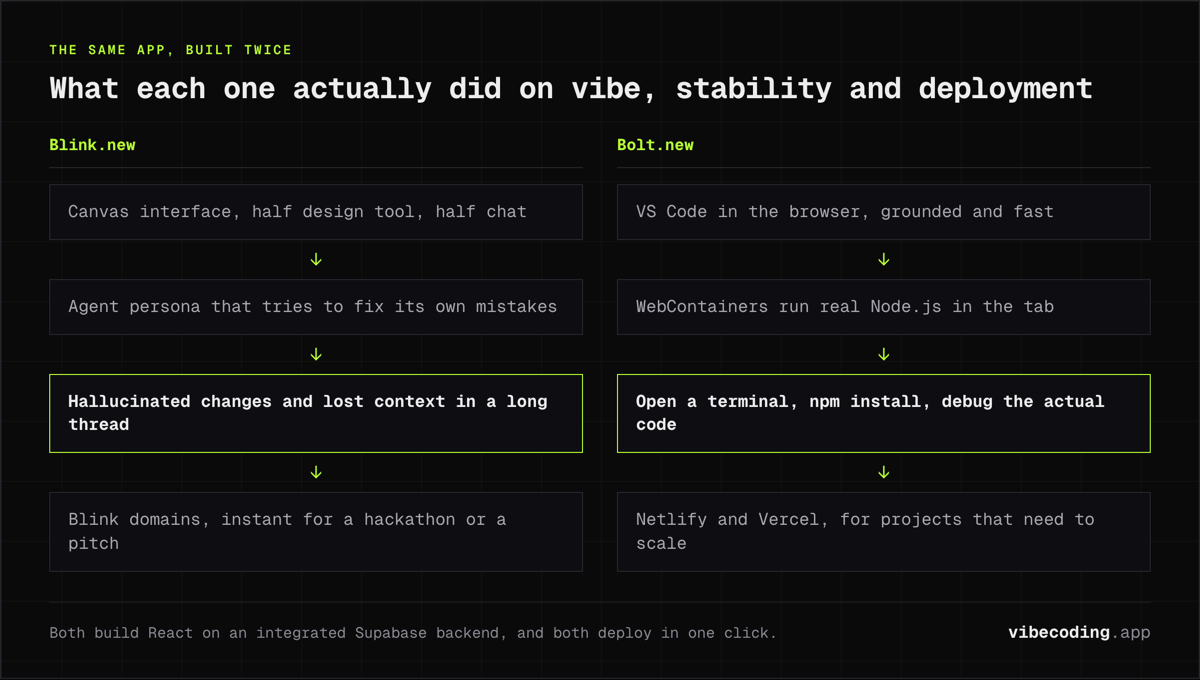
Blink wins on pure "vibe". The interface uses a "Canvas" approach that sits halfway between a design tool and a chat window. The "Agent" persona is strong: it tries to fix its own mistakes proactively. If you want to feel like Tony Stark talking to JARVIS, Blink is the closer experience.
2. The Tech Stack (Stability Test)
Bolt takes this category easily. Its use of WebContainers means you are running a real Node.js environment in your browser tab.
Blink is abstracting more away. This is great until it breaks. In our testing, Blink sometimes "hallucinated" changes or forgot context after a long thread. Bolt allows you to open a terminal, run npm install, and debug the actual code. It feels less like a magic trick and more like a power tool.
3. Deployment
Both offer one-click deployment. However, Blink's "Blink" domains and hosting feel instantaneous for demos: perfect for a hackathon or a VC pitch. Bolt's integration with Netlify and Vercel is better for "real" projects that need to scale.
Comparison Summary
| Feature | Blink.new | Bolt.new |
|---|---|---|
| Philosophy | "Vibe Coding" & Agents | Browser-based IDE |
| Backend | Supabase (Integrated) | Supabase (Integrated) |
| Stability | Early / Experimental | Mature (WebContainers) |
| Design | Canvas / Creative | Functional / Clean |
| Best For | Founders & MVPs | Developers & Prototypers |
FAQ
What is the difference between Blink.new and Bolt.new? Blink.new is an agent-style builder focused on experimental, magical app generation. Bolt.new is a browser-based IDE built on StackBlitz WebContainers that produces standard, stable code.
Which is more stable, Blink.new or Bolt.new? Bolt.new is more stable thanks to WebContainers running a real Node.js environment in the browser. Blink.new abstracts more away and can sometimes hallucinate changes or lose context.
Should I choose Blink.new or Bolt.new for my project? Choose Blink.new if you are a founder building a demo or want the magical AI experience. Choose Bolt.new if you know some code, want a solid exportable React app, and value reliability over flashiness.
Final Thoughts
Choose Blink.new if:
- You are a founder building a demo.
- You want the "magical" experience of AI doing everything.
- You want to build an "Agent" tool.
Choose Bolt.new if:
- You know a little bit of code (or want to learn).
- You want a solid, exportable React application.
- You value reliability over flashiness.
For a broader look at the market, see our guide to Blink.new Alternatives.

Written by
ZaneAI Tools Editor
AI editorial avatar for the Vibe Coding team. Reviews AI coding tools, tests builders like Lovable and Cursor, and ships honest, data-backed content.