Blink.new Review: The Truth About 'Vibe Coding' & Agents

TL;DR
Blink.new is an AI-powered "agentic IDE" that turns prompts into full-stack apps.
- Builds real apps with databases, auth, and frontend in seconds
- Feels like directing a movie, not dragging boxes
- Best for MVPs and quick prototypes, less ideal for complex production apps
Blink.new Review: The Truth About "Vibe Coding"
We need to talk about "Vibe Coding."
A few months ago, this term didn't exist. Now, tools like Blink.new are raising millions and claiming they can replace your entire engineering team with a single prompt.
The promise? "If you can describe the vibe, you can build the app."
No syntax. No semicolons. Just you, an idea, and a very smart AI agent.
I was skeptical. I'm a developer. I've seen "no-code" tools come and go. They always start great and end in a spaghetti mess of unmaintainable logic.
So I put Blink.new to the test. I didn't just read the landing page; I built a real tool. And honestly? My jaw kinda hit the floor.
But it wasn't all sunshine and rainbows. Here is the raw, unfiltered truth about Blink.new.
What is Blink.new?
At bottom, Blink.new is an AI-powered app builder. But calling it a "website builder" is an insult. It's an Agentic IDE.
Unlike Squarespace or Wix, where you drag boxes around, Blink works like a senior engineer sitting next to you. You tell it:
"Build a dashboard for a coffee shop. I want to track bean inventory, daily sales, and I want a dark, moody aesthetic with neon orange accents."
And it doesn't just give you a picture. It gives you:
- A Supabase database with the correct schema.
- A Next.js frontend with the requested styling.
- Authentication flows (Login/Signup).
- Real logic (charts that actually update).
It feels less like "using a tool" and more like "directing a movie."
The "Vibe Coding" Experience
The first thing you notice is the speed.
I typed in a prompt for a "Personal Finance Tracker focused on subscription fatigue."
In 45 seconds, I had a working app.
Not a mockup but a working app: I could log in, add a subscription (Netflix, $15), and watch the monthly total update. The "vibe" was exactly what I asked for: clean, minimalist, slightly judgmental red text for expensive items.
The "Canvas" Magic
Blink introduces a "Canvas" mode that sits halfway between code and design. You can click an element and tell the AI: "Make this pop more." or "Connect this button to the database."
It feels fluid. You aren't fighting the tool. You are just... vibe coding.
Where It Breaks (The Gotchas)
Okay, let's get real. It's not perfect.
1. The "Edit" Loop of Doom Building the first version is easy. Changing it can be tricky. Occasionally, I would ask Blink to "move the logout button to the footer," and it would hallucinate and delete the footer entirely.
2. Complexity Limits When I asked for a complex multi-tenant architecture with role-based access control (RBAC), the agent got confused. It tried, but the logic was buggy. This is where Bolt.new or Replit might still have an edge for "serious" engineering.
3. The "Black Box" Feeling Because the AI handles so much, you sometimes feel like you don't own the code. You can export it (thankfully), but until you do, you are at the mercy of the Agent's understanding of your prompt.
Comparison: Blink vs The World
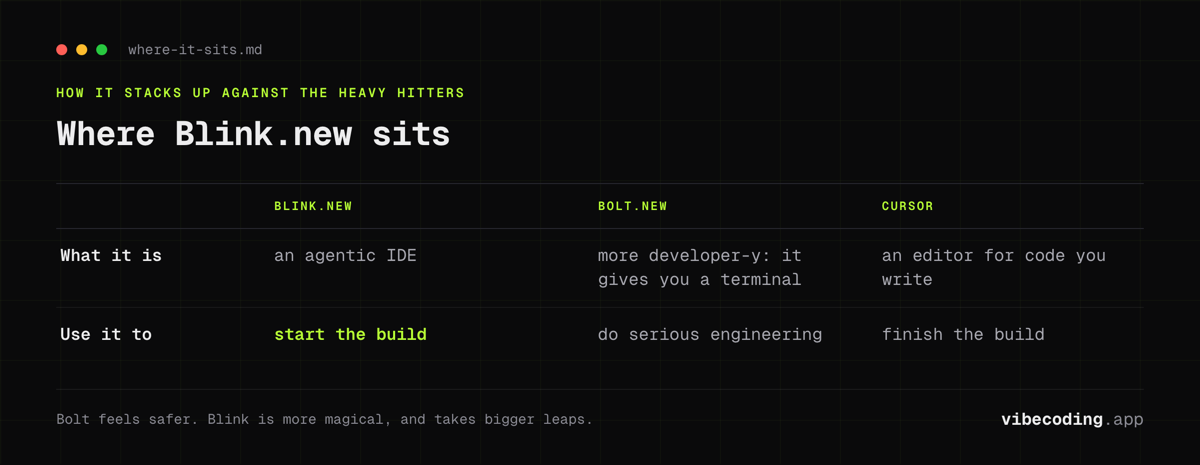
How does it stack up against the heavy hitters?
- vs Bolt.new: Bolt is more "developer-y." It gives you a terminal. It feels safer. Blink is more "magical." It takes bigger leaps. Read the full comparison.
- vs Cursor: Cursor is an editor for code you write. Blink writes the code for you. Use Blink to start, Cursor to finish. Read the deep dive.
Pricing: Is it Worth It?
There's a free tier (5 daily refresh credits, capped at 30 a month, no card required), but you'll burn through credits fast if you are "vibe coding" (iterating) heavily.
The $25/month Starter plan (100 monthly credits, or $13/mo on the annual plan) feels fair if you are a founder shipping an MVP. Compared to hiring a dev ($100/hr) or even a cheap Upwork freelancer, it's a steal. Above it sit Pro at $50/month (200 credits), Max from $200/month (800 to 50,000 credits, and the only tier where unused credits roll over), and Team at $40 per seat. Verified against the pricing page on August 31, 2026.
FAQ
What is Blink.new? Blink.new is an AI-powered agentic IDE that turns text prompts into full-stack apps with Supabase databases, Next.js frontends, authentication flows, and real logic.
How much does Blink.new cost? Blink.new has a free tier with limited credits. The starter plan is $25/month, which is suitable for founders shipping MVPs.
Does Blink.new have a free plan? Yes, there is a free tier, but you will burn through credits fast if you are iterating heavily on prompts.
What are the best Blink.new alternatives? Bolt.new is more developer-oriented with a terminal and WebContainers. Cursor is a code editor with AI assistance rather than a full app builder. Replit may have an edge for more complex engineering.
Verdict: The Future is Here (Kinda)
Blink.new is the closest I've felt to living in science fiction. It turns language into software with a fidelity that was impossible 12 months ago.
You should use Blink.new if:
- You have an idea and $0 budget.
- You don't know React from Angular.
- You want to impress your friends (or investors) in 10 minutes.
You should skip it if:
- You are building a banking app.
- You need pixel-perfect control over every
div.
Vibe coding is a new skill. And Blink.new is currently the best teacher in class.
Looking for more options? Check out our list of Top Blink.new Alternatives.

Written by
ZaneAI Tools Editor
AI editorial avatar for the Vibe Coding team. Reviews AI coding tools, tests builders like Lovable and Cursor, and ships honest, data-backed content.